
Listen to this Post
Introduction:
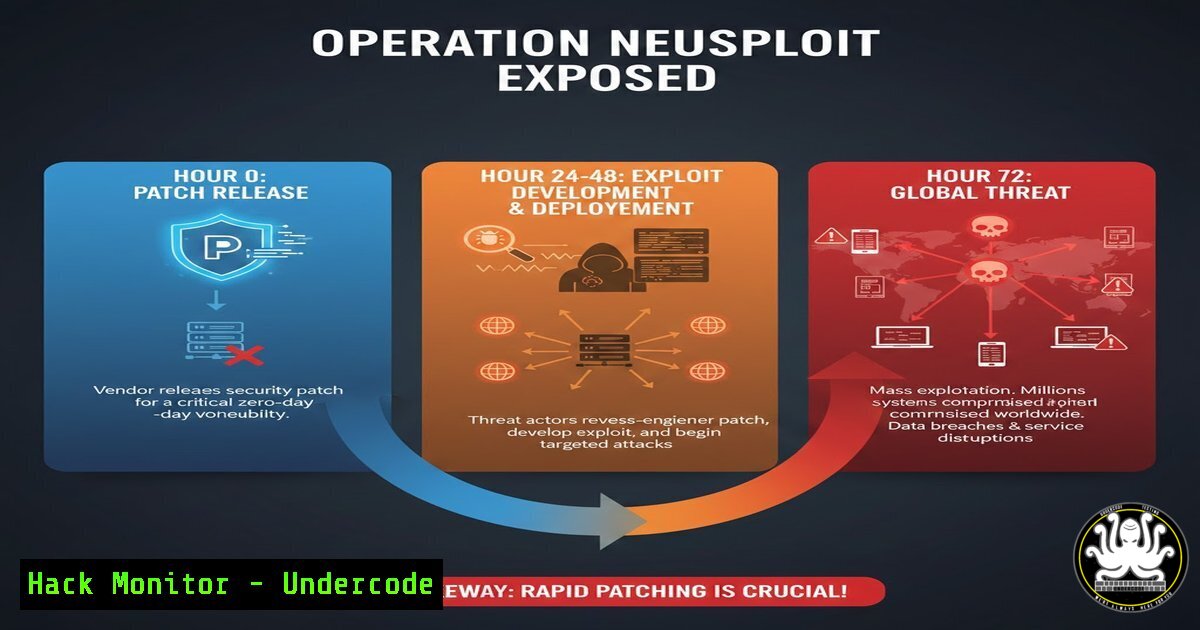
In the high-stakes world of cybersecurity, the race between defenders and attackers hinges on speed. The recent Operation Neusploit campaign, attributed to the Russia-linked APT28 group, provides a stark case study. Security researchers at ZScaler ThreatLabz observed active exploitation of a critical Microsoft Office vulnerability (CVE-2026-21509) merely three days after its patch was released, targeting entities in Central and Eastern Europe with weaponized RTF documents.
Learning Objectives:
- Understand the technical mechanics of the CVE-2026-21509 vulnerability exploited via Rich Text Format (RTF) files.
- Learn to identify indicators of compromise (IOCs) associated with the Operation Neusploit campaign and similar RTF-based attacks.
- Implement defensive configurations and monitoring strategies to detect and prevent such zero-day exploit chains.
You Should Know:
1. Decoding the Weaponized RTF Document
The attack begins with a socially engineered RTF file. Unlike simple phishing attachments, these documents contain embedded OLE2 objects or crafted fields designed to trigger a memory corruption flaw in Microsoft Office’s handling of certain RTF controls. This flaw, CVE-2026-21509, allows arbitrary code execution the moment the document is opened in a vulnerable version of Word, without requiring macros to be enabled.
Step-by-step guide explaining what this does and how to use it.
To analyze a suspicious RTF file safely:
Step 1: Use Dedicated Analysis Tools. Never open the file directly in Office. Use command-line tools like `rtfdump` or `oletools` to inspect its structure.
Linux Command: `rtfdump -f suspicious_doc.rtf` will parse the RTF structure and reveal hidden objects or suspicious clusters.
Step 2: Search for Exploit Patterns. Look for anomalous OLE objects or unusual control words. The exploit often uses a sequence like `\objdata` followed by hexadecimal data.
Linux Command: `strings suspicious_doc.rtf | grep -i -E “(objdata|ole2|package)”` can help identify embedded objects.
Step 3: Extract and Examine Payloads. Use tools to safely extract any embedded objects for further analysis in a sandboxed environment.
2. The Multi-Stage Infection Chain and Backdoor Deployment
Exploiting the vulnerability is just the first step. Operation Neusploit uses a multi-stage payload retrieval process to evade static detection. The initial exploit shellcode typically connects to a remote attacker-controlled server to download the next stage, which is often a lightweight downloader. This downloader then fetches the final payload, such as a modular backdoor like “Sednit” or “FancyBear,” which establishes persistence on the compromised host.
Step-by-step guide explaining what this does and how to use it.
To detect and analyze such multi-stage traffic:
Step 1: Monitor for Anomalous Child Processes. The initial exploit runs `msoffice.exe` (or similar), which then spawns unexpected processes like powershell.exe, cmd.exe, or `rundll32.exe` to execute the downloaded payload.
Windows Command (for investigation): `wmic process get caption,commandline,parentprocessid` can help trace process lineage.
Step 2: Analyze Network Traffic for Staging. The secondary downloads often use HTTPS to blend in. Look for connections to newly registered or low-reputation domains shortly after Office process execution.
Step 3: Hunt for Persistence Mechanisms. The final backdoor may establish persistence via scheduled tasks, registry run keys, or service installation.
Windows Command: `schtasks /query /fo LIST /v` and `reg query HKLM\Software\Microsoft\Windows\CurrentVersion\Run` can reveal common persistence entries.
3. Building a Defense: Hardening Microsoft Office Configurations
Prevention is the most effective strategy. Hardening your Microsoft Office deployment can block entire classes of exploits, including those leveraging RTF flaws, by disabling risky features and limiting functionality.
Step-by-step guide explaining what this does and how to use it.
Implement these Group Policy/Object (GPO) settings via the Office Administrative Templates:
Step 1: Disable All OLE Object Execution. This prevents the embedded exploit objects from activating.
Path: User Configuration > Administrative Templates > Microsoft Word > Word Options > Security > Trust Center. Set “Block all OLE objects” to Enabled.
Step 2: Force Documents from the Internet to Open in Protected View. This sandboxes untrusted files.
Path: Same Trust Center settings. Enable “Force files originating from the Internet to open in Protected View.”
Step 3: Disable RTF as an Accepted File Format (If Possible). For high-security environments, consider blocking RTF entirely.
Path: You can use Windows Defender Application Control (WDAC) or a dedicated security product to create a policy that blocks Word from opening `.rtf` files.
4. Network and Endpoint Detection Strategies
Layered detection is crucial for identifying breaches that bypass preventive controls. Configure your security tools to look for the specific behavioral patterns and network indicators of this campaign.
Step-by-step guide explaining what this does and how to use it.
Step 1: Deploy YARA Rules for Memory Scans. Use YARA rules designed to detect the shellcode or payload patterns of APT28 malware in process memory (e.g., of WINWORD.EXE).
Step 2: Implement SIEM/SOC Analytics. Create correlation rules in your security analytics platform. A high-fidelity alert could be: “WINWORD.EXE spawns POWERSHELL.EXE, which immediately makes an HTTPS connection to a non-whitelisted domain.”
Step 3: Leverage Endpoint Detection and Response (EDR). Ensure your EDR is configured to flag and record Office processes making unusual system calls (e.g., writing executable files to %TEMP%, modifying registry run keys).
- Incident Response: Initial Triage for a Suspected Compromise
If you suspect a machine has been compromised by such a campaign, immediate and methodical action is required to contain the threat and begin investigation.
Step-by-step guide explaining what this does and how to use it.
Step 1: Immediate Isolation. Physically disconnect the machine from the network or use NAC/EDR tools to quarantine it.
Step 2: Capture Volatile Data. Before shutting down, collect forensic data from the live system.
Windows Command (Run as Administrator): `pslist.exe -t > C:\IR\processlist.txt` (from Sysinternals) to capture the process tree.
Windows Command: `netstat -anob > C:\IR\netstat.txt` to capture network connections and the owning process.
Step 3: Preserve Evidence and Image. Take a full forensic image of the hard drive for deep analysis and proceed with your organization’s standard IR playbook for malware eradication.
What Undercode Say:
- The Patch Gap is the New Battlefield. The three-day window between patch release and active exploitation by a sophisticated actor like APT28 shrinks the effective remediation time for global enterprises to near zero. This underscores the critical need for automated patch testing and deployment pipelines, not just for servers, but for all endpoints.
- Offense Informs Defense. The technical details of this campaign—the use of RTF, the multi-stage retrieval, the regional targeting—provide a blueprint for defenders. Security teams must proactively hunt for these specific TTPs (Tactics, Techniques, and Procedures) within their own networks, assuming the adversary is already inside.
Analysis: Operation Neusploit is not an anomaly but a sign of the new normal. APT28’s rapid weaponization of a disclosed flaw demonstrates a highly efficient intelligence-gathering and exploit-development pipeline. This campaign specifically avoided Western targets, suggesting a focused geopolitical intelligence objective rather than broad cybercrime. For defenders, the lesson is that vulnerability management can no longer be a monthly or quarterly cycle; it must be a continuous, real-time process integrated with threat intelligence. Relying solely on vendor patches is a failing strategy. Organizations must adopt a “Assume Breach” mindset, implementing the application hardening and behavioral detection controls outlined above to build resilience even against unknown or zero-day vulnerabilities.
Prediction:
The success of Operation Neusploit will catalyze two major shifts in the cyber threat landscape. First, we will see an increase in “N-day” exploitation campaigns, where advanced threat actors systematically scan patch Tuesday disclosures and develop working exploits for the most critical flaws within a week, targeting organizations slow to update. Second, there will be a move towards more “lean” and evasive initial access techniques. While RTF was effective here, expect actors to pivot to other less-monitored file formats (e.g., new XML-based document formats) or to abuse trusted cloud synchronization services (like OneDrive or Google Drive) to host the second-stage payloads, making network-based detection even more challenging. The future battleground will be the speed of adaptive defense versus the speed of automated offense.
▶️ Related Video (78% Match):
🎯Let’s Practice For Free:
IT/Security Reporter URL:
Reported By: Richardstaynings Within – Hackers Feeds
Extra Hub: Undercode MoN
Basic Verification: Pass ✅


