Listen to this Post
Introduction:
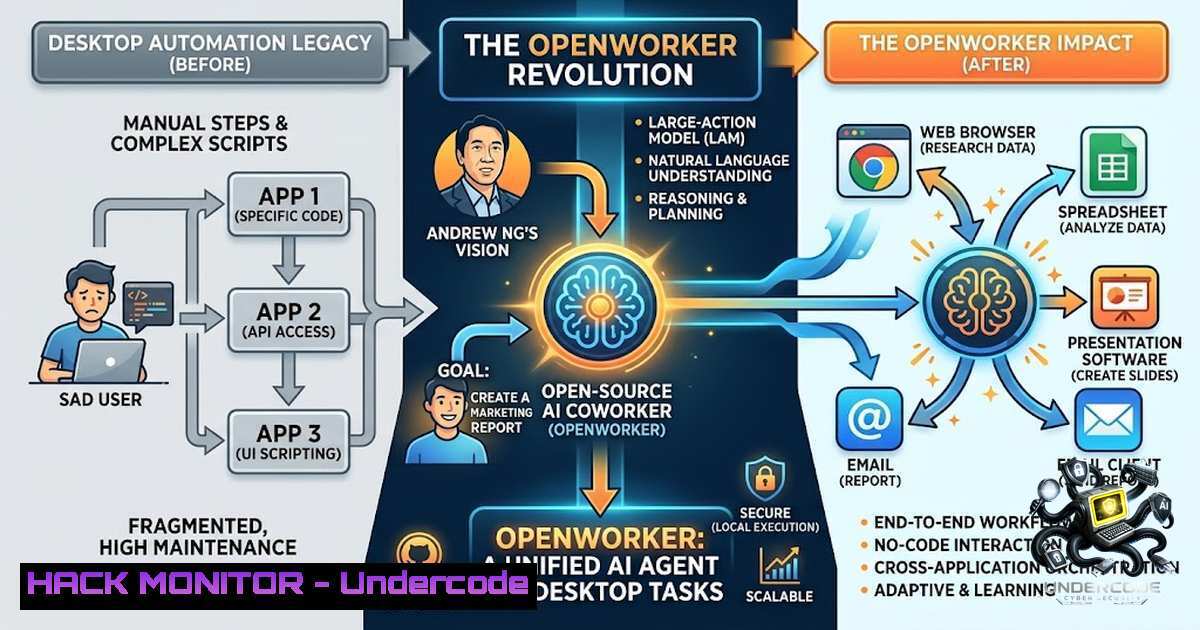
The line between conversational AI and actual digital labor has just been erased. On July 24, 2026, Andrew Ng – the legendary AI educator and former head of Google Brain – announced the open-source release of OpenWorker, a desktop AI agent that doesn’t just chat with you but delivers finished work. Built on his team’s aisuite library and released under the MIT License, OpenWorker represents a fundamental shift from AI as a brainstorming partner to AI as a fully autonomous coworker that lives on your desktop. For cybersecurity professionals, IT administrators, and AI engineers, this isn’t just another tool – it’s a new attack surface, a new automation paradigm, and a new frontier in agentic security that demands immediate attention.
Learning Objectives:
- Understand the architecture, capabilities, and security implications of OpenWorker as a local-first AI agent
- Master the installation, configuration, and integration of OpenWorker with various LLM providers and enterprise tools
- Learn to implement security controls, access restrictions, and monitoring for AI agents operating on endpoint devices
You Should Know:
- What Is OpenWorker and Why Does It Matter?
OpenWorker is an open-source desktop AI agent that breaks the chatbot paradigm entirely. Instead of providing text-based suggestions, it autonomously executes tasks across your files, calendar, Slack, email, and terminal – delivering finished documents, scheduled messages, and updated calendar entries.
Andrew Ng’s vision is clear: “The next big step forward for AI isn’t just better base models – it’s agents that can actually get real work done”. OpenWorker embodies this thesis, supporting over 25 tool integrations including GitHub, Slack, Jira, Notion, Linear, HubSpot, Outlook, Gmail, and Google Calendar. It runs locally on macOS with Windows support in development, and its model-agnostic architecture allows users to bring their own API keys for GPT-5.6 Sol, Claude Fable, Gemini 3.6, or open-weight models via Ollama.
The MIT License means enterprises can freely audit, modify, and deploy OpenWorker internally – but it also means security teams must take ownership of securing their agentic deployments.
2. Installation and Initial Configuration
OpenWorker is available on GitHub at github.com/andrewyng/openworker. The installation process varies by platform:
macOS Installation:
 Clone the repository
git clone https://github.com/andrewyng/openworker.git
cd openworker

Install dependencies using pip
pip install -r requirements.txt

Set up environment variables
cp .env.example .env
 Edit .env to add your API keys
Windows (Preview):
Windows support is actively under development. Users can track progress on the GitHub repository and expect a signed Windows executable in future releases.
Configuration Steps:
- API Key Setup: OpenWorker doesn’t bundle any model. Add your API keys for preferred providers (OpenAI, Anthropic, Google, or local Ollama endpoints)
- Tool Authorization: Grant OpenWorker permission to access integrated tools like Slack, Gmail, GitHub, and local file system
- Approval Settings: Configure which actions require explicit human approval before execution
Linux Alternative via Ollama:
 Install Ollama
curl -fsSL https://ollama.com/install.sh | sh

Pull an open-weight model
ollama pull deepseek-r1:7b

Configure OpenWorker to use local Ollama endpoint
export OLLAMA_BASE_URL="http://localhost:11434"
3. Understanding the Security Architecture
OpenWorker’s security model rests on three core pillars:
Local-First Data Privacy: Conversation history, tokens, API keys, and the agent loop remain on your local machine. Data only leaves your device when it goes to the selected LLM provider or integrated third-party tools.
Human-in-the-Loop Controls: OpenWorker pauses and requests explicit approval before executing critical actions – sending emails, modifying calendar events, or running terminal commands. This mitigates the “accidental deletion” risk that plagues autonomous agents.
Model Agnosticism with Local Options: Users can run entirely local models via Ollama, keeping all data processing within their infrastructure.
However, these features don’t eliminate risk. Security teams must consider:
– API Key Exposure: Keys stored in `.env` files could be compromised
– Tool Permission Creep: Granting broad access to Slack, GitHub, and email creates significant blast radius
– Prompt Injection: Malicious instructions in third-party content could mislead the agent
– Terminal Command Execution: OpenWorker can run terminal commands – a potential vector for privilege escalation
4. Operational Security Best Practices
For organizations deploying OpenWorker, implement these controls:
Linux/Unix System Hardening:
 Create a dedicated service account for OpenWorker
sudo useradd -r -s /bin/bash openworker

Restrict file system access
sudo setfacl -R -m u:openworker:rx /path/to/allowed/directories
sudo setfacl -R -m u:openworker: /path/to/sensitive/directories

Monitor OpenWorker processes
ps aux | grep openworker
 Set up auditd rules for OpenWorker activity
auditctl -w /home/openworker/.env -p wa -k openworker_env
Windows Security Configuration (Preview):
 Create a restricted user account
New-LocalUser -1ame "OpenWorkerSvc" -Password (Read-Host -AsSecureString)

Apply AppLocker policies
New-AppLockerPolicy -RuleType Exe -User Everyone -Path "C:\OpenWorker\" -Action Allow

Enable Windows Defender Application Guard for isolated execution
API Key Management:
 Use environment variables instead of .env files for production
export OPENAI_API_KEY=$(aws secretsmanager get-secret-value --secret-id openworker/openai --query SecretString --output text)

Rotate keys regularly
 Implement key revocation procedures
5. Tool Integration and MCP Extensibility
OpenWorker’s power comes from its extensive tool ecosystem. Understanding these integrations is critical for both automation and security:
Supported Tools:
- Communication: Slack, Gmail, Outlook
- Project Management: Jira, Linear, Notion
- Development: GitHub (can read repos, check issues, commit changes)
- Productivity: Google Calendar, HubSpot
MCP Protocol Extensions: If the 25 built-in tools aren’t enough, OpenWorker supports the Model Context Protocol (MCP) for adding custom tools. This extensibility means organizations can build proprietary integrations – but each new connection introduces unique security concerns.
Verifying Tool Permissions:
 Check what tools OpenWorker has access to
cat ~/.openworker/config.json | jq '.tools'

Audit tool usage logs
tail -f ~/.openworker/logs/agent.log | grep "tool_call"
6. Use Cases and Deployment Scenarios
OpenWorker ships with four pre-configured use cases:
| Use Case | Capabilities | Security Considerations |
|-|–||
| Sales | Research prospects, draft outreach emails | Access to CRM and email; risk of data exfiltration |
| Executive Assistant | Calendar management, inbox organization | High-privilege access to sensitive scheduling data |
| Marketing | Ad spend tracking, weekly performance reports | Access to financial data and analytics platforms |
| DevOps/SRE | Alert response, incident post-mortem drafting | Access to monitoring systems and incident databases |
Automation Example – Incident Response:
OpenWorker can respond to Slack alerts, gather relevant logs, draft post-mortem reports, and update Jira tickets – all autonomously. This represents significant operational efficiency but requires careful audit trails.
7. Monitoring and Auditing AI Agent Activity
Implement comprehensive monitoring:
Linux Log Monitoring:
 Set up OpenWorker log rotation
cat > /etc/logrotate.d/openworker << EOF
/home/openworker/logs/.log {
daily
rotate 30
compress
missingok
notifempty
}
EOF

Monitor for suspicious patterns
grep -E "ERROR|WARNING|unauthorized|permission denied" /home/openworker/logs/agent.log

Real-time alerting with fail2ban or custom scripts
tail -f /home/openworker/logs/agent.log | while read line; do
if echo "$line" | grep -q "API_KEY_EXPOSED"; then
 Trigger incident response
curl -X POST https://your-alert-system/webhook -d "{\"alert\":\"OpenWorker API key risk\"}"
fi
done
Windows Event Logging:
 Enable PowerShell script block logging
Set-ItemProperty -Path "HKLM:\SOFTWARE\Policies\Microsoft\Windows\PowerShell\ScriptBlockLogging" -1ame "EnableScriptBlockLogging" -Value 1

Monitor OpenWorker events in Event Viewer
Get-WinEvent -LogName "Microsoft-Windows-PowerShell/Operational" | Where-Object { $_.Message -match "openworker" }
What Undercode Say:
- Key Takeaway 1: OpenWorker represents a paradigm shift from conversational AI to action-oriented agents – but this power comes with unprecedented security responsibilities. Organizations must treat AI agents as privileged endpoints requiring the same security rigor as any critical infrastructure component.
- Key Takeaway 2: The local-first, open-source nature of OpenWorker is both a strength and a vulnerability. While it enables privacy and auditability, it also means security teams must build their own guardrails – no vendor will provide them.
Analysis:
The OpenWorker release is a watershed moment for enterprise AI adoption. Andrew Ng has effectively democratized agentic AI, putting production-ready autonomous capabilities into the hands of every developer and organization. However, the cybersecurity community has learned painful lessons from previous waves of rapid adoption – cloud Shadow IT, unsecured APIs, and LLM prompt injection attacks are just the beginning.
OpenWorker’s ability to execute terminal commands, access email, modify calendars, and interact with GitHub repositories creates a blast radius that dwarfs traditional chatbot risks. A single compromised API key or successful prompt injection could lead to data exfiltration, unauthorized code commits, or lateral movement across enterprise systems.
The human-in-the-loop approval mechanism is a critical safeguard, but it’s not foolproof. Sophisticated attackers can craft prompts that appear benign while executing malicious actions, or exploit the agent’s trust in third-party tool responses. Organizations must implement defense-in-depth: network isolation for agent endpoints, strict API key rotation policies, comprehensive audit logging, and regular security reviews of agent configurations.
Prediction:
- +1 OpenWorker’s open-source model and MIT License will accelerate innovation in AI agent security, with community-developed guardrails, monitoring tools, and security frameworks emerging within 6-12 months.
- +1 The local-first architecture will drive adoption in regulated industries (healthcare, finance, government) where cloud-based AI assistants face compliance barriers.
- -1 Expect a wave of OpenWorker-related security incidents in 2026-2027 as organizations deploy without adequate security controls, mirroring the OpenClaw security disaster pattern.
- -1 The extensibility via MCP protocol will create a fragmented security landscape, with custom integrations introducing vulnerabilities that standard security tools cannot detect.
- -1 API key management will emerge as the single largest operational risk, with exposed keys in `.env` files and CI/CD pipelines enabling large-scale compromises.
- +1 Security vendors will rapidly develop OpenWorker-specific detection rules, CASB integrations, and DLP policies, creating a new category of “Agent Security Posture Management” (ASPM) tools.
- +1 The combination of local execution and model-agnostic design will enable air-gapped AI automation for classified and high-security environments.
- -1 Organizations that treat OpenWorker as “just another productivity tool” rather than a privileged endpoint will face regulatory scrutiny and breach notifications within 18 months.
- +1 Andrew Ng’s educational ecosystem (DeepLearning.AI) will produce security-focused courses on securing AI agents, raising the baseline of practitioner knowledge.
- +1 By 2028, autonomous agents like OpenWorker will be dominant in industries including financial services and healthcare – but only for organizations that invested early in security frameworks.
▶️ Related Video (76% Match):
🎯Let’s Practice For Free:
🎓 Live Courses & Certifications:
Join Undercode Academy for Verified Certifications
🚀 Request a Custom Project:
Secure, high-velocity infrastructure and disruptive technological engineering. Contact our engineering team for high-tier development and proprietary systems:
[email protected]
💎 Smart Architecture | 🛡️ Secure by Design | ⭐ Trusted by Thousands
IT/Security Reporter URL:
Reported By: Shubhamsaboo Andrew – Hackers Feeds
Extra Hub: Undercode MoN
Basic Verification: Pass ✅


