
Listen to this Post
Introduction
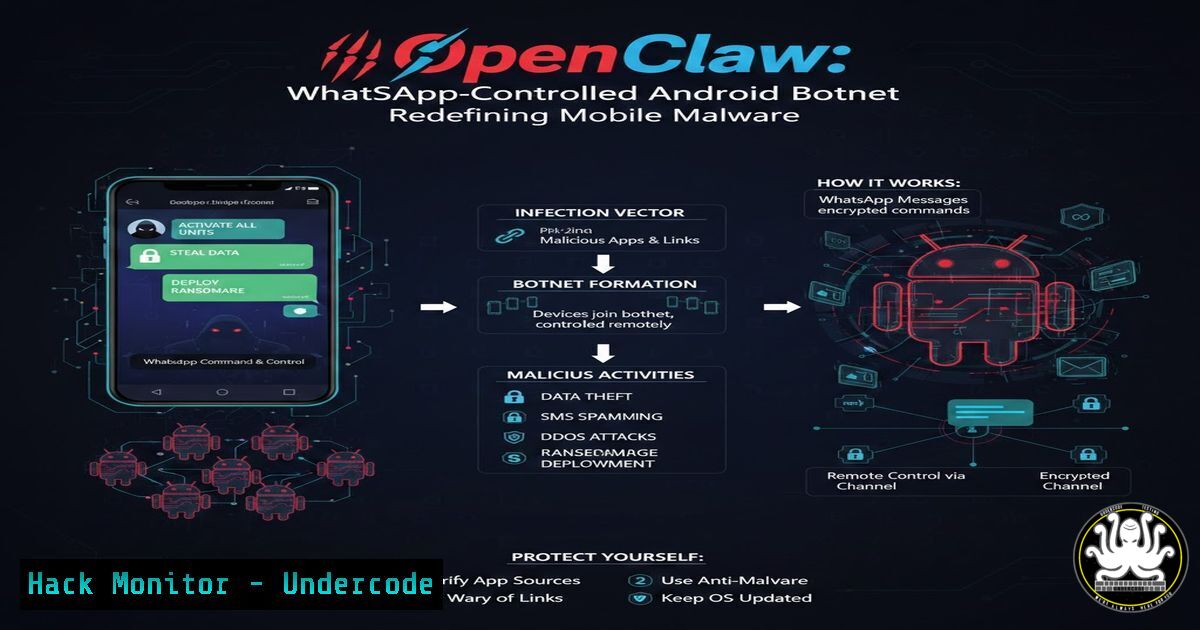
In a concerning evolution of mobile malware, security researcher Lukas Stefanko has unveiled OpenClaw, a sophisticated Android remote access tool that leverages WhatsApp as its command and control infrastructure. This malware, detailed in a recent technical analysis, demonstrates how threat actors can weaponize popular messaging platforms to create resilient botnets that bypass traditional security controls. The OpenClaw project, which can be installed via Termux on Android devices, represents a significant shift in mobile malware architecture—one that security professionals must understand to protect against emerging threats.
Learning Objectives
- Understand the technical architecture of WhatsApp-based command and control systems
- Master the installation and configuration process of OpenClaw for research purposes
- Analyze the implications of messaging platform abuse for mobile device security
You Should Know
1. OpenClaw Architecture and WhatsApp Integration
OpenClaw represents a paradigm shift in mobile botnet design by using WhatsApp messages as its command channel. Unlike traditional malware that relies on dedicated C2 servers which can be taken down, OpenClaw’s decentralized approach makes takedown attempts significantly more challenging.
The malware operates by:
- Installing via Termux on Android devices
- Establishing persistence through legitimate-looking processes
- Parsing WhatsApp messages for specific command patterns
- Executing commands and exfiltrating data through WhatsApp responses
For researchers studying this threat, here’s how to set up a controlled environment for analysis:
Linux/macOS Prerequisites:
 Install Android Debug Bridge (ADB)
sudo apt-get install adb  Debian/Ubuntu
brew install android-platform-tools  macOS

Download and install Android emulator
wget https://redirector.gvt1.com/edgedl/android/studio/ide-zips/2024.1.1.11/android-studio-2024.1.1.11-linux.tar.gz
tar -xzf android-studio--linux.tar.gz
cd android-studio/bin
./studio.sh
Windows PowerShell (Admin):
 Install Windows Subsystem for Android
Enable-WindowsOptionalFeature -Online -FeatureName "Microsoft-Windows-Subsystem-Linux"
 Download Android SDK tools
Invoke-WebRequest -Uri "https://dl.google.com/android/repository/commandlinetools-win-11076708_latest.zip" -OutFile "sdk-tools.zip"
Expand-Archive -Path "sdk-tools.zip" -DestinationPath "C:\Android\sdk"
2. Termux Installation and Environment Setup
Termux serves as the execution environment for OpenClaw. Understanding this setup is crucial for both defensive and offensive security professionals:
Step-by-step Termux Configuration:
 Install Termux from F-Droid (not Play Store, as it's outdated)
curl -O https://f-droid.org/repo/com.termux_118.apk
adb install com.termux_118.apk

Basic Termux setup
pkg update && pkg upgrade -y
pkg install git python nodejs wget curl nano -y
pkg install openssh termux-api -y

Grant storage permissions
termux-setup-storage

Install OpenClaw dependencies
pkg install android-tools -y
pkg install termux-exec -y
OpenClaw Installation Script Analysis:
The installer script referenced in Stefanko’s research performs several critical functions:
!/bin/bash
 OpenClaw installer - FOR RESEARCH PURPOSES ONLY

Clone the repository
git clone https://github.com/security-research/openclaw-lab.git
cd openclaw-lab

Install Node.js dependencies
npm install whatsapp-web.js qrcode-terminal puppeteer
npm install express socket.io axios

Configure WhatsApp Web integration
echo "module.exports = {
whatsapp: {
sessionPath: './session.json',
commandPrefix: '!claw',
adminNumbers: ['+1234567890'] // Research only
},
android: {
shellAccess: true,
fileAccess: true,
cameraAccess: false // Disabled for safety
}
}" > config.js
3. Command Structure and Detection Methods
OpenClaw uses a structured command system over WhatsApp that security teams must learn to detect:
Common Commands Analyzed:
 Python script to simulate OpenClaw command parsing
import re
import hashlib

class OpenClawAnalyzer:
def <strong>init</strong>(self):
self.command_patterns = {
'exec_shell': r'!claw exec (.)',
'download_file': r'!claw get (.)',
'upload_file': r'!claw put (.) (.)',
'screenshot': r'!claw screen',
'location': r'!claw loc',
'contacts': r'!claw contacts',
'sms_dump': r'!claw sms',
'persist': r'!claw persist (on|off)'
}

def analyze_message(self, message):
for cmd_type, pattern in self.command_patterns.items():
match = re.match(pattern, message)
if match:
return {
'command_type': cmd_type,
'parameters': match.groups(),
'risk_level': self._assess_risk(cmd_type)
}
return None

def _assess_risk(self, cmd_type):
risk_map = {
'exec_shell': 'CRITICAL',
'download_file': 'HIGH',
'upload_file': 'HIGH',
'screenshot': 'MEDIUM',
'location': 'MEDIUM',
'contacts': 'LOW',
'sms_dump': 'MEDIUM',
'persist': 'CRITICAL'
}
return risk_map.get(cmd_type, 'UNKNOWN')
4. Detection and Mitigation Strategies
Security professionals can implement the following detection mechanisms:
Android Security Configuration:
 ADB commands to detect OpenClaw artifacts
adb shell "find /data/data/ -name 'termux' -type d 2>/dev/null"
adb shell "ps -A | grep -E 'node|npm|termux'"
adb shell "dumpsys package | grep -E 'Termux|OpenClaw'"

Check for suspicious accessibility services
adb shell "settings get secure enabled_accessibility_services"

Monitor for WhatsApp Web sessions
adb shell "dumpsys package com.whatsapp | grep -A 5 'Signatures'"
Network Detection (Suricata Rules):
 Suricata rule to detect OpenClaw C2 traffic
alert tls $HOME_NET any -> $EXTERNAL_NET 443 (msg:"Potential OpenClaw WhatsApp C2";
tls.fingerprint; content:"|4a 7b 2f 3c 9d 8e 1a 5b|";
classtype:trojan-activity; sid:1000001; rev:1;)

Zeek script for behavioral analysis
@load base/protocols/http
@load base/protocols/ssl

event http_request(c: connection, method: string, original_URI: string,
unescaped_URI: string, version: string) {
if ( /whatsapp.com/ in original_URI &&
/graphql/ in original_URI ) {
print fmt("Potential WhatsApp C2 traffic from %s", c$id$orig_h);
}
}
5. Command Execution and Persistence Mechanisms
Understanding how OpenClaw maintains persistence is crucial for remediation:
// Android persistence mechanism analysis
public class OpenClawPersistence {
private static final String TERMUX_BOOT_SCRIPT =
"/data/data/com.termux/files/home/.termux/boot/openclaw.sh";

public void establishPersistence() {
// Boot completed receiver
IntentFilter filter = new IntentFilter(Intent.ACTION_BOOT_COMPLETED);
registerReceiver(new BootReceiver(), filter);

// AlarmManager for periodic restart
AlarmManager alarmManager = (AlarmManager)
getSystemService(Context.ALARM_SERVICE);
PendingIntent pendingIntent = PendingIntent.getBroadcast(
this, 0, new Intent("RESTART_SERVICE"), 0);
alarmManager.setRepeating(AlarmManager.ELAPSED_REALTIME_WAKEUP,
SystemClock.elapsedRealtime() + 60000, 60000, pendingIntent);
}

// JobScheduler for Android 5+
private void scheduleJob() {
ComponentName serviceName = new ComponentName(this,
OpenClawJobService.class);
JobInfo jobInfo = new JobInfo.Builder(1337, serviceName)
.setPeriodic(15  60  1000) // Every 15 minutes
.setPersisted(true)
.setRequiresCharging(false)
.setRequiresDeviceIdle(false)
.build();

JobScheduler jobScheduler = (JobScheduler)
getSystemService(Context.JOB_SCHEDULER_SERVICE);
jobScheduler.schedule(jobInfo);
}
}
6. Forensics and Artifact Collection
For incident responders, here’s a comprehensive data collection script:
!/bin/bash
 OpenClaw forensic collection script

FORENSIC_DIR="/case/$(date +%Y%m%d_%H%M%S)_openclaw"
mkdir -p $FORENSIC_DIR

Collect Termux artifacts
adb shell "tar -czf /sdcard/termux_backup.tar.gz /data/data/com.termux/"
adb pull /sdcard/termux_backup.tar.gz $FORENSIC_DIR/

Collect WhatsApp database (requires root)
adb shell "su -c 'dd if=/data/data/com.whatsapp/databases/msgstore.db' > $FORENSIC_DIR/msgstore.db"

Collect running processes
adb shell "ps -A -Z" > $FORENSIC_DIR/processes.txt

Collect network connections
adb shell "netstat -an" > $FORENSIC_DIR/netstat.txt

Collect installed packages
adb shell "pm list packages -f" > $FORENSIC_DIR/packages.txt

Collect logs
adb logcat -d > $FORENSIC_DIR/logcat.txt

Hash collected files
find $FORENSIC_DIR -type f -exec sha256sum {} \; > $FORENSIC_DIR/hashes.txt
7. API Security and Cloud Hardening
Organizations must adapt their security posture to address threats like OpenClaw:
AWS Security Group Hardening:
 Block suspicious outbound connections
aws ec2 authorize-security-group-egress \
--group-id sg-12345678 \
--protocol tcp \
--port 443 \
--cidr 0.0.0.0/0 \
--no-dry-run

Implement VPC Flow Logs for monitoring
aws ec2 create-flow-logs \
--resource-type VPC \
--resource-ids vpc-12345678 \
--traffic-type ALL \
--log-group-name "OpenClaw-Detection" \
--deliver-logs-permission-arn arn:aws:iam::123456789:role/FlowLogsRole
Kubernetes Network Policy:
apiVersion: networking.k8s.io/v1
kind: NetworkPolicy
metadata:
name: block-whatsapp-c2
spec:
podSelector:
matchLabels:
app: android-emulator
policyTypes:
- Egress
egress:
- to:
- ipBlock:
cidr: 0.0.0.0/0
except:
- 157.240.0.0/16  Facebook/WhatsApp IP range
What Undercode Say
- Platform Weaponization: OpenClaw demonstrates how legitimate platforms like WhatsApp can be repurposed as malicious C2 channels, bypassing traditional network-based detection mechanisms that focus on suspicious IPs and domains.
-
Mobile-First Threat Evolution: The convergence of Termux’s Linux environment with Android’s accessibility features creates a powerful attack surface that traditional mobile security solutions are ill-equipped to detect.
-
Defense Paradigm Shift: Organizations must adopt behavioral analysis and anomaly detection rather than relying solely on signature-based approaches, as malware increasingly uses encrypted, legitimate channels for communication.
-
Research Responsibility: While OpenClaw represents a significant technical achievement in malware development, it also serves as a critical warning for the security community to develop countermeasures before such techniques become widespread in criminal campaigns.
The emergence of OpenClaw signals a troubling trend in mobile malware sophistication. By weaponizing widely-used messaging platforms, threat actors can create botnets that are resilient, difficult to detect, and capable of evolving faster than traditional security controls. Security teams must immediately begin monitoring for anomalous WhatsApp Web sessions, unusual Termux installations, and unexpected outbound connections to messaging platforms. The days of treating WhatsApp as a trusted application are over—in the hands of attackers, it becomes a formidable command and control channel that demands our attention and adaptation.
Prediction
Within the next 12-18 months, we will witness a surge in messaging-platform-based malware as threat actors recognize the advantages of using legitimate, encrypted channels for command and control. This will force a fundamental redesign of mobile endpoint detection and response (EDR) solutions, which will need to implement behavioral analysis capabilities that can distinguish between legitimate user behavior and automated command execution within trusted applications. The cat-and-mouse game will escalate as messaging platforms implement their own anti-automation measures, potentially breaking functionality for legitimate users in the process.
▶️ Related Video (90% Match):
🎯Let’s Practice For Free:
IT/Security Reporter URL:
Reported By: Lukasstefanko Openclaw – Hackers Feeds
Extra Hub: Undercode MoN
Basic Verification: Pass ✅


