
Listen to this Post
Introduction
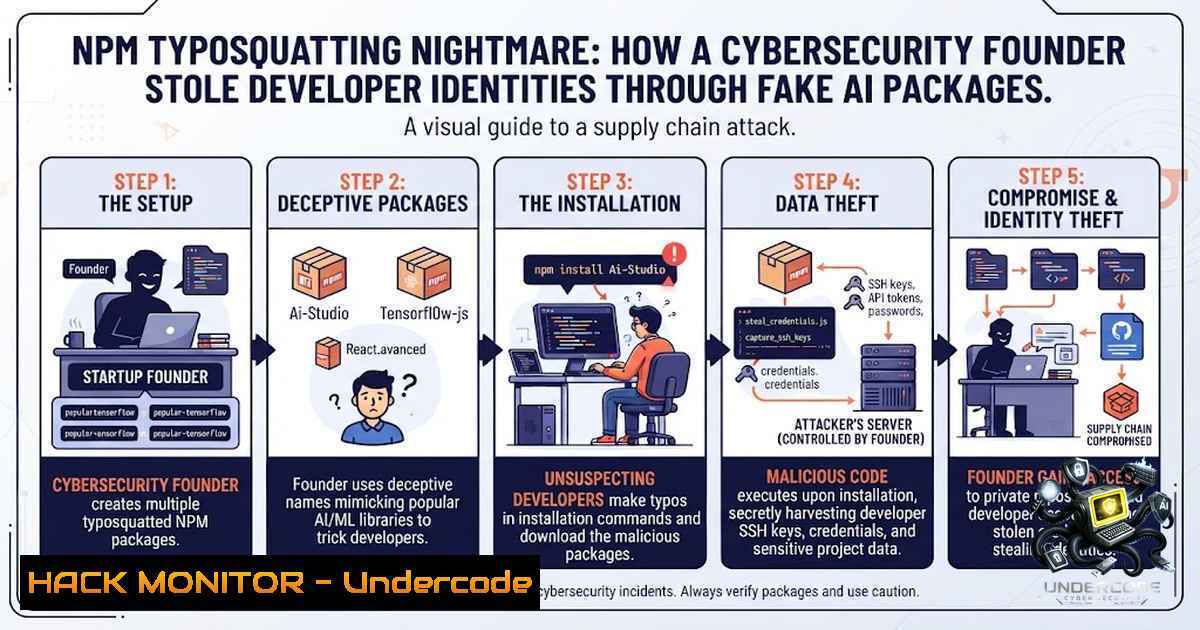
A sophisticated supply-chain attack targeting the AI developer ecosystem has been uncovered, revealing that a stealth-mode cybersecurity startup founder published typosquatted npm packages to harvest sensitive developer identity data. Between April and June 2026, seven malicious packages impersonating Anthropic, LangChain, Ollama, OpenAI, Vercel, and Aspect Security quietly compromised thousands of developer machines through npm install-time scripts, exfiltrating 11 categories of identity data including Git emails, SSH key comments, cloud configurations, and corporate network fingerprints. What makes this campaign particularly alarming is not just the technical sophistication—it’s the fact that the operator behind these packages is the founder of a cybersecurity company, raising troubling questions about the ethics of product development in the security industry.
Learning Objectives
- Understand how npm install-time scripts (preinstall/postinstall) can be weaponized to execute arbitrary code without developer awareness
- Identify the 11 categories of sensitive identity data harvested by the infostealer and the exfiltration techniques used
- Implement practical detection and mitigation strategies including npm configuration hardening, network monitoring, and package verification
You Should Know
- Understanding the Attack Chain: From npm Install to Full Identity Exfiltration
The attack leverages a legitimate npm feature: install-time scripts defined in package.json. When a developer runs npm install, npm downloads the package, unpacks it, and executes any script in the `preinstall` or `postinstall` fields before the developer’s code ever touches the library. These scripts run automatically with the same permissions as the user executing the install—on a developer laptop, that’s full access to dotfiles, SSH keys, and cloud credentials; on a CI runner, it’s the build account with deploy keys and cloud access.
Step-by-step breakdown of the attack:
- Package impersonation: The attacker publishes typosquatted packages with names like `anthropic-toolkit` (impersonating
@anthropic-ai/sdk), `ai-sdk-helpers` (impersonating Vercel’sai), and `@langgraphjs/toolkit` (impersonating@langchain/langgraph). -
Alibi code in src/: Each package contains legitimate-looking TypeScript utility files (retry.ts, stream-to-string.ts, etc.) that are never actually executed—they exist purely to pass visual inspection.
-
Malicious payload in scripts/postinstall.js: The real payload—461 lines, 16 KB of hand-written JavaScript—executes during installation.
-
Data harvesting: The script collects 11 categories of data in seconds:
– Machine identity: hostname, OS username, Windows DOMAIN\USER
– Git identity: reads ~/.gitconfig, ~/.config/git/config, and project .git/config
– GitHub identity: extracts user from ~/.config/gh/hosts.yml
– Reflog scraping: walks up 10 directory levels, opens .git/logs/HEAD, extracts up to 15 unique committer email addresses
– Git remote: reads project’s remote origin URL
– SSH key comments: reads every file in ~/.ssh/.pub, extracting email comments
– Cloud environment: reads ~/.config/gcloud/properties and ~/.aws/config
– Corporate network fingerprint: reads /etc/resolv.conf for search domain
– Host project metadata: climbs directory tree reading package.json
– CI provider: checks for GITHUB_ACTIONS, GITLAB_CI, JENKINS_URL, etc.
– Runtime metadata: Node.js version, OS, CPU architecture, timestamp
- Exfiltration: The script POSTs all collected data as a single JSON payload to a Google Cloud Run URL (npm-package-logger-228835561205.europe-west1.run.app). The `.run.app` domain is TLS-encrypted and on most enterprise allowlists, making it an ideal exfiltration channel.
-
Silent failure: The script uses a 5-second timeout and silently swallows all errors—even if exfiltration fails, the install succeeds and the developer never notices.
2. Detecting Typosquatted Packages: A Practical Guide
Typosquatting relies on developers making small mistakes when typing package names. Here’s how to protect your team:
Manual verification steps:
 Before installing any package, verify its authenticity
npm view <package-1ame> versions --json  Check version history
npm view <package-1ame> maintainers  Verify maintainer identity
npm view <package-1ame> repository.url  Check if repo matches official source
npm view <package-1ame> homepage  Verify official website
Version backfilling detection: Attackers often publish many versions in a single day to make packages appear mature. Check the actual first-published timestamp:
 Get the exact publish time of the first version
npm view <package-1ame> time --json | jq '.[] | select(. != "modified" and . != "created") | .' | sort
Automated detection with npm audit and tools:
 Use npm audit to check for known vulnerabilities
npm audit --json | jq '.advisories | keys'

Use Snyk (install first: npm install -g snyk)
snyk test <package-1ame>

Use Socket.dev CLI (install: npm install -g @socketsecurity/cli)
socket scan <package-1ame>
Windows PowerShell verification:
 Check package details
npm view <package-1ame> versions --json | ConvertFrom-Json | Measure-Object
npm view <package-1ame> maintainers
npm view <package-1ame> repository.url
CI/CD pipeline integration: Add these checks to your `.github/workflows/` or CI scripts:
 .github/workflows/npm-audit.yml
name: NPM Security Scan
on: [bash]
jobs:
security-scan:
runs-on: ubuntu-latest
steps:
- uses: actions/checkout@v3
- run: npm install -g @socketsecurity/cli
- run: socket scan --all
- run: npm audit --audit-level=high
3. Blocking Install-Time Script Execution: The Nuclear Option
The most effective defense against this class of attack is to disable install-time scripts entirely.
Global disable (npm):
 Disable scripts globally
npm config set ignore-scripts true

Verify setting
npm config get ignore-scripts
Project-level disable (.npmrc):
 Place in .npmrc at project root
ignore-scripts=true
pnpm equivalent (.npmrc):
 For pnpm users
ignore-scripts=true
Yarn equivalent:
 Yarn 2+ (Berry) - add to .yarnrc.yml
enableScripts: false
Windows (PowerShell):
 Set npm config globally
npm config set ignore-scripts true

Or set environment variable for current session
$env:NPM_CONFIG_IGNORE_SCRIPTS = "true"
Important caveat: Disabling scripts breaks packages that legitimately need to compile native extensions (e.g., bcrypt, sharp, node-gyp). Consider using a per-package allowlist or running security-sensitive installs in isolated environments.
Selective allowlist approach:
 Install with scripts enabled for trusted packages only
npm install <trusted-package> --ignore-scripts=false

Or use a tool like npm-whitelist-scripts
npx npm-whitelist-scripts <package-1ame>
4. Network Monitoring: Detecting Exfiltration to Serverless PaaS
The attackers in this campaign used Google Cloud Run (.run.app) as their exfiltration endpoint. This traffic is often overlooked because it terminates TLS at Google’s edge and uses domains on most enterprise allowlists.
Linux – Monitor outbound connections to Cloud Run domains:
 Monitor all outbound connections to .run.app domains
sudo tcpdump -i any -1 'dst host .run.app' -v

Log all HTTPS connections to Cloud Run
sudo tcpdump -i any -1 'tcp port 443 and (dst host .run.app)' -w cloudrun_traffic.pcap

Analyze with tshark
tshark -r cloudrun_traffic.pcap -Y 'http.host contains "run.app"' -T fields -e http.host -e ip.dst
Windows – Monitor with PowerShell and netsh:
 Start packet capture for outbound HTTPS
netsh trace start capture=yes provider=Microsoft-Windows-Kernel-1etwork tracefile=C:\capture.etl

Filter for Cloud Run domains (requires additional tools)
 Use Sysmon or Windows Defender Firewall with advanced security logging
Firewall blocking (Linux – iptables):
 Block all outbound traffic to .run.app domains
sudo iptables -A OUTPUT -d .run.app -j DROP

Or use a more specific approach with domain blocking via dnsmasq
echo "address=/.run.app/0.0.0.0" | sudo tee -a /etc/dnsmasq.conf
sudo systemctl restart dnsmasq
Enterprise egress filtering: Consider implementing egress controls that inspect or restrict outbound traffic to serverless PaaS hostnames. Use a proxy or CASB (Cloud Access Security Broker) to inspect TLS-encrypted traffic.
- The Evolution of a Threat Actor: From Crude to Polished
The campaign shows a clear evolution from a crude April 2026 test (@aspect-security/argon2) to a sophisticated June 2026 operation.
April version (`@aspect-security/argon2`):
- Used `preinstall` hook (fires before npm does anything else)
- 601-byte script collecting only hostname and git email
- Shelled out to `git config user.email` (easier to log)
- No error handling—network errors would crash the install
- No opt-out mechanism
- No cover-story comments
June version (AI-SDK packages):
- Used `postinstall` hook (fires after unpacking)
- 16 KB script collecting full identity graph
- Read git config files directly (no shell subprocess)
- Silent error handling—guaranteed to complete
- Named opt-out via environment variables
- Elaborate “anonymous telemetry” cover story
How to detect evolution patterns:
 Check version history for sudden size changes
npm view <package-1ame> dist --json | jq '. | {version: .version, size: .size}'

Compare package contents across versions
npm pack <package-1ame>@<version>
tar -tzf <package-1ame>-<version>.tgz | grep -E "(preinstall|postinstall)"
- The Argon2 Case Study: A Masterclass in Social Engineering
The `@aspect-security/argon2` package demonstrates sophisticated social engineering that goes far beyond simple typosquatting:
The layered con:
- Scope squatting: `@aspect-security` impersonates Aspect Security, a well-known application-security consulting firm
- Package name squatting: `argon2` impersonates the real, widely-used npm package for Argon2 password hashing
- Maintainer impersonation: README claims collaboration with
@ranisalt, the real argon2 maintainer - Fabricated evidence: Claims “54.2% of common Node.js environments fail to build” with a fake Hugging Face dataset citation
- SEO bait: Troubleshooting section listing exact error messages from real argon2 build failures
Detection script for Argon2 impersonation:
!/bin/bash
 check-argon2.sh - Verify argon2 package authenticity

PACKAGE="@aspect-security/argon2"

echo "Checking $PACKAGE for impersonation indicators..."

Check if package exists
if npm view $PACKAGE 2>/dev/null; then
echo "⚠️ Package exists! Checking for red flags..."

Check maintainer claims
README=$(npm view $PACKAGE readme)
if echo "$README" | grep -q "ranisalt"; then
echo "🔴 RED FLAG: Claims collaboration with @ranisalt (verify independently)"
fi

Check for fake statistics
if echo "$README" | grep -q "54.2%"; then
echo "🔴 RED FLAG: Contains fabricated statistic"
fi

Check for fake citation
if echo "$README" | grep -q "huggingface.co/datasets/security-benchmarks"; then
echo "🔴 RED FLAG: References non-existent dataset"
fi
else
echo "✅ Package not found (good) or has been removed"
fi
- Incident Response: What to Do If You’ve Been Compromised
If your team installed any of the malicious packages between April and June 2026, take immediate action:
Step 1: Identify affected machines
 Check npm global and local installations
npm list -g --depth=0 | grep -E "(anthropic-toolkit|ai-sdk-helpers|ollama-helpers|openai-agents-helpers|@langgraphjs/toolkit|@aspect-security/argon2)"

Check package-lock.json and yarn.lock
grep -E "(anthropic-toolkit|ai-sdk-helpers|ollama-helpers|openai-agents-helpers|@langgraphjs/toolkit|@aspect-security/argon2)" package-lock.json yarn.lock 2>/dev/null
Step 2: Rotate all credentials
The attackers collected identity fingerprints including:
- Git emails and commit history
- SSH key comments (which often contain email addresses)
- AWS profile names and account IDs
- GCP project IDs and account emails
- Corporate DNS domains
- Private repository names
While the script did not steal actual credentials (AWS keys, SSH private keys, OAuth tokens), the collected identity data is sufficient for targeted spear-phishing and social engineering.
Step 3: Rotate the following immediately:
- Git personal access tokens
- GitHub/GitLab SSH keys (generate new ones and update all services)
- Cloud IAM credentials (AWS access keys, GCP service account keys)
- Any credentials exposed in git reflog or environment variables
Step 4: Monitor for follow-on attacks
 Check for unusual outbound connections
sudo netstat -tnap | grep ESTABLISHED | grep -vE "(127.0.0.1|::1)"

Check for new SSH keys added
ls -la ~/.ssh/

Check cloud audit logs for unusual access
 AWS: aws cloudtrail lookup-events --max-items 100
 GCP: gcloud logging read "protoPayload.methodName="
Step 5: Report the incident
Report the compromise to:
- npm Security: [email protected]
- Your organization’s security team
- Relevant cloud providers (AWS, GCP, etc.)
What Undercode Say
- Install-time scripts are the most overlooked attack vector in the npm ecosystem — Runtime code review, dependency scanning, and SBOM tooling are all blind to this class of attack because the malicious code never runs when the package is used; it only runs during installation. The 461-line postinstall script executes in the couple of seconds between `npm install` firing and the terminal returning to the prompt, long before any runtime security tool would inspect the package.
-
“Recon-only” payloads are not benign—they’re arguably more dangerous than credential theft — While the attacker technically avoided stealing credentials (no private keys, no AWS access keys, no OAuth tokens), the exfiltrated identity data (hostname, all email addresses, GitHub login, employer DNS domain, AWS profile names, GCP project IDs, private repository names, and colleague emails) doesn’t expire. This data is the raw material for sophisticated follow-on attacks including spear-phishing, targeted social engineering, and credential theft that occurs weeks later. The author’s decision to skip credential files was not restraint—it was a calculated choice to make the traffic look boring in security reviews while building a permanent identity dossier.
Analysis:
The most disturbing aspect of this campaign is the identity of the operator—the founder of a stealth-mode cybersecurity startup. This isn’t an opportunistic data thief using throwaway accounts. The technical sophistication (polished 16 KB beacon with cover-story comments, version backfilling to defeat reputation tools, layered social engineering with fabricated statistics and impersonated maintainers), the iterative evolution from crude April test to polished June campaign, and the choice to publish under a real identity all point to a calculated, commercial motivation: product seeding. A stealth startup needs a dataset to build detection models or attribution intelligence, and tens of thousands of real developer profiles (hostnames, git emails, cloud configs, employer DNS domains) is an enormous competitive advantage. The line between security research and criminal activity has become dangerously blurred—and the industry is still not equipped to distinguish between legitimate telemetry and sophisticated data harvesting.
Prediction
-1: The npm ecosystem will see a surge in similar campaigns as other threat actors adopt the techniques demonstrated here—version backfilling, serverless PaaS exfiltration, and “recon-only” identity harvesting. The AI developer community, with its fast-moving, high-trust culture, will remain the primary target.
-1: Traditional security tools (SAST, DAST, dependency scanners) will continue to miss install-time attacks because they focus on runtime code execution. A new category of “install-time security” tooling will need to emerge, but adoption will lag behind attacker innovation.
+1: The public disclosure of this campaign has already resulted in the removal of all malicious packages and the npm account. This serves as a deterrent and raises awareness among developers about the risks of install-time scripts.
-1: Serverless PaaS platforms (Cloud Run, AWS Lambda, Azure Functions) will become the exfiltration channel of choice for supply-chain attackers because their domains are on enterprise allowlists and their traffic is TLS-encrypted end-to-end. Enterprise security teams will need to implement egress filtering specifically targeting these platforms.
-1: The ethical boundary between security research and criminal activity will become increasingly difficult to police. The “product seeding” justification—that collecting real developer data is necessary for building detection products—will be used by others to rationalize similar behavior. The industry needs clear guidelines on what constitutes acceptable research versus unauthorized data collection.
+1: The campaign’s reliance on `postinstall` scripts has a simple mitigation: npm config set ignore-scripts true. As awareness grows, more organizations will adopt this configuration, significantly reducing the attack surface for this class of threat.
▶️ Related Video (78% Match):
🎯Let’s Practice For Free:
🎓 Live Courses & Certifications:
Join Undercode Academy for Verified Certifications
🚀 Request a Custom Project:
Secure, high-velocity infrastructure and disruptive technological engineering. Contact our engineering team for high-tier development and proprietary systems:
[email protected]
💎 Smart Architecture | 🛡️ Secure by Design | ⭐ Trusted by Thousands
IT/Security Reporter URL:
Reported By: We Uncovered – Hackers Feeds
Extra Hub: Undercode MoN
Basic Verification: Pass ✅


