Listen to this Post
Introduction:
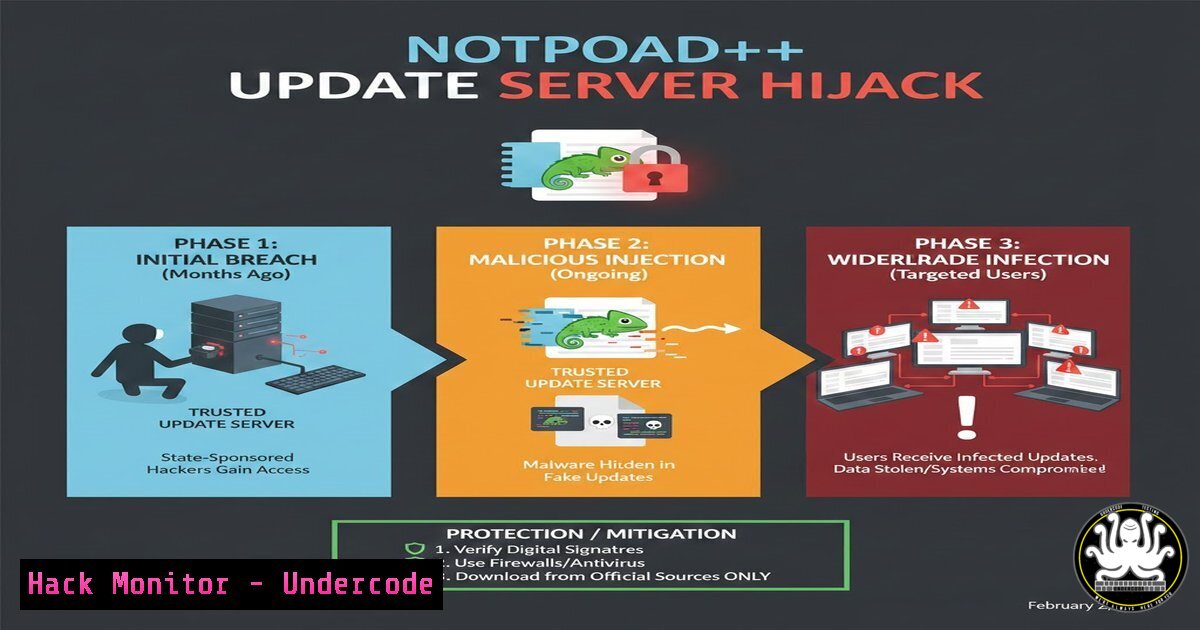
A sophisticated, months-long campaign successfully compromised the official update mechanism of Notepad++, a widely trusted text editor used by millions of developers and IT professionals. State-sponsored actors hijacked update traffic by targeting the software’s hosting provider, selectively redirecting users to malicious servers. This supply chain attack underscores a critical shift in cyber offensives, where attackers exploit the trust in routine software maintenance to deploy payloads deep within secured networks.
Learning Objectives:
- Understand the mechanics of a software supply chain attack through compromised update channels.
- Learn practical techniques to detect and block malicious update traffic on enterprise networks.
- Implement hardening measures for internal update infrastructures and client endpoints.
You Should Know:
- The Attack Vector: Compromised Hosting & DNS Redirection
Step‑by‑step guide explaining what this does and how to use it.
The core of this attack was not a direct breach of Notepad++’s code, but a compromise of its digital supply chain—specifically, its hosting provider. Attackers gained control to manipulate DNS or web server configurations. This allowed them to perform a “man-in-the-middle” attack on the update process. For selected targets, requests to the legitimate update server were transparently redirected to attacker-controlled infrastructure. These malicious servers then delivered a tampered installer or update package, likely containing a backdoor or reconnaissance malware, all while appearing legitimate to the user.
2. Detecting Compromised Update Traffic on Your Network
Step‑by‑step guide explaining what this does and how to use it.
Security teams must monitor for anomalous connections from software update processes. The malicious update servers in such campaigns often use new or uncommon domain names and IP addresses.
– On Windows (using PowerShell): You can audit network connections made by processes. To check for suspicious outbound connections from common update clients or `notepad++.exe` itself, use:
Get-NetTCPConnection -State Established | Where-Object OwningProcess -eq (Get-Process notepad++).Id | Select-Object LocalAddress, LocalPort, RemoteAddress, RemotePort, State
– On Linux: Use tools like `ss` or `netstat` to monitor connections. To watch for DNS queries to potentially malicious domains, you can use:
sudo tcpdump -i any -n port 53 | grep -E "(A\?|AAAA\?)" | awk '{print $NF}'
Continuously compare these connections against a known good baseline and threat intelligence feeds for newly flagged domains associated with the campaign.
3. Hardening Internal Update Servers and Proxies
Step‑by‑step guide explaining what this does and how to use it.
Enterprises should not allow clients to fetch updates directly from the public internet. Instead, use an internal update server or a secured proxy that validates and caches updates.
– Implement Certificate Pinning: Configure your proxy or client group policy to pin the TLS certificate of the legitimate update server. This prevents redirection to servers with different certificates, even if DNS is compromised.
– Hash Verification: Script a process where the internal server downloads an update, verifies its SHA-256 hash against a value obtained via a separate, trusted channel (like a GPG-signed email from the vendor), and then distributes it. Example hash verification in bash:
echo "a1b2c3...expected_sha256_hash... /path/to/downloaded/Notepad++_update.exe" | sha256sum -c
– Use Windows Group Policy/Intune or Linux Repositories: Distribute approved, vetted updates through managed channels like WSUS, an internal apt/yum repo, or MDM solutions, disabling the built-in updater.
4. Enforcing Code Signing Verification at the Endpoint
Step‑by‑step guide explaining what this does and how to use it.
A critical last line of defense is ensuring the operating system verifies the digital signature of all installed software. A malicious update would likely be signed with an untrusted or stolen certificate.
– On Windows (via PowerShell): You can verify the signature of a downloaded executable before installation:
Get-AuthenticodeSignature -FilePath "C:\Path\To\Notepad++Installer.exe" | Format-List
Look for `Status: Valid` and verify the `SignerCertificate` issuer is correct. Enforce code signing policies via AppLocker or Windows Defender Application Control.
– On Linux: While less common for desktop apps, you can implement integrity checks using `dpkg-sig` for Debian packages or verify GPG signatures for repositories and tarballs.
5. Proactive Threat Hunting for Compromise Indicators
Step‑by‑step guide explaining what this does and how to use it.
Assume a breach may have already occurred. Hunt for artifacts related to the specific malicious payloads delivered in this campaign (which would be identified by threat intelligence reports on the Hacker News article).
– Analyze Process Trees: Look for `notepad++.exe` spawning unusual child processes (e.g., cmd.exe, powershell.exe, wscript.exe).
– Check for Persistence: Examine auto-start locations for new, suspicious entries. On Windows, audit run keys:
Get-Item -Path "Registry::HKCU\Software\Microsoft\Windows\CurrentVersion\Run", "Registry::HKLM\Software\Microsoft\Windows\CurrentVersion\Run" | Get-ItemProperty
– Monitor for Network Beaconing: Use SIEM or EDR tools to detect periodic, outbound connections from workstations to unknown external IPs, which may indicate an implanted backdoor calling home.
6. Implementing a Zero-Trust Approach to Software Updates
Step‑by‑step guide explaining what this does and how to use it.
Move beyond implicit trust. Treat all external software update sources as untrusted until verified.
– Segment Your Network: Create a dedicated, isolated VLAN for devices that require external update access, heavily monitoring all traffic from it.
– Use a Next-Gen Firewall or SWG: Deploy solutions that can inspect SSL/TLS traffic for update domains, blocking connections to IPs not in the vendor’s official range or to newly registered domains.
– Mandate Multi-Factor Authentication (MFA) for Hosting/Provider Accounts: While this is a vendor-side action, enterprise customers should demand that their software vendors enforce MFA for all administrative access to code repositories and update servers to prevent the initial compromise.
What Undercode Say:
- Key Takeaway 1: The battlefield has decisively shifted to the software supply chain. Attackers are investing significant resources to compromise the weakest links—like hosting providers and update channels—to achieve maximum impact with minimal detection.
- Key Takeaway 2: The “trust but verify” model is obsolete. This incident proves that even the most legitimate digital signatures and routine processes can be subverted. A “never trust, always verify, enforce least privilege” architecture is now mandatory for critical infrastructure.
+ analysis around 10 lines.
This attack represents a strategic evolution. By targeting a niche but globally trusted developer tool, the actors ensured access to high-value targets: systems administrators, software developers, and IT personnel. The months-long operation suggests a goal of persistent intelligence gathering rather than immediate, disruptive damage. It exploits a fundamental conflict in cybersecurity: the necessity of updates for patching vulnerabilities versus the inherent risk of the update process itself. Defenders can no longer rely solely on vendor reputation or TLS encryption. The focus must expand to include the integrity of the entire delivery pipeline, demanding greater transparency from vendors about their own supply chain security practices and pushing enterprises to adopt more aggressive isolation and verification controls.
Prediction:
This event will catalyze two major trends. First, there will be a rapid escalation in similar attacks against other critical open-source and freemium software tools, particularly those with less mature security postures. Second, it will drive regulatory and procurement standards to mandate Software Bill of Materials (SBOM) and attestations of secure delivery practices. We will see the rise of “update integrity” as a dedicated security product category, leveraging technologies like blockchain-based timestamping and binary transparency logs to provide verifiable proof that software has not been tampered with from build to delivery. The era of blind faith in the update notification pop-up is conclusively over.
▶️ Related Video (80% Match):
🎯Let’s Practice For Free:
IT/Security Reporter URL:
Reported By: Hackermohitkumar Warning – Hackers Feeds
Extra Hub: Undercode MoN
Basic Verification: Pass ✅


