Listen to this Post
Introduction:
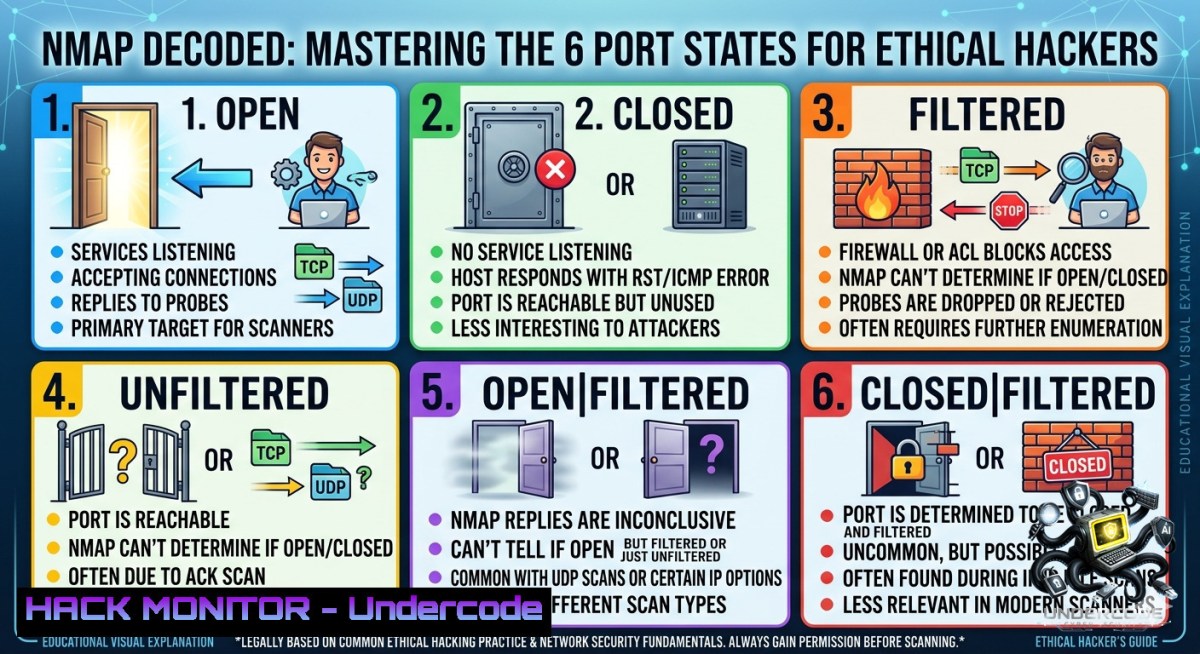
When performing port scanning with Nmap, the results don’t only show open or closed ports. Instead, Nmap classifies ports into six distinct states based on the responses received from the target system or firewall. Understanding these states helps pentesters interpret scan results correctly and identify potential attack surfaces during reconnaissance.
Learning Objectives:
- Objective 1: Understand the six Nmap port states and how each is determined by packet responses.
- Objective 2: Learn to use specific Nmap scan types to identify and exploit open services.
- Objective 3: Master firewall evasion techniques for comprehensive network reconnaissance.
You Should Know:
- The Six Port States: A Technical Deep Dive
This guide expands on the six port states Nmap uses: open, closed, filtered, unfiltered, open|filtered, and closed|filtered. These states describe how Nmap perceives the port from the scanner’s perspective.
🟢 Open (Actively Accepting Connections)
An application is actively accepting TCP connections, UDP datagrams, or SCTP associations on this port. For TCP ports, Nmap confirms this by receiving a SYN/ACK packet in response to its SYN probe. Open ports are the primary targets for attackers and pentesters as each represents a potential avenue for attack.
🔴 Closed (Accessible but No Listener)
The port is accessible (it receives and responds to Nmap probe packets), but there is no application listening on it. Nmap typically identifies a closed port by receiving an RST (reset) packet in response to a SYN probe. While not directly vulnerable, closed ports can help with host discovery and OS fingerprinting.
🛡️ Filtered (Blocked by Firewall)
Nmap cannot determine whether the port is open because packet filtering prevents its probes from reaching the port. This state occurs when a firewall, router rule, or host-based firewall blocks the probe, often resulting in no response (timeout) or an ICMP “communication administratively prohibited” message. Filtered ports provide little information but confirm the presence of security controls.
📡 Unfiltered (Accessible but Ambiguous)
This state means the port is accessible, but Nmap is unable to determine whether it is open or closed. Only the ACK scan (-sA) classifies ports into this state, which is used to map firewall rulesets. To resolve the actual state, combine ACK scans with other scan types like SYN, Window, or FIN scans.
❓ Open|Filtered (Indeterminate Open/Filtered)
Nmap places ports in this state when it cannot determine whether the port is open or filtered. This occurs for scan types where open ports give no response (such as UDP, FIN, NULL, and Xmas scans). The lack of response could indicate either an open port or a packet filter that dropped the probe.
⚠️ Closed|Filtered (Indeterminate Closed/Filtered)
This state is used when Nmap cannot determine whether a port is closed or filtered. It is primarily used for the IP ID idle scan (-sI) and indicates that the port is either closed or being filtered by a firewall.
Step-by-Step Guide: Recognizing Port States with Basic Commands
- Basic TCP SYN Scan (Default for Root): Run `sudo nmap -sS 192.168.1.1` to display standard open/closed/filtered states.
- ACK Scan for Firewall Detection: Execute `nmap -sA 192.168.1.1` to identify filtered ports (no response) versus unfiltered ports (RST response).
- FIN Scan to Bypass Simple Firewalls: Use `nmap -sF 192.168.1.1` to probe ports; open/filtered ports give no response while closed return RST.
2. Practical Firewall Evasion & Advanced Reconnaissance
Firewalls and IDS/IPS systems often block standard SYN scans, requiring penetration testers to use advanced techniques.
Step-by-Step Guide: Evading Firewalls with Fragmentation and Decoys
- Packet Fragmentation: Use `nmap -f 192.168.1.1` to split probe packets into tiny fragments (8 bytes or less). This helps bypass simple packet filters and intrusion detection systems that reassemble packets incorrectly.
- Source Port Manipulation: Some firewall rules trust traffic from specific ports (e.g., port 53 for DNS). Bypass this by scanning with `–source-port 53` or
-g 53. - Decoy Scans: Obfuscate your source IP by using `nmap -D RND:10,ME 192.168.1.1` to generate decoy IP addresses.
3. The Attack Surface in Practice: Enumerating Services
Once open ports are identified, the next step is service and version detection.
Step-by-Step Guide: Service and OS Fingerprinting
- Aggressive Scan: Run `sudo nmap -A -T4 192.168.1.1` to combine OS detection, version detection, script scanning, and traceroute.
- Version Detection: Use `nmap -sV –version-intensity 9 192.168.1.1` for granular service version identification.
- Default Scripts: Execute `nmap -sC 192.168.1.1` to run a set of default Nmap Scripting Engine (NSE) scripts for vulnerability discovery.
What Undercode Say:
- Key Takeaway 1: The granularity of Nmap’s six port states provides a nuanced view of network defenses. A “filtered” state is not a dead end; it’s a data point indicating the presence of security controls that require further probing. The “open|filtered” state reveals the limitations of UDP and FIN scans, forcing pentesters to use multiple techniques to resolve ambiguity.
- Key Takeaway 2: Active evasion techniques like packet fragmentation and source port manipulation are valuable but their effectiveness depends on specific firewall misconfigurations. A robust defense-in-depth strategy will detect these anomalies. The real power of Nmap lies in its ability to quickly identify and enumerate the attack surface through automated script execution.
Prediction:
- +1 The constant evolution of Nmap’s scripting engine and fingerprint databases will continue to automate vulnerability discovery, dramatically reducing the time from reconnaissance to exploitation.
- -1 The increasing adoption of zero-trust network access (ZTNA) and sophisticated cloud-1ative firewalls will render many of Nmap’s basic stealth scanning techniques ineffective, requiring a shift towards agent-based and API-driven recon methods.
- -1 As organizations deploy more advanced IDS/IPS systems, attackers and pentesters will face a steeper learning curve. Evasion will require custom packet crafting, making standardized tools less reliable for stealthy operations without significant customization.
▶️ Related Video (84% Match):
🎯Let’s Practice For Free:
🎓 Live Courses & Certifications:
Join Undercode Academy for Verified Certifications
🚀 Request a Custom Project:
Secure, high-velocity infrastructure and disruptive technological engineering. Contact our engineering team for high-tier development and proprietary systems:
[email protected]
💎 Smart Architecture | 🛡️ Secure by Design | ⭐ Trusted by Thousands
IT/Security Reporter URL:
Reported By: Cybersecurity Pentesting – Hackers Feeds
Extra Hub: Undercode MoN
Basic Verification: Pass ✅


