Listen to this Post
Introduction:
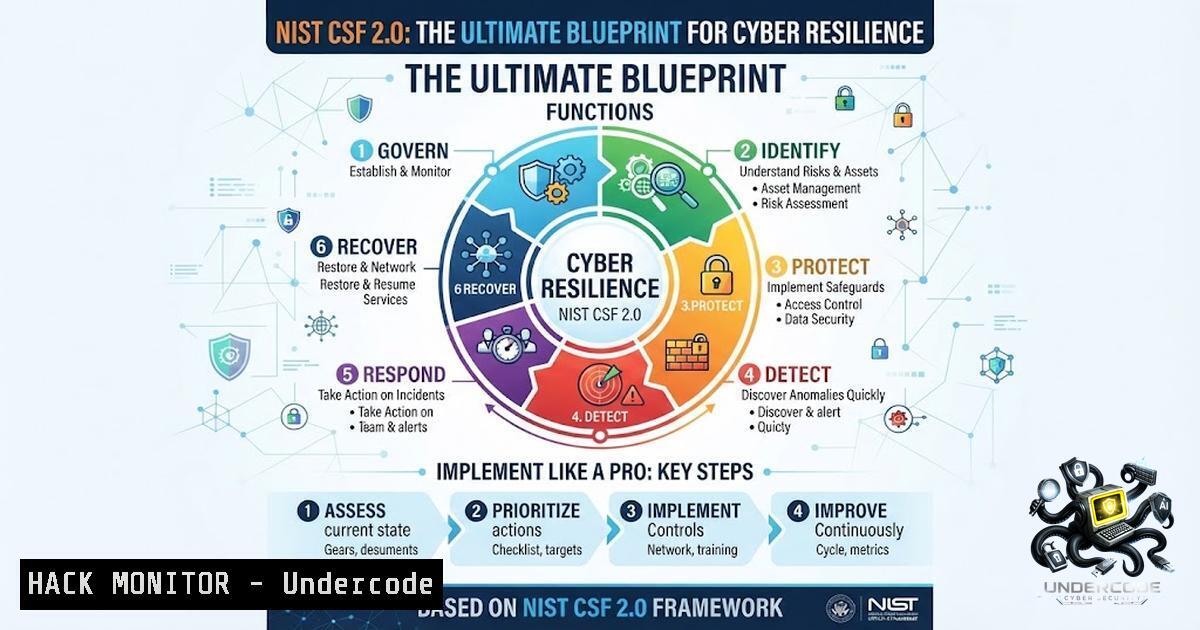
Cybersecurity is no longer about deploying the latest tools in isolation; it’s about building a structured, repeatable, and defensible approach to managing cyber risk. The NIST Cybersecurity Framework (CSF) provides a globally recognized methodology that helps organizations strengthen their security posture through five core functions: Identify, Protect, Detect, Respond, and Recover. With the release of CSF 2.0 in 2024, a sixth function—Govern—has been added to tie executive strategy directly to security operations, raising the bar for what constitutes a complete implementation.
Learning Objectives:
- Understand the core functions of the NIST CSF 2.0 and how they map to a comprehensive cybersecurity lifecycle.
- Learn how to apply practical Linux, Windows, cloud, and API security commands to align with NIST controls.
- Develop a step-by-step implementation roadmap for assessing, hardening, and continuously monitoring your environment against the framework.
You Should Know:
1. Identify: Know Your Assets and Risks
The Identify function is the foundation of any security program. It requires organizations to develop an organizational understanding of their systems, assets, data, and capabilities to manage cybersecurity risk. Without a clear inventory, you cannot protect what you do not know exists.
Step‑by‑step guide:
- Step 1: Inventory all network interfaces and connected devices. On Linux, use `ip a` to list all network interfaces. On Windows, enumerate installed software with
Get-WmiObject -Class Win32_Product | Select-Object -Property Name, Version. - Step 2: Discover all open ports and active services using Nmap:
nmap -sV --script vuln <target_IP>. This helps map your attack surface. - Step 3: Document business-critical assets and data flows. Create a data classification policy that maps each asset to its confidentiality, integrity, and availability (CIA) requirements.
- Step 4: Conduct a risk assessment to identify vulnerabilities and threats. Prioritize risks based on their potential business impact.
2. Protect: Implement Safeguards to Secure Critical Systems
The Protect function focuses on developing and implementing appropriate safeguards to ensure delivery of critical infrastructure services. This is where you harden systems, enforce access controls, and implement data security measures.
Step‑by‑step guide:
- Step 1: Harden Linux systems by checking for unnecessary SUID/SGID binaries that could be exploited for privilege escalation:
find / -type f \( -perm -4000 -o -perm -2000 \) -exec ls -la {} \; 2>/dev/null. Remove unnecessary elevated permissions withchmod u-s /path/to/file. - Step 2: Configure a firewall on Linux using UFW: `sudo ufw enable` and allow only essential services like SSH, HTTP, and HTTPS.
- Step 3: On Windows, enable the Defender Firewall across all profiles:
Set-1etFirewallProfile -Profile Domain,Public,Private -Enabled True. - Step 4: Enforce least-privilege access. For AWS S3 buckets, audit policies with `aws s3api get-bucket-policy –bucket
` and restrict overly permissive rules.
3. Detect: Continuously Monitor for Threats and Events
The Detect function enables timely discovery of cybersecurity events. Continuous monitoring is essential for identifying anomalies and potential breaches before they escalate.
Step‑by‑step guide:
- Step 1: Monitor Linux system logs in real-time:
sudo tail -f /var/log/syslog. - Step 2: On Windows, check security event logs for suspicious activity:
Get-WinEvent -LogName Security -MaxEvents 10. - Step 3: Deploy an intrusion detection system (IDS) like Snort or Suricata to analyze network traffic patterns.
- Step 4: Implement security information and event management (SIEM) to aggregate and correlate logs from across your environment. Use tools like Wazuh (open-source) or Splunk to set up alerting rules based on NIST detect categories.
4. Respond: Contain, Investigate, and Recover from Incidents
The Respond function focuses on taking action regarding a detected cybersecurity incident. A well-rehearsed response plan minimizes damage and reduces recovery time.
Step‑by‑step guide:
- Step 1: Block a malicious IP address on Linux using iptables:
sudo iptables -A INPUT -s 192.168.1.100 -j DROP. - Step 2: Isolate a compromised Windows machine from the network by blocking all inbound and outbound traffic:
Set-1etFirewallProfile -Profile Domain,Public,Private -DefaultInboundAction Block -DefaultOutboundAction Block. - Step 3: Initiate your incident response plan. Assign roles (e.g., incident commander, forensic lead, communications) and begin evidence collection.
- Step 4: Conduct a preliminary investigation to determine the scope and root cause. Use forensic tools like FTK or Autopsy to preserve and analyze disk images.
5. Recover: Restore Operations and Improve Resilience
The Recover function ensures that affected systems and services are restored in a timely manner while incorporating lessons learned to prevent recurrence.
Step‑by‑step guide:
- Step 1: Restore systems from verified clean backups. Ensure backups are tested regularly and stored offline or in a segregated environment.
- Step 2: Patch all vulnerabilities that were exploited during the incident.
- Step 3: Conduct a post-incident review (PIR) to document what happened, what was done, and what could be improved.
- Step 4: Update your risk register, incident response playbooks, and security controls based on findings from the review.
- Govern: Align Security Strategy with Business Objectives (CSF 2.0 New)
The Govern function is a new addition in CSF 2.0 that establishes and monitors the organization’s cybersecurity risk management strategy, expectations, and policy.
Step‑by‑step guide:
- Step 1: Establish a cybersecurity governance committee with executive sponsorship to oversee the framework implementation.
- Step 2: Define clear policies and standards that align with NIST CSF categories and subcategories. Map existing compliance frameworks (ISO 27001, CIS Controls, etc.) to CSF for streamlined reporting.
- Step 3: Implement compliance monitoring tools. For example, use Microsoft Purview Compliance Manager to select and activate a NIST CSF template and monitor overall compliance posture.
- Step 4: Automate evidence collection using tools like Nisify, which aggregates technical evidence from cloud platforms and maps it to NIST controls.
7. Cloud and API Security Hardening
Modern infrastructures rely heavily on cloud services and APIs, making them prime targets for attackers. NIST SP 800-228 provides specific guidelines for API protection in cloud-1ative systems.
Step‑by‑step guide:
- Step 1: Audit cloud storage permissions. For AWS, use `aws s3api get-bucket-policy –bucket
` to verify that S3 buckets are not publicly accessible. - Step 2: Implement API security testing using OWASP ZAP. Launch ZAP in daemon mode: `./zap.sh -daemon -port 8080 -host 0.0.0.0` and configure automated scans against your API endpoints.
- Step 3: Enforce authentication and authorization for all APIs. Use OAuth 2.0 or OpenID Connect and validate tokens at the API gateway level.
- Step 4: Regularly review cloud security posture using tools like Azure Security Benchmark, which provides CSF 2.0-aligned security baseline configurations.
What Undercode Say:
- Key Takeaway 1: The NIST CSF is not a one-time compliance checklist but a continuous journey of improvement. Organizations that treat it as a living framework—regularly assessing, updating, and maturing their controls—gain a significant advantage in resilience.
- Key Takeaway 2: Automation is critical for efficient compliance. Leveraging PowerShell scripts, Linux commands, AWS CLI, and open-source tools like Nmap and OWASP ZAP can streamline the implementation of NIST controls, reduce human error, and provide real-time visibility into your security posture.
Analysis: The NIST CSF 2.0 represents a significant evolution from its predecessor, adding the Govern function to bridge the gap between executive strategy and operational security. This change acknowledges that cybersecurity is not just a technical problem but a business risk that requires top-down oversight. The framework’s flexibility makes it applicable to organizations of all sizes and sectors, from startups to government agencies. However, the challenge lies in moving beyond theoretical alignment to actual implementation. Many organizations reference CSF in policies without building the underlying controls, creating a dangerous gap between documented posture and actual risk exposure. To succeed, security teams must translate framework categories into actionable technical controls, continuously monitor their effectiveness, and adapt to emerging threats. The integration of automated tools and cloud-1ative security practices is no longer optional—it is essential for maintaining a defensible posture in today’s rapidly evolving threat landscape.
Prediction:
- +1 As regulatory bodies and cyber insurers increasingly mandate CSF alignment, adoption of NIST CSF 2.0 will become a baseline requirement for doing business, driving widespread standardization in security practices.
- +1 The rise of AI-driven security tools will accelerate NIST CSF implementation by automating risk assessments, threat detection, and compliance reporting, making the framework more accessible to resource-constrained organizations.
- -1 Organizations that fail to move beyond checklist compliance and invest in continuous monitoring and response capabilities will face escalating breach costs and potential regulatory penalties, as the gap between policy and practice widens.
- -1 The complexity of CSF 2.0, particularly the new Govern function, may overwhelm smaller organizations without dedicated security personnel, leading to superficial adoption and a false sense of security.
▶️ Related Video (72% Match):
🎯Let’s Practice For Free:
🎓 Live Courses & Certifications:
Join Undercode Academy for Verified Certifications
🚀 Request a Custom Project:
Secure, high-velocity infrastructure and disruptive technological engineering. Contact our engineering team for high-tier development and proprietary systems:
[email protected]
💎 Smart Architecture | 🛡️ Secure by Design | ⭐ Trusted by Thousands
IT/Security Reporter URL:
Reported By: Karthikeyan Jagannathan – Hackers Feeds
Extra Hub: Undercode MoN
Basic Verification: Pass ✅


