
Listen to this Post
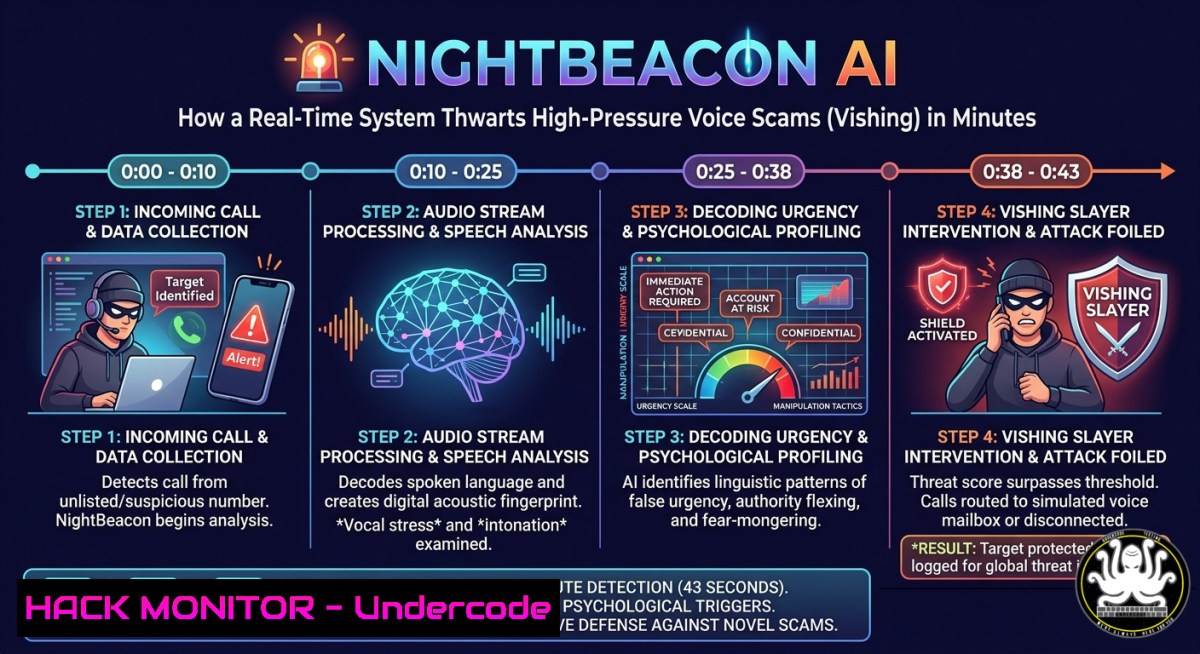
Introduction:
Vishing (voice phishing) attacks have surged, with attackers using emotional manipulation—urgency, fear, authority—to trick victims. Traditional security tools fail to analyze voice tone and real-time conversational pressure. NightBeacon AI by Binary Defense changes this: it ingests voice recordings or live audio feeds, detects vishing patterns in seconds, and flags malicious tonality and urgency within phishing campaigns. This article extracts the technical core of such a system and provides hands-on steps to build or integrate similar AI-driven vishing analysis.
Learning Objectives:
- Understand how AI models classify vishing using tonality, urgency, and sentiment analysis.
- Implement real-time voice capture and preprocessing on Linux/Windows for AI inference.
- Build a prototype vishing detector using open-source speech-to-text and machine learning.
You Should Know:
- Real-Time Voice Capture & Streaming for AI Inference
To replicate NightBeacon’s real‑time analysis, you need to ingest audio from microphones or phone systems. Below are verified commands for capturing live audio on both Linux and Windows, then piping it to a processing script.
Linux (using `arecord` and `ffmpeg`):
 Capture 16kHz mono audio (optimal for speech models)
arecord -f S16_LE -r 16000 -c 1 -t raw | ffmpeg -f s16le -ar 16000 -ac 1 -i pipe:0 -f wav - | python3 vis_h_analyzer.py
Windows (using PowerShell and `ffmpeg`):
 Enumerate microphones, then record to raw PCM
ffmpeg -f dshow -i audio="Microphone Array" -ar 16000 -ac 1 -f s16le pipe:1 | python vis_h_analyzer.py
Step‑by‑step:
- Install `ffmpeg` and Python with `pyaudio` or
sounddevice. - Create `vish_analyzer.py` that reads stdin PCM chunk (e.g., 4 seconds).
3. Convert PCM to spectrogram or MFCC features.
4. Feed features into a pre‑trained urgency/tonality classifier.
- Output alert if urgency score > threshold or phishing keyword detected.
- Building a Tonality & Urgency Classifier with Open‑Source ML
The core AI analyzes prosody (pitch, rate, energy) and sentiment. Use `librosa` and a small neural net.
- Building a Tonality & Urgency Classifier with Open‑Source ML
Python example:
import librosa, numpy as np
import joblib

def extract_urgency_features(y, sr):
rms = librosa.feature.rms(y=y).mean()
zcr = librosa.feature.zero_crossing_rate(y).mean()
tempo, _ = librosa.beat.beat_track(y=y, sr=sr)
return [rms, zcr, tempo]

Load pre‑trained model (RandomForest)
model = joblib.load("vishing_urgency_model.pkl")
y, sr = librosa.load("call.wav", sr=16000)
features = extract_urgency_features(y, sr)
urgency = model.predict_proba([bash])[bash][1]  probability of urgent vishing
print(f"Urgency score: {urgency:.2f}")
Step‑by‑step training (Linux):
- Collect benign customer calls and known vishing recordings (see Kaggle’s “Vishing Voice Dataset”).
- Label each with urgency (0–1) and tonality (calm, aggressive, panicked).
3. Extract MFCCs, spectral centroids, and formants.
4. Train an XGBoost or tiny LSTM.
- Convert to ONNX for real‑time inference (<50ms per chunk).
- Integrating with Telephony & Audio Systems (Asterisk / Twilio)
NightBeacon ties into “audio systems” – you can do the same with SIP trunks or VoIP.
- Integrating with Telephony & Audio Systems (Asterisk / Twilio)
Asterisk (Linux) – stream calls to AI:
 In extensions.conf, use System() to call a script on each call
exten => <em>X.,1,Set(RECORDED_FILE=/tmp/call</em>${STRFTIME(${EPOCH},%Y%m%d_%H%M%S)}.wav)
exten => _X.,n,Monitor(wav,${RECORDED_FILE})
exten => _X.,n,System(/opt/vish_ai_consumer.py ${RECORDED_FILE})
Twilio Function (Node.js) – real‑time stream:
// Using Twilio Media Streams
const WebSocket = require('ws');
wss.on('connection', (ws) => {
ws.on('message', (msg) => {
const data = JSON.parse(msg);
if (data.event === 'media') {
const audioPayload = Buffer.from(data.media.payload, 'base64');
sendToVishAI(audioPayload); // gRPC to Python service
}
});
});
Step‑by‑step:
- Register a Twilio phone number, enable “Media Streams” to your WebSocket server.
- Forward each audio chunk (8kHz mulaw) to your urgency model.
- If urgency > 0.7, call a webhook to block the call or alert SOC.
- Optimizing Inference Speed – 4.3 Seconds for 11‑Minute Calls
The post claims 11 min call analyzed in 4.3 seconds – achieved via chunked parallel inference.
- Optimizing Inference Speed – 4.3 Seconds for 11‑Minute Calls
Technique – overlapping sliding windows:
import threading
from queue import Queue

def chunk_worker(audio_chunk, model, result_q):
score = model.predict(audio_chunk)
result_q.put(score)

def parallel_analysis(full_audio, chunk_duration=4.0, step=2.0, sr=16000):
chunks = []
for start in np.arange(0, len(full_audio)/sr - chunk_duration, step):
chunk = full_audio[int(startsr):int((start+chunk_duration)sr)]
chunks.append(chunk)
with ThreadPoolExecutor(max_workers=4) as executor:
futures = [executor.submit(chunk_worker, c, model, q) for c in chunks]
return max([f.result() for f in futures])  highest urgency
Performance tuning:
- Use GPU (CUDA) with TensorRT or OpenVINO for batch inference.
- Pre‑load model into shared memory (Linux
/dev/shm). - On Windows, use DirectML or Intel OpenVINO.
5. Mitigation & Hardening Against AI‑Evasion Attacks
Attackers may add noise or distort voice to bypass detection. Harden your vishing AI with adversarial training.
Mitigation steps:
- Train on augmented audio: background noise, codec compression, pitch shifting.
- Deploy ensemble: combine urgency model + keyword spotting (e.g., “bank”, “SSN”) + call metadata (source number reputation).
- Linux command to test robustness:
sox call.wav noisy_call.wav white noise 0.05
ffmpeg -i call.wav -af "atempo=1.2, aecho=0.8:0.9:1000:0.3" distorted.wav
Windows PowerShell (using ffmpeg):
ffmpeg -i call.wav -af "afftdn=nf=-25" denoised.wav
Re‑run your model on these modified files; if accuracy drops, augment training data with `audiomentations` library.
6. Deploying NightBeacon‑like AI in Your SOC
Binary Defense integrates into SIEMs. Use this Logstash filter (Elastic Stack) to pipe vishing alerts:
filter {
exec {
command => "python3 /opt/vish_detector.py %{message}"
add_tag => ["vishing_analysis"]
}
if "vishing_high" in [bash] {
mutate { add_field => { "alert_severity" => "critical" } }
}
}
Step‑by‑step for SOC:
- Deploy the urgency model as a REST API (FastAPI + Docker).
- Install filebeat on your PBX server to ship call recordings to
/vish_api. - Create a Sigma rule (
vishing_sigma.yml) that triggers on urgency > 0.8 OR keyword “verify account”. - Automate block via your SOAR (e.g., Shuffle or TheHive).
What Undercode Say:
- Key Takeaway 1: Vishing detection shifts from keyword matching to behavioral prosody analysis – tonality and urgency are stronger indicators than spoken words.
- Key Takeaway 2: Real‑time AI for voice is achievable with chunked parallel inference and lightweight models (<50MB) on CPU, as demonstrated by the 4.3‑second analysis of an 11‑minute call.
Prediction:
Within 18 months, vishing‑as‑a‑service kits will adopt voice‑changing AI to mimic calm, trusted tones, forcing defenders to move from urgency detection to deep speaker verification and semantic‑contextual models. Enterprises will mandate real‑time AI call screening for all inbound helpdesk and finance calls, making vishing more expensive to execute. The arms race will shift toward generative voice deepfake detection – but for now, tonality‑based AI is a decisive first‑line weapon.
▶️ Related Video (84% Match):
🎯Let’s Practice For Free:
IT/Security Reporter URL:
Reported By: Davidkennedy4 Binarydefense – Hackers Feeds
Extra Hub: Undercode MoN
Basic Verification: Pass ✅


