Listen to this Post
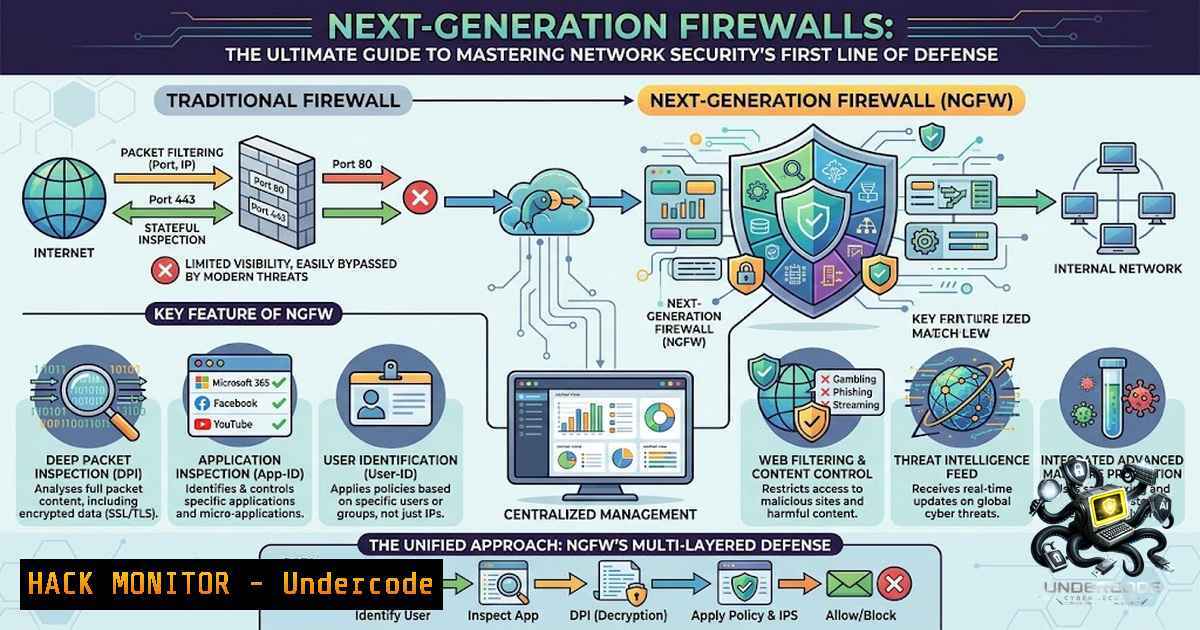
Introduction:
Every device connected to a network constantly sends and receives data—a connectivity that powers modern business operations while simultaneously creating endless opportunities for cyber threats. Firewalls serve as the security gatekeeper, monitoring, filtering, and controlling network traffic based on predefined security policies to protect organizations from unauthorized access and malicious activity. As threats evolve from simple port scans to sophisticated application-layer attacks and encrypted malware, understanding how modern firewalls operate—and how to properly configure them across Linux, Windows, and cloud environments—has become essential for any cybersecurity professional.
Learning Objectives:
- Understand the core firewall technologies including packet filtering, stateful inspection, and application-layer filtering
- Master practical firewall configuration commands for Linux (iptables/UFW) and Windows (netsh advfirewall)
- Implement cloud security groups and next-generation firewall (NGFW) features like TLS inspection and IPS
- Deploy Web Application Firewalls (WAF) to protect APIs and web services
- Apply Zero Trust principles through network segmentation and microsegmentation
- The Anatomy of Firewall Traffic Processing: A Step-by-Step Technical Deep Dive
When a client initiates a request—whether a user accessing a web application or a server communicating with a database—the firewall performs a series of critical inspections before any traffic is allowed to pass. Understanding this workflow is fundamental to troubleshooting and optimization.
Step 1: Client Initiates a Request – A user’s browser or application generates a packet destined for a server, containing source/destination IP addresses, ports, and protocol information.
Step 2: Traffic Travels Across the Network – The packet traverses the network infrastructure, eventually reaching the firewall’s ingress interface.
Step 3: The Firewall Intercepts the Packet – The firewall captures the packet and begins processing through its rule chains. In Linux iptables, packets traverse chains in linear order—INPUT for incoming, OUTPUT for outgoing, and FORWARD for routed traffic.
Step 4: Security Rules Are Applied – The firewall evaluates the packet against its rule set, checking IP addresses, ports, protocols, and connection state. With an empty iptables configuration, the firewall accepts all connections—a dangerous default that must be hardened.
Step 5: Allowed Traffic Is Forwarded – If the packet matches an ACCEPT rule, it’s forwarded to its destination. Otherwise, it’s dropped or rejected based on the default policy.
Step 6: The Server Processes the Request – The destination server receives and processes the allowed traffic.
Step 7: The Response Is Inspected Again – Stateful firewalls track connection states, inspecting return traffic to verify legitimate sessions.
Linux Command Walkthrough – Basic Stateful Firewall Setup:
 Check current iptables ruleset
sudo iptables -1vL --line-1umbers

Set default policies (DROP all, allow specific)
sudo iptables -P INPUT DROP
sudo iptables -P FORWARD DROP
sudo iptables -P OUTPUT ACCEPT

Allow established connections (stateful tracking)
sudo iptables -A INPUT -m state --state ESTABLISHED,RELATED -j ACCEPT

Allow loopback interface
sudo iptables -A INPUT -i lo -j ACCEPT

Allow SSH (port 22) from specific management subnet only
sudo iptables -A INPUT -p tcp --dport 22 -s 192.168.1.0/24 -j ACCEPT

Allow HTTP/HTTPS to web server
sudo iptables -A INPUT -p tcp --dport 80 -j ACCEPT
sudo iptables -A INPUT -p tcp --dport 443 -j ACCEPT

Save rules to persist after reboot
sudo iptables-save | sudo tee /etc/iptables/rules.v4
For Ubuntu users seeking simplicity, UFW provides a more approachable interface:
sudo ufw enable
sudo ufw allow 22/tcp
sudo ufw allow 80/tcp
sudo ufw allow 443/tcp
sudo ufw status verbose
- Windows Firewall Hardening: Enterprise-Grade Configuration with netsh advfirewall
Windows Firewall with Advanced Security provides granular control over inbound and outbound traffic. The `netsh advfirewall` command-line tool is the modern replacement for the deprecated `netsh firewall` context, offering precise rule control across domain, private, and public profiles.
Step-by-Step Windows Firewall Configuration:
Step 1: Launch with Elevated Privileges – Right-click Command Prompt and select “Run as administrator.” All commands require administrative rights.
Step 2: Enable the Firewall for All Profiles
netsh advfirewall set allprofiles state on
Step 3: Create Inbound Rules for Critical Services
 Allow SSH (port 22) from specific IP range
netsh advfirewall firewall add rule name="Allow SSH" dir=in action=allow protocol=TCP localport=22 remoteip=192.168.1.1-192.168.1.100

Allow a specific application
netsh advfirewall firewall add rule name="My Application" dir=in action=allow program="C:\MyApp\MyApp.exe" enable=yes

Open port 80 for web traffic
netsh advfirewall firewall add rule name="Open Port 80" dir=in action=allow protocol=TCP localport=80
Step 4: Block Outbound Traffic for a Specific Program
netsh advfirewall firewall add rule name="Block App" program="C:\malicious.exe" dir=out action=block
Step 5: Delete Rules When No Longer Needed
netsh advfirewall firewall delete rule name="My Application"
Step 6: Export and Import Policies for Consistency Across Servers
netsh advfirewall export "C:\FirewallPolicy.wfw"
netsh advfirewall import "C:\FirewallPolicy.wfw"
Step 7: Logging and Monitoring
netsh advfirewall set logging filename "C:\Windows\System32\LogFiles\Firewall\pfirewall.log"
netsh advfirewall set logging droppedconnections enable
- Cloud Security Groups: Reusable Firewall Templates for Modern Infrastructure
Managing network security across multiple cloud instances requires scalable approaches. Security Groups function as reusable firewall templates, allowing administrators to define traffic rules once and apply them across instances. This approach ensures consistency, reduces configuration errors, and naturally enforces least-privilege principles.
Real-World Security Group Architecture:
| Tier | Security Group Rules |
|||
| Web Servers | Allow HTTP/HTTPS from anywhere (0.0.0.0/0), SSH from admin IPs only |
| App Servers | Accept traffic only from web servers on port 8080 |
| Database | Strictly allow port 3306 (MySQL) only from app servers |
Implementation Best Practices:
- Divide Security Groups Based on Scope – Create separate groups for production, staging, and development environments
- Replace Default Groups – Remove default security groups that permit unrestricted internal communication
- Apply Least Privilege – Database tiers should never accept traffic directly from the public internet
- Microservices Segmentation – Each microservice gets its own security group; the API gateway communicates with auth services, auth services with data layers, but data layers cannot accept traffic directly from the API gateway
AWS Security Group Example (via CLI):
 Create a security group
aws ec2 create-security-group --group-1ame WebServerSG --description "Web server security group"

Allow HTTP and HTTPS inbound
aws ec2 authorize-security-group-ingress --group-1ame WebServerSG --protocol tcp --port 80 --cidr 0.0.0.0/0
aws ec2 authorize-security-group-ingress --group-1ame WebServerSG --protocol tcp --port 443 --cidr 0.0.0.0/0

Allow SSH from admin network only
aws ec2 authorize-security-group-ingress --group-1ame WebServerSG --protocol tcp --port 22 --cidr 203.0.113.0/24
4. Next-Generation Firewalls (NGFW): Beyond Port-Based Filtering
Traditional firewalls operate at layers 3 and 4, inspecting only IP addresses and ports. Next-generation firewalls (NGFWs) add layer 7 capabilities including deep packet inspection (DPI), application awareness, TLS/SSL inspection, and intrusion prevention. Yet most production deployments underutilize these features—relying on port-based rules while leaving TLS inspection disabled.
Zone-Based Segmentation: The Foundation of NGFW Policy
Zone segmentation creates trust boundaries rather than writing rules between IP ranges:
| Zone | Contents |
||-|
| Untrust | Internet-facing interfaces |
| Trust | Internal LAN / workstations |
| DMZ | Public-facing servers |
| Servers | Internal application / database tier |
| Mgmt | Out-of-band management plane |
Palo Alto PAN-OS Configuration Example:
 Create zones
set zone untrust network layer3
set zone trust network layer3
set zone dmz network layer3

Bind interfaces to zones
set network interface ethernet ethernet1/1 layer3 zone untrust
set network interface ethernet ethernet1/2 layer3 zone trust
set network interface ethernet ethernet1/3 layer3 zone dmz

Security policy: Allow trust → untrust (outbound internet, inspected)
set rulebase security rules outbound-internet from trust
set rulebase security rules outbound-internet to untrust
set rulebase security rules outbound-internet application any
set rulebase security rules outbound-internet action allow
set rulebase security rules outbound-internet profile-setting group strict-inspection

Security policy: Allow untrust → dmz (inbound to public services only)
set rulebase security rules inbound-dmz from untrust
set rulebase security rules inbound-dmz to dmz
set rulebase security rules inbound-dmz destination [ 10.0.2.10 10.0.2.11 ]
set rulebase security rules inbound-dmz application [ web-browsing ssl ]
set rulebase security rules inbound-dmz action allow

Critical: Deny dmz → servers (DMZ must never reach internal DB tier)
set rulebase security rules dmz-to-servers-deny from dmz
set rulebase security rules dmz-to-servers-deny to servers
set rulebase security rules dmz-to-servers-deny action deny
TLS/SSL Deep Inspection: The Non-1egotiable Security Control
The majority of modern malware, command-and-control traffic, and data exfiltration rides over TLS. Without decryption, your NGFW is inspecting metadata only—signatures, application control, and URL filtering all degrade significantly for encrypted sessions. The firewall acts as a man-in-the-middle proxy, terminating the client TLS session and re-encrypting toward the destination using a CA certificate that endpoints trust.
- Intrusion Detection and Prevention Systems (IDS/IPS): Adding Active Threat Hunting
IDS/IPS systems complement firewalls by detecting and blocking malicious patterns that bypass basic filtering. Snort, a powerful open-source NIDS/NIPS, analyzes network packets in real-time using signature-based detection and protocol analysis.
Snort Installation and Configuration (Ubuntu/Debian):
 Install Snort
sudo apt update
sudo apt install snort snort-rules-default -y

Verify installation
snort -V

Configure main configuration file
sudo nano /etc/snort/snort.conf

Define your network variables
var HOME_NET 192.168.1.0/24
var EXTERNAL_NET any

Include custom rules
include $RULE_PATH/local.rules

Configure output
output alert_fast: /var/log/snort/alert
Snort Operating Modes:
| Mode | Purpose | Command |
||||
| Sniffer | Real-time packet capture | `snort -v -i eth0` |
| Packet Logger | Capture and log packets | `snort -dev -l /var/log/snort -i eth0` |
| NIDS/NIPS | Detection/Prevention with rules | `snort -c /etc/snort/snort.conf -i eth0` |
IDS vs IPS Mode:
- IDS (Intrusion Detection System): Monitors traffic and alerts on threats
- IPS (Intrusion Prevention System): Monitors, alerts, and actively blocks malicious traffic inline
Configuration Best Practices:
| Setting | Recommendation |
|||
| `HOME_NET` | Set to your monitored network segment |
| Rule Management | Include only necessary rules for performance |
| Preprocessors | Enable stream5, frag3, `http_inspect` based on needs |
| Log Location | Ensure sufficient disk space for logs |
- Web Application Firewalls (WAF): Protecting APIs and Web Services
APIs and web applications require specialized protection beyond network-layer firewalls. Web Application Firewalls (WAFs) inspect HTTP/HTTPS traffic at the application layer, blocking SQL injection, cross-site scripting (XSS), and other OWASP Top 10 threats.
NGINX App Protect (NAP) WAF Configuration as API Firewall:
 SSH to the Nginx App Protect VM
ssh user@nap-vm-ip

Navigate to nginx folder
cd /etc/nginx

Check content - look for policy files
ls
 Expected: conf.d, nginx.conf, NginxApiSecurityPolicy.json, log-default.json

Copy the existing policy file for modification
sudo cp NginxApiSecurityPolicy.json api-sentence.json

Edit the policy to reference OpenAPI specification
sudo vi api-sentence.json

Add OAS file URL in the policy:
{
"policy": {
"name": "app_protect_api_security_policy",
"description": "NGINX App Protect API Security Policy",
"template": { "name": "POLICY_TEMPLATE_NGINX_BASE" },
"open-api-files": [ { "link": "https://api.swaggerhub.com/apis/.../3.0.1" } ]
}
}

Apply the policy (syntax varies by implementation)
sudo nginx -t && sudo nginx -s reload
WAF Protection Capabilities:
- API Discovery and Protection: Enforces positive security models based on OpenAPI specifications
- Bot Detection: Blocks automated abuse and credential stuffing
- SSL/TLS Enforcement: Requires encrypted connections for all API traffic
- Attack Score Filtering: Blocks requests exceeding threat scores
- Zero Trust and Network Segmentation: Modern Firewall Strategy
Firewalls have evolved from perimeter defenses to enforcement points for Zero Trust architectures. Modern enterprise firewalls provide:
- Microsegmentation: Granular segmentation of workloads, preventing lateral movement
- Threat Intelligence Integration: Real-time blocking of known malicious IPs and domains
- Application Awareness: Identifying and controlling traffic by application, not just port
- Real-Time Security Analytics: Continuous monitoring and alerting
Zero Trust Implementation Checklist:
- Assume Breach Mentality – Never trust internal traffic implicitly
- Verify Every Access Attempt – Authenticate and authorize all requests
- Limit Blast Radius – Segment networks so compromise of one system doesn’t spread
- Inspect All Traffic – Apply TLS inspection, IPS, and application filtering to east-west traffic, not just north-south
What Undercode Say:
- Firewalls are foundational, but configuration is where security lives – A firewall with default settings (allowing all traffic) provides no protection. Proper rule sets, default-deny policies, and regular auditing are non-1egotiable.
-
The shift to NGFW capabilities is essential, not optional – TLS inspection and application-layer filtering are no longer “advanced features” but baseline requirements. Organizations that rely solely on port-based filtering are effectively blind to most modern threats.
-
Cloud security groups enforce better security architecture – The reusable template model forces architects to think through traffic flows and least-privilege principles, reducing the likelihood of accidentally exposing sensitive resources.
-
IDS/IPS adds detection depth that firewalls alone cannot provide – Firewalls block known bad traffic based on rules; IDS/IPS detects anomalies and emerging threats through signature and behavioral analysis, providing critical visibility into ongoing attacks.
-
API protection requires dedicated WAF capabilities – Traditional firewalls cannot understand API semantics or enforce OpenAPI-based positive security models. As organizations shift to API-first architectures, WAF deployment becomes critical.
-
Configuration mistakes are the leading cause of firewall failures – Common errors include allowing SSH from anywhere, leaving default credentials, disabling TLS inspection, and failing to log dropped packets for troubleshooting.
-
Regular rule review and testing prevents security drift – Firewall rule sets accumulate over time. Scheduled audits should identify redundant, overly permissive, or obsolete rules.
-
Automation is essential for scale – Manually configuring firewalls across hundreds of instances is error-prone. Infrastructure-as-code and security group templates ensure consistency and auditable change management.
Prediction:
-
+1 Firewalls will evolve into fully integrated Zero Trust enforcement points, combining network filtering with identity-aware access controls and continuous risk scoring, creating adaptive security perimeters that follow workloads regardless of location.
-
+1 AI-powered firewall management will reduce configuration errors by automatically suggesting rule optimizations, detecting anomalies in traffic patterns, and generating least-privilege policies based on observed application behavior.
-
-1 Organizations that fail to implement TLS inspection will remain vulnerable to encrypted threats, as ransomware and data exfiltration increasingly leverage TLS to evade detection. The “decrypt or fail” reality will force compliance mandates for TLS inspection in regulated industries.
-
-1 The complexity of modern firewall ecosystems—spanning on-premises, cloud, and hybrid environments—will create security gaps where policies are inconsistently applied, leading to increased exploitation of misconfigured cloud security groups and unpatched firewall appliances.
-
+1 Security groups and microsegmentation will become the primary control mechanism for container and Kubernetes environments, with network policies enforcing Zero Trust between microservices and limiting blast radius in the event of compromise.
-
-1 The shortage of skilled firewall administrators will worsen, leaving many organizations dependent on default configurations and vendor recommendations that do not account for their specific threat landscape, increasing the attack surface across enterprise networks.
▶️ Related Video (82% Match):
https://www.youtube.com/watch?v=1hpAduwucbc
🎯Let’s Practice For Free:
🎓 Live Courses & Certifications:
Join Undercode Academy for Verified Certifications
🚀 Request a Custom Project:
Secure, high-velocity infrastructure and disruptive technological engineering. Contact our engineering team for high-tier development and proprietary systems:
[email protected]
💎 Smart Architecture | 🛡️ Secure by Design | ⭐ Trusted by Thousands
IT/Security Reporter URL:
Reported By: How Firewalls – Hackers Feeds
Extra Hub: Undercode MoN
Basic Verification: Pass ✅


