
Listen to this Post
Introduction:
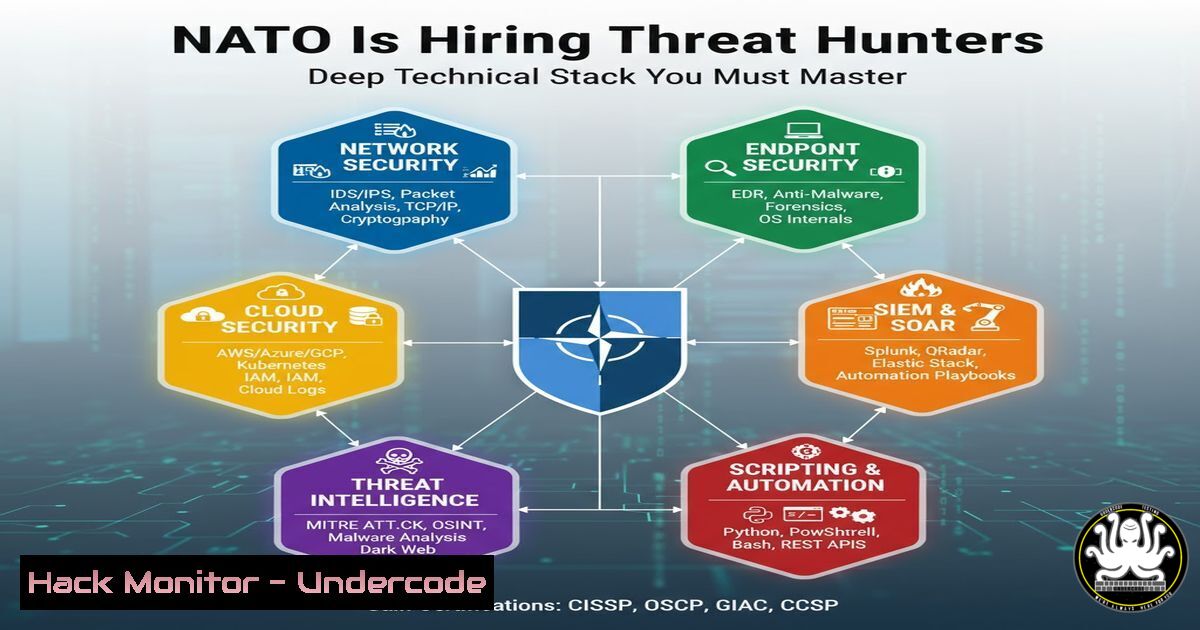
The recent job posting by NATO for a Senior Cyber Security Defender (Threat Hunting) signals a critical demand for professionals who can proactively uncover stealthy adversaries before they cause damage. Unlike standard incident response, threat hunting requires a deep understanding of adversary behaviors, advanced log analysis, and the ability to pivot across disparate data sources. This article breaks down the core technical competencies, command-line methodologies, and tooling required to excel in such a high-stakes role, drawing on the practical skills needed to chase threats inside a highly secure enterprise network.
Learning Objectives:
- Understand the proactive threat hunting methodology and how it differs from reactive incident response.
- Master essential Linux and Windows command-line tools for hunting adversaries.
- Learn to configure and utilize open-source hunting tools like Sysmon, osquery, and YARA.
- Develop proficiency in analyzing network traffic and endpoint telemetry for indicators of compromise.
- Apply practical mitigation techniques based on threat hunting findings.
You Should Know:
1. The Proactive Hunter’s Mindset and Data Collection
Threat hunting is based on the hypothesis that a breach has already occurred but evaded detection. The first step is ensuring you have the right telemetry. Without comprehensive logs, you are flying blind. On Windows endpoints, Sysmon is non-negotiable. On Linux, auditd and eBPF tools provide deep visibility.
To deploy Sysmon with a high-fidelity configuration, a hunter must understand its components. A typical installation command is:
`Sysmon64.exe -accepteula -i config.xml`
To verify it is running and collecting events, check the System event log or use:
`Get-WinEvent -LogName “Microsoft-Windows-Sysmon/Operational” | Group-Object -Property Id`
For Linux, enabling auditd to monitor for specific syscalls is critical. To watch for file permission changes (a common privilege escalation technique), you might add:
`-w /etc/passwd -p wa -k passwd_changes`
`-w /etc/shadow -p wa -k shadow_changes`
Then restart the service:
`sudo service auditd restart`
Verify the rules are loaded with:
`sudo auditctl -l`
- Endpoint Triage: The Art of the “Live Response”
When a hypothesis points to a specific machine, a hunter must perform live triage without tipping off the adversary. On Windows, this often involves parsing the AMCache, Prefetch, and ShimCache for execution history.
To extract recently executed programs from the AMCache (Windows 10/11), you would use a tool like PECmd (part of Eric Zimmerman’s tools):
`PECmd.exe -f C:\Windows\appcompat\Programs\Amcache.hve –csv output.csv`
For a quick check of running processes and their network connections, native commands are indispensable:
`netstat -ano | findstr ESTABLISHED`
`tasklist /v`
On Linux, the `/proc` filesystem is a goldmine. To check for processes hiding their command lines or running from deleted files (a common malware trick):
`sudo ls -la /proc//exe 2>/dev/null | grep deleted`
`sudo grep -r “^COMMAND_LINE” /proc//cmdline 2>/dev/null`
To check for unusual outbound connections:
`sudo netstat -tunap | grep ESTABLISHED`
- Memory and Process Analysis: Finding the In-Memory Threat
Modern malware often lives only in memory. If you have a memory dump (or access to the live system), tools like Rekall or Volatility are essential. For example, to list processes that have a TCP connection from a memory image (memdump.raw):
`volatility -f memdump.raw –profile=Win10x64 netscan`
To identify code injection, you would look for processes that have memory pages that are executable and writable (a rare combination):
`volatility -f memdump.raw –profile=Win10x64 malfind`
For live analysis on Linux, `lsof` and `strace` can reveal suspicious behavior. To trace all system calls made by a potentially malicious process (PID 1337):
`sudo strace -p 1337 -o strace_output.txt`
4. Network Threat Hunting: Following the Data
Adversaries must communicate. Hunters analyze network flows and full packet captures to find Command and Control (C2) traffic. Tools like Zeek (formerly Bro) generate logs from network traffic. A hunter must be able to query these logs. For example, to find all HTTP requests to a suspicious domain:
`cat http.log | zeek-cut ts uid id.orig_h id.resp_h host uri | grep “evil-domain.com”`
For packet-level analysis with tcpdump or Wireshark, extracting all HTTP user agents can reveal automated tools:
`sudo tcpdump -i eth0 -A -s 0 port 80 | grep “User-Agent:”`
If you suspect DNS tunneling, analyzing DNS query lengths is key. Using Zeek’s dns.log, you can calculate query lengths with a simple awk command:
`cat dns.log | zeek-cut query | awk ‘{print length($0), $0}’ | sort -nr | head -20`
5. YARA Rules: The Hunter’s Signature Language
YARA is used to classify and identify malware samples based on textual or binary patterns. A threat hunter must write rules to hunt for specific IOCs across thousands of endpoints. A simple rule to hunt for a specific C2 string in a process memory might look like:
rule Suspicious_C2_Domain
{
strings:
$c2_string = "https://malicious-c2[.]com"
condition:
$c2_string
}
To run this across a collection of files (or processes), you would use:
`yara64.exe -r suspicious_rule.yara C:\Path\To\Suspect\Files\`
- Cloud and Identity: Hunting in Azure AD and Office 365
In a modern NATO context, cloud tenants are prime targets. Hunters must analyze Unified Audit Logs. Using PowerShell with the Exchange Online Management module, you can search for suspicious mailbox rules (often created by attackers for persistence):
Connect-ExchangeOnline
Get-InboxRule -Mailbox "[email protected]" | Format-List Name, Description
To hunt for impossible travel logins in Azure AD, you would query the SignInLogs via KQL in Azure Sentinel or directly with the Graph API. A KQL example:
`SigninLogs
| where LocationDetails != ” “
| summarize make_set(city) by UserPrincipalName
| where array_length(set_city) > 5`
7. Mitigation and Hardening Post-Hunt
Hunting is useless without action. If a hunt reveals unconstrained delegation on a critical server (a major escalation path in Active Directory), a hunter must recommend immediate hardening. To check for unconstrained delegation:
`Get-ADComputer -Filter {TrustedForDelegation -eq $true} -Properties TrustedForDelegation, TrustedToAuthForDelegation, ServicePrincipalNames`
If found, the mitigation is to disable it via PowerShell or ADUC. To disable unconstrained delegation for a specific computer:
`Set-ADComputer “COMPUTER-NAME” -TrustedForDelegation $false`
What Undercode Say:
- Visibility is King: You cannot hunt what you cannot see. Mastering the deployment and validation of logging mechanisms (Sysmon, auditd, Zeek) is the foundational skill of a threat hunter, not the advanced analysis.
- Think Like an Adversary, Not Just an Analyst: The most effective hunters are those who understand penetration testing and exploit development. They can anticipate where an attacker will place persistence or hide data, allowing them to form precise, effective hypotheses.
Analysis: The NATO job description emphasizes going “down the rabbit hole” for “even the most stealthy threat.” This requires a blend of deep OS internals knowledge, network forensic analysis, and the creativity to connect disparate events. The role is moving away from simple alert triage to a proactive, intelligence-driven pursuit. Candidates must demonstrate not just tool proficiency, but a methodological approach to proving or disproving a breach hypothesis with data. The inclusion of stakeholder management highlights that findings must be communicated effectively to technical and non-technical leaders to drive remediation and strategic security improvements.
Prediction:
As AI-generated malware becomes more polymorphic and evasive, the demand for human-led threat hunting will skyrocket. Future hunting will integrate AI-based anomaly detection as a starting point, but the human hunter’s role will evolve into a “cyber forensic anthropologist,” piecing together behavioral artifacts that AI models might overlook. We will see a convergence of threat hunting with deception technologies, where hunters actively deploy honeypots and breadcrumbs to lure and confirm the presence of advanced adversaries before they can strike their primary targets.
▶️ Related Video (74% Match):
🎯Let’s Practice For Free:
IT/Security Reporter URL:
Reported By: Lfortemps Hiring – Hackers Feeds
Extra Hub: Undercode MoN
Basic Verification: Pass ✅


