
Listen to this Post
Introduction:
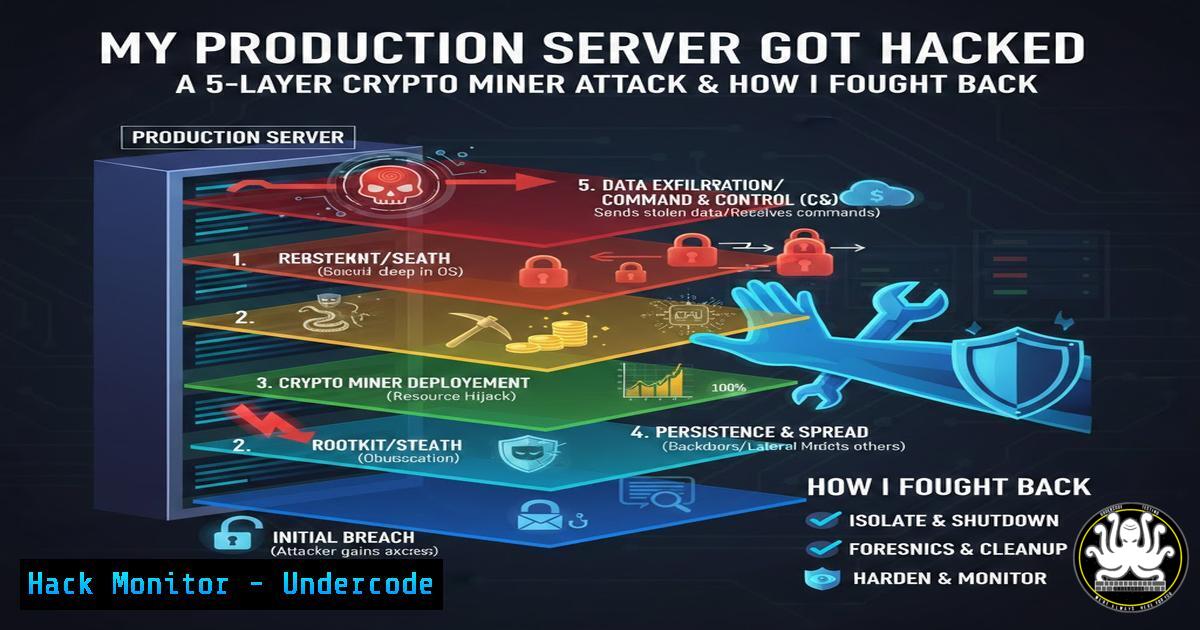
A seemingly routine server performance issue quickly unraveled into a full‑scale security incident when a solo developer discovered his DigitalOcean droplet had been compromised by a cryptocurrency miner. The attacker didn’t just drop a single binary; they established a sophisticated, multi‑layered persistence framework designed to survive reboots, logins, and naive cleanup attempts. This article dissects the attack from initial breach to complete remediation, providing system administrators and developers with the forensic commands and hardening techniques needed to defend against similar threats. We’ll explore how to identify hidden mining processes, dismantle advanced persistence mechanisms, and implement modern security tools to lock down your infrastructure.
Learning Objectives:
- Identify and terminate active cryptocurrency mining processes (e.g., XMRig) using system monitoring tools.
- Discover and remove multiple Linux persistence mechanisms including systemd services, rc.local scripts, and hidden binaries.
- Apply file attribute management with `chattr` to remove “immutable” protections placed by attackers.
- Implement SSH key‑based authentication and firewall rules to prevent brute‑force attacks.
- Deploy and configure CrowdSec as a modern intrusion prevention alternative to Fail2ban.
You Should Know:
1. Incident Triage: Identifying the Malicious Miner
When the server became unresponsive and CPU usage spiked to 100%, the developer first suspected a system update issue. However, accessing the droplet via the recovery console revealed a telltale process: ./bn5a48YH. This unusually named binary was consuming 364% CPU, a clear indicator of a multi‑threaded cryptocurrency miner like XMRig.
To conduct your own triage on a potentially compromised Linux system, you must first list all running processes and sort them by CPU usage:
 List processes sorted by CPU usage (highest first)
ps aux --sort=-%cpu | head -20
If you suspect processes are hiding their names, inspect the `/proc` filesystem directly:
 Check the command line of suspicious PIDs
cat /proc/[bash]/cmdline | strings -1
 Verify the binary's location and hash
ls -la /proc/[bash]/exe
sha256sum /proc/[bash]/exe
To immediately halt the miner, you can kill the process, but be aware that persistence mechanisms will restart it. For a temporary stop:
 Kill the specific malicious process
kill -9 [bash]
 Find and kill all processes named after the miner
pkill -f bn5a48YH
2. Removing Advanced Persistence: The Attacker’s Five Mechanisms
The attacker ensured the miner would survive reboots and logins through five distinct persistence techniques. Removing them requires a systematic check of common startup locations.
a) Systemd Service (c3pool_miner.service)
Attackers often install malicious systemd units to start services at boot.
 List all service files to find suspicious names
systemctl list-units --type=service --all | grep -i c3pool
 View the service's content and disable it
cat /etc/systemd/system/c3pool_miner.service
systemctl stop c3pool_miner.service
systemctl disable c3pool_miner.service
rm -f /etc/systemd/system/c3pool_miner.service
systemctl daemon-reload
b) Fake MySQL Binary at /etc/mysqld
Hiding binaries in directories like `/etc` is common. The developer found a binary there that had been dormant since 2023.
 Check for large, recently modified, or executable files in /etc
find /etc -type f -executable -exec ls -lh {} \; 2>/dev/null | grep -v "^total"
 Remove the malicious binary
rm -f /etc/mysqld
 Also search for other hidden binaries
find / -name "." -type f -executable 2>/dev/null
c) Modified /etc/rc.local
This legacy script runs at the end of the boot process.
 Inspect rc.local for malicious entries
cat /etc/rc.local
 Edit the file to remove any lines invoking the miner
nano /etc/rc.local
d) init.d Script as Fallback
SysV init scripts can also start processes. Attackers often place scripts in /etc/init.d/.
 List all init scripts
ls -la /etc/init.d/
 Check for scripts with suspicious content
grep -r "bn5a48YH" /etc/init.d/
 Remove the malicious script
rm -f /etc/init.d/[bash]
update-rc.d [bash] remove
e) profile.d Script Runs on SSH Login
Scripts in `/etc/profile.d/` execute whenever a user logs in via shell.
 List and inspect all profile scripts
ls -la /etc/profile.d/
cat /etc/profile.d/ | grep -i "bn5a48YH|xmrig|c3pool"
 Remove any malicious files found
rm -f /etc/profile.d/[bash]
3. Bypassing File Immutability: Using `chattr -i`
The attacker set the immutable attribute on critical files to prevent deletion, even by root. When you try to remove a file and receive rm: cannot remove 'file': Operation not permitted, you must first remove the immutable flag.
 Check for files with the 'i' attribute
lsattr /path/to/suspicious/file
 Remove the immutable attribute
chattr -i /path/to/suspicious/file
 Now you can delete or modify the file
rm -f /path/to/suspicious/file
This command was essential for removing the fake MySQL binary and other protected scripts. Be thorough and scan for other immutable files across the system:
 Recursively check for immutable flags in key directories
lsattr -R /etc/ 2>/dev/null | grep "-i-"
4. Securing SSH and Eliminating the Attack Vector
The initial compromise occurred due to a brute‑force attack on the root password. The fix is to disable password authentication entirely and use SSH keys.
Step 1: Generate an SSH key pair on your local machine (if you don’t have one)
ssh-keygen -t ed25519 -a 100
Step 2: Copy the public key to the server
ssh-copy-id -i ~/.ssh/id_ed25519.pub user@your_server_ip
Alternatively, manually append the key to `~/.ssh/authorized_keys`.
Step 3: Harden the SSH daemon configuration
Edit `/etc/ssh/sshd_config` and ensure the following lines are set:
PermitRootLogin prohibit-password  or 'without-password' or 'no'
PasswordAuthentication no
PubkeyAuthentication yes
ChallengeResponseAuthentication no
UsePAM no
After making changes, restart the SSH service:
systemctl restart sshd
Warning: Before disconnecting your current session, open a new terminal window and test the key-based login to ensure you haven’t locked yourself out.
5. Implementing a Modern Firewall: UFW and CrowdSec
With the immediate threat removed, it’s time to build a defensive perimeter.
Enable UFW (Uncomplicated Firewall)
 Set default policies
ufw default deny incoming
ufw default allow outgoing
 Allow SSH (on its non-default port if changed)
ufw allow 22/tcp
 Allow web traffic
ufw allow 80/tcp
ufw allow 443/tcp
 Enable the firewall
ufw enable
ufw status verbose
Deploy CrowdSec as a Fail2ban Replacement
CrowdSec offers a collaborative IP reputation system. The developer noted it blocked 48 attacks in the first 24 hours.
 Install CrowdSec (example for Debian/Ubuntu)
curl -s https://packagecloud.io/install/repositories/crowdsec/crowdsec/script.deb.sh | sudo bash
apt install crowdsec
 Install the firewall bouncer to automatically block IPs
apt install crowdsec-firewall-bouncer-iptables
After installation, monitor the activity:
 Check for blocked IPs and alerts
cscli alerts list
cscli decisions list
 View logs
journalctl -u crowdsec -f
6. Automated Daily Backups to Object Storage
Backups are the final safety net. Automate them to a remote, immutable location like DigitalOcean Spaces or AWS S3.
Example script using `rclone` and `cron`:
First, install and configure `rclone` with your object storage provider.
rclone config
Create a backup script `/usr/local/bin/backup.sh`:
!/bin/bash
BACKUP_DIR="/tmp/backup_$(date +%Y%m%d)"
mkdir -p $BACKUP_DIR
cp -r /var/www /etc/nginx /etc/ssh $BACKUP_DIR
mysqldump --all-databases > $BACKUP_DIR/mysql_all.sql
tar -czf /tmp/server_backup_$(date +%Y%m%d).tar.gz $BACKUP_DIR
rclone copy /tmp/server_backup_$(date +%Y%m%d).tar.gz remote:backup-bucket/
rm -rf $BACKUP_DIR /tmp/server_backup_$(date +%Y%m%d).tar.gz
Make it executable and add a cron job:
chmod +x /usr/local/bin/backup.sh
crontab -e
 Add the line to run daily at 2 AM
0 2    /usr/local/bin/backup.sh
What Undercode Say:
- Assume Defense in Depth, Not a Single Wall: The attacker didn’t rely on one backdoor; they planted five. Your defense must be equally layered. Removing a miner process is not enough—you must hunt down every persistence mechanism, from systemd timers to profile scripts, using the forensic commands detailed above.
- Modern Threats Require Modern Tools: Fail2ban is a great tool, but the collaborative nature of CrowdSec, which shares threat intelligence across a global network, proved more effective in blocking the repeat attacker. This highlights a shift from reactive, local bans to proactive, community‑driven defense.
The attacker’s sophistication—using immutable flags, hidden binaries dated back to 2023, and multiple startup methods—reveals a methodical approach. They planned for long‑term access, not just a quick crypto mine. This case is a stark reminder that for solo developers, “it won’t happen to me” is not a security strategy. Automating backups, moving to key‑based authentication, and deploying next‑gen IPS tools are not optional extras; they are the baseline for any production server exposed to the internet. The discovery of a binary from 2023 suggests the system was compromised for months, silently waiting to be activated.
Prediction:
As cloud infrastructure becomes more accessible to solo developers, we will see a rise in automated, AI‑driven attack tools that specifically target misconfigured droplets and VPS instances. These attacks will not just deploy miners but will also use compromised servers as launch points for larger DDoS campaigns and supply chain attacks against the developer’s wider network. Consequently, the future of server defense will hinge on automated, community‑based security platforms (like CrowdSec) that can instantly share and block zero‑second attacks, making collaborative security the new standard for individual developers and small teams.
▶️ Related Video (78% Match):
🎯Let’s Practice For Free:
IT/Security Reporter URL:
Reported By: Nur Mohammod – Hackers Feeds
Extra Hub: Undercode MoN
Basic Verification: Pass ✅


