Listen to this Post
Introduction:
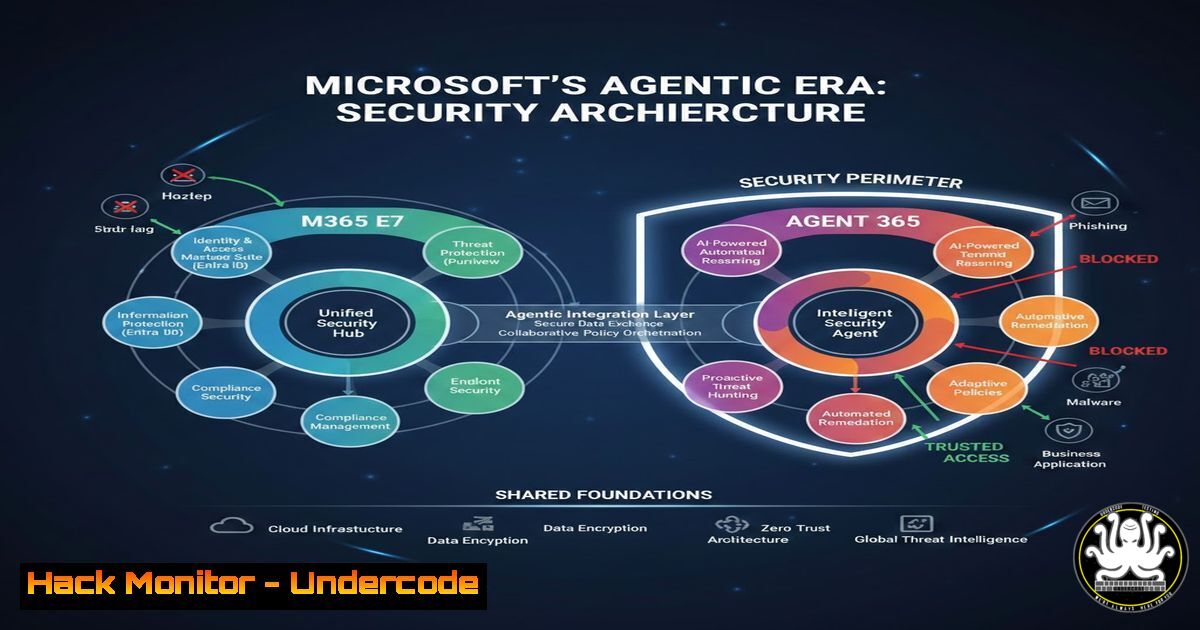
Microsoft’s announcement of the M365 E7 SKU signals a paradigm shift in how enterprises will manage, secure, and interact with their digital estate. At the core of this release is “Agent 365,” a control plane designed for the burgeoning era of autonomous AI agents, coupled with the Microsoft Entra Suite and advanced security capabilities. For cybersecurity professionals, this isn’t just a product update; it is a fundamental change in the attack surface, shifting focus from human identities to a hybrid mesh of human and non-human (agent) identities. Understanding how to configure, monitor, and harden this new environment is critical to maintaining the principle of least privilege and preventing systemic compromise.
Learning Objectives:
- Understand the security implications of the new “Agent 365” control plane and agentic AI architecture.
- Learn how to implement and enforce Identity Governance (IGA) and Secure Service Edge (SASE) principles using the Microsoft Entra Suite.
- Master the configuration of advanced Defender for Cloud and Purview policies to monitor both user and automated agent activity.
You Should Know:
1. Dissecting the Threat Model for Agent 365
Agent 365 functions as a “control plane for agents.” In essence, it manages the lifecycle and permissions of autonomous AI agents that can execute tasks, query databases, and interact with APIs on behalf of users. Unlike traditional service accounts, these agents are dynamic and context-aware. The primary security risk here is “Agent Impersonation” or “Agent Privilege Escalation.” If an agent’s decision-making logic is poisoned or its credentials are stolen, it can perform actions far beyond the original user’s intent.
Step‑by‑step guide to auditing your current service principal hygiene (preparation for Agent 365):
1. Inventory Existing Agents: Before introducing AI agents, audit current service principals and applications in Azure AD (Entra ID).
PowerShell (AzureAD module):
Get-AzureADServicePrincipal | Select DisplayName, AppId, AccountEnabled | Export-Csv C:\Audit\ServicePrincipals.csv
2. Review Credentials: Check for long-lived secrets or certificates.
Azure CLI:
az ad app credential list --id <app_id>
3. Assign “Agent Reader” Role: In preparation for Agent 365, create a test administrative unit and assign a security analyst the “Agent Reader” role (expected in preview) via the Entra Admin Center to audit agent activities without granting edit rights.
- Implementing the Entra Suite: The Convergence of IGA and SASE
The Entra Suite bundles Identity Governance (IGA) with Secure Service Edge (SASE) capabilities. This is crucial for managing access for both humans and agents, regardless of location. The goal is to enforce Conditional Access policies based on real-time risk signals for both user and agent sessions.
Step‑by‑step guide to configuring a Conditional Access policy for Agent traffic:
1. Navigate: Go to the Microsoft Entra Admin Center > Protection > Conditional Access.
2. Create New Policy: Name it “CA-Policy: Block Agent Access from Non-Compliant Networks.”
3. Assignments (Users): Select specific test users or the “Agent 365” service principal (once available in the directory).
4. Assignments (Cloud Apps or Actions): Select “Microsoft 365 Copilot” and “All Agents” (a new tag expected in E7).
5. Conditions (Network): Under “Locations,” select “Any network” except your trusted corporate IP ranges.
6. Access Controls (Grant): Select “Block Access.”
- Enable Policy: Set to “Report-only” initially to monitor logs before enforcing.
-
Hardening the “Agent Perimeter” with Microsoft Defender XDR
E7 includes advanced Defender capabilities to monitor agent behavior. Traditional EDR focuses on processes (exe, ps). Agent security focuses on API calls and data access patterns. You must configure custom detection rules to spot anomalies, such as an agent suddenly querying thousands of records at 3 AM.
Step‑by‑step guide to creating a custom analytic rule for Agent behavior (KQL in Microsoft 365 Defender):
1. Navigate: Go to Microsoft 365 Defender > Hunting > Advanced Hunting.
2. Query for Agent Logs:
// Detect unusual volume of SharePoint file downloads by a specific Agent
CloudAppEvents
| where Timestamp > ago(1h)
| where ActionType == "FileDownloaded"
| where Application == "Agent 365" // Placeholder for the actual app name
| summarize DownloadCount = count(), UniqueFiles = dcount(FileName) by AccountObjectId, bin(Timestamp, 5m)
| where DownloadCount > 100 // Baseline threshold
3. Create Custom Detection: Click “Create detection rule” to alert the SOC whenever this query returns results.
4. Configure Alert Settings: Set the severity to “High” and assign it to the Identity & Access team.
- Data Security in the Age of Autonomous Agents (Purview)
Agents will inevitably access sensitive data. Microsoft Purview’s advanced capabilities allow for “real-time” data classification and policy enforcement during the agent’s execution cycle. This prevents an agent from inadvertently sharing PII or financial data with unauthorized external sources.
Step‑by‑step guide to extending a Data Loss Prevention (DLP) policy to cover Agent activity:
1. Access Purview: Go to Microsoft Purview compliance portal > Solutions > Data Loss Prevention > Policies.
2. Create or Modify Policy: Select an existing policy (e.g., “GDPR High Volume Export”).
3. Locations: Under “Locations,” ensure “Teams chat and channel messages,” “SharePoint sites,” and “Devices” are selected.
4. Include Agents: In the policy settings, under “Advanced DLP rules,” add a condition for “Instance Name” contains “Agent 365” or “Copilot.”
5. Action: Configure the action to “Block” the activity and “Show a policy tip” to the user auditing the agent.
6. Test: Run the policy in simulation mode for 48 hours.
- Deploying and Securing the Infrastructure with Intune (For Agents on Endpoints)
While agents live in the cloud, they may control processes on endpoints. E7’s Intune capabilities ensure that the endpoint interacting with an agent meets compliance standards. This is “Agent-Triggered Compliance.”
Step‑by‑step guide to deploying a compliance policy for devices running Agent services:
1. Navigate: Microsoft Intune Admin Center > Devices > Compliance Policies > Create Policy.
2. Platform: Select “Windows 10 and later.”
3. Settings: Configure mandatory settings:
- Device Health: Require BitLocker to be enabled.
- System Security: Require a firewall and Antivirus (Microsoft Defender) to be active.
- Microsoft Defender for Endpoint: Require the device to be at a specific “Risk Score” (e.g., Medium or lower).
- Assignments: Assign the policy to a device group named “Managed Agent Hosts.”
- Monitor: Check the compliance dashboard to ensure the agents’ host machines are healthy before granting them sensitive tokens.
What Undercode Say:
- Key Takeaway 1: The introduction of Agent 365 requires security teams to stop thinking solely about “user” behavior and start analyzing “digital” behavior. The principle of “Non-Human Identities” (NHIs) must become a core pillar of your IAM strategy immediately.
- Key Takeaway 2: The $99 price point for E7 is a premium for security consolidation. It forces organizations to rely on Microsoft’s unified signal (Entra + Defender + Purview) rather than stitching together third-party tools, which will reduce latency in threat detection but increase vendor lock-in.
- Analysis: This launch validates that the industry is moving toward “agentic” processes. However, it also introduces a new attack vector: the agent control plane itself. If an attacker compromises the administrative access to “Agent 365,” they can effectively command a botnet of privileged AI entities within the enterprise. SOCs must begin training analysts on API security, JSON log analysis, and AI prompt injection detection, moving beyond traditional malware analysis. The convergence of IGA and SASE is a direct response to the “work from anywhere” model, but now it applies to agents working from anywhere, which requires automated, zero-trust policy enforcement at the network edge, not just the identity layer.
Prediction:
By 2028, we will see the rise of “Agent ID Theft” as a primary threat vector, surpassing traditional credential phishing. Attackers will move from hacking humans to hacking the prompts and permissions of high-value enterprise agents. This will lead to the emergence of specialized “Agent Security Posture Management” (ASPM) tools, and Microsoft’s early bundling of these capabilities in E7 will set the de facto standard for how we audit and secure digital labor. The “Identity-First” security model will evolve into a “Transaction-First” model, where every action executed by an agent is treated as a distinct, auditable event requiring its own context-aware verification.
▶️ Related Video (80% Match):
🎯Let’s Practice For Free:
IT/Security Reporter URL:
Reported By: Markolauren Secure – Hackers Feeds
Extra Hub: Undercode MoN
Basic Verification: Pass ✅


