Listen to this Post
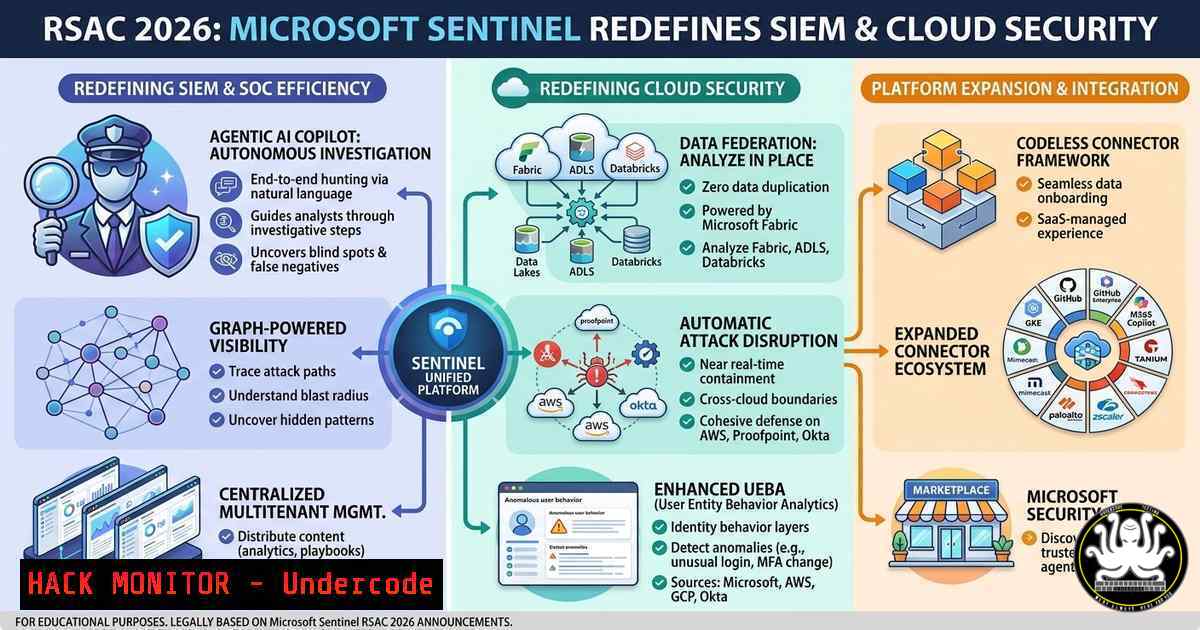
Introduction:
Microsoft’s announcement at RSAC 2026 has unveiled a new wave of capabilities for Microsoft Sentinel, pushing the boundaries of cloud-native SIEM and security orchestration. These updates focus on hyper-automation, AI-driven investigation, and deep integration with the latest cloud threat landscapes, aiming to reduce mean time to respond (MTTR) and empower security operations centers (SOCs) with proactive defense mechanisms.
Learning Objectives:
- Master the new AI-driven investigation tools in Microsoft Sentinel to automate threat hunting.
- Implement advanced cloud hardening techniques using the updated UEBA and entity behavior analytics.
- Deploy automated response playbooks that integrate with Defender XDR and third-party firewalls.
You Should Know:
1. AI-Driven Investigation & Entity Behavior Analytics
The RSAC 2026 update introduces a significant upgrade to Sentinel’s UEBA (User and Entity Behavior Analytics), now leveraging generative AI to provide plain-language summaries of complex attack chains. This feature allows analysts to query entities using natural language, significantly lowering the barrier to advanced threat hunting.
Step‑by‑step guide:
To utilize the new AI Investigator, navigate to the Microsoft Sentinel blade in Azure. Under Threat Management, select Investigation. Click on New AI Investigation. Input a natural language query such as “Show me all entities that exhibited privilege escalation patterns in the last 24 hours.”
- Linux Command (for endpoint logging): Ensure Syslog is forwarded correctly. To verify rsyslog configuration for Sentinel, check the forwarder config:
sudo cat /etc/rsyslog.d/95-sentinel.conf
To test connectivity, use `logger` to send a test message:
logger "Test log for Sentinel RSAC 2026 feature validation"
-
Windows Command (PowerShell): To verify the Azure Monitor Agent (AMA) status on Windows endpoints:
Get-Service -Name "AzureMonitorAgent"
To manually trigger a log collection test:
$Event = New-Object System.Diagnostics.EventLog("Application")
$Event.WriteEntry("Sentinel Connectivity Test", "Information", 12345)
- Cloud Hardening with the New “Cloud Security Graph”
A new feature announced is the “Cloud Security Graph,” which visualizes relationships between cloud identities, resources, and access paths. It integrates with Microsoft Defender for Cloud to provide a dynamic attack path analysis, highlighting potential lateral movement vectors within Azure and AWS environments.
Step‑by‑step guide:
To enable and use the Cloud Security Graph, navigate to Microsoft Sentinel > Configuration > Data Connectors. Ensure the Microsoft Defender for Cloud connector is enabled and set to a high ingestion tier. Once data is flowing, go to Cloud Security > Attack Path Analysis.
- Azure CLI Command: To audit risky permissions that might appear in the graph:
az role assignment list --all --query "[?contains(principalType, 'User') && contains(roleDefinitionName, 'Owner')]"
- Terraform Hardening: To prevent misconfigurations that lead to attack paths, apply a policy requiring specific tags or restricting public network access:
resource "azurerm_storage_account" "secure_storage" {
name = "securestore${random_id.storage.hex}"
resource_group_name = azurerm_resource_group.rg.name
location = azurerm_resource_group.rg.location
account_tier = "Standard"
account_replication_type = "GRS"
public_network_access_enabled = false
Additional hardening for Sentinel log storage
}
3. Automated Response Playbooks (Logic Apps Upgrade)
The announcement highlighted a revamped Logic Apps integration allowing for “Autonomous Response.” These new playbooks can now automatically isolate compromised Azure Virtual Desktop (AVD) sessions, revoke OAuth tokens, and trigger containment in third-party firewalls like Palo Alto Networks or Zscaler without human intervention.
Step‑by‑step guide:
To create an autonomous containment playbook, go to Microsoft Sentinel > Automation > Create > Playbook with new logic app.
- Trigger: Select Microsoft Sentinel Incident as the trigger.
- Condition: Add a condition to check incident severity (e.g., if severity equals High).
- Action: Add Microsoft Graph API – revokeSessions. This forces the user to re-authenticate, breaking the attacker’s current session.
- Action: Add Azure Virtual Desktop – Send Session Logoff. Select the host pool and specific session host.
- KQL Query (Analytics Rule): To trigger this playbook, you need a high-fidelity detection rule. For example, detecting Impossible Travel combined with AVD sign-ins:
AADSignInEventsBeta
| where Application == "Windows Virtual Desktop"
| where Timestamp > ago(1h)
| join kind=inner (AADSignInEventsBeta
| where Application == "Windows Virtual Desktop"
| where Timestamp > ago(24h)
| project UserPrincipalName, City, Country
| summarize make_set(City), make_set(Country) by UserPrincipalName) on UserPrincipalName
| where array_length(set_City) > 2 or array_length(set_Country) > 2
4. Sentinel API Security for Third-Party Integrations
With new features comes the need to secure the API surface. The RSAC 2026 update emphasizes the importance of securing the ingestion pipelines. Administrators must now harden the Azure Key Vault used to store API keys for custom connectors (e.g., for AWS S3 or GCP Pub/Sub).
Step‑by‑step guide:
To secure your custom data ingestion API keys:
- Azure Key Vault Setup: Create a Key Vault with Soft Delete and Purge Protection enabled.
az keyvault create --name "sentinel-secrets-rsac" --resource-group "rg-sentinel" --enable-soft-delete true --enable-purge-protection true
- Managed Identity: Ensure your Logic App or Function App used for ingestion has a system-assigned managed identity.
- Access Policy: Grant the managed identity Get and List permissions on the Key Vault.
- Avoid Hardcoding: In your ingestion script (Python), retrieve the secret dynamically:
from azure.identity import DefaultAzureCredential
from azure.keyvault.secrets import SecretClient
credential = DefaultAzureCredential()
secret_client = SecretClient(vault_url="https://sentinel-secrets-rsac.vault.azure.net", credential=credential)
api_key = secret_client.get_secret("aws-s3-key").value
5. Advanced Threat Hunting with Unified XDR
The integration between Sentinel and Microsoft 365 Defender is now seamless, allowing for cross-product threat hunting. Analysts can pivot from a suspicious email detected in Defender for Office 365 directly to the endpoint process tree in Defender for Endpoint, all within the Sentinel portal, using the new “Investigate in XDR” button.
Step‑by‑step guide:
To perform cross-domain hunting, use the new Unified Hunting experience in Microsoft Sentinel > Hunting.
- KQL Query for Phishing to Endpoint Correlation:
// Find users who received a phishing email
EmailEvents
| where ThreatTypes has "Phish"
| where Timestamp > ago(1d)
| project RecipientEmailAddress, SenderFromAddress, Subject
| join kind=inner (
// Correlate with endpoint processes
DeviceProcessEvents
| where Timestamp > ago(1d)
| where FileName in~ ("powershell.exe", "cmd.exe", "wscript.exe")
) on $left.RecipientEmailAddress == $right.AccountUpn
What Undercode Say:
- Proactive Over Reactive: The new AI-driven investigation and autonomous playbooks signal a shift from alert fatigue to automated response, allowing SOC teams to focus on strategy rather than triage.
- Converged Security: The unification of identity (AAD), endpoint (Defender), and cloud infrastructure (Security Graph) under Sentinel’s single pane of glass is finally delivering on the promise of XDR.
- API Security is Paramount: As automation increases, securing the API keys and managed identities used for these workflows becomes the new perimeter. A leaked API key could allow an attacker to disable these new AI-driven protections.
Prediction:
This update will accelerate the “Death of the Standalone SIEM,” forcing legacy SIEM vendors to either rapidly integrate generative AI or face obsolescence. Expect to see a rise in “Autonomous SOC” job roles within the next 12 months, focusing on tuning AI models and managing automated playbooks rather than manually handling alerts.
▶️ Related Video (82% Match):
🎯Let’s Practice For Free:
IT/Security Reporter URL:
Reported By: Jamesagombar Whats – Hackers Feeds
Extra Hub: Undercode MoN
Basic Verification: Pass ✅


