Listen to this Post
Introduction:
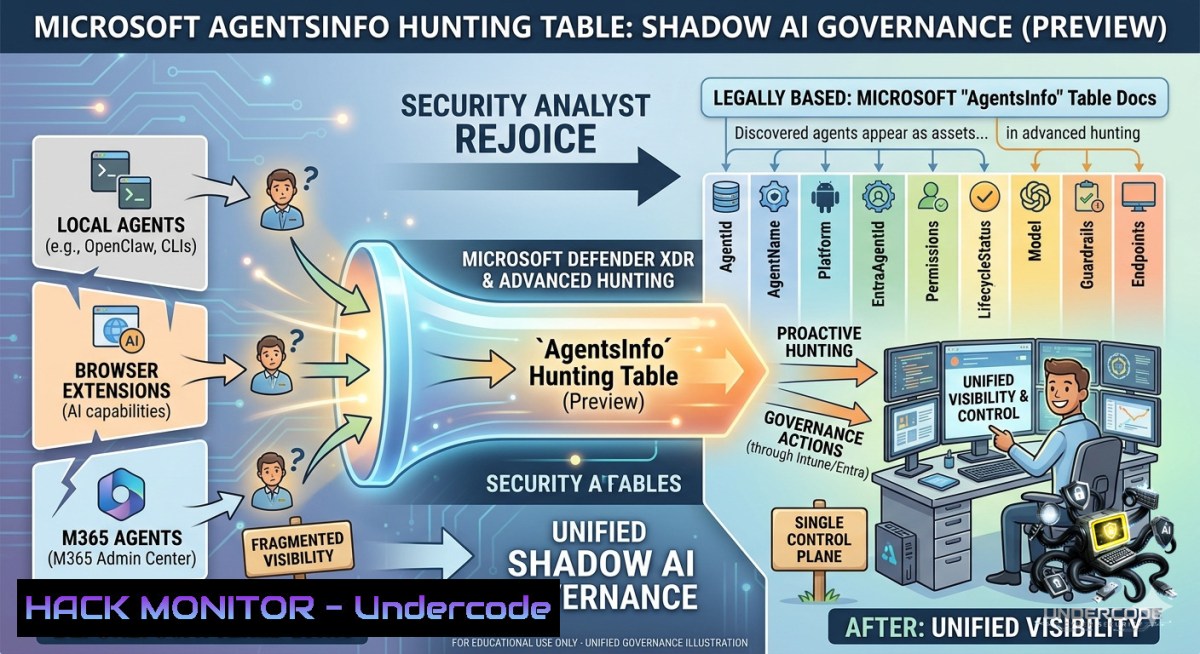
The proliferation of AI agents across enterprise environments—from Microsoft Copilot Studio to third-party custom bots—has created a new frontier of “shadow AI,” where security teams lack centralized visibility into agent identities, permissions, and data access. Microsoft’s introduction of the AgentsInfo table (now in preview) within Microsoft Defender XDR’s advanced hunting schema marks a pivotal shift, replacing the legacy `AIAgentsInfo` table and providing a unified inventory for all agent types, including endpoint-discovered assets. This evolution empowers security operations centers (SOCs) to apply the same rigorous threat hunting and governance frameworks to AI agents as they do to traditional endpoints and identities, directly addressing the governance gap highlighted by the Microsoft Agent 365 initiative.
Learning Objectives:
– Master the transition from `AIAgentsInfo` to the unified `AgentsInfo` table in Microsoft Defender XDR advanced hunting queries.
– Learn to discover, inventory, and assess the security posture of all AI agents across Copilot Studio, Microsoft Foundry, and third-party platforms using KQL.
– Implement automated threat hunting rules to detect overprivileged agents, identity anomalies, and governance violations within your Agent 365 estate.
You Should Know:
1. From `AIAgentsInfo` to `AgentsInfo`: The Security Hunters’ Migration Path
The new `AgentsInfo` table consolidates disparate agent telemetry into a single schema, supporting governance for Copilot Studio, Microsoft 365 Copilot, Microsoft Foundry, third-party agents, and endpoint-discovered agents. Microsoft will deprecate the `AIAgentsInfo` table on July 1, 2026, necessitating an urgent migration for all Agent 365 customers.
Step‑by‑step migration guide:
– Step 1: Audit current legacy queries. Run a search across your advanced hunting queries for any reference to `AIAgentsInfo`.
– Step 2: Map columns. The `AgentsInfo` table introduces critical columns such as `EntraAgentId` (unique Entra ID object identifier), `ToolsAuthenticationType` (structured auth model), `Permissions` (granted permissions with approval state), and `LifecycleStatus` (Active, Blocked, Uninstalled, Deleted).
– Step 3: Rewrite KQL. Replace `AIAgentsInfo` with `AgentsInfo` and adapt any custom queries using the new column names. Below is a verified KQL migration example to get the latest state of all agents (excluding deleted ones):
// Updated query using AgentsInfo table (Preview)
AgentsInfo
| summarize arg_max(Timestamp, ) by AgentId
| where LifecycleStatus != "Deleted"
| project AgentName, Platform, AgentDescription, Version, EntraAgentId, LifecycleStatus, PublishedStatus, Permissions
– Step 4: Test in preview. Run your migrated queries in the Microsoft Defender portal under Investigation & response > Hunting > Advanced hunting. Validate that the output matches your previous operational dashboards.
2. Linux/Windows Kusto CLI & API Hunting Commands for Agent Governance
To operationalize AI agent hunting, security engineers can leverage the advanced hunting API from both Windows PowerShell and Linux (using `curl` with an Azure AD access token). This enables automated inventory scripts and SIEM integration.
Windows PowerShell snippet – query AgentsInfo via API:
$tenantId = "your-tenant-id"
$clientId = "your-client-id"
$clientSecret = "your-client-secret"
$body = @{
client_id = $clientId
client_secret = $clientSecret
scope = "https://api.security.microsoft.com/.default"
grant_type = "client_credentials"
}
$authResponse = Invoke-RestMethod -Method Post -Uri "https://login.microsoftonline.com/$tenantId/oauth2/v2.0/token" -Body $body
$accessToken = $authResponse.access_token
$headers = @{ Authorization = "Bearer $accessToken" }
$kqlQuery = "AgentsInfo | where Platform == 'Third-party' | project AgentName, Permissions, LifecycleStatus"
$body = @{ Query = $kqlQuery } | ConvertTo-Json
$result = Invoke-RestMethod -Method Post -Uri "https://api.security.microsoft.com/api/advancedhunting/run" -Headers $headers -Body $body -ContentType "application/json"
$result.Results | ConvertTo-Json -Depth 10
Linux/Unix bash snippet – using `curl` and `jq`:
tenantId="your-tenant-id"
clientId="your-client-id"
clientSecret="your-client-secret"
 Get token
token=$(curl -s -X POST https://login.microsoftonline.com/$tenantId/oauth2/v2.0/token \
-H "Content-Type: application/x-www-form-urlencoded" \
-d "client_id=$clientId&scope=https://api.security.microsoft.com/.default&client_secret=$clientSecret&grant_type=client_credentials" | jq -r '.access_token')
 Run KQL query
curl -s -X POST https://api.security.microsoft.com/api/advancedhunting/run \
-H "Authorization: Bearer $token" \
-H "Content-Type: application/json" \
-d '{"Query":"AgentsInfo | where Platform == \"Microsoft 365 Copilot\" | project AgentName, EntraAgentId, Permissions"}' | jq '.'
3. Hardening AI Agent Posture with Microsoft Defender for Cloud & Microsoft Purview
With `AgentsInfo`, security teams can enforce explicit verification (Zero Trust principle) by validating each agent’s Entra ID identity and permissions against corporate policies. The Agent 365 Registry exposes governance actions such as block, delete, and reassign ownership, while surfacing high-severity Microsoft Entra alerts directly in the inventory.
Step‑by‑step posture assessment:
– Step 1: Identify overprivileged agents. Run a KQL query in `AgentsInfo` to find agents with excessive permissions or those using key-based access (which bypasses RBAC):
AgentsInfo
| where Permissions contains "KeyBased" or ToolsAuthenticationType contains "Key"
| project AgentName, Platform, Permissions, PublishedStatus, LifecycleStatus
– Step 2: Mitigate via Microsoft Entra & Purview. Navigate to Microsoft 365 admin center > Agents > Agent 365 Registry. Select the risky agent and apply governance actions (e.g., Block, Reassign ownership).
– Step 3: Apply Conditional Access policies. In Microsoft Entra, enforce policies such as “require compliant device” or “block high-risk sign-ins” for agents by their `EntraAgentId`. Use the Microsoft Foundry Control Plane to enable guardrails that detect risks in agent tool calls and prompt injections.
4. Proactive Threat Hunting Rules for AI Agent Anomalies
The unified `AgentsInfo` table enables defenders to write proactive hunting rules that detect malicious or anomalous agent behavior, such as a newly created agent with broad permissions or an agent accessing sensitive data via embedded file content.
Sample KQL hunting rules:
– Detect newly published agents with high-risk permissions:
AgentsInfo
| where PublishedStatus == "Published"
| where LifecycleStatus == "Active"
| where Permissions has "Read.All" or Permissions has "Sensitive"
| project Timestamp, AgentName, Platform, Permissions, CreatedDateTime
– Hunt for ownerless agents (created by departed employees):
AgentsInfo
| where LifecycleStatus == "Active"
| where isempty(EntraAgentId) or EntraAgentId == "00000000-0000-0000-0000-000000000000"
| project AgentName, Platform, AgentDescription, CreatedDateTime
– Monitor shadow agents discovered via endpoints:
AgentsInfo
| where Platform == "Endpoint-discovered"
| where PublishedStatus != "Published"
| project Timestamp, AgentName, SourceAgentId, Availability, Permissions
Windows/Linux tool configuration:
– Integrate these KQL rules into Microsoft Sentinel as scheduled queries or near-real-time analytics rules. Use the Microsoft Defender XDR streaming API to export `AgentsInfo` logs to your SIEM (e.g., Splunk, QRadar) for cross‑correlation.
5. Agent Vulnerability Exploitation & Mitigation Example: Credential Reuse in Custom Agents
Scenario: An attacker compromises a third‑party AI agent that has not been migrated to Entra ID-based authentication. The agent uses hardcoded API keys (discoverable via `ToolsAuthenticationType`), allowing lateral movement to an Azure storage account.
Mitigation step‑by‑step:
– Exploitation detection in `AgentsInfo`:
AgentsInfo
| where ToolsAuthenticationType contains "api_key" or Permissions contains "StorageAccountKey"
| join (IdentityLogonEvents | where LogonType == "Network") on $left.EntraAgentId == $right.AccountSid
– Remediation actions:
– Block the agent via the Agent 365 Registry.
– Rotate secrets and migrate the agent to keyless Microsoft Entra authentication (managed identity).
– Apply network controls: Use a Foundry project with private endpoints for inbound access and outbound private agent isolation. Basic setup without outbound isolation will not protect agent traffic.
– Enable Content Safety guardrails: Configure Prompt Shields to block indirect prompt injection attacks from untrusted tool responses or retrieved documents.
What Undercode Say:
– Key Takeaway 1: The `AgentsInfo` table is not just a schema rename; it is a strategic unification that brings third-party and endpoint-discovered agents into the Microsoft security graph. Security teams that fail to migrate before the July 2026 deadline will lose visibility into a growing attack surface.
– Key Takeaway 2: Proactive governance of AI agents requires a shift from reactive alerting to continuous posture management. Using KQL-based hunting and Entra ID conditional access policies on agent identities turns the `AgentsInfo` table into an actionable security control, not just an inventory.
Prediction:
– +1 Microsoft will expand the `AgentsInfo` table to include real-time agent behavioral telemetry (e.g., token consumption, data access patterns) by Q4 2026, enabling anomaly detection for AI agent misuse.
– -1 Organizations that postpone migration from `AIAgentsInfo` will experience a spike in undetected shadow AI incidents from mid-2026 onward, as the deprecation of the legacy table removes their only native discovery mechanism.
– +1 The convergence of Agent 365 Registry with Microsoft Entra Agent ID will drive adoption of Zero Trust principles for AI workloads, making “just‑in‑time” agent access and continuous compliance evaluation a standard enterprise practice by 2027.
▶️ Related Video (74% Match):
🎯Let’s Practice For Free:
🎓 Live Courses & Certifications:
[Join Undercode Academy for Verified Certifications](https://undercode.co.uk/certifications/)
🚀 Request a Custom Project:
Secure, high-velocity infrastructure and disruptive technological engineering. Contact our engineering team for high-tier development and proprietary systems:
[[email protected]](mailto:[email protected])
💎 Smart Architecture | 🛡️ Secure by Design | ⭐ Trusted by Thousands
IT/Security Reporter URL:
Reported By: [Markolauren Agentsinfo](https://www.linkedin.com/posts/markolauren_agentsinfo-preview-agent365-share-7469703868889886720-y9oO/) – Hackers Feeds
Extra Hub: Undercode MoN
Basic Verification: Pass ✅
🔐JOIN OUR CYBER WORLD [ CVE News • HackMonitor • UndercodeNews ]
[💬 Whatsapp](https://undercode.help/whatsapp) | [💬 Telegram](https://t.me/UndercodeCommunity)
📢 Follow UndercodeTesting & Stay Tuned:
[𝕏 formerly Twitter 🐦](https://x.com/undercodeupdate) | [@ Threads](https://www.threads.net/@undercodetesting) | [🔗 Linkedin](https://www.linkedin.com/company/undercodetesting/) | [🦋BlueSky](https://bsky.app/profile/undercode.bsky.social)


