Listen to this Post
Introduction:
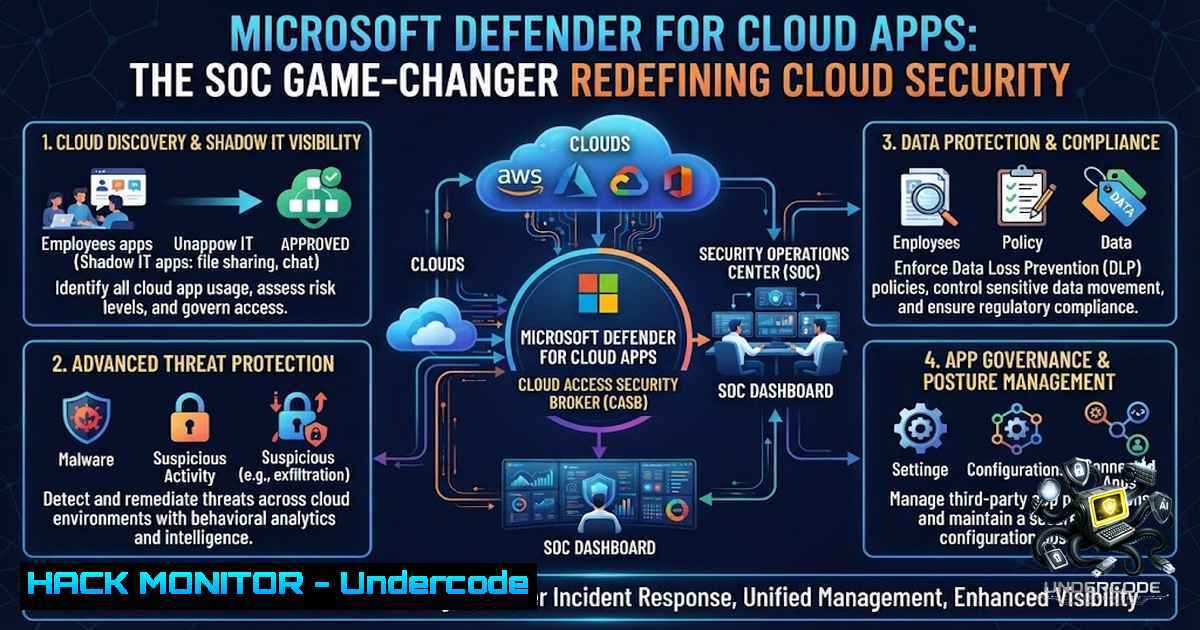
Modern Security Operations Centers (SOCs) face an unprecedented challenge: securing a sprawling ecosystem of SaaS applications, shadow IT, and multi-cloud infrastructure while combating sophisticated threats that bypass traditional perimeter defenses. Microsoft Defender for Cloud Apps (formerly Microsoft Cloud App Security) emerges as a critical CASB (Cloud Access Security Broker) solution that provides deep visibility, data protection, and threat detection across your entire cloud app portfolio. This article explores how SOC teams can leverage Defender for Cloud Apps to discover shadow IT, detect anomalies, and automate remediation—transforming reactive security into proactive cloud defense.
Learning Objectives:
- Understand the core capabilities of Microsoft Defender for Cloud Apps and its role within the Microsoft security stack
- Master Cloud Discovery to identify and govern shadow IT usage across your organization
- Implement Conditional Access App Control for real-time session monitoring and granular access policies
- Configure anomaly detection policies and investigate security incidents using built-in SOC hunting tools
- Integrate Defender for Cloud Apps with Microsoft Sentinel and Defender for Endpoint for unified threat response
You Should Know:
- Cloud Discovery: Uncovering Shadow IT and Risky Apps
Shadow IT remains one of the biggest blind spots for security teams. Employees adopt unauthorized cloud services for productivity, often exposing sensitive data to unvetted platforms. Microsoft Defender for Cloud Apps addresses this through Cloud Discovery, which analyzes traffic logs from firewalls and proxies to identify over 31,000 cloud apps in use across your organization.
Step-by-Step Guide to Configuring Cloud Discovery:
- Collect logs: Export firewall or proxy logs (e.g., from Cisco, Palo Alto, Zscaler) in the required format. Defender for Cloud Apps supports custom log parsers for most vendors.
-
Upload logs to Defender for Cloud Apps: Navigate to Settings → Cloud Apps → Cloud Discovery → Log collectors. Upload your log files manually or configure automated upload using the Log Collector tool.
-
Analyze discovered apps: Once processed, review the Discovered apps dashboard. Apps are categorized by risk level (high, medium, low) based on compliance, data sensitivity, and security posture.
-
Sanction or unsanction apps: Mark trusted apps as Sanctioned to allow access, or Unsanctioned to block usage. Unsanctioned apps can be blocked via integration with your existing network security appliances.
-
Create custom app tags: Under Settings → Cloud Apps → App tags, create custom tags to group apps by department, risk level, or compliance requirement.
Linux Command for Log Collection (Syslog Forwarding):
 Configure rsyslog to forward firewall logs to Defender for Cloud Apps Log Collector
echo ". @<LOG_COLLECTOR_IP>:514" >> /etc/rsyslog.conf
systemctl restart rsyslog

Test log forwarding
logger "Test log from Linux firewall"
Windows Command for Log Collection (PowerShell):
 Forward Windows Event Logs to Syslog server (Log Collector)
wevtutil epl Security C:\security_logs.evtx
 Use a third-party tool like nxlog to convert and forward to Log Collector
2. Conditional Access App Control: Real-Time Session Protection
Conditional Access App Control (CAAC) is a reverse proxy architecture that sits between your users and SaaS applications, enabling real-time monitoring and control over user sessions. This allows SOC analysts to enforce granular policies such as blocking downloads, preventing copy-paste of sensitive data, or requiring multi-factor authentication based on risk signals.
Step-by-Step Guide to Deploying CAAC:
- Configure your IdP: Integrate Azure AD (now Microsoft Entra ID) as your identity provider. Under Enterprise Applications, select the SaaS app you want to protect.
-
Enable Conditional Access: Create a new Conditional Access policy in Azure AD. Under Session, select Use Conditional Access App Control and choose Use custom policy or Use built-in controls.
-
Deploy the reverse proxy: Defender for Cloud Apps automatically provisions the proxy. No additional infrastructure is required—traffic is routed through Microsoft’s cloud proxy.
-
Define session policies: In Defender for Cloud Apps, navigate to Control → Policies → Session policies. Create policies such as:
- Block download of sensitive documents (based on data classification)
- Monitor and log all file uploads for compliance auditing
- Require step-up authentication when accessing from an untrusted location
- Test and monitor: Access the SaaS app as a test user. Verify that session controls are applied and logs appear in the Activity log within Defender for Cloud Apps.
API Security Integration (Graph API):
 Use Microsoft Graph API to query CAAC session logs
$token = Get-MgAccessToken -Scopes "https://graph.microsoft.com/.default"
$headers = @{ Authorization = "Bearer $token" }
$uri = "https://graph.microsoft.com/v1.0/auditLogs/directoryAudits?`$filter=activityDateTime ge 2026-01-01"
Invoke-RestMethod -Uri $uri -Headers $headers -Method Get
3. Anomaly Detection and Threat Hunting
Defender for Cloud Apps includes a robust anomaly detection engine powered by machine learning. It identifies suspicious activities such as impossible travel, unusual admin activities, mass downloads, and ransomware behavior. SOC analysts can leverage these detections to hunt across the entire cyberattack chain.
Step-by-Step Guide to Configuring Anomaly Detection Policies:
- Review default policies: Navigate to Control → Policies → Anomaly detection policies. Microsoft provides over 20 out-of-the-box policies covering common threat scenarios.
-
Customize policy severity: Adjust the severity levels (Low, Medium, High) based on your organization’s risk appetite. For example, set Impossible travel to High severity to trigger immediate alerts.
-
Create custom detection policies: Click + Create policy and select Activity policy. Define conditions such as:
– Activity type: File download, login, or admin action
– Risk factors: IP reputation, user location, device compliance
– Threshold: Number of activities within a time window
- Integrate with Microsoft Sentinel: Under Settings → Microsoft Sentinel, enable the connector to forward alerts and logs to your SIEM for centralized investigation.
-
Investigate incidents: Use the Activity log and Alerts dashboard to drill down into suspicious events. Leverage the Investigate feature to visualize user activity timelines and related entities.
KQL Query for Threat Hunting in Microsoft Sentinel:
// Hunt for impossible travel events from Defender for Cloud Apps
CloudAppEvents
| where Timestamp > ago(7d)
| where Application == "Microsoft Defender for Cloud Apps"
| where ActionType == "Impossible travel"
| project Timestamp, AccountUpn, IPAddress, Country, City, RiskScore
| sort by Timestamp desc
4. Cloud Hardening and Data Protection
Beyond threat detection, Defender for Cloud Apps provides SaaS Security Posture Management (SSPM) to identify misconfigurations and compliance gaps in your cloud apps. This includes checking for overly permissive sharing links, unencrypted data, and non-compliant settings across Microsoft 365, Salesforce, and other integrated platforms.
Step-by-Step Guide to Cloud Hardening:
- Run posture assessments: Navigate to Discover → Security posture. Review the built-in assessments for each connected app (e.g., Microsoft 365, AWS, GCP).
-
Remediate misconfigurations: For each finding, click Remediate to apply the recommended fix. For example:
– Disable public sharing of SharePoint sites
– Enforce MFA for all admin accounts
– Enable audit logging for all cloud resources
- Automate remediation with Playbooks: Use Azure Logic Apps or Power Automate to create automated response playbooks. For instance, when a high-risk sharing link is detected, automatically revoke access and notify the security team.
-
Monitor data exfiltration: Configure File policies to detect and block the sharing of sensitive data (e.g., credit card numbers, PII) outside the organization.
Azure CLI Command for Cloud Hardening:
 Enforce MFA for all users in Azure AD
az ad user list --query "[].userPrincipalName" -o tsv | while read user; do
az ad user update --id "$user" --force-change-password-1ext-login true
done

Enable Azure Defender for Cloud (formerly Azure Security Center)
az security auto-provisioning-setting update --1ame default --auto-provision On
PowerShell Command for Microsoft 365 Hardening:
 Disable external sharing for all SharePoint sites
Connect-SPOService -Url https://<tenant>-admin.sharepoint.com
Set-SPOTenant -SharingCapability Disabled

Enable audit logging for Exchange Online
Set-AdminAuditLogConfig -UnifiedAuditLogIngestionEnabled $true
5. Integration with Defender for Endpoint and Identity
Defender for Cloud Apps integrates natively with Microsoft Defender for Endpoint and Defender for Identity, providing a unified view across endpoints, identities, and cloud apps. This cross-domain visibility enables SOC teams to correlate signals and detect advanced persistent threats (APTs) that span multiple attack vectors.
Step-by-Step Guide to Cross-Product Integration:
- Enable integration: In Defender for Cloud Apps, go to Settings → Microsoft Defender for Endpoint and toggle the integration switch.
-
Configure data sharing: Ensure that the Microsoft 365 Defender portal has the necessary permissions to share alerts and device information.
-
Unified investigation: Use the Advanced hunting feature in Microsoft 365 Defender to query across endpoints, identities, and cloud apps in a single KQL query.
-
Automated response: Create automated response actions such as isolating a compromised endpoint when Defender for Cloud Apps detects a risky cloud app activity from that device.
KQL Query for Cross-Domain Threat Hunting:
// Correlate endpoint alerts with cloud app activities
let EndpointAlerts = AlertInfo
| where ServiceSource == "Microsoft Defender for Endpoint"
| project AlertId, DeviceId, Timestamp;
let CloudAppEvents = CloudAppEvents
| where Timestamp > ago(7d)
| project Timestamp, AccountUpn, IPAddress, Application, ActionType;
EndpointAlerts
| join kind=inner (DeviceInfo) on DeviceId
| join kind=inner (CloudAppEvents) on $left.DeviceName == $right.AccountUpn
| project Timestamp, DeviceName, AccountUpn, AlertTitle, CloudAppAction, IPAddress
6. SOC Workflow Automation and Playbooks
To operationalize Defender for Cloud Apps, SOC teams should build automated playbooks that reduce mean time to respond (MTTR). Using Azure Logic Apps or Power Automate, you can create workflows that trigger on specific alerts and execute predefined actions.
Step-by-Step Guide to Building a Response Playbook:
- Create a Logic App: In Azure Portal, create a new Logic App and select the When a Defender for Cloud Apps alert is created trigger.
-
Define conditions: Add a condition node to filter alerts by severity (e.g., only High severity) or alert type (e.g., “Suspicious file download”).
3. Add response actions:
- Send email notification to the SOC team with alert details
- Revoke user session using the Microsoft Graph API
- Isolate user device via Defender for Endpoint integration
- Create a ticket in ServiceNow or Jira for tracking
- Test and deploy: Trigger a test alert and verify that all actions execute correctly before enabling the playbook in production.
Azure CLI Command to Deploy a Logic App:
 Deploy a Logic App template for Defender for Cloud Apps alert response
az deployment group create --resource-group <RG_NAME> \
--template-file defender_playbook.json \
--parameters alertSeverity=High
What Undercode Say:
- Key Takeaway 1: Microsoft Defender for Cloud Apps is not just a CASB—it’s a comprehensive cloud-1ative application protection platform (CNAPP) that unifies discovery, threat detection, and posture management. SOC teams that treat it as a standalone tool miss the strategic advantage of integrating it with the broader Microsoft security stack.
-
Key Takeaway 2: Automation is the force multiplier. By building playbooks and leveraging cross-product integrations, organizations can reduce alert fatigue and accelerate incident response. The true power of Defender for Cloud Apps lies in its ability to transform raw telemetry into actionable intelligence through machine learning and automated remediation.
-
Key Takeaway 3: Shadow IT discovery remains the most underutilized feature. Many organizations deploy Defender for Cloud Apps for threat detection but neglect the continuous discovery and governance of unsanctioned apps. Regular log uploads and app risk assessments are essential for maintaining a zero-trust posture in the cloud.
Analysis: The shift toward SaaS-first architectures has rendered traditional network perimeter defenses obsolete. Defender for Cloud Apps addresses this by providing visibility and control at the application layer, where data actually resides. However, successful implementation requires a cultural shift: SOC analysts must move from reactive alert-triage to proactive threat hunting, leveraging the platform’s anomaly detection and cross-domain integration capabilities. Organizations that invest in training and playbook automation will see the greatest ROI, while those that deploy the tool without operational workflows risk drowning in alerts. The future of cloud security lies in unified platforms that break down silos between endpoint, identity, and cloud security—and Defender for Cloud Apps is a cornerstone of that vision.
Prediction:
- +1 Microsoft will continue to enhance Defender for Cloud Apps with generative AI capabilities, enabling natural language threat hunting and automated incident summarization, reducing the skill barrier for junior SOC analysts.
-
+1 Integration with third-party SaaS providers (beyond Microsoft 365) will expand rapidly, making Defender for Cloud Apps a universal CASB for multi-cloud and hybrid environments.
-
-1 As organizations adopt more SaaS apps, the volume of alerts and misconfigurations will grow exponentially, straining SOC resources unless they invest heavily in automation and AI-driven prioritization.
-
-1 Attackers will increasingly target CASB solutions themselves, attempting to bypass or disable monitoring controls. Organizations must treat Defender for Cloud Apps as a critical asset and apply zero-trust principles to its administrative interfaces.
-
+1 The convergence of Defender for Cloud Apps with Microsoft Sentinel and Defender XDR will create a unified security operations platform that competes directly with SIEM and SOAR vendors, offering a compelling alternative for Microsoft-centric organizations.
▶️ Related Video (84% Match):
https://www.youtube.com/watch?v=2zoNyWMdK0A
🎯Let’s Practice For Free:
🎓 Live Courses & Certifications:
Join Undercode Academy for Verified Certifications
🚀 Request a Custom Project:
Secure, high-velocity infrastructure and disruptive technological engineering. Contact our engineering team for high-tier development and proprietary systems:
[email protected]
💎 Smart Architecture | 🛡️ Secure by Design | ⭐ Trusted by Thousands
IT/Security Reporter URL:
Reported By: Bartosz Wysocki – Hackers Feeds
Extra Hub: Undercode MoN
Basic Verification: Pass ✅


