Listen to this Post
Introduction:
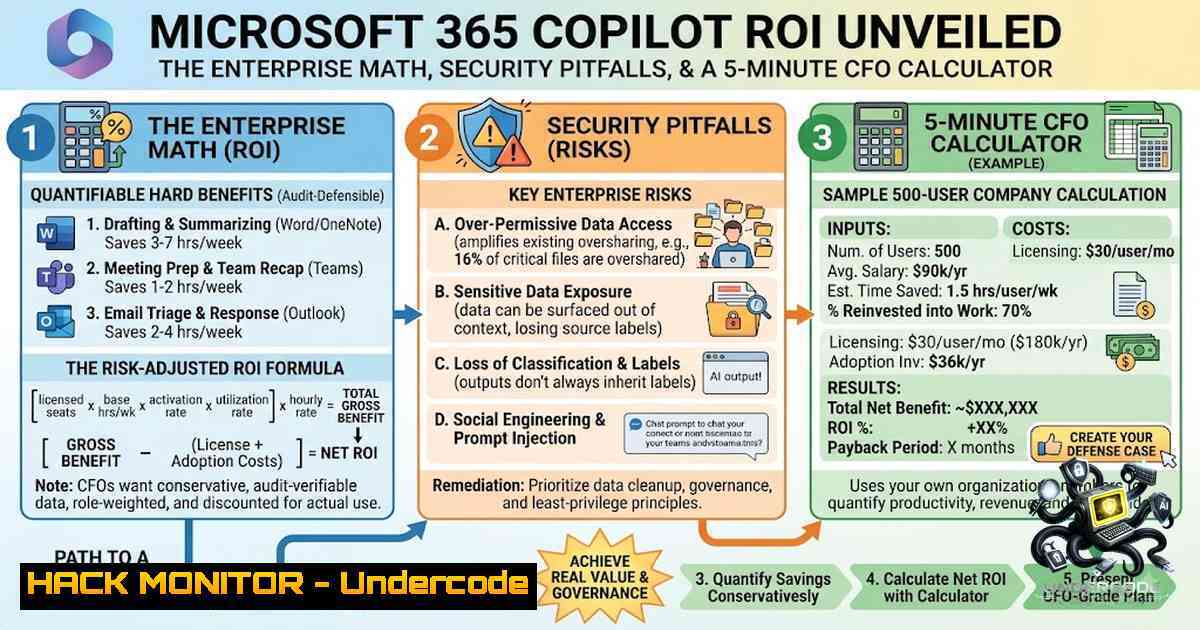
Microsoft 365 Copilot represents the most significant productivity shift in the Microsoft ecosystem since the introduction of cloud-based Office 365, with GPT-5.2 now powering Copilot as of January 2026. Yet the question that ends every enterprise Copilot conversation is simple: “What’s the ROI?” With Copilot priced at $30 per user per month on top of existing E3 or E5 licenses — or $99 per user per month for the bundled E7 SKU — organizations face mounting pressure to quantify the business case before committing to large-scale deployment. The recently launched CopilotAdoption.uk ROI Calculator promises to deliver that answer in five minutes, modeling your users, salaries, and breakeven day with 100% private data. This article dissects the enterprise ROI framework, exposes the security and governance risks that can derail your Copilot investment, and provides actionable technical guidance for a secure, high-ROI deployment.
Learning Objectives:
- Quantify Microsoft 365 Copilot ROI using the 6-driver framework and enterprise-grade ROI math.
- Identify and remediate data oversharing vulnerabilities that represent the single greatest deployment risk.
- Implement security guardrails including Conditional Access policies, DLP enforcement, and audit logging to protect against known vulnerabilities like CVE-2026-42824.
- Configure tenant settings to optimize adoption, satisfaction, and retention.
- Build a defensible business case using the CopilotAdoption.uk ROI Calculator and Microsoft’s Copilot Analytics.
You Should Know:
- The 6-Driver ROI Framework: Where the Math Actually Comes From
Most ROI calculators on the internet tell the same story: assume 100% adoption, plug in a few numbers, and declare victory. But published Microsoft enterprise telemetry shows the market average adoption sits at just 35.8%. Realistic ROI modeling demands a more sophisticated approach.
EPC Group’s 6-driver framework, built from 200+ Fortune 500 Copilot deployments, provides the most defensible enterprise ROI math available today:
Driver 1 — Time Savings (Highest-Impact Driver): Knowledge workers report 30–60 minutes per day saved on routine tasks: email triage, meeting summaries, document drafting, and data lookup. At a $75,000 fully-loaded knowledge worker cost (US average for office workers, mid-level), 45 minutes per day saved across 240 working days = $5,625 per user per year recovered. Net of the Copilot license ($360–$720 per user per year), this yields an ROI of 8–15x.
Driver 2 — Meeting Efficiency: Copilot in Teams produces real-time meeting summaries and action items. The average enterprise meeting wastes 22% of attendee time on context-setting. Cutting that to 10% at 12 hours per week of meetings = 90 minutes per user per week recovered = $1,800 per user per year.
Driver 3 — Document Creation Acceleration: Copilot in Word and PowerPoint accelerates first-draft creation by 40–60%. For documentation-heavy roles — legal, consulting, marketing, technical writing — this driver alone justifies the license.
Driver 4 — Email Triage: Copilot in Outlook prioritizes, summarizes, and drafts responses. The average enterprise knowledge worker spends 28% of working time on email. Cutting that to 20% = 30 minutes per day = $3,750 per user per year.
Driver 5 — Knowledge Worker Reach Extension: Copilot grounds in Microsoft Graph (SharePoint, OneDrive, Teams, email) and lets users query the entire organizational knowledge base in natural language. For roles that previously couldn’t access certain knowledge silos — new hires, cross-functional roles — this driver is hard to quantify but anecdotally large.
Driver 6 — Attrition Reduction (Often Missed): McKinsey, Gartner, and Microsoft’s own research consistently show a 15–25% intent-to-stay increase for users with Copilot versus without. At enterprise attrition cost of 150–200% of fully-loaded salary, this driver delivers substantial financial impact.
The Enterprise Math at Scale:
For a 1,000-knowledge-worker deployment:
| Metric | Value |
|–|-|
| Loaded hourly rate | $58/hr |
| Annual hours saved (all users) | 120,000 hrs |
| Annual productivity savings | $7,015,385 |
| Annual license cost | -$1,009,800 |
| Implementation (Year 1 only) | -$300,000 |
| Year 1 Net | $5,705,585 |
| Year 3 Net | $17,716,754 |
| Year 1 ROI | 435.6% |
| Payback Period | 1 month |
Loaded Hourly Rate Formula:
Loaded hourly rate = (Annual Salary × 1.28) / 2080 working hours
The 1.28 multiplier covers benefits, employer taxes, and overhead. Use 48 weeks per year (accounting for PTO and holidays) rather than 52.
Breakeven Calculation:
Divide the fully-loaded annual license cost by the value of an employee hour to get breakeven hours, then test measured minutes saved against weekly active usage. Pilots above 60% weekly active use clear the cost bar.
Organizations that follow a structured deployment framework achieve 70%+ active adoption and see an average of 26 minutes saved per user per day, translating to 116% ROI over three years according to Forrester research.
- The Data Oversharing Crisis: Your Biggest Deployment Risk
Copilot surfaces content based on existing Microsoft 365 permissions. If your SharePoint sites have overly broad “Everyone” or “All Users” access, Copilot will expose that data to anyone with a license. Microsoft’s own documentation calls out data oversharing as the primary deployment risk.
EPC Group’s readiness assessments consistently find that 60–80% of enterprise SharePoint sites have at least one oversharing vulnerability.
Step-by-Step SharePoint Permission Audit:
Step 1: Identify High-Risk Sites
Run the following SharePoint Online Management Shell commands to identify sites with excessive permissions:
 Connect to SharePoint Online
Connect-SPOService -Url https://[bash]-admin.sharepoint.com

Get all sites with "Everyone" or "Everyone except external users" access
Get-SPOSite | ForEach-Object {
$site = $<em>.Url
Get-SPOSiteGroup -Site $site | Where-Object { $</em>. -match "Everyone" }
}

Export all site permissions to CSV for analysis
Get-SPOSite | ForEach-Object {
Get-SPOSiteGroup -Site $<em>.Url | Select-Object @{N="Site";E={$</em>.Url}}, , Users
} | Export-Csv -Path "SitePermissionsAudit.csv" -1oTypeInformation
Step 2: Implement SharePoint Advanced Management (SAM)
SAM is included with your Microsoft 365 Copilot license and provides capabilities for managing sharing, access, and governance across SharePoint. Use SAM to:
- Identify sites with external sharing enabled
- Detect overshared links
- Apply site access restrictions
- Monitor sharing activity
Step 3: Apply Interim Access Restrictions
For high-risk sites identified in the audit, apply interim restrictions:
 Restrict access to a specific site
Set-SPOSite -Identity "https://[bash].sharepoint.com/sites/HighRiskSite" -RestrictedAccessBlocked $true

Remove "Everyone" group from a site
Remove-SPOSiteGroup -Site "https://[bash].sharepoint.com/sites/HighRiskSite" -GroupName "Everyone"
Step 4: Remediate and Continuously Enforce
Use Microsoft Purview to continuously enforce secure guardrails. Configure DLP policies to prevent sensitive data from being exposed to Copilot:
 Connect to Security & Compliance Center
Connect-IPPSSession

Create a DLP policy for Copilot data protection
New-DlpCompliancePolicy -1ame "Copilot Data Protection" -Comment "Prevents sensitive data exposure to Copilot" -ExchangeLocation All -SharePointLocation All -OneDriveLocation All -Mode Enable

Add rule to block sensitive content
New-DlpComplianceRule -1ame "Block Sensitive Content in Copilot" -Policy "Copilot Data Protection" -ContentContainsSensitiveInformation @(@{Name="Credit Card Number"; minCount=1}) -BlockAccess $true
- Security Vulnerabilities: CVE-2026-42824 (SearchLeak) and the DLP Bypass
CVE-2026-42824 — SearchLeak (Severity: High)
Varonis Threat Labs disclosed SearchLeak on June 15, 2026 — a three-stage attack chain that allowed an attacker to silently exfiltrate a victim’s emails, MFA codes, calendar events, SharePoint documents, and OneDrive files with nothing more than a single click on a crafted Microsoft 365 URL. The victim saw only Copilot “thinking” briefly, with no other visible indication of data theft.
Attack Chain:
- URL Parameter-to-Prompt Injection: The attacker injects a malicious payload via Copilot Enterprise Search’s `q` parameter.
- HTML Rendering Race Condition: An attacker-controlled image tag fires before output sanitization completes.
- Bing SSRF: Stolen data routes through Microsoft’s own infrastructure, bypassing the page’s Content Security Policy entirely.
Remediation (Already Patched Server-Side):
Microsoft deployed a backend fix during the June 13, 2026 Patch Tuesday cycle — no action is required from tenant administrators.
Defense-in-Depth Measures:
Monitor Copilot Audit Logs for Encoded Payloads:
 Connect to Security & Compliance Center
Connect-IPPSSession

Search audit logs for suspicious Copilot activity
Search-UnifiedAuditLog -Operations "CopilotSearch" -StartDate (Get-Date).AddDays(-30) | Where-Object { $_.AuditData -match "q=" } | Export-Csv -Path "CopilotAuditLog.csv"
Apply Conditional Access Policies Restricting Copilot Access:
 Create Conditional Access policy for Copilot (via Microsoft Graph PowerShell)
Connect-MgGraph -Scopes "Policy.ReadWrite.ConditionalAccess", "Application.Read.All"

Define the policy
$conditions = @{
Applications = @{
IncludeApplications = @("Microsoft 365 Copilot")
}
Users = @{
IncludeUsers = @("all")
}
Locations = @{
IncludeLocations = @("AllTrusted")
}
}

$grantControls = @{
BuiltInControls = @("mfa", "compliantDevice")
}

New-MgIdentityConditionalAccessPolicy -DisplayName "Copilot Managed Device Restriction" -Conditions $conditions -GrantControls $grantControls
DLP Bypass Vulnerability (February 2026):
A software bug in Microsoft 365 Copilot caused the AI assistant to incorrectly process and summarize email messages marked with confidentiality sensitivity labels, effectively bypassing configured Data Loss Prevention (DLP) policies. The root cause: a code issue allowing items in Sent Items and Drafts folders to be picked up by Copilot even though confidential labels were in place.
Organizations in regulated industries — healthcare, finance, government — are at particular risk.
DLP Bypass Remediation Steps:
Step 1: Audit Sensitivity-Label Enforcement
 Get all sensitivity labels
Get-Label | Format-Table DisplayName, Action, Priority

Check DLP policy matches
Get-DlpCompliancePolicy | Where-Object { $_.Mode -1e "Disabled" }
Step 2: Review Copilot Data Access Policies
Evaluate current Microsoft 365 Copilot configurations to understand where confidential data is accessible. Use Microsoft Purview to monitor Copilot’s interactions with protected data.
Step 3: Monitor Microsoft Advisories
Track updates to the CW1226324 fix deployment via the Microsoft 365 admin center and validate remediation in your environment.
- Tenant Configuration: 10 Priority Settings for Copilot Success
Proper configuration of Copilot tenant settings is critical so users can fully benefit from Copilot. Tenants that are correctly configured show measurable improvements in usage, engagement, and satisfaction.
Top 10 Configuration Settings:
| | Setting | Location | Why It Matters |
|||-|-|
| 1 | Web Search | Microsoft 365 admin center > Copilot | Enables real-time public information retrieval; reduces reliance on outdated training data |
| 2 | Copilot app pinned to Windows taskbar | Microsoft 365 admin center | Provides consistent one-click entry; reduces friction; increases adoption |
| 3 | Core 1P Agents | Microsoft 365 admin center | Enables Researcher agent for advanced, multi-step research |
| 4 | Sensitivity Labels | Microsoft Purview compliance portal | Enforces data protection even during AI-assisted work |
| 5 | SharePoint Restricted Search | SharePoint Admin Center | Prevents oversharing by limiting search scope |
| 6 | Conditional Access Policies | Azure AD | Restricts Copilot access to managed devices and trusted IPs |
| 7 | Viva Insights Integration | Viva Insights admin | Provides consolidated reports showing usage and business impact |
| 8 | Copilot Analytics | Microsoft 365 admin center | Provides deep insights about how employees are using Copilot |
| 9 | DLP Policies | Microsoft Purview | Prevents sensitive data exposure; blocks unauthorized AI processing |
| 10 | Enterprise Data Protection (EDP) | Microsoft 365 admin center | Ensures data is secure, private, and compliant |
Configuration Commands:
 Enable Web Search for Copilot (via PowerShell)
Set-CsTeamsMeetingPolicy -Identity Global -AllowCopilotWebSearch $true

Enable Copilot app pinning (via Group Policy or Intune)
 Configure Windows 10/11 policy: Computer Configuration > Administrative Templates > Windows Components > Cloud Content > "Turn off Microsoft consumer experiences"
 Set to "Disabled" to enable Copilot pinning

Enable Core 1P Agents
Set-CsTeamsMeetingPolicy -Identity Global -AllowCopilotResearcherAgent $true
- Building the Business Case: Using the CopilotAdoption.uk ROI Calculator
The CopilotAdoption.uk ROI Calculator provides a free, 5-minute ROI assessment that models your users, salaries, and breakeven day with 100% private data.
How to Use the Calculator:
- Enter your organization size: Number of knowledge workers who will receive Copilot licenses.
- Input average salary: The fully-loaded cost per employee (annual salary × 1.28).
- Select adoption rate: Realistic adoption (market average: 35.8%; best practice: 70%+).
- Define use cases: Email triage, document creation, meeting summarization, data lookup.
Key Metrics to Track:
- Hours saved per week: EPC Group benchmark: 2–4 hours per knowledge worker. Use 2.5 for conservative business case.
- Payback period: Disciplined rollout brings payback to 4–9 months.
- Net annual value: Total annual value — total annual cost.
- ROI ratio: Total annual value / total annual cost.
Using Microsoft Copilot Studio ROI Analysis:
Microsoft’s published ROI calculation uses the Agent Assisted Hours (AAH) formula:
Agent Assisted Value = Agent Assisted Hours × Hourly Rate
Annualized ROI = (Total Annual Value — Total Annual Cost) / Total Annual Cost
Reference Worked Example (Microsoft Copilot Studio):
| Metric | Value |
|–|-|
| Agent Assisted Hours (per agent, per year) | 500 hrs |
| Hourly Rate | $58/hr |
| Agent Assisted Value | $29,000/yr |
| License Cost (per agent) | $3,600/yr |
| Annualized ROI | 705% |
What Undercode Say:
- ROI is achievable but requires rigor: The math works — 435.6% Year 1 ROI and 1-month payback at scale — but only if you deploy with data governance first, security hardening second, phased rollouts third, and adoption measurement throughout.
-
Security is not optional: CVE-2026-42824 (SearchLeak) and the DLP bypass demonstrate that Copilot introduces new attack surfaces. Conditional Access policies, audit logging, and Purview governance are mandatory, not nice-to-have.
-
Adoption drives ROI: Pilots above 60% weekly active use clear the cost bar. Organizations that follow a structured deployment framework achieve 70%+ active adoption. The calculator is only as good as the adoption assumptions you feed it.
-
Data oversharing is the 1 deployment risk: 60–80% of enterprise SharePoint sites have at least one oversharing vulnerability. Audit before you deploy, not after.
-
The 5-minute calculator is a starting point: The CopilotAdoption.uk tool gives you a directional answer. For a defensible business case, combine it with Microsoft Copilot Analytics, Viva Insights, and your own organizational metrics.
Prediction:
+1 Enterprise Copilot ROI will become a standard boardroom metric by 2027, with CFOs demanding quarterly ROI reporting and CIOs held accountable for adoption rates. The organizations that treat Copilot as a strategic transformation initiative — not a license toggle — will capture the 8–15x ROI multiplier.
+1 The Copilot security landscape will mature rapidly, with Microsoft introducing additional Purview controls, automated oversharing remediation, and real-time DLP enforcement for AI interactions. CVE-2026-42824 will be remembered as the wake-up call that drove enterprise AI security to parity with traditional data protection.
-1 Organizations that rush Copilot deployment without data readiness will face data exposure incidents, regulatory fines, and failed rollouts stuck in prolonged pilot phases — the 40%+ of organizations currently stuck in pilot will likely double as security incidents erode executive confidence.
-1 The 35.8% market average adoption rate will persist for organizations that fail to invest in change management, user training, and use-case identification. Without these investments, even the most compelling ROI math will remain theoretical.
-1 The gap between “Copilot-ready” and “Copilot-vulnerable” organizations will widen, creating a two-tier AI economy where early adopters with secure, governed deployments capture the productivity gains while laggards struggle with compliance, security, and user adoption challenges.
▶️ Related Video (72% Match):
🎯Let’s Practice For Free:
🎓 Live Courses & Certifications:
Join Undercode Academy for Verified Certifications
🚀 Request a Custom Project:
Secure, high-velocity infrastructure and disruptive technological engineering. Contact our engineering team for high-tier development and proprietary systems:
[email protected]
💎 Smart Architecture | 🛡️ Secure by Design | ⭐ Trusted by Thousands
IT/Security Reporter URL:
Reported By: https://lnkd.in/p/e6tKvShk – Hackers Feeds
Extra Hub: Undercode MoN
Basic Verification: Pass ✅


