Listen to this Post
Introduction:
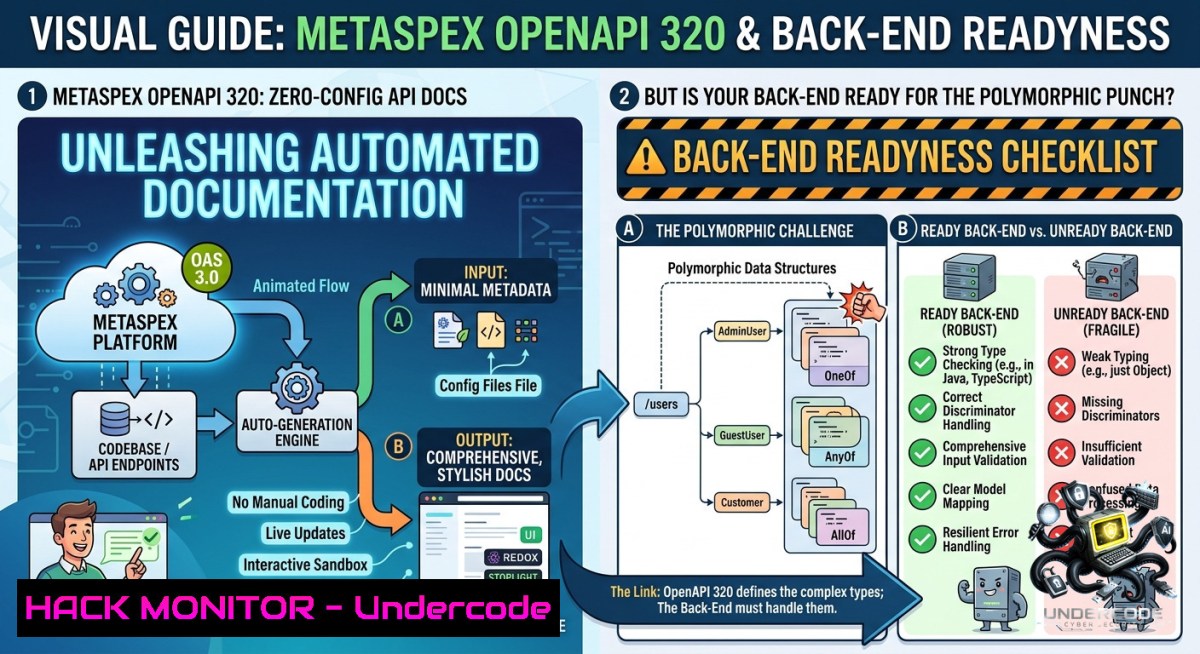
Automated API documentation is no longer a luxury – it’s a security and development necessity. Metaspex now natively serves an OpenAPI 3.2.0 specification endpoint (/openapi.json) without any configuration changes, exposing every web service endpoint, JSON schema, and even full polymorphism for query and reply payloads. While this accelerates UI engineering and client integration, it also widens the attack surface: every exposed schema and exception reply becomes a blueprint for reconnaissance.
Learning Objectives:
- Parse and validate an auto‑generated OpenAPI 3.2.0 specification to identify hidden endpoints and polymorphic payloads.
- Generate client SDKs and security test harnesses directly from the `/openapi.json` endpoint.
- Harden API responses by understanding how Metaspex handles exception replies and polymorphic serialisation.
You Should Know:
- Mining the Auto‑Generated OpenAPI Endpoint for Hidden Attack Surface
Metaspex automatically adds a built‑in web service at `https://your-metaspex-backend/openapi.json`. This returns the complete OpenAPI 3.2.0 specification including all endpoints, query schemas, reply schemas, and special exception replies. Attackers can grab this file in seconds. Defenders must retrieve and audit it regularly.
Step‑by‑step guide to extract and inspect:
Linux / macOS (using curl and jq):
 Fetch the OpenAPI spec from a Metaspex back end
curl -s https://your-metaspex-api.example/openapi.json | jq '.' > metaspex_spec.json

List all available endpoints (paths)
jq '.paths | keys' metaspex_spec.json

Find endpoints that accept POST (data modification)
jq '.paths | to_entries[] | select(.value | has("post")) | .key' metaspex_spec.json

Extract all schemas that use polymorphism (anyOf/oneOf)
jq '.components.schemas | to_entries[] | select(.value | has("anyOf") or has("oneOf")) | .key' metaspex_spec.json
Windows (PowerShell):
 Download the spec
Invoke-WebRequest -Uri "https://your-metaspex-api.example/openapi.json" -OutFile "metaspex_spec.json"

Parse and list endpoints (requires ConvertFrom-Json)
$spec = Get-Content "metaspex_spec.json" | ConvertFrom-Json
$spec.paths.PSObject.Properties.Name

Find exception reply schemas – look for "4xx" or "5xx" responses
$spec.paths.PSObject.Properties | ForEach-Object {
$<em>.Value.PSObject.Properties | Where-Object { $</em>.Name -match "get|post|put|delete" } | ForEach-Object {
$_.Value.responses.PSObject.Properties.Name -match "4[0-9][0-9]|5[0-9][0-9]"
}
}
What this does:
The `/openapi.json` endpoint reveals every API contract. By systematically listing paths and schemas, you can identify forgotten development endpoints, internal exception structures (which often leak stack traces or database error codes), and polymorphic payloads that may allow type confusion attacks.
- Building a Security Testing Harness from the OpenAPI Spec
Because Metaspex provides full JSON polymorphism for both query and reply payloads, traditional static fuzzing may miss valid but malicious payloads. Generate a dynamic test suite using the OpenAPI document.
Step‑by‑step guide – using openapi‑generator and prism for validation & fuzzing:
Linux/macOS (install tools first):
 Install OpenAPI Generator (requires Java)
npm install -g @openapitools/openapi-generator-cli
 Install Prism (API mocking & validation)
npm install -g @stoplight/prism-cli

Generate a Python client library (for integration tests)
openapi-generator-cli generate -i metaspex_spec.json -g python -o metaspex_client/

Use Prism to proxy and validate traffic against the spec (detects schema violations)
prism proxy https://your-metaspex-api.example/openapi.json --errors --verbose
 Now send requests to http://127.0.0.1:4010 – Prism validates and forwards.

Generate a security test script – for each endpoint, try injection in parameters
python3 -c "
import json, requests
spec = json.load(open('metaspex_spec.json'))
for path, methods in spec['paths'].items():
for method, details in methods.items():
if method.lower() not in ['get','post','put','delete']: continue
print(f'Testing {method.upper()} {path}')
 Attempt SQLi in query parameters (if any)
params = details.get('parameters', [])
for p in params:
if p.get('in') == 'query':
test_payload = {p['name']: \"' OR '1'='1\"}
if method.lower() == 'get':
requests.get('https://your-metaspex-api.example'+1ath, params=test_payload)
"
Windows (PowerShell with RESTest):
 Install Pester testing framework (run as Admin)
Install-Module -1ame Pester -Force -SkipPublisherCheck
 Use the spec to generate test cases (simplified)
$spec = Get-Content "metaspex_spec.json" | ConvertFrom-Json
foreach ($path in $spec.paths.PSObject.Properties) {
$methods = $path.Value
foreach ($method in $methods.PSObject.Properties) {
$operation = $method.Value
if ($operation.responses."400") {
Write-Host "Endpoint $($path.Name) has a 400 response – test malformed $($method.Name) requests"
 Build a malformed request using the schema's 'example' or 'format' violations
}
}
}
Why this matters:
Metaspex’s polymorphism allows the same endpoint to accept different JSON shapes. Attackers can exploit this by sending a valid polymorphic payload that switches from a harmless `UserQuery` object to a `PrivilegedQuery` object if the discriminator field is tampered. Using the generated client and Prism, you can detect when your back end accepts unexpected variants.
3. Hardening Exception Replies to Prevent Information Leakage
The Metaspex OpenAPI spec explicitly documents “special exception replies”. While helpful for debugging, these exception schemas often contain internal error codes, file paths, or query fragments. An attacker reading the spec can craft requests that trigger specific exceptions and read the leaked details.
Step‑by‑step guide to sanitise exception replies:
Linux – intercept and mask responses using NGINX reverse proxy:
 /etc/nginx/sites-available/metaspex_proxy
server {
listen 80;
location / {
proxy_pass https://your-metaspex-api.example;
 Intercept 4xx/5xx responses
error_page 400 401 403 404 500 502 503 504 = @custom_error;
}
location @custom_error {
 Return a generic JSON error without internal details
add_header Content-Type application/json;
return 200 '{"error":"Request failed. Contact support with time and request ID."}';
}
}
Windows – use IIS URL Rewrite with Outbound Rules:
<!-- In web.config under <system.webServer>/<rewrite>/<outboundRules> -->
<rule name="Mask Exception Details" preCondition="ResponseIsJson">
<match filterByTags="None" pattern="(stack|trace|exception|inner|path|line \d+)" />
<action type="Rewrite" value=""sanitized"" />
</rule>
<preConditions>
<preCondition name="ResponseIsJson">
<add input="{RESPONSE_CONTENT_TYPE}" pattern="application/json" />
<add input="{RESPONSE_STATUS}" pattern="4[0-9][0-9]|5[0-9][0-9]" />
</preCondition>
</preConditions>
How to test hardening:
After applying masking, retrieve the OpenAPI spec and check the `responses` section for 4xx/5xx schemas. Ensure that the examples or schemas do not contain sensitive literals. Then trigger an exception (e.g., malformed polymorphic payload) and verify that the actual reply matches the generic message – not the detailed spec.
4. Using OpenAPI 3.2.0 for Zero‑Trust Client Integration
The automatic OpenAPI endpoint is a goldmine for CI/CD pipelines. At build time, UI engineers can consume it to generate TypeScript models, reducing manual API mapping errors. But from a security perspective, this also means every client automatically knows exactly how to talk to your API – including deprecated or shadow endpoints.
Step‑by‑step – integrate OpenAPI spec into a React frontend with code generation:
Linux/macOS:
 Install OpenAPI TypeScript generator (npm)
npm install -g openapi-typescript-codegen

Generate a fully typed API client directly from Metaspex
openapi --input https://your-metaspex-api.example/openapi.json --output ./src/api --client axios
Windows (using Docker to avoid Node version issues):
docker run --rm -v ${PWD}:/local openapitools/openapi-generator-cli generate -i https://your-metaspex-api.example/openapi.json -g typescript-axios -o /local/src/api
Security validation:
After generation, review the exported interfaces. Look for any endpoint or schema that should not be public (e.g., `/internal/health` or /admin/purge). If found, these endpoints are being advertised by Metaspex. Fix by either removing the endpoint on the back end or adding a pre‑processor filter that excludes certain paths from the OpenAPI output.
5. Monitoring for OpenAPI Endpoint Abuse in Production
Because the `/openapi.json` endpoint is unauthenticated by default (Metaspex adds it “automatically”), attackers can repeatedly download it to detect API drift and new endpoints. Set up real‑time alerts.
Linux – fail2ban rule for excessive OpenAPI pulls:
 /etc/fail2ban/filter.d/metaspex-openapi.conf
[bash]
failregex = ^<HOST> . "GET /openapi.json HTTP/1.." 200
ignoreregex =

/etc/fail2ban/jail.local
[metaspex-openapi]
enabled = true
port = http,https
filter = metaspex-openapi
logpath = /var/log/nginx/access.log
maxretry = 5
findtime = 300
bantime = 3600
action = iptables-multiport[name=openapi, port="http,https", protocol=tcp]
Windows PowerShell – scheduled task to scan IIS logs:
$logPath = "C:\inetpub\logs\LogFiles\W3SVC1.log"
$threshold = 10
$timeWindow = 300  seconds
$ipTable = @{}
Get-ChildItem $logPath | ForEach-Object {
Get-Content $_ | ForEach-Object {
if ($_ -match "(\d+.\d+.\d+.\d+).GET /openapi.json") {
$ip = $matches[bash]
$timestamp = [bash]::ParseExact($<em>.Substring(0,19),"yyyy-MM-dd HH:mm:ss",$null)
if (-1ot $ipTable.ContainsKey($ip)) { $ipTable[$ip] = @() }
$ipTable[$ip] += $timestamp
}
}
}
foreach ($ip in $ipTable.Keys) {
$count = ($ipTable[$ip] | Where-Object { $</em> -gt (Get-Date).AddSeconds(-$timeWindow) }).Count
if ($count -ge $threshold) {
Write-Warning "Blocking $ip – $count OpenAPI pulls in last $timeWindow seconds"
 netsh advfirewall firewall add rule name="Block_OpenAPI_$ip" dir=in action=block remoteip=$ip
}
}
What Undercode Say:
- Key Takeaway 1: Metaspex’s zero‑config OpenAPI 3.2.0 support is a double‑edged sword. It eliminates manual documentation drift but gives attackers a machine‑readable attack blueprint – including polymorphic payload structures that are notoriously hard to fuzz manually.
- Key Takeaway 2: Exception replies documented in OpenAPI often leak internal context. You must mask or rewrite those responses at the proxy layer; otherwise, the spec itself becomes a reconnaissance report.
- Analysis: The automatic addition of `/openapi.json` to all Metaspex back ends forces organisations to adopt “security by default” for their API metadata. Unlike manually maintained Swagger UIs that can be disabled or protected, this endpoint is built‑in. The good news is that it supports full JSON polymorphism, which means robust client‑side validation is possible – but only if you generate clients from the spec and enforce strict discriminators. The 122 KB spec size for identity management indicates moderate complexity; however, as more services adopt Metaspex, aggregation of multiple OpenAPI specs will create an aggregated attack surface. Teams should treat the OpenAPI endpoint as a public asset and run `diff` on every deployment to detect unauthorised endpoint additions.
Prediction:
- -1 Over the next 12 months, automated attack tools will directly consume `/openapi.json` endpoints from Metaspex and similar platforms, leading to a surge in “spec‑aware” API breaches – especially targeting polymorphic serialisation bugs where type confusion allows privilege escalation.
- +1 This same standard will drive adoption of OpenAPI‑first security testing in CI/CD, with tools like Prism and 42Crunch integrating Metaspex’s auto‑spec to block deployments that expose dangerous exception schemas.
- -1 Many developers will mistakenly treat the 122 KB spec as “just documentation” and fail to implement rate limiting on the endpoint, resulting in DoS via recursive spec parsing or massive off‑line reconnaissance.
- +1 The explicit listing of query and reply JSON schemas will enable automated GDPR/CCPA compliance checks – scanning for accidentally exposed personal data fields before they hit production.
▶️ Related Video (66% Match):
🎯Let’s Practice For Free:
🎓 Live Courses & Certifications:
Join Undercode Academy for Verified Certifications
🚀 Request a Custom Project:
Secure, high-velocity infrastructure and disruptive technological engineering. Contact our engineering team for high-tier development and proprietary systems:
[email protected]
💎 Smart Architecture | 🛡️ Secure by Design | ⭐ Trusted by Thousands
IT/Security Reporter URL:
Reported By: Openapi Share – Hackers Feeds
Extra Hub: Undercode MoN
Basic Verification: Pass ✅


