
Listen to this Post
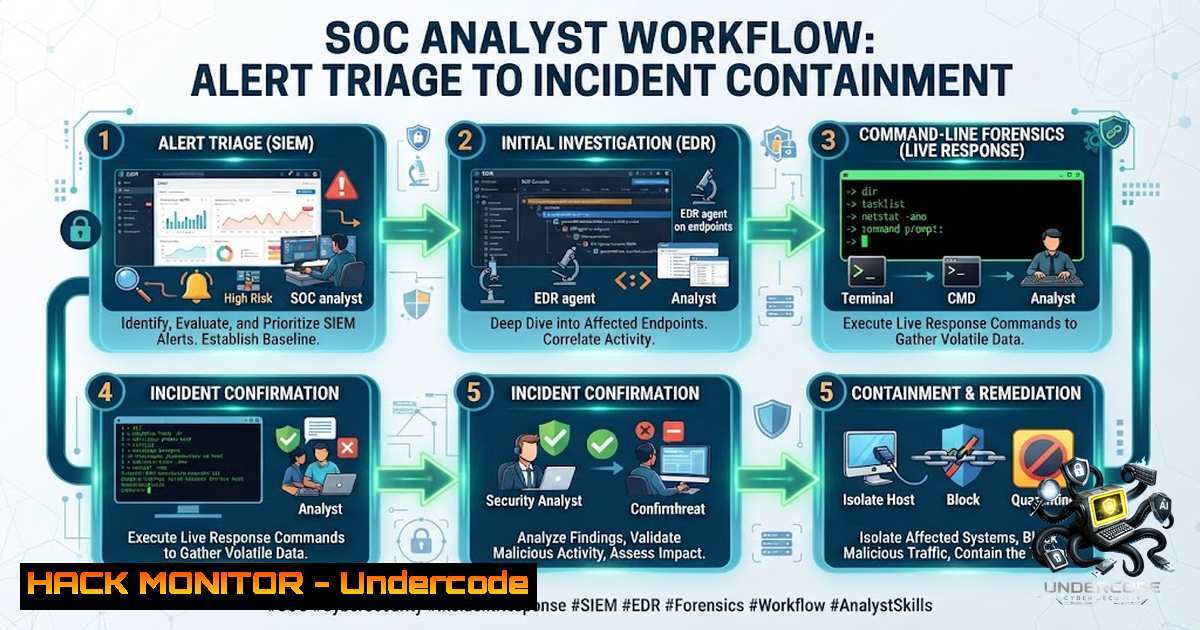
Introduction:
In today’s rapidly evolving threat landscape, a Security Operations Center (SOC) is the nerve center of an organization’s cyber defense. However, having advanced security tools is not enough—what separates an effective SOC from a reactive one is a well-defined, structured analyst workflow. A disciplined SOC Analyst Workflow enables security teams to continuously monitor, detect, analyze, and respond to incidents efficiently, minimizing both dwell time and business impact. As Gauri Kaur aptly noted, behind every fast response to a cyber threat is a well-defined process that ensures no critical step is overlooked.
Learning Objectives:
- Master the end-to-end SOC incident lifecycle from monitoring and triage to containment and recovery.
- Learn to leverage SIEM queries, EDR tools, and command-line forensics (Windows PowerShell and Linux Bash) for rapid investigation.
- Understand how to integrate threat intelligence and automate response workflows to reduce Mean Time to Detect (MTTD) and Mean Time to Respond (MTTR).
You Should Know:
- The SOC Incident Lifecycle: A Structured Approach to Cyber Defense
A typical SOC workflow follows a phased approach that ensures consistency and thoroughness during an incident. While different frameworks exist, the core phases remain consistent: Monitoring → Triage → Investigation → Containment → Eradication → Recovery → Lessons Learned.
- Monitoring: Continuous collection and analysis of logs from endpoints, networks, and cloud environments. This is the foundation upon which all detections are built.
- Triage (Level 1): The first alert goes to an L1 SOC Analyst. Their primary job is to quickly assess the alert, determine if it is a false positive or a true positive, and escalate accordingly. Speed and accuracy at this stage are critical to prevent alert fatigue.
- Investigation (Level 2/3): Deep-dive analysis to understand the scope, root cause, and impact of the incident. This involves correlating data from multiple sources (SIEM, EDR, Threat Intelligence) and mapping adversary behavior to frameworks like MITRE ATT&CK.
- Containment: Immediate actions to stop the spread of the incident. This can include isolating affected systems, blocking IP addresses, or disabling compromised user accounts.
- Eradication & Recovery: Removing the root cause (e.g., malware, backdoors) and restoring systems to a known good state.
- Lessons Learned: A post-incident review to improve processes, update playbooks, and strengthen defenses.
Step‑by‑step guide:
- Establish a Baseline: Before an incident occurs, document normal network and system behavior. This baseline is invaluable for identifying anomalies during the monitoring phase.
- Implement a Triage Matrix: Define severity levels (Critical, High, Medium, Low) with corresponding response times. For example, Critical incidents (active data exfiltration, ransomware) require immediate response, while Low severity (port scans) can wait up to 24 hours.
- Follow the Playbook: Use standardized incident response playbooks for common scenarios (e.g., ransomware, phishing, lateral movement). This ensures that even junior analysts follow best practices.
- Document Everything: Maintain detailed incident reports and chain-of-custody documentation. This is crucial for legal proceedings and post-incident analysis.
-
SIEM Mastery: Querying for Threats Like a Pro
The SIEM (Security Information and Event Management) is the central hub for log aggregation and alerting. A SOC analyst must be proficient in crafting effective queries across different platforms. Each SIEM platform uses a different query syntax: Splunk uses SPL (Search Processing Language), Microsoft Sentinel uses KQL (Kusto Query Language), and Elastic Security uses EQL/Lucene.
Step‑by‑step guide:
- Start with Context: When an alert fires, begin your investigation by pulling all related events around the alert timestamp, host, and user.
- Identify Brute Force Attempts: Use queries to detect multiple failed login attempts from the same IP address.
– Splunk SPL:
index=windows EventCode=4625 | stats count by src_ip | where count > 10
This query identifies potential brute-force attacks by counting failed logon attempts (Event ID 4625) per source IP.
– PowerShell (Windows Event Log):
Get-WinEvent -FilterHashtable @{LogName='Security'; ID=4625} -MaxEvents 50
This pulls the last 50 failed logon attempts directly from the Security log.
3. Detect Lateral Movement: Monitor for Event ID 4624 (Successful Logon) and pay close attention to Logon Type. Type 10 indicates an RDP logon, while Type 3 indicates a network logon (SMB).
– KQL (Microsoft Sentinel):
SecurityEvent
| where EventID == 4624
| where LogonType == 10
| project TimeGenerated, Account, SourceIp, Computer
4. Hunt for PowerShell Abuse: Attackers frequently use PowerShell for fileless malware and lateral movement. Monitor Event ID 4104 in the PowerShell Operational log, which captures the full script text after deobfuscation.
– PowerShell:
Get-WinEvent -FilterHashtable @{LogName='Microsoft-Windows-PowerShell/Operational'; ID=4104} -MaxEvents 20 | Select-Object TimeCreated, Message
- Endpoint Triage: Essential Linux Commands for Incident Response
When investigating a potentially compromised Linux server, speed and accuracy are paramount. A structured approach using built-in command-line tools allows analysts to quickly gather critical evidence.
Step‑by‑step guide:
- Initial Triage (System Snapshot): Run a series of commands to get a quick overview of the system state.
– Check logged-in users:
who
w
– View system uptime and load:
uptime
– List recent logins:
last -1 20
2. Process Investigation: Identify suspicious processes, especially those with unusual parent-child relationships or running from temporary directories.
– List all processes in a hierarchical tree:
ps -eFH
– Find processes listening on network ports:
netstat -tulpn
ss -tulpn
3. Persistence Mechanisms: Attackers often establish persistence to maintain access. Check common locations.
– Check cron jobs:
crontab -l
cat /etc/crontab
ls -la /etc/cron.
– Check systemd services:
systemctl list-unit-files --type=service --state=enabled
– Check SSH keys:
cat ~/.ssh/authorized_keys
4. Log Analysis: Examine authentication logs for signs of brute-force or unauthorized access.
– View SSH authentication failures:
grep "Failed password" /var/log/auth.log
– View successful SSH logins:
grep "Accepted password" /var/log/auth.log
- Windows Forensics: PowerShell Commands Every SOC Analyst Must Know
PowerShell is the Swiss Army knife for Windows incident response. It is already installed on every Windows machine, requiring no additional tools or admin approval for basic triage.
Step‑by‑step guide:
1. Process and Network Triage:
- List top CPU-consuming processes with paths:
Get-Process | Sort-Object CPU -Descending | Select-Object -First 20 Name, Id, CPU, Path
If a process is running from `C:\Users\Public` or
C:\Temp, it is highly suspicious. - List established network connections:
netstat -ano | findstr ESTABLISHED
Get-1etTCPConnection | Where-Object {$_.State -eq "Established"}
2. Persistence Hunting:
- Check common Run keys:
reg query HKLM\Software\Microsoft\Windows\CurrentVersion\Run
reg query HKCU\Software\Microsoft\Windows\CurrentVersion\Run
- List scheduled tasks:
schtasks /query /fo CSV | ConvertFrom-Csv
3. File and Hash Analysis:
- Find recently modified files (last 24 hours):
Get-ChildItem -Path C:\ -Recurse -File -ErrorAction SilentlyContinue | Where-Object {$_.LastWriteTime -gt (Get-Date).AddDays(-1)} | Sort-Object LastWriteTime -Descending | Select-Object -First 50 - Calculate file hash for IOC matching:
Get-FileHash -Path C:\path\to\suspicious.exe -Algorithm SHA256
5. Integrating Threat Intelligence and Automation
Modern SOCs do not operate in a vacuum. Integrating threat intelligence feeds and automating repetitive tasks are key to scaling operations and reducing analyst fatigue.
Step‑by‑step guide:
- Ingest STIX/TAXII Feeds: Automate the ingestion of structured threat intelligence using standards like STIX (Structured Threat Information Expression) and TAXII (Trusted Automated Exchange of Intelligence Information). This allows for real-time IOC (Indicator of Compromise) matching against network and endpoint telemetry.
- Automate with SOAR: Use Security Orchestration, Automation, and Response (SOAR) platforms to connect SIEM, EDR, and other tools into unified workflows. For example, automatically isolate an endpoint when a critical alert is triggered.
- Map to MITRE ATT&CK: Map detected behaviors to the MITRE ATT&CK framework. This helps analysts understand the adversary’s TTPs (Tactics, Techniques, and Procedures), prioritize response efforts, and identify gaps in detection coverage.
What Undercode Say:
- Key Takeaway 1: A structured workflow is the backbone of an effective SOC. It ensures that analysts follow a consistent process, reducing the risk of missing critical steps during high-pressure incidents.
- Key Takeaway 2: Mastery of command-line tools (PowerShell for Windows, Bash for Linux) and SIEM query languages is non-1egotiable for modern SOC analysts. These skills enable rapid, deep-dive investigations that GUI-based tools alone cannot provide.
- Analysis: The cybersecurity landscape is characterized by an overwhelming volume of alerts. Without a disciplined workflow and strong technical fundamentals, analysts are prone to burnout and can easily miss sophisticated attacks. The integration of threat intelligence and automation is not just a luxury but a necessity to keep pace with adversaries. As organizations increasingly adopt cloud and hybrid environments, SOC analysts must also expand their skills to include cloud security monitoring and API security. The human element—skilled analysts following well-defined processes—remains the most critical component of any cyber defense strategy.
Prediction:
- +1 The increasing adoption of AI and machine learning in SIEM and SOAR platforms will significantly reduce alert fatigue, allowing Tier 1 analysts to focus on high-fidelity alerts and complex investigations.
- +1 The demand for SOC analysts with cloud security expertise (AWS, Azure, GCP) will skyrocket as more enterprises migrate to the cloud, making cloud-1ative SIEM and EDR skills highly valuable.
- -1 The sophistication of cyberattacks, particularly ransomware and supply chain compromises, will continue to outpace the defensive capabilities of organizations that fail to invest in continuous training and workflow optimization for their SOC teams.
- -1 The shortage of skilled cybersecurity professionals will persist, placing immense pressure on existing SOC teams and increasing the risk of burnout and human error if automation and structured workflows are not prioritized.
▶️ Related Video (74% Match):
🎯Let’s Practice For Free:
🎓 Live Courses & Certifications:
Join Undercode Academy for Verified Certifications
🚀 Request a Custom Project:
Secure, high-velocity infrastructure and disruptive technological engineering. Contact our engineering team for high-tier development and proprietary systems:
[email protected]
💎 Smart Architecture | 🛡️ Secure by Design | ⭐ Trusted by Thousands
IT/Security Reporter URL:
Reported By: Gaurikaur426 Cybersecurity – Hackers Feeds
Extra Hub: Undercode MoN
Basic Verification: Pass ✅


