Listen to this Post
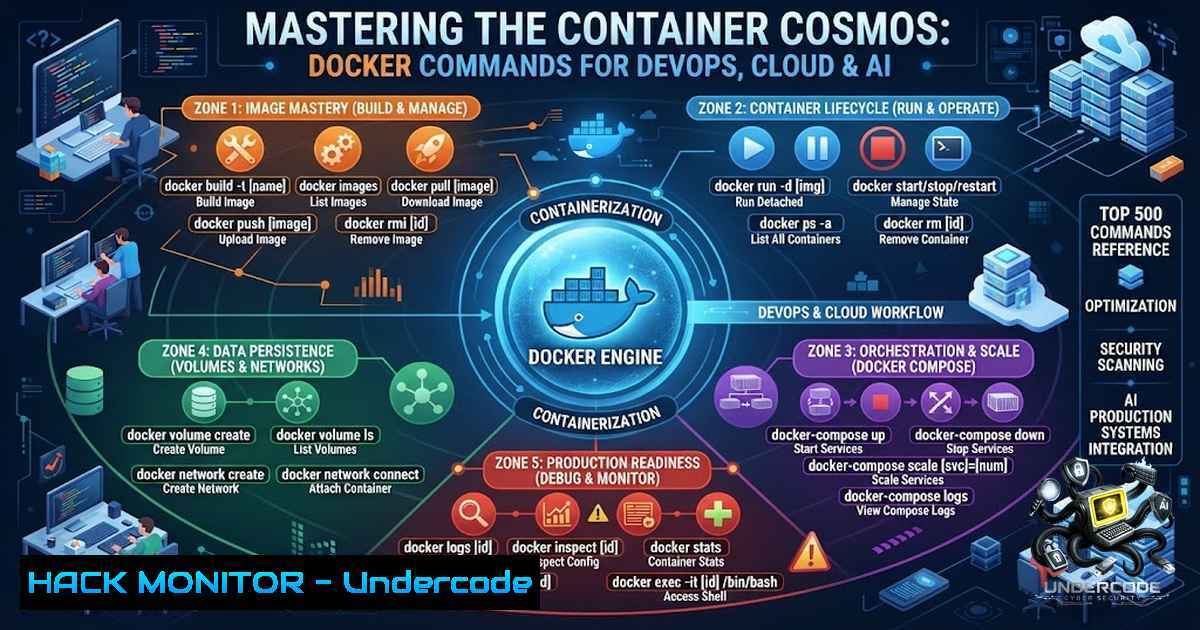
Introduction:
In the rapidly evolving landscape of DevOps, Cloud Computing, and AI-driven production systems, containerization has become the bedrock of modern infrastructure. Docker, the industry-standard container runtime, provides an extensive CLI that, when mastered, transforms complex system administration into a manageable and automated workflow. This article dissects the most critical Docker commands from a curated collection of 500, offering a structured approach to image management, container orchestration, networking, storage, and security hardening to ensure your production environments are both robust and efficient.
Learning Objectives:
- Master the complete lifecycle management of Docker containers, from creation to cleanup.
- Implement advanced networking and volume management for persistent and interconnected microservices.
- Apply security hardening and resource optimization techniques to safeguard production containers.
- Leverage Docker commands for troubleshooting, debugging, and performance monitoring in real-world scenarios.
You Should Know:
1. Container Lifecycle Management: From Birth to Termination
The foundation of Docker proficiency lies in understanding the container lifecycle. While `docker run` is the entry point, the full spectrum of commands ensures you have granular control over your application’s state.
- Creating and Running: `docker run -d –1ame web-server -p 8080:80 nginx:alpine` launches an Nginx container in detached mode (
-d), maps host port 8080 to container port 80, and uses a lightweight Alpine-based image. - Inspection and Logs: To debug, use `docker logs -f web-server` to follow logs in real-time, and `docker inspect web-server` to view low-level configuration details (network settings, mount points, etc.).
- Execution: For interactive troubleshooting, `docker exec -it web-server /bin/sh` drops you into a shell inside the running container.
- Cleanup: System hygiene is critical. `docker rm -f $(docker ps -aq)` forcefully removes all containers, while `docker system prune -a -f` removes all unused data, including stopped containers and dangling images.
2. Image Management and the Dockerfile Workflow
Images are the blueprints for containers. Moving beyond basic docker pull, advanced commands enable you to build optimized and secure images.
- Building Efficiently: `docker build -t my-app:latest .` uses the Dockerfile in the current directory. Use `–1o-cache` to force a fresh build during dependency updates.
- Layering and History: `docker history my-app:latest` reveals the layers of an image, helping you identify bloat. Combining this with `docker image inspect` allows you to audit environment variables and exposed ports.
- Tagging and Registry Operations: `docker tag my-app:latest my-registry.com/my-app:v1.0` prepares an image for pushing. Use `docker push my-registry.com/my-app:v1.0` to upload to a private registry, and `docker login` to authenticate.
- Exporting and Importing: For offline transfers, `docker save -o my-app.tar my-app:latest` exports an image to a tarball, while `docker load -i my-app.tar` imports it back.
3. Networking Mastery: Connecting the Microservices
Docker’s networking capabilities are essential for microservices communication and isolation. Security hardening starts with proper network segmentation.
- Network Management: `docker network ls` lists all networks. Create an isolated bridge network for your application stack using
docker network create --driver bridge my-secure-1et. - Connecting Containers: When running a container, attach it to your custom network with
docker run --1etwork my-secure-1et --1ame api-server my-api. Containers on the same user-defined bridge network can communicate via container names. - Security Isolation: To prevent inter-container communication on the default bridge, start the Docker daemon with
--icc=false. For production, limit host exposure by binding ports explicitly to specific IPs:-p 127.0.0.1:8080:80.
4. Data Persistence with Volumes and Bind Mounts
Containers are ephemeral, but data doesn’t have to be. Mastering storage commands ensures stateful applications run smoothly.
- Volume Management: `docker volume create postgres-data` creates a managed volume. Run a PostgreSQL container with `docker run -v postgres-data:/var/lib/postgresql/data postgres:13` to persist database files.
- Inspecting Volumes: `docker volume inspect postgres-data` shows the mount point on the host. For detailed usage, `docker system df -v` provides a breakdown of volume space utilization.
- Bind Mounts for Development: For hot-reloading code, use bind mounts:
docker run -v "$(pwd)":/app -w /app node:14 npm start. This mounts the current directory to `/app` inside the container.
5. Security Hardening and Resource Optimization (Linux/Windows)
Security in containerized environments is paramount. The following commands and flags are crucial for a hardened production setup.
- Running as Non-Root: Always specify `–user 1000:1000` in your `docker run` command or set `USER 1000` in the Dockerfile to enforce least privilege.
- Resource Limits: Prevent DoS attacks by limiting resources: `docker run –memory=”512m” –cpus=”1.0″ my-app` ensures the container doesn’t consume excessive host resources.
- Capability Dropping: Reduce the attack surface by dropping all capabilities and adding only what is necessary:
docker run --cap-drop=ALL --cap-add=NET_BIND_SERVICE my-app. - Windows Containers: On Windows Server, similar commands apply. Use `docker run –isolation=hyperv mcr.microsoft.com/windows/servercore:ltsc2022` for Hyper-V isolation, providing a stronger security boundary than process isolation.
6. Advanced Debugging and Monitoring
Production incidents require rapid diagnosis. These commands provide deep visibility into container health.
- Resource Usage: `docker stats` shows real-time CPU, memory, and network I/O for all running containers.
- Process Inspection: `docker top my-container` lists the running processes inside the container, which is useful for detecting rogue processes.
- Event Logging: `docker events –filter ‘type=container’ –filter ‘event=die’` streams Docker daemon events, helping you audit why containers are crashing.
- Copying Files: To extract logs or configuration files without exec, use
docker cp my-container:/app/logs/error.log ./error.log.
7. Orchestration Prep: Docker Compose and Swarm
While Kubernetes is dominant, Docker’s native orchestration tools remain relevant for smaller deployments and local testing.
- Compose Up/Down: `docker-compose up -d` starts a multi-container application defined in a `docker-compose.yml` file. Use `docker-compose down -v` to remove containers and volumes.
- Scaling Services: In Swarm mode, `docker service scale my-service=5` scales replicas. `docker service logs my-service` aggregates logs from all replicas.
- Secrets Management: For sensitive data, `echo “my-password” | docker secret create db_password -` injects secrets into Swarm services securely, avoiding environment variable leaks.
What Undercode Say:
- Key Takeaway 1: The power of Docker lies not just in running containers, but in the comprehensive CLI that allows for granular security, networking, and storage configurations. Mastering these commands transitions a developer from a casual user to a production-grade engineer.
- Key Takeaway 2: Security is not an afterthought. Implementing resource limits, dropping capabilities, and using non-root users via the CLI are immediate, actionable steps that significantly reduce the risk of container escapes and resource exhaustion in shared environments.
- Analysis: The curated list of 500 commands serves as a critical knowledge base. As AI and Cloud workloads increasingly rely on containerization for reproducibility and scaling, the efficiency of an engineer is directly proportional to their fluency with the Docker CLI. The ability to script complex `docker` commands for CI/CD pipelines or automated incident response is a defining skill for modern platform teams. Furthermore, integrating these commands with tools like `jq` for parsing JSON output from `docker inspect` enables advanced automation and observability.
Prediction:
- +1 The continued evolution of Docker and the standardization of the OCI (Open Container Initiative) will solidify the Docker CLI as the universal control plane for all containerized workloads, regardless of the underlying orchestrator.
- +1 AI-augmented CLI tools will emerge, translating natural language requests into complex `docker` commands, lowering the barrier to entry while still requiring experts to validate security and performance implications.
- -1 Without diligent adoption of the security commands highlighted (e.g.,
--cap-drop,--security-opt), the rapid proliferation of containers will lead to an increase in supply chain attacks and container escapes, necessitating stricter runtime security policies. - -1 The sheer volume of commands (500+) can lead to analysis paralysis; organizations must invest in structured training and curated cheat sheets to prevent misconfigurations that lead to production outages.
▶️ Related Video (68% Match):
🎯Let’s Practice For Free:
🎓 Live Courses & Certifications:
Join Undercode Academy for Verified Certifications
🚀 Request a Custom Project:
Secure, high-velocity infrastructure and disruptive technological engineering. Contact our engineering team for high-tier development and proprietary systems:
[email protected]
💎 Smart Architecture | 🛡️ Secure by Design | ⭐ Trusted by Thousands
IT/Security Reporter URL:
Reported By: Adityajaiswal7 Top – Hackers Feeds
Extra Hub: Undercode MoN
Basic Verification: Pass ✅


