Listen to this Post
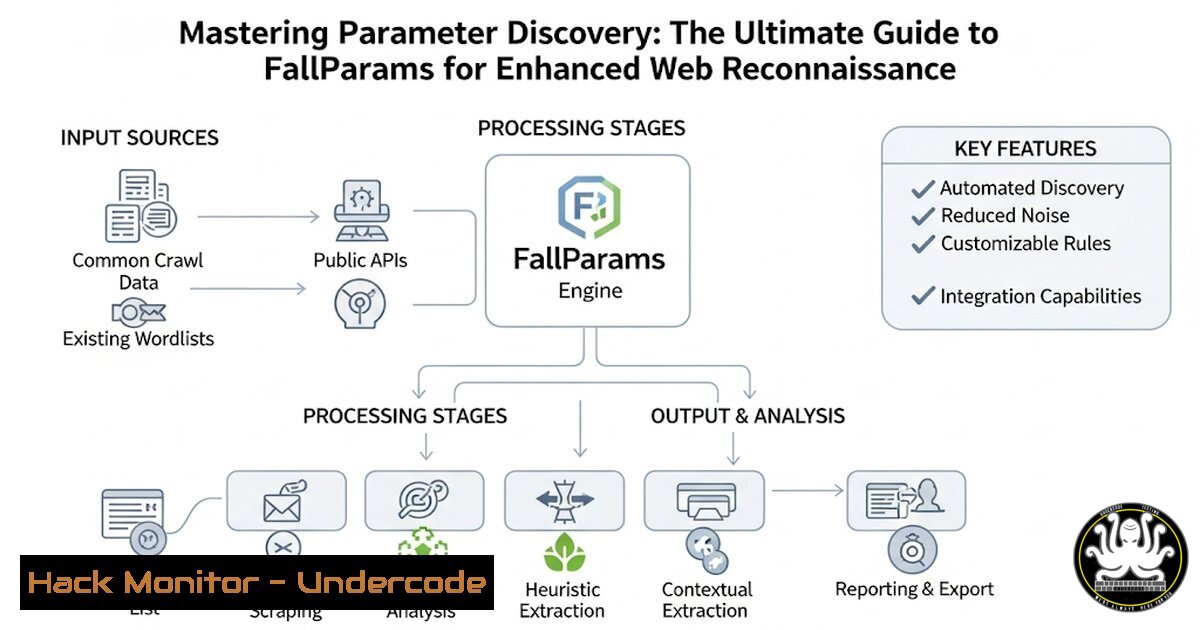
Introduction:
In the relentless cat-and-mouse game of web application security, discovering hidden attack surfaces is paramount. FallParams emerges as a critical open-source tool designed to automate the discovery of GET and POST parameters, a fundamental step in uncovering potential vulnerabilities during penetration tests and bug bounty hunts. This guide provides a deep technical dive into leveraging FallParams to its full potential, transforming your reconnaissance methodology.
Learning Objectives:
- Understand the core functionality and installation process of the FallParams tool.
- Master the command-line syntax and advanced options for effective parameter discovery.
- Integrate FallParams findings into a broader vulnerability assessment and exploitation workflow.
You Should Know:
1. Installing FallParams on a Linux Recon Workstation
FallParams is a Node.js-based tool, requiring a specific environment to operate. This setup ensures you have the latest version directly from the repository.
 Step 1: Ensure Node.js and npm are installed
sudo apt update && sudo apt install -y nodejs npm  For Debian/Ubuntu

Step 2: Install FallParams using npm (Node Package Manager)
npm install -g fallparams

Step 3: Verify the installation
fallparams --version
This sequence first updates your package lists and installs Node.js and npm, the prerequisites for FallParams. The `-g` flag installs the tool globally on your system, making the `fallparams` command available from any terminal location. Verifying the installation confirms everything is set up correctly.
2. Basic Target Enumeration with FallParams
The most straightforward use of FallParams is to probe a single URL for hidden parameters. This is the essential first command you will run.
 Basic usage against a target URL
fallparams -u https://target.com/page.php
This command instructs FallParams to analyze `https://target.com/page.php`. It will make requests and apply its techniques to uncover parameters that are not visible in the client-side source code. The output will list potential parameters, which you can then test for vulnerabilities like SQL Injection, XSS, or SSRF.
3. Leveraging Wordlists for Comprehensive Discovery
The true power of FallParams is unlocked by using custom wordlists. This allows you to brute-force a vast array of potential parameter names.
 Using a custom wordlist for extended parameter discovery
fallparams -u https://target.com/api/endpoint -w /usr/share/wordlists/parameters.txt
The `-w` flag specifies a path to a wordlist file. Tools like `SecLists` provide excellent, extensive wordlists for this purpose (/usr/share/seclists/Discovery/Web-Content/). This method significantly expands the scope of your test beyond the tool’s default dictionary, increasing the chance of finding obscure parameters.
4. Piping Target URLs from Subdomain Enumeration
For efficient testing at scale, you can pipe a list of URLs from other reconnaissance tools (like subfinder, assetfinder, or amass) directly into FallParams.
 Generating a list of subdomains and piping them to FallParams
subfinder -d target.com -silent | httpx -silent | fallparams --stdin
This powerful one-liner uses `subfinder` to discover subdomains of target.com. The results are piped (|) to httpx, a tool that probes for live HTTP/HTTPS servers. Finally, the live URLs are piped to FallParams using the `–stdin` flag, which reads targets from standard input. This automates parameter discovery across an entire attack surface.
5. Controlling Concurrency and Rate Limiting
To avoid overwhelming target servers or triggering aggressive rate-limiting and WAF bans, it’s crucial to control the speed of your requests.
 Running FallParams with controlled concurrency and a delay
fallparams -u https://target.com/ -c 5 -d 100
The `-c 5` option sets the concurrency level to 5 simultaneous threads, while `-d 100` imposes a 100-millisecond delay between requests initiated by each thread. This throttles the tool’s activity, making your scan stealthier and more polite, which is essential for operating within the rules of engagement of a bug bounty program.
6. Outputting Results for Further Analysis
Saving your results is critical for documentation, reporting, and feeding data into other tools in your workflow.
 Saving discovered parameters to a JSON file
fallparams -u https://target.com/profile.php -o results.json
The `-o` flag followed by a filename (results.json) writes the tool’s output to a file in JSON format. This structured data can easily be parsed by custom scripts or other security tools to automate the next steps of vulnerability testing, such as fuzzing the discovered parameters with `ffuf` or Arjun.
7. Integrating with Proxies for Traffic Analysis
Routing FallParams traffic through a proxy like Burp Suite allows you to inspect every raw request and response, enabling deeper manual analysis.
 Directing all FallParams traffic through a local Burp Suite proxy
fallparams -u https://target.com/ --proxy http://127.0.0.1:8080
The `–proxy` flag sends all HTTP requests generated by FallParams through the proxy server at the specified address (127.0.0.1:8080 is Burp’s default listener). This allows you to analyze the techniques FallParams uses, identify false positives, and manually investigate interesting responses directly within Burp’s powerful interface.
What Undercode Say:
- Automation is non-negotiable for modern reconnaissance; manual parameter hunting is obsolete at scale.
- The value of a tool is defined by its integration into a larger pipeline, not just its standalone functionality.
FallParams represents a significant evolution in the reconnaissance phase of security assessments. It moves beyond traditional content discovery to target the very data structures a web application uses, which is where logic flaws and complex vulnerabilities often reside. While powerful, it is not a silver bullet. Its output requires expert analysis to distinguish noise from true vulnerabilities and to contextualize parameters within specific application functionality. The future of such tools lies in increased intelligence—moving from pure wordlist brute-forcing to leveraging machine learning models trained on code patterns to predict parameter names and types, thereby dramatically increasing efficiency and coverage. Mastering tools like FallParams is now a baseline requirement for effective offensive security professionals.
Prediction:
The automation of parameter discovery will rapidly evolve from wordlist-based brute-forcing to AI-driven predictive analysis, drastically increasing the pace at which application attack surfaces are mapped. This will force a paradigm shift in defensive security, pushing developers towards stricter input validation frameworks, mandatory parameter allow-listing, and the increased adoption of code-level security tools that can identify exposed parameters early in the SDLC. The next 12-18 months will see a surge in vulnerabilities rooted in hidden parameters, followed by a market correction as defensive practices adapt.
🎯Let’s Practice For Free:
IT/Security Reporter URL:
Reported By: Abhirup Konwar – Hackers Feeds
Extra Hub: Undercode MoN
Basic Verification: Pass ✅


