
Listen to this Post
Introduction
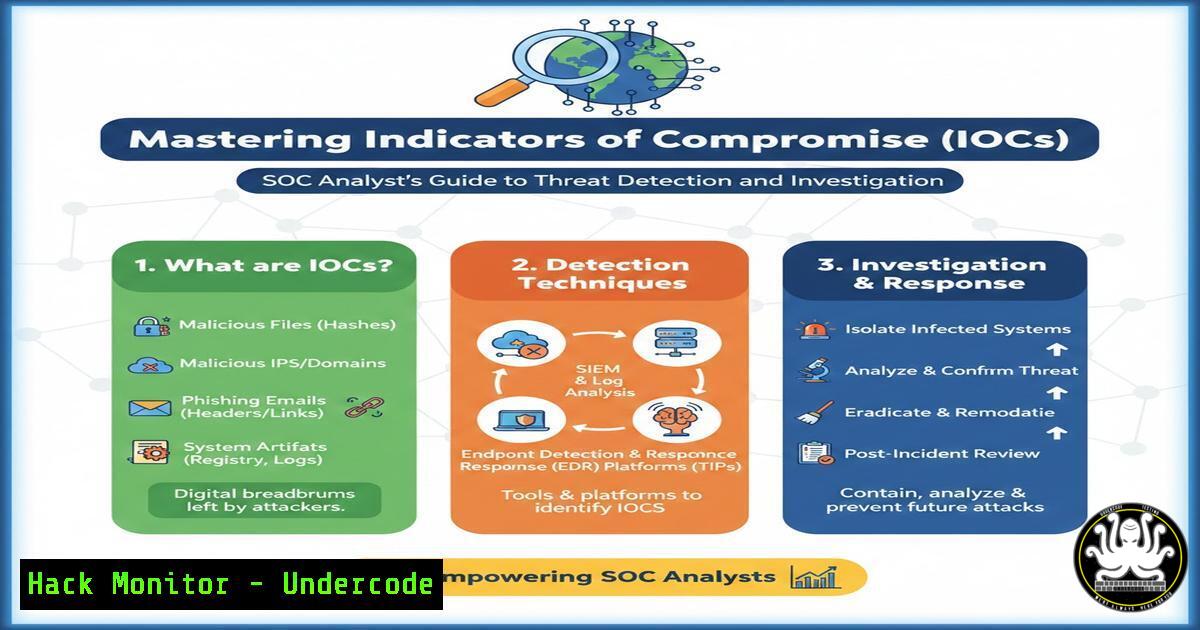
In the high-stakes world of Security Operations Centers (SOCs), Indicators of Compromise (IOCs) serve as the digital breadcrumbs that reveal malicious activity across enterprise networks. These forensic artifacts—ranging from suspicious IP addresses to anomalous file hashes—form the foundation of modern threat detection and incident response. Understanding how to identify, analyze, and leverage IOCs effectively separates elite security analysts from novices, enabling organizations to shift from reactive alert fatigue to proactive threat hunting.
Learning Objectives
- Understand the complete taxonomy of IOCs and their practical applications in SOC environments
- Master command-line techniques for IOC identification across Windows and Linux systems
- Learn to differentiate between IOCs and alerts while building effective detection rules
- Develop hands-on skills for investigating file-based, network-based, and behavioral IOCs
You Should Know
1. File-Based Indicators: Hunting Malicious Artifacts on Disk
File-based IOCs represent the most common indicators encountered during incident response. These include cryptographic hashes (MD5, SHA1, SHA256), suspicious filenames, and anomalous file paths that deviate from baseline system behavior.
Linux File Investigation Commands:
 Calculate file hashes for verification against known IOC databases
sha256sum suspicious_file.exe
md5sum potential_malware.dll

Recursively search for files by name or pattern
find / -name "malware" -type f 2>/dev/null
find /home -name ".exe" -type f -exec sha256sum {} \; > suspicious_hashes.txt

Check file timestamps for signs of manipulation (timestamping)
stat /path/to/suspicious/file
ls -la --full-time /var/tmp/

Search for recently modified files in sensitive directories
find /tmp -type f -mtime -1 -ls
find /etc -type f -mtime -3 -exec ls -la {} \; 2>/dev/null
Windows File Investigation Commands (PowerShell):
 Generate file hashes for suspicious files
Get-FileHash -Path C:\Windows\Temp\suspicious.exe -Algorithm SHA256
Get-ChildItem -Path C:\Users\ -Recurse -Include .exe, .dll | Get-FileHash | Export-CSV file_hashes.csv

Identify recently created files in temp directories
Get-ChildItem -Path C:\Windows\Temp -Recurse | Where-Object {$_.CreationTime -gt (Get-Date).AddDays(-1)}

Check for alternate data streams (ADS) often used by malware
Get-Item -Path  -Stream  | Where-Object {$_.Stream -ne ':$DATA'}
2. Network-Based IOCs: Tracing Malicious Communications
Network indicators provide visibility into command-and-control (C2) communications, data exfiltration attempts, and malicious domain resolutions. SOC analysts must master packet analysis and log investigation techniques.
Network IOC Investigation Techniques:
 Linux network analysis commands
tcpdump -i eth0 -n host 185.130.5.133 -w suspicious_traffic.pcap
netstat -tunap | grep ESTABLISHED
ss -tunap | grep :443

DNS investigation (check for domain generation algorithms - DGAs)
dig malicious-domain.xyz
nslookup 185.130.5.133
whois 185.130.5.133 | grep -i "org-name|netname"

Check current connections against threat intelligence feeds
curl -s http://api.threatintel.com/check/ip/185.130.5.133 | jq .

Monitor live traffic for IOC matches
tcpdump -i eth0 -A -s 0 -n 'host 185.130.5.133 or port 53' | grep -i "malware|c2|beacon"
Windows Network Analysis:
 Examine active network connections
netstat -ano | findstr ESTABLISHED
Get-NetTCPConnection | Where-Object {$_.RemoteAddress -match "185.130.5"}

Check DNS cache for suspicious domains
ipconfig /displaydns | findstr malicious

Monitor DNS queries in real-time
Get-WinEvent -LogName Microsoft-Windows-DNS-Client/Operational | Where-Object {$_.Message -match "malicious"}
3. Host-Based IOCs: Detecting System Compromise
Host-based indicators reveal system-level modifications that persist across reboots and user sessions. These include registry modifications, scheduled task creations, and unusual process executions.
Windows Host IOC Hunting:
 Registry persistence mechanisms
reg query HKLM\SOFTWARE\Microsoft\Windows\CurrentVersion\Run
reg query HKCU\SOFTWARE\Microsoft\Windows\CurrentVersion\Run

Check for suspicious scheduled tasks
schtasks /query /fo LIST /v | findstr "Task To Run" -B 5

Examine recently created services
Get-WmiObject -Class Win32_Service | Where-Object {$<em>.StartMode -eq "Auto" -and $</em>.PathName -match "temp|users|appdata"}

Process investigation
Get-Process | Where-Object {$_.CPU -gt 50} | Format-Table Name, CPU, ID
Get-Process -Id 1234 | Select-Object -Property

Check for DLL injection indicators
tasklist /m | findstr "unknown.dll"
Linux Host IOC Hunting:
 Check for suspicious processes
ps auxf | grep -v "^[" | awk '$3>50.0 || $4>50.0'
lsof -p 1234

Examine cron jobs for persistence
crontab -l
ls -la /etc/cron /var/spool/cron/

Check for kernel module loading
lsmod | grep -i "hide|rootkit"
dmesg | tail -20

Review authentication logs for anomalies
grep "Failed password" /var/log/auth.log | awk '{print $11}' | sort | uniq -c | sort -nr
lastb | head -20
4. Email-Based IOCs: Analyzing Phishing Threats
Email remains the primary initial attack vector, making email-based IOCs critical for early detection. Header analysis, attachment hashing, and URL extraction form the core of email threat investigation.
Email Header Analysis Commands:
 Extract and analyze email headers
curl -s "https://emailheader.org/analyze" --data "headers=$(cat email_headers.txt)" | grep -i "spf|dkim|dmarc"

Command-line header parsing
grep -E "Received: from|Return-Path:|Reply-To:" email_headers.txt

Extract URLs from email body
grep -oE 'https?://[^"]+' email_body.txt | sort -u

Check attachment hashes against VirusTotal
echo "attachment_hash.txt" | while read hash; do
curl -s "https://www.virustotal.com/api/v3/files/$hash" -H "x-apikey: YOUR_API_KEY" | jq '.data.attributes.last_analysis_stats'
done
Phishing Investigation Workflow:
 Simple Python script to extract and analyze email IOCs
import re
import hashlib
from email import policy
from email.parser import BytesParser

with open('suspicious.eml', 'rb') as fp:
msg = BytesParser(policy=policy.default).parse(fp)

Extract sender information
print(f"From: {msg['From']}")
print(f"Reply-To: {msg['Reply-To']}")
print(f"Return-Path: {msg['Return-Path']}")

Extract all URLs
urls = re.findall(r'https?://[^\s<>"{}|\^`[]]+', str(msg))
print(f"URLs found: {urls}")

Hash attachments
for part in msg.iter_attachments():
content = part.get_content()
if content:
hash_value = hashlib.sha256(content.encode()).hexdigest()
print(f"Attachment: {part.get_filename()}, SHA256: {hash_value}")
5. Behavioral IOCs: Identifying Anomalous Patterns
Behavioral analysis represents the evolution from static signature-based detection to dynamic threat hunting. Failed login patterns, lateral movement indicators, and data exfiltration signatures fall under this category.
Failed Login Analysis:
 Linux - Detect brute force attempts
grep "Failed password" /var/log/auth.log | awk '{print $1,$2,$3,$11}' | sort | uniq -c | sort -nr

Create a timeline of failed attempts
grep "Failed password" /var/log/auth.log | cut -d' ' -f1-3,11-13 | while read line; do
date -d "$(echo $line | cut -d' ' -f1-3)" +"%Y-%m-%d %H:%M:%S"
done

Windows - Failed login events (Event ID 4625)
Get-WinEvent -FilterHashtable @{LogName='Security'; ID=4625} -MaxEvents 100 |
Select-Object TimeCreated, @{n='TargetUser';e={$<em>.Properties[bash].Value}},
@{n='SourceIP';e={$</em>.Properties[bash].Value}} |
Group-Object SourceIP | Sort-Object Count -Descending
Lateral Movement Detection:
 Detect pass-the-hash and remote service creation
Get-WinEvent -LogName Security | Where-Object {$<em>.ID -in 4624,4648,4672} |
Where-Object {$</em>.Message -match "logon type 3|network"}

Check for administrative share access
Get-ChildItem -Path \\Admin$ -ErrorAction SilentlyContinue

Remote PowerShell session detection
Get-WinEvent -LogName "Windows PowerShell" | Where-Object {$<em>.ID -eq 4104 -and $</em>.Message -match "Invoke-Command|Enter-PSSession"}
6. Building Detection Rules from IOCs
Converting raw IOCs into actionable detection rules requires understanding SIEM query languages and Sigma rule syntax.
Sigma Rule Example (Command-Line Detection):
title: Suspicious PowerShell Download Pattern
id: 12345678-1234-1234-1234-123456789012
status: experimental
description: Detects PowerShell commands attempting to download files
logsource:
category: process_creation
product: windows
detection:
selection:
Image|endswith: '\powershell.exe'
CommandLine|contains|all:
- 'Invoke-WebRequest'
- 'DownloadFile'
- 'http'
condition: selection
falsepositives:
- Legitimate administrative scripts
level: high
Splunk Query for IOC Hunting:
index=windows EventCode=4688
| where match(CommandLine, "(?i)(Invoke-WebRequest|wget|curl).http")
| stats count by User, ComputerName, CommandLine
| where count > 5
| sort - count
ELK Stack Query:
{
"query": {
"bool": {
"must": [
{ "match": { "process.name": "powershell.exe" } },
{ "wildcard": { "process.command_line": "Invoke-WebRequesthttp" } }
],
"filter": [
{ "range": { "@timestamp": { "gte": "now-24h" } } }
]
}
}
}
What Undercode Say
- IOCs are living artifacts that require continuous refinement—static indicators become obsolete quickly as attackers rotate infrastructure, making behavioral analysis and threat intelligence integration essential for long-term detection efficacy.
- Context transforms IOCs into intelligence—raw indicators like IP addresses or file hashes hold limited value without understanding the attack chain, malware family, and tactics they represent.
- Automation without investigation fails—while SIEM tools can match millions of IOCs, human analysis remains critical for eliminating false positives and uncovering sophisticated threats that evade signature-based detection.
- Proactive hunting beats reactive alerting—organizations that train analysts to hunt for behavioral IOCs rather than waiting for automated alerts consistently identify breaches weeks faster than those relying solely on alert-driven workflows.
- IOCs represent the past; TTPs reveal the future—mature security programs eventually shift focus from individual indicators to adversary tactics, techniques, and procedures (TTPs) as described in the MITRE ATT&CK framework.
Prediction
As artificial intelligence and machine learning mature in cybersecurity, the nature of IOCs will undergo fundamental transformation. Static indicators will become increasingly irrelevant as polymorphic malware and AI-generated attack infrastructure evolve faster than signature databases can update. The future belongs to behavioral IOCs derived from baseline analytics—systems that learn normal user and entity behavior to detect anomalies in real-time without relying on known malicious artifacts. Organizations that invest now in UEBA (User and Entity Behavior Analytics) and federated threat intelligence sharing will maintain detection capabilities against adversaries who have already begun using generative AI to create unique attack patterns for every target. The SOC analyst of 2025 will spend less time chasing hash matches and more time interpreting behavioral anomalies through machine learning models that continuously adapt to emerging threats.
▶️ Related Video (82% Match):
🎯Let’s Practice For Free:
IT/Security Reporter URL:
Reported By: Abu Razaq – Hackers Feeds
Extra Hub: Undercode MoN
Basic Verification: Pass ✅


