Listen to this Post
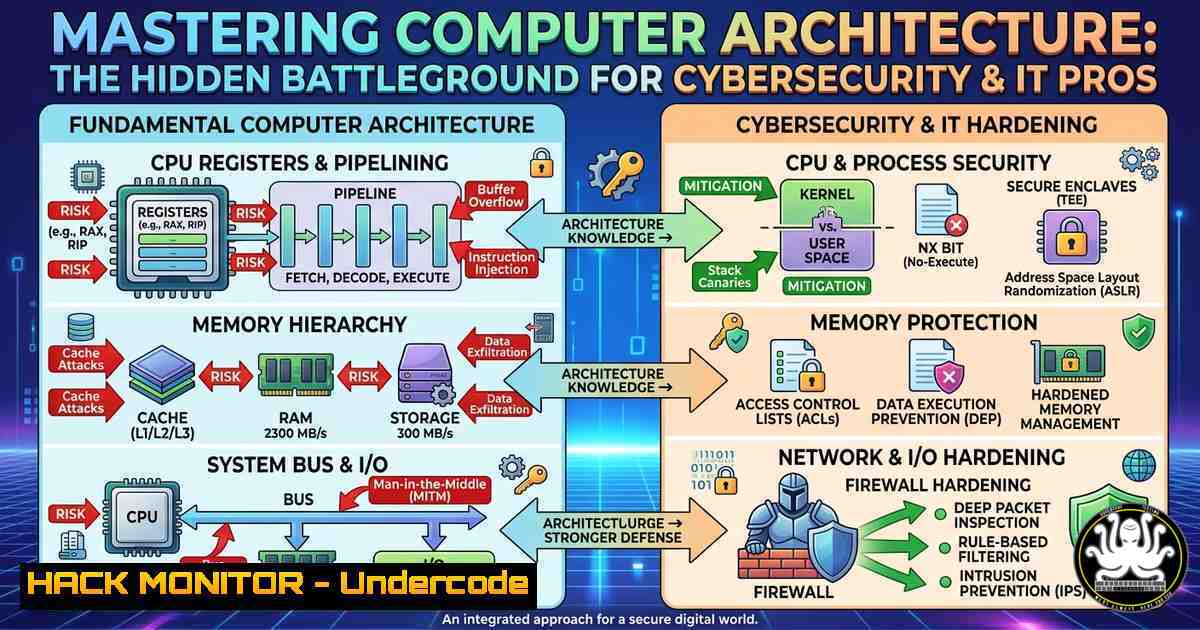
Introduction:
Computer architecture isn’t just academic theory – it’s the foundation upon which all cybersecurity defenses, performance optimizations, and network troubleshooting rest. Understanding how the CPU fetches instructions, how the system bus moves data, and how I/O devices interact with memory gives you the power to spot anomalies, harden systems, and pass advanced certs like CCNA, CCNP, and FortiGate NSE4.
Learning Objectives:
- Deconstruct the CPU’s internal components (ALU, Control Unit, Registers) and their role in executing both benign and malicious code.
- Analyze the Instruction Cycle (Fetch–Decode–Execute–Store) using real‑world Linux/Windows commands and debugging tools.
- Monitor system bus performance and I/O pathways to detect hardware‑level threats and optimize network device configurations.
You Should Know:
- Deconstructing the CPU: ALU, Control Unit, and Registers in Action
The Arithmetic Logic Unit (ALU) performs all mathematical and logical comparisons, while the Control Unit (CU) orchestrates instruction flow without processing data itself. Registers are ultra‑fast memory locations inside the CPU that hold immediate operands and addresses – a prime target for transient execution attacks (e.g., Spectre).
Step‑by‑step guide:
- Linux: Use `lscpu` to see architecture, core counts, and cache sizes. Run `cat /proc/cpuinfo | grep -E “processor|model name|flags”` to inspect CPU features (e.g., `vmx` for virtualization).
- Windows: Open PowerShell as admin and execute
Get-WmiObject -Class Win32_Processor | Format-List Name,NumberOfCores,Architecture. To see register values of a running process, download WinDbg (part of Windows SDK) and attach to a process with!reg. - Security application: Monitor unexpected changes to debug registers (DR0‑DR7) using Sysinternals Regmon or Linux `perf` – rootkits often manipulate them to hide breakpoints.
2. The Instruction Cycle Demystified: Fetch–Decode–Execute–Store
Every command you run repeats this 4‑step loop. Malware can hijack the cycle by injecting bogus instructions during “Fetch” (code injection) or altering the “Store” phase to corrupt memory.
Step‑by‑step guide:
- Simulate with objdump (Linux): Write a tiny C program (
int main() { return 0; }), compile withgcc -o test test.c, then dump its assembly:objdump -d test | grep -A20 "<main>". Identifymov,add, `ret` – these map to fetch/decode/execute. - Windows debugging: Use WinDbg to step through a binary with `t` (trace) and `r` (registers) to see the instruction pointer (
ripon x64) moving. - Hands‑on lab: Run a loop in Python and monitor CPU cycles with Linux
perf stat ./your_script. Compare the number of instructions retired versus branches mispredicted – attackers use branch target injection to violate the cycle’s integrity.
3. System Bus and Motherboard: The Data Highway
The motherboard houses the system bus, split into Data Bus (carries values), Address Bus (specifies memory locations), and Control Bus (timing/direction). A compromised bus can be used for bus snooping or DMA attacks (e.g., FireWire/Thunderbolt direct memory access).
Step‑by‑step guide:
- Linux bus inspection: Run `lspci -tv` to view PCI device tree; `dmesg | grep -i “bus”` shows kernel bus initialisation. To mitigate DMA attacks, enable IOMMU: add `intel_iommu=on` or `amd_iommu=on` to GRUB cmdline.
- Windows: Open Device Manager → View → Resources by type → Input/Output (I/O) and Memory. Use DMA Remapping check in Windows Security (Device Security → Core Isolation → Memory Access Protection).
- Performance monitoring: Linux `iostat -x 1` shows device busy percentage; high `svctm` may indicate bus saturation. In Windows, run `typeperf “\PCIe Bus\”` from Performance Monitor.
4. I/O Pathways: Input/Output Security Considerations
Input devices (keyboard, mouse) convert physical actions into machine‑readable data; output devices (monitor, printer) reverse the process. Attackers often place hardware keyloggers between the keyboard and USB port or exploit printer firmware to exfiltrate documents.
Step‑by‑step guide:
- Detect rogue input devices (Linux): `lsusb` lists all USB devices; cross‑reference with
dmesg | grep -i "new device". Install `usbguard` to enforce a USB device whitelist. - Windows hardening: Open `devmgmt.msc` → Universal Serial Bus controllers → Disable “Composite Parent” if unused. Use Sysmon (Event ID 24) to log USB device plug‑and‑play events.
- Output device logging: Configure printer monitoring via SNMP (e.g.,
snmpwalk -v2c -c public printer_IP 1.3.6.1.2.1.43). For screensaver exfiltration, use Windows Group Policy to disable “Fast User Switching”.
- Hardware vs. Software: Why Cybersecurity Needs Architecture Knowledge
Hardware provides the physical “body” – CPU, RAM, motherboard – but without firmware and an OS, it is inert. However, firmware rootkits (e.g., LoJax) reside in SPI flash memory, survive OS reinstallation, and can manipulate the system bus at Ring -2.
Step‑by‑step guide:
- Check firmware integrity (Linux): Install `flashrom` and compare your BIOS image against the vendor’s hash:
flashrom -r bios_backup.bin && sha256sum bios_backup.bin. - Windows: Use `msinfo32` → “BIOS Version/Date”. Run CHIPSEC framework: `python chipsec_main.py -n -l chipsec.log` to scan for SMM cache poisoning and SPI write protection.
- Command example: To verify that your CPU enforces SMEP (Supervisor Mode Execution Prevention), on Linux:
cat /proc/cpuinfo | grep smep. If missing, add `nosmep` to GRUB (for testing only). In production, ensure it’s enabled to prevent kernel‑mode code execution from user pages.
- Training Pathways: CCNA, CCNP, FortiGate NSE4 – Applying Architecture to Networking
Network devices are specialized computers: routers have CPUs (often MIPS or ARM), a control plane, and a forwarding plane. Understanding the Instruction Cycle and bus architecture helps you diagnose high CPU load from ACL processing or fragmented packets.
Step‑by‑step guide (FortiGate firewall example):
- SSH into your FortiGate and run `get system performance status` – note the CPU and memory usage.
- To see how packets are processed per core: `diagnose sys top` (similar to Linux
top). - Hardening: Disable unnecessary services (e.g., telnet) to reduce control‑plane interruptions: `config system global` →
set admin-telnet disable. - For Cisco devices (CCNA/CCNP): `show processes cpu` reveals which instruction cycles are consumed by routing updates. Use `debug ip packet` with ACL filters to avoid CPU overload.
- Bus relevance: In high‑end routers, the switching fabric is the “system bus”. Monitor its backplane utilisation with
show fabric utilization. A saturated fabric can mimic a DoS attack.
What Undercode Say:
- Key Takeaway 1: The four‑step Instruction Cycle (Fetch–Decode–Execute–Store) is more than an exam bullet point – it’s the precise sequence that malware exploits via code injection and return‑oriented programming (ROP).
- Key Takeaway 2: Modern cybersecurity training (CCNA, NSE4) must integrate hardware architecture because threats like DMA attacks, bus snooping, and firmware rootkits bypass traditional software defences.
Analysis (10 lines):
Sayed Hamza Jillani’s breakdown of computer architecture is not just academic – it directly informs how we build detection rules and harden systems. For instance, when you understand that registers hold immediate data, you realise why antivirus sensors monitor `dr7` for debugger evasion. The system bus’s address and control lines explain why IOMMU group assignment is critical for virtualised environments. Without this low‑level knowledge, a security analyst might treat high interrupt rates as a normal load, missing a hardware keylogger’s `IRQ` flood. Moreover, the distinction between hardware (physical) and software (operational) underscores the need for firmware scanning – a blind spot in many SOCs. Jillani’s emphasis on the motherboard as a “central hub” directly translates to network switch backplane capacity planning. Finally, aligning these fundamentals with vendor certs (FortiGate’s `diagnose sys top` or Cisco’s show processes cpu) bridges theory and practice, producing engineers who can both configure firewalls and explain why a malformed packet spikes the ALU.
Prediction:
Within the next three years, entry‑level cybersecurity certifications will require hands‑on lab questions that combine CPU register inspection with malware analysis – for example, “Use Linux `perf` to identify a branch target injection attack.” As firmware and bus‑level attacks become commodity (e.g., Thunderbolt DMA exploit kits), defensive tools will shift from signature‑based detection to hardware‑telemetry anomaly detection, integrating metrics like bus snoop latency and register access frequency. Organisations that train their teams on computer architecture today will be the only ones able to triage tomorrow’s low‑level compromises before they pivot to the network core.
▶️ Related Video (72% Match):
🎯Let’s Practice For Free:
IT/Security Reporter URL:
Reported By: Sayed Hamza – Hackers Feeds
Extra Hub: Undercode MoN
Basic Verification: Pass ✅


