Listen to this Post
Introduction:
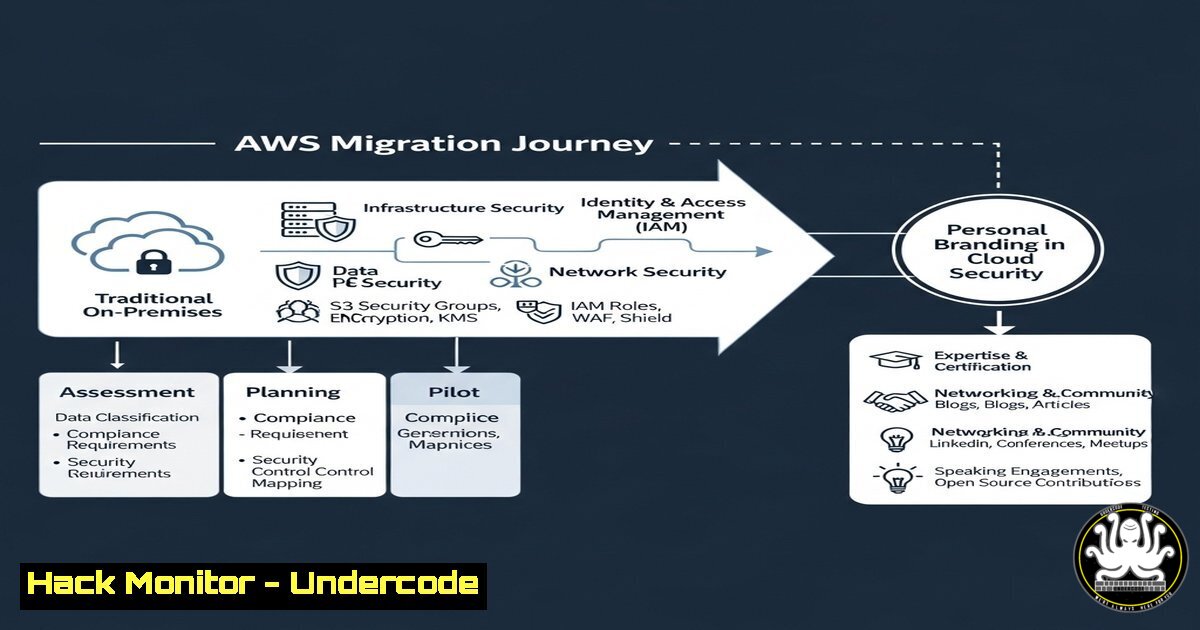
The secure migration to cloud environments like AWS is a critical competency for modern cybersecurity professionals. Simultaneously, building a strong personal brand has become essential for career advancement in this competitive field. This article provides the technical commands and strategic insights to excel in both areas.
Learning Objectives:
- Master key AWS CLI and security scanning commands for a secure cloud migration.
- Implement Linux and Windows hardening techniques to protect migrated workloads.
- Develop a technical content strategy to build a recognized cybersecurity brand.
You Should Know:
1. AWS CLI: Initial Configuration and Security Auditing
Before migration, securely configure your AWS Command Line Interface and audit your current environment.
aws configure
Step-by-step guide: This command initiates an interactive setup. When prompted, input your AWS Access Key ID, Secret Access Key, default region name (e.g., us-east-1), and preferred output format (e.g., json). This establishes secure, programmatic access to your AWS account. Always follow the principle of least privilege when creating the IAM user associated with these keys.
aws iam get-account-authorization-details
Step-by-step guide: This command retrieves a detailed JSON output of all IAM users, roles, policies, and group definitions in your account. Pipe the output to a file (> current_iam_state.json) for offline analysis. Use this to conduct a pre-migration audit, identifying over-permissioned users and roles that need to be hardened before moving workloads.
2. Vulnerability Assessment with Nmap and Nikto
Scan your on-premises servers to identify vulnerabilities that must be remediated before migrating.
nmap -sV -sC --script vuln <target_IP>
Step-by-step guide: This Nmap command performs a version scan (-sV), with default scripts (-sC), and runs scripts from the `vuln` category against the target IP. It identifies known vulnerabilities in running services. Always ensure you have explicit authorization before scanning any system.
nikto -h https://your-target-domain.com
Step-by-step guide: Nikto is a web server scanner. This command tests the target web server for over 6700 potentially dangerous files/CGIs, outdated server versions, and version-specific problems. Review the output and patch all critical findings, such as misconfigurations or unpatched software, prior to migration.
- Linux Workload Hardening with SSHD and Firewall Configuration
Secure Linux servers that are being migrated by enforcing strong remote access and network policies.sudo sed -i 's/^PermitRootLogin yes/PermitRootLogin no/' /etc/ssh/sshd_config
Step-by-step guide: This command uses `sed` to find and uncomment the `PermitRootLogin` line in the SSH configuration file, changing its value to
no. This critical hardening step prevents direct root login via SSH, forcing attackers to compromise a user account first. Restart the SSH service (systemctl restart sshd) for changes to take effect.sudo ufw enable && sudo ufw default deny incoming && sudo ufw allow 22
Step-by-step guide: This command chain enables the Uncomplicated Firewall (UFW), sets the default policy to deny all incoming connections, and then allows traffic only on port 22 (SSH). This ensures the server only exposes necessary services, drastically reducing its attack surface after it’s deployed in AWS.
4. Windows Server Hardening via PowerShell
Harden Windows servers by enforcing powerful audit policies and disabling insecure protocols.
PowerShell
Set-MpPreference -DisableRealtimeMonitoring $false
Enable-NetFirewallRule -DisplayGroup "Windows Defender Firewall Remote Management"
Step-by-step guide: These PowerShell commands ensure Windows Defender real-time monitoring is active and enable the necessary firewall rules for its remote management. This is a foundational step for securing the endpoint before, during, and after migration.
PowerShell
auditpol /set /category:"Account Logon","Account Management","Detailed Tracking","Logon/Logoff","Policy Change","Privilege Use","System" /success:enable /failure:enable
Step-by-step guide: This `auditpol` command configures advanced auditing to log both successful and failed events across all major policy categories. Comprehensive logging is vital for post-migration security monitoring and incident response investigations in the cloud.
5. AWS S3 Bucket Security and Encryption
Misconfigured S3 buckets are a leading cause of cloud data breaches. Configure them securely.
aws s3api put-bucket-encryption --bucket my-migration-bucket --server-side-encryption-configuration '{"Rules": [{"ApplyServerSideEncryptionByDefault": {"SSEAlgorithm": "AES256"}}]}'
Step-by-step guide: This command enforces AES-256 server-side encryption on all objects uploaded to the specified S3 bucket. Encryption at rest is a non-negotiable security control for protecting sensitive data in the cloud.
aws s3api put-public-access-block --bucket my-migration-bucket --public-access-block-configuration BlockPublicAcls=true,IgnorePublicAcls=true,BlockPublicPolicy=true,RestrictPublicBuckets=true
Step-by-step guide: This is perhaps the most critical S3 command. It applies a public access block configuration, effectively disabling all possible ways to make a bucket public. This single command mitigates the risk of accidental data exposure.
- Building Your Brand with Technical Content from CLI Output
Leverage your technical work to create engaging content that demonstrates expertise.history | awk '{print $2}' | sort | uniq -c | sort -rn | head -10Step-by-step guide: This pipeline parses your shell history to find your top 10 most-used commands. This insight can form the basis of a “Top 10 AWS CLI Commands for Security” LinkedIn post, providing immediate value to your network and showcasing practical knowledge.
git log --oneline --author="Your Name" --since="1 month ago" | wc -l
Step-by-step guide: This command counts your commits to a security-related project over the last month. Quantifying your contributions provides concrete metrics you can share (“Automated 50 security controls last month…”) to build credibility and demonstrate proactive initiative.
7. Automating Security with AWS Lambda and Python
Automate post-migration security checks using serverless functions.
import boto3
def lambda_handler(event, context):
ec2 = boto3.client('ec2')
unencrypted_volumes = ec2.describe_volumes(Filters=[{'Name': 'encrypted', 'Values': ['false']}])
for volume in unencrypted_volumes['Volumes']:
print(f"Unencrypted volume found: {volume['VolumeId']}")
 Logic to send to SNS topic for alerting
Step-by-step guide: This simple Python code for an AWS Lambda function uses Boto3 to identify unencrypted EBS volumes. Automating compliance checks is a core cloud security skill. Writing about such automation projects demonstrates your ability to solve real-world problems at scale, a key element of a strong professional brand.
What Undercode Say:
- A secure AWS migration is not just about moving data; it’s a strategic opportunity to rebuild and harden your infrastructure by automating security from the ground up.
- Your professional brand is your most valuable asset; it is built by consistently translating complex technical work into actionable insights that help others.
The convergence of deep technical skill and the ability to articulate its value is the new frontier for cybersecurity leadership. The commands and strategies outlined provide a blueprint for securing critical assets while simultaneously building a reputation as a knowledgeable and generous practitioner. The most sought-after experts are not just those who can configure a firewall, but those can explain why it matters.
Prediction:
The increasing complexity of cloud environments will make automated, code-defined security (IaC) the absolute standard. Professionals who fail to cultivate both these technical automation skills and the soft skills to communicate their implementation will be left behind. The future belongs to those who can architect secure systems and evangelize the principles behind them, turning personal expertise into industry-wide best practices.
🎯Let’s Practice For Free:
IT/Security Reporter URL:
Reported By: https://lnkd.in/p/d4asxs3R – Hackers Feeds
Extra Hub: Undercode MoN
Basic Verification: Pass ✅


