Listen to this Post
Introduction:
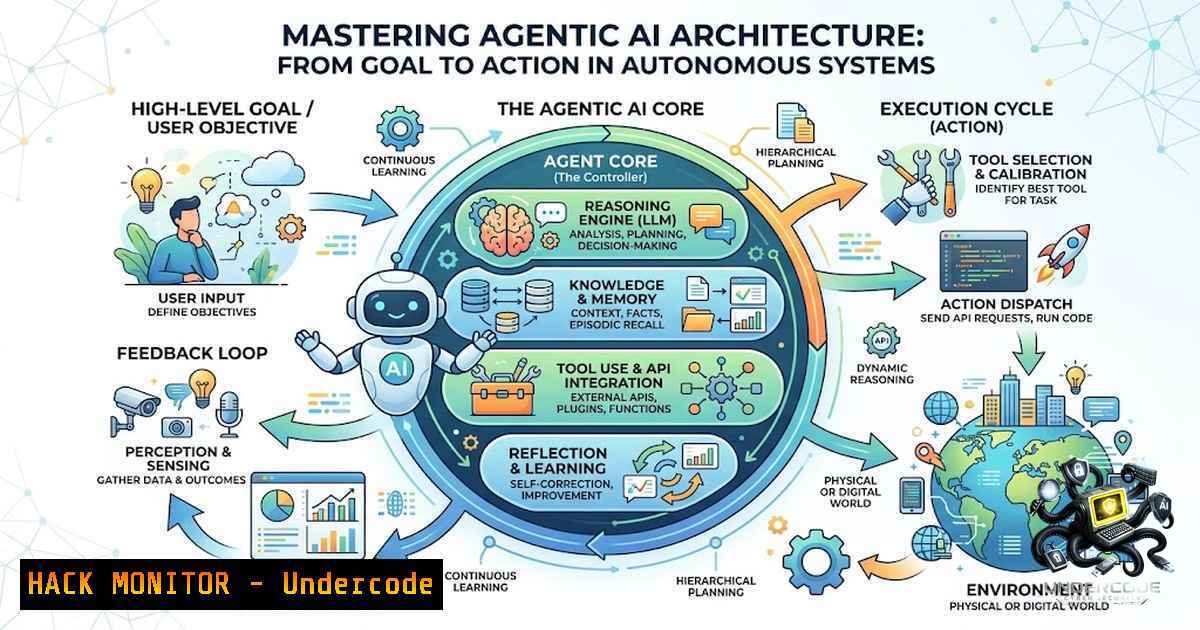
The evolution from simple prompt-response AI systems to complex, goal-oriented autonomous agents represents a paradigm shift in how we design intelligent applications. Traditional AI models operate in a single step: user asks, model responds. However, real-world challenges—from analyzing sales declines to orchestrating IT operations—require a multi-step, iterative process involving planning, tool usage, memory, and validation. This article explores the core components of Agentic AI architecture, providing a technical blueprint for building robust, secure, and effective multi-agent systems.
Learning Objectives:
- Understand the fundamental components of Agentic AI architecture, including orchestrators, planners, and specialized agents.
- Learn how to implement and secure tool-calling, memory management, and validation loops in AI workflows.
- Gain practical knowledge for deploying, monitoring, and governing autonomous AI agents in enterprise environments.
You Should Know:
1. The Core Components of an Agentic Workflow
At its heart, an agentic workflow moves beyond a simple linear interaction. It is a dynamic, feedback-driven loop that can be broken down into five key stages: Plan, Act, Observe, Reflect, and Improve. The architecture is built on several critical components that work in concert to achieve a user-defined goal.
First, the Orchestrator serves as the central nervous system, managing the overall process and directing traffic between other components. It is responsible for initializing the workflow, deciding when to engage the planner, and handling the final response. Second, the Planner takes the user’s high-level goal and decomposes it into a series of actionable, logical steps. This is often achieved through techniques like Chain-of-Thought (CoT) or Tree-of-Thoughts (ToT) prompting, which allow the LLM to “reason” through the problem.
Next, Specialized Agents are the workers that execute specific tasks. These are not just general-purpose LLMs; they are fine-tuned or prompted to excel in a particular domain. For instance, you might have a `RetrievalAgent` for searching a vector database, a `SQLAgent` for querying relational databases, an `APIAgent` for interacting with external services, and a `CodeExecutionAgent` for running Python scripts. Each agent is granted access to a specific set of tools and functions.
Crucially, Memory carries context between these steps, preventing the agent from “forgetting” past actions. There are two primary types of memory in this architecture: short-term memory, which holds the current conversation or task state, and long-term memory, which can store user preferences or past successful strategies for future use. Finally, Guardrails are the security and safety mechanisms that define what the agents are permitted to access or execute. This includes data access controls (e.g., “can query the customer database but not the HR database”) and action permissions (e.g., “can read files but cannot delete them”).
Step-by-step guide to setting up a basic orchestrator:
This example uses Python and the LangChain framework to conceptualize a simple orchestrator that routes a query to a planner.
 Python code using LangChain
from langchain.agents import initialize_agent, Tool
from langchain.llms import OpenAI
from langchain.chains import LLMChain, SimpleSequentialChain

<ol>
<li>Define the LLM (simplified)
llm = OpenAI(openai_api_key="YOUR_API_KEY")</p></li>
<li><p>Define the tools the agent can use
tools = [
Tool(name="SQL Database Query", func=sql_query_function, description="Useful for querying sales data"),
Tool(name="Sentiment Analysis API", func=api_function, description="Analyzes customer feedback"),
]</p></li>
<li><p>Initialize the orchestrator/agent
orchestrator = initialize_agent(tools, llm, agent="zero-shot-react-description", verbose=True)</p></li>
<li><p>The orchestrator receives the user request and begins the workflow
user_query = "Why did sales decline in the Northeast region last month?"
response = orchestrator.run(user_query)
print(response)
Command-line perspective (Linux/Unix):
Monitoring the health and performance of these agents is crucial. On a Linux system, you might use the `htop` command to view system resource usage of the containers or processes running your agents. For logging, a simple `tail -f /var/log/agentic_ai/orchestrator.log` can provide real-time insight into the steps being taken.
2. Implementing Tool Calling and Function Execution
The power of an AI agent lies in its ability to interact with the external world through tools. This is often implemented via function calling. The LLM does not execute code directly; instead, it generates a structured output (like a JSON object) that the orchestrator parses. This JSON describes a specific tool and the arguments required to call it. The orchestrator then securely executes this function and returns the result to the LLM for the next step.
For example, to answer “What is the current inventory for product X?”, the planner might decide to use the `query_inventory` tool. The LLM would output a JSON payload like {"tool": "query_inventory", "parameters": {"product_id": "X123"}}. The orchestrator intercepts this, calls the actual database or API function with the provided parameters, and feeds the result back to the LLM.
Securing this process is paramount. Improperly managed tool calling can be a massive security vulnerability. For instance, a malicious user could craft a prompt that attempts to exploit a SQL injection vulnerability through the `SQLAgent` or use the `CodeExecutionAgent` to run arbitrary, harmful code on the host system.
Step-by-step guide to secure tool execution:
- Input Sanitization: All arguments passed to a tool function must be rigorously validated and sanitized. Use parameterized SQL queries (e.g., `sqlite3` with placeholders) to prevent SQL injection. For Python’s `eval` or
exec, avoid using them entirely if possible. If necessary, use the `ast` module to safely parse literals. - Permission Control (Guardrails): Implement a permission layer that checks if the agent is allowed to call a specific tool with specific parameters based on the user’s context. For instance, a customer support agent should not be able to run a system-level shutdown command.
- Resource Limits: Enforce timeouts and memory limits on tool execution to prevent infinite loops or resource exhaustion attacks. This can be done using Python’s `signal` module or running the execution in a separate, sandboxed process (e.g., using `subprocess` with
timeout). - Audit Logging: Log every single tool call, its parameters, the user who initiated the request, and the result. This is critical for debugging, auditing, and forensic analysis in case of an incident.
Windows/PowerShell command for logging:
On a Windows server hosting an agent, you can use `PowerShell` to set up a listener for application logs. The command `Get-WinEvent -LogName Application | Where-Object { $_.ProviderName -match “AgenticAI” } | Format-Table -AutoSize` can be used to filter and display relevant log entries. For continuous monitoring, you can integrate this with a centralized logging solution like the ELK stack or Azure Monitor.
3. Managing State and Memory Across Multi-Agent Systems
One of the biggest challenges in multi-agent systems is maintaining a coherent and accurate state across a long-running workflow. Each agent operates independently, but they all contribute to a single goal. If the `SQLAgent` retrieves sales data, and the `AnalysisAgent` later needs that data, it must be accessible. This is where state management comes in.
A common pattern is the use of a StateGraph. The orchestrator maintains a global state dictionary or object that is passed to each agent in sequence. After an agent completes its task, it updates the state with its findings. This creates a blackboard-like system where information is centrally available. This pattern is heavily used in frameworks like LangGraph, which allows you to define a graph of nodes (agents) and edges (transitions), with a shared state that flows between them.
For example, the state might look like this:
{
"user_query": "Why did sales decline?",
"plan": ["retrieve_data", "analyze_sales", "generate_report"],
"current_step": "analyze_sales",
"raw_data": " [{'region': 'Northeast', 'sales': 1200, 'prev_sales': 1500}...]",
"analysis_results": "Sales in the Northeast declined by 20% due to a supply chain disruption.",
"final_response": null
}
Step-by-step guide to implementing a state graph:
- Define the State Schema: Create a Pydantic class or a TypedDict in Python to define the schema of your state. This provides type safety and clarity for all agents.
- Design the Workflow Nodes and Edges: Use a framework like LangGraph to define your agents as nodes and the transitions between them as edges. This allows for complex, conditional branching (e.g., “If the `RetrieveAgent` fails to find data, go to the `ErrorHandlerAgent` instead of the
AnalysisAgent“). - Implement Node Functions: Each node function takes the current state as input, performs its operation (e.g., calling a tool), and returns a partial update to the state (e.g.,
{"analysis_results": "..."}). LangGraph merges these updates back into the main state. - Implement Conditional Edges: Use functions to dynamically decide the next step based on the current state. For example, after validation, you can decide whether the response is ready to return to the user or if it needs to be routed back for replanning.
 Python using LangGraph (Conceptual)
from typing import TypedDict, List
from langgraph.graph import StateGraph, END

class AgentState(TypedDict):
user_query: str
plan: List[bash]
current_step: str
data: str
error: str

def retrieve_node(state: AgentState):
 Simulate retrieving data
if "sales" in state["user_query"]:
return {"data": "Sales data retrieved: 1200 units"}
return {"error": "Failed to retrieve sales data"}

def analyze_node(state: AgentState):
 Analyze the data
if "error" not in state:
return {"plan": ["analyze_data"], "current_step": "analysis"}
return {"error": "Cannot analyze due to retrieval failure"}

... more nodes for validation and final response ...

builder = StateGraph(AgentState)
builder.add_node("retrieve", retrieve_node)
builder.add_node("analyze", analyze_node)
 ... add other nodes and define edges ...
builder.add_conditional_edges("analyze", lambda state: "final" if "error" not in state else "error_handler")
 ...
graph = builder.compile()
 final_output = graph.invoke({"user_query": "Why did sales decline?"})
4. Evaluation, Observability, and Human-in-the-Loop
Agentic AI systems are non-deterministic; their responses can vary with each run. Without proper evaluation, it is impossible to know if the system is improving or degrading. Evaluation involves running the system against a set of known test cases and measuring metrics like correctness, latency, and cost. For a tool-calling agent, you might check if it uses the right tool (e.g., “Does it choose the SQL tool for data queries?”), passes the correct parameters, and produces the right final answer.
Observability is the practice of making the internal state of the system visible. This is essential for debugging failures and improving performance. This requires detailed logging of the LLM’s “thoughts” (i.e., the chain of thought prompts), the tool calls it made, the results returned, and the time taken for each step. Tools like LangSmith or OpenTelemetry can be integrated to provide deep insights into the agent’s decision-making process.
For high-impact decisions (e.g., making a financial transaction, modifying a production database, or generating a medical diagnosis), a Human-in-the-Loop (HITL) is recommended. The agent performs all the planning and execution but pauses at the final “act” step. It presents its plan and proposed action to a human operator, who can then approve, modify, or reject the action. This prevents catastrophic errors and builds trust in the system.
Step-by-step guide to implementing a HITL checkpoint:
- Define Breakpoints: In your workflow definition, identify nodes where human approval is required.
- Pause Execution: At these breakpoints, have the orchestrator save the current state and then wait for external input.
- Create an Approval Interface: This could be a simple command-line prompt, a web dashboard, or an email notification. The interface should show the user the action the agent is about to take (e.g., “The agent wants to run the SQL query:
DELETE FROM users WHERE id = 10.”) and provide options like “Approve,” “Reject,” or “Modify.” - Resume Execution: Once the human provides input, the orchestrator resumes the workflow from the breakpoint, using the human’s instruction to guide the next step.
5. Security and Governance in Agentic AI
Security is the bedrock upon which any production-ready Agentic AI system must be built. The power to interact with the world is a double-edged sword. A key principle is the Principle of Least Privilege (PoLP): each agent should have the minimum permissions necessary to do its job.
Implementing this in practice requires a layered security approach. First, API keys and credentials must be stored securely, using a vault solution like HashiCorp Vault or Azure Key Vault, not in environment variables or code. Second, all tool calls and LLM interactions should be subject to rate limiting to prevent abuse and runaway costs. Third, your guardrails must be robust. This could involve using a separate “moderator” LLM that scans the inputs and outputs for sensitive data like PII, or using regular expressions to detect and mask PII before it’s passed to an external tool or stored in a log.
What Undercode Say:
- Agentic AI is a powerful evolution from simple LLM interactions, enabling complex problem-solving through planning and tool execution, but it introduces significant complexity and security challenges that cannot be ignored.
- The key to successful implementation lies in robust engineering practices: clear state management, observability, and strict security controls (guardrails) are not optional, but mandatory for production-grade systems.
Expected Output:
Prediction:
+1 The demand for specialized roles like “AI Agent Engineer” and “LLM Security Specialist” will skyrocket, leading to a new wave of dedicated certifications and training programs in the next 2-3 years.
+N The ease of deploying autonomous agents, combined with inadequate security practices, will lead to a significant number of high-profile data breaches and security incidents in 2026, forcing a regulatory crackdown on their use in sensitive sectors.
+1 The open-source ecosystem (LangChain, LangGraph, AutoGen) will continue to mature rapidly, lowering the barrier to entry and democratizing agentic AI for smaller enterprises.
+N The “black box” nature of multi-agent systems will complicate root cause analysis for failures, making debugging a major bottleneck in developer productivity and system reliability.
+1 Integration with observability platforms (e.g., LangSmith, Arize) will become the new standard, transforming agentic AI from a research project into a manageable and mature enterprise technology.
▶️ Related Video (86% Match):
🎯Let’s Practice For Free:
🎓 Live Courses & Certifications:
Join Undercode Academy for Verified Certifications
🚀 Request a Custom Project:
Secure, high-velocity infrastructure and disruptive technological engineering. Contact our engineering team for high-tier development and proprietary systems:
[email protected]
💎 Smart Architecture | 🛡️ Secure by Design | ⭐ Trusted by Thousands
IT/Security Reporter URL:
Reported By: Rakeshkanche Agenticai – Hackers Feeds
Extra Hub: Undercode MoN
Basic Verification: Pass ✅


