
Listen to this Post
Introduction:
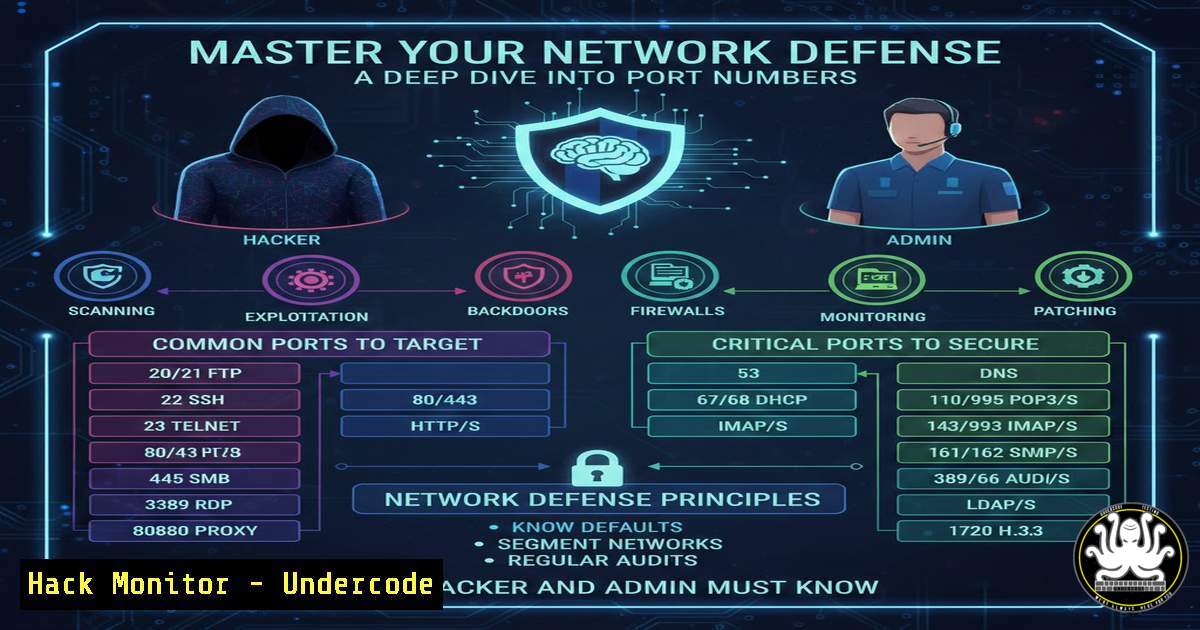
In the world of networking, the IP address is the street address of a building, but the port number is the specific apartment number where the data actually lives. While often viewed as a basic concept, understanding port numbers is critical for cybersecurity defense and attack surface management. They are the gatekeepers that differentiate a web server from a database and, if misconfigured, can become the open window for a cyber intrusion. This article explores the mechanics of port numbers, their role in session management, and how to audit them to harden your infrastructure against malicious actors.
Learning Objectives:
- Understand the logical function of port numbers in distinguishing network services.
- Learn how to enumerate open ports and services on local and remote machines.
- Identify common attack vectors related to port exposure and misconfigurations.
- Master command-line techniques for port scanning and firewall management across Linux and Windows.
- Implement mitigation strategies to secure unused or vulnerable ports.
You Should Know:
- The Anatomy of a Socket Pair: How Sessions Are Tracked
The foundation of modern networking lies in the socket pair (Source IP, Source Port, Destination IP, Destination Port). As described in the post, when you connect to YouTube (destination port 443), your OS assigns a random, ephemeral source port (usually between 32768–65535 on Linux or 49152–65535 on Windows). This allows your computer to manage multiple tabs simultaneously.
Step‑by‑step guide to viewing active connections:
- Linux (View active socket pairs):
View all current TCP connections with numerical addresses and ports
ss -tunap

Alternative: Using netstat (older systems)
netstat -tunap
What this does: `-t` (TCP), `-u` (UDP), `-n` (numeric), `-a` (all), `-p` (program). This shows you the live socket pairs, confirming how your browser’s dynamic port routes traffic back to the correct tab.
-
Windows (View active connections):
Using native netstat
netstat -ano | findstr ESTABLISHED

Using PowerShell for detailed output
Get-NetTCPConnection -State Established
What this does: Displays the local and remote ports, helping you identify which processes (PIDs) are holding connections open.
- Mapping the Service Landscape: The Art of Port Scanning
Knowing which ports are listening is the first step in penetration testing. An attacker scans for open ports to identify running services (like an outdated SSH server on port 22 or a database on 3306).
Step‑by‑step guide to scanning your own perimeter:
-
Linux (Using Nmap):
Scan a specific IP for open TCP ports
nmap -sT -p- 192.168.1.10

Scan for service version detection (to find vulnerable software)
nmap -sV -p 22,80,443 192.168.1.10

Aggressive scan with OS detection
nmap -A 192.168.1.10
Security Note: Only scan systems you own or have written permission to test. Unauthorized scanning is illegal.
-
Windows (Using Test-NetConnection):
Check if a specific port is open on a remote host
Test-NetConnection google.com -Port 443

Scan a range of ports (basic)
1..1024 | % {Test-NetConnection localhost -Port $_ -WarningAction SilentlyContinue}
3. Firewall Hardening: Closing the Unused Ports
A default installation of any OS may have unnecessary services running. Reducing the attack surface means allowing only required ports.
Step‑by‑step guide to configuring host-based firewalls:
- Linux (UFW – Uncomplicated Firewall):
Check current status
sudo ufw status verbose

Deny all incoming by default, allow outgoing
sudo ufw default deny incoming
sudo ufw default allow outgoing

Allow only specific ports (e.g., SSH and Web)
sudo ufw allow 22/tcp
sudo ufw allow 80/tcp
sudo ufw allow 443/tcp

Enable the firewall
sudo ufw enable
-
Linux (iptables – Advanced):
Block all incoming traffic except established connections
sudo iptables -P INPUT DROP
sudo iptables -A INPUT -m state --state ESTABLISHED,RELATED -j ACCEPT
sudo iptables -A INPUT -p tcp --dport 22 -j ACCEPT
sudo iptables -A INPUT -p tcp --dport 443 -j ACCEPT
-
Windows (Windows Defender Firewall with PowerShell):
Block an inbound port (e.g., Port 445 to prevent SMB attacks)
New-NetFirewallRule -DisplayName "Block SMB Port 445" -Direction Inbound -LocalPort 445 -Protocol TCP -Action Block

Allow specific port (e.g., RDP port 3389 from a specific IP)
New-NetFirewallRule -DisplayName "Allow RDP from Office" -Direction Inbound -LocalPort 3389 -Protocol TCP -Action Allow -RemoteAddress 192.168.1.100
4. Service Hardening: Binding Services to Specific Interfaces
Sometimes a service listens on `0.0.0.0` (all interfaces), exposing it to the network when it should only be accessible locally (e.g., a database admin panel).
Step‑by‑step guide to binding services securely:
- Check what a service is listening on:
Linux
ss -lntp | grep :5432  Example for PostgreSQL
-
Configuration Example (Nginx):
Edit `/etc/nginx/sites-available/default` to bind only to internal IP:
server {
listen 192.168.1.10:80;  Instead of listen 80;
...
}
- Configuration Example (SSH):
Edit `/etc/ssh/sshd_config` to prevent remote root login and bind to specific interface:PermitRootLogin no ListenAddress 192.168.1.10
Then restart: `sudo systemctl restart sshd`
5. Detecting Port Knocking and Stealth Scans
Attackers use techniques like FIN scans or slow scans to avoid detection. System administrators can log these attempts.
Step‑by‑step guide to detecting port scans:
- Linux (Monitoring logs):
Watch firewall logs for repeated hits (if using UFW)
sudo tail -f /var/log/ufw.log

Use fail2ban to detect and block scanners
sudo apt install fail2ban
sudo fail2ban-client status
-
Windows (Event Viewer):
Check `Applications and Services Logs/Microsoft/Windows/Windows Firewall with Advanced Security` for connection events.
6. Cloud Security Groups: The Virtual Firewall
In cloud environments (AWS, Azure, GCP), traditional firewalls are replaced by Security Groups (stateful) and Network ACLs (stateless). Misconfigured security groups allowing `0.0.0.0/0` on port 22 (SSH) or 3389 (RDP) are the 1 cause of cloud breaches.
Step‑by‑step guide to auditing cloud ports (AWS Example):
- Using AWS CLI to find overly permissive rules:
Describe security groups and find those with 0.0.0.0/0 on SSH
aws ec2 describe-security-groups --query 'SecurityGroups[?IpPermissions[?FromPort==<code>22</code> && IpRanges[?CidrIp==<code>0.0.0.0/0</code>]]]' --output table
-
Remediation (Revoke rule):
aws ec2 revoke-security-group-ingress --group-id sg-12345678 --protocol tcp --port 22 --cidr 0.0.0.0/0
7. Docker and Container Port Exposure
Containers often publish ports to the host, bypassing host firewalls if not handled correctly. A database container should not be exposed directly to the internet.
Step‑by‑step guide to secure container networking:
- Check exposed ports on running containers:
docker ps --format "table {{.Names}}\t{{.Ports}}" -
Run a container binding only to localhost (not accessible externally):
docker run -d -p 127.0.0.1:5432:5432 postgres
Explanation: This makes the PostgreSQL port only available on the host’s loopback interface, not the public network interface.
-
Network segmentation with Docker:
Create a dedicated network for internal services
docker network create internal-net

Run a database on that network without exposing port to host
docker run -d --network internal-net --name db postgres
What Undercode Say:
Port numbers are the unsung heroes of network segmentation, but they are also the low-hanging fruit for attackers. The key takeaway is that visibility leads to vulnerability. By regularly auditing open ports with tools like `ss` and nmap, and strictly enforcing firewall rules (both host-based and cloud-native), you transform a basic networking concept into a formidable security control. Remember the principle of least privilege: if a service doesn’t need to be accessed from the internet, bind it to localhost or a private IP. In the age of microservices and cloud-native architectures, port mismanagement is a leading cause of data exposure. Treat your port list like a VIP list—only allow the essential services to enter, and keep the dynamic source port dance invisible to the outside world.
Prediction:
As 5G and IoT devices proliferate, the number of exposed ports will explode exponentially. The future of cybersecurity will shift toward Zero Trust Networking, where even traffic on internal ports is encrypted and authenticated. We predict a rise in “port obfuscation” techniques like Port Knocking and Single Packet Authorization (SPA) to protect critical infrastructure, alongside AI-driven anomaly detection that spots port scanning behavior in milliseconds, automatically blocking the source IP before a handshake is even completed.
▶️ Related Video (76% Match):
🎯Let’s Practice For Free:
IT/Security Reporter URL:
Reported By: Mondaysam %F0%9D%90%8B%F0%9D%90%9E%F0%9D%90%AD%F0%9D%90%AC – Hackers Feeds
Extra Hub: Undercode MoN
Basic Verification: Pass ✅


