Listen to this Post
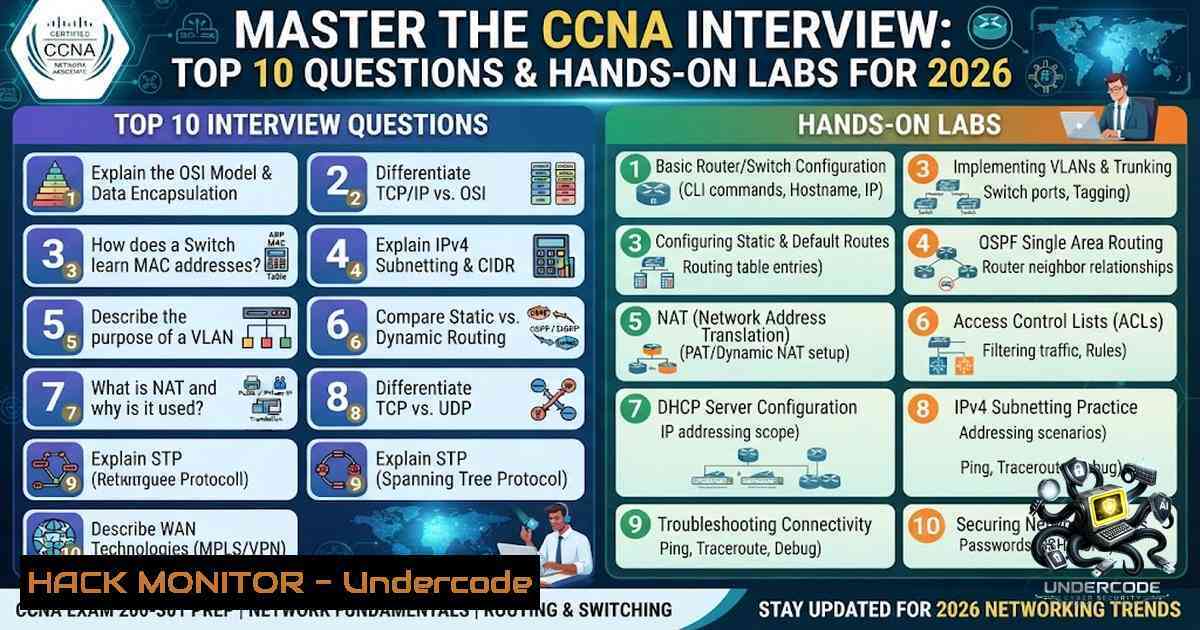
Introduction:
The Cisco Certified Network Associate (CCNA) remains one of the most recognized entry-level certifications in the IT industry, serving as a gateway for aspiring network engineers. However, passing the exam is only half the battle; the technical interview is where theoretical knowledge meets practical scrutiny. This article bridges the gap between certification and career, breaking down the most frequently asked CCNA interview questions and supplementing them with hands-on Linux/Windows commands, configuration examples, and troubleshooting scenarios to ensure you not only answer questions correctly but also demonstrate real-world competency.
Learning Objectives:
- Master the core networking fundamentals, including the OSI model, IP addressing, and subnetting.
- Differentiate between essential network devices (hub, switch, router) and protocols (TCP/UDP, STP, VLANs).
- Acquire practical command-line skills for network verification and troubleshooting on both Cisco IOS and general OS platforms.
- Understand advanced concepts such as dynamic routing, NAT, and network security to tackle scenario-based questions.
1. Core Networking Fundamentals & The OSI Model
Interviewers often begin with foundational questions to assess your understanding of how networks operate. A common opening is: “What is the OSI model, and what are its layers?” The OSI (Open Systems Interconnection) model is a conceptual framework used to understand and implement networking protocols. It consists of seven layers: Physical, Data Link, Network, Transport, Session, Presentation, and Application. Each layer serves a specific function, from the physical transmission of bits (Layer 1) to end-user application interaction (Layer 7).
To demonstrate deeper knowledge, be prepared to explain how data moves through these layers. When a user sends an email, the data is encapsulated layer by layer at the source and de-encapsulated at the destination. Furthermore, you should be able to map common protocols to this model. For example, TCP and UDP operate at the Transport layer (Layer 4), while IP operates at the Network layer (Layer 3).
Step‑by‑step guide to reinforce this concept:
- Visualize the Process: Sketch the OSI model on a whiteboard. Label each layer and write one example of a protocol or device that operates at that layer (e.g., Hub – Layer 1, Switch – Layer 2, Router – Layer 3).
- Use the `ping` Command: The `ping` command tests connectivity by sending ICMP Echo Request packets. It primarily tests Layer 3 (Network layer) connectivity.
– Linux/Windows: `ping 8.8.8.8`
3. Trace the Route: Use the `tracert` (Windows) or `traceroute` (Linux) command to see the path packets take to a destination. This helps visualize the routing process across multiple networks.
– Windows: `tracert 8.8.8.8`
– Linux: `traceroute -1 8.8.8.8`
2. Networking Devices: Hub, Switch, and Router
Another predictable question is: “Explain the difference between a switch and a hub.” A hub operates at the Physical layer (Layer 1) and is a simple, unintelligent device that broadcasts incoming data packets to all other ports, leading to collisions and inefficiency. In contrast, a switch operates at the Data Link layer (Layer 2) and is intelligent; it uses MAC addresses to forward frames only to the specific destination port, creating a dedicated and secure connection.
Taking it a step further, a router operates at the Network layer (Layer 3) and connects different networks, forwarding data packets based on IP addresses. This distinction is crucial: switches connect devices within the same network (LAN), while routers connect different networks.
Step‑by‑step guide to device verification:
- View the MAC Address Table (Cisco Switch): This command shows the MAC addresses the switch has learned and which ports they are associated with.
– `Switch> enable`
– `Switch show mac address-table`
2. View the Routing Table (Cisco Router): This shows the known networks and the next-hop IP addresses for routing.
– `Router> enable`
– `Router show ip route`
3. View ARP Table (Windows/Linux): The Address Resolution Protocol (ARP) maps IP addresses to MAC addresses.
– Windows: `arp -a`
– Linux: `arp -1`
3. VLANs, Trunking, and Network Segmentation
“What is a VLAN, and why is it used?” is a high-frequency question. A VLAN (Virtual Local Area Network) is a logical grouping of devices within a network that communicate as if they are on the same physical network, regardless of their physical location. VLANs are used to improve network efficiency by reducing broadcast domains, enhance security by isolating traffic, and simplify network management.
To allow traffic from multiple VLANs to traverse a single physical link between switches, VLAN trunking is used. The 802.1Q tagging protocol is the standard for this, adding a tag to each Ethernet frame to identify which VLAN it belongs to.
Step‑by‑step guide to VLAN configuration on a Cisco Switch:
1. Create a VLAN:
– `Switch configure terminal`
– `Switch(config) vlan 10`
– `Switch(config-vlan) name Sales`
– `Switch(config-vlan) exit`
2. Assign a Port to the VLAN:
– `Switch(config) interface fastEthernet 0/1`
– `Switch(config-if) switchport mode access`
– `Switch(config-if) switchport access vlan 10`
3. Configure a Trunk Port:
– `Switch(config) interface fastEthernet 0/24`
– `Switch(config-if) switchport mode trunk`
4. The Spanning Tree Protocol (STP)
STP is a critical protocol that prevents loops in Ethernet networks. In a network with redundant links, broadcast storms can cripple the network. STP creates a loop-free logical topology by blocking redundant paths and automatically reactivating them if the primary path fails. Interviewers may ask you to explain the port states (Blocking, Listening, Learning, Forwarding, Disabled) or the root bridge election process.
Step‑by‑step guide to STP verification and tuning:
1. View STP Status:
– `Switch show spanning-tree`
2. Change the Bridge Priority (to influence root bridge election):
– `Switch(config) spanning-tree vlan 1 priority 4096`
3. Configure PortFast: For access ports connected to end devices, PortFast immediately transitions the port to the Forwarding state, skipping the listening and learning states.
– `Switch(config-if) spanning-tree portfast`
5. IP Addressing, Subnetting, and NAT
Mastery of IP addressing and subnetting is non-1egotiable. A common question is: “What is a subnet mask, and how does it work?” A subnet mask is a 32-bit value used to divide an IP address into network and host portions. It allows devices to determine whether a destination is on the same local network or if routing is required.
Furthermore, “Explain NAT (Network Address Translation)” is a typical question. NAT is a technique used to translate private IP addresses within a local network to a single public IP address for external communication. It conserves public IP addresses and adds a layer of security by hiding internal IP structures.
Step‑by‑step guide to subnetting and NAT configuration:
- Subnetting Calculation: For the network
192.168.1.0/26, the subnet mask is255.255.255.192. This provides 64 total addresses, 62 usable hosts, and a broadcast address of192.168.1.63.
2. Configure Static NAT (Cisco Router):
– `Router(config) ip nat inside source static 192.168.1.10 203.0.113.5`
– `Router(config) interface fastEthernet 0/0`
– `Router(config-if) ip nat inside`
– `Router(config) interface serial 0/0/0`
– `Router(config-if) ip nat outside`
6. Dynamic Routing: OSPF and EIGRP
Routing protocols are a major topic. “What is the difference between static routing and dynamic routing?” Static routing involves manually configuring routes, while dynamic routing uses protocols like OSPF or EIGRP to automatically discover and maintain routes. OSPF (Open Shortest Path First) is a link-state protocol that uses Dijkstra’s algorithm to calculate the shortest path. EIGRP is an advanced distance-vector protocol that uses a composite metric of bandwidth, delay, reliability, and load.
Step‑by‑step guide to OSPF configuration:
1. Enable OSPF on a Router:
– `Router(config) router ospf 1`
– `Router(config-router) network 192.168.1.0 0.0.0.255 area 0`
2. Verify OSPF Neighbors:
– `Router show ip ospf neighbor`
3. View the OSPF Routing Table:
– `Router show ip route ospf`
7. Network Troubleshooting and Security
Scenario-based questions often test your troubleshooting methodology. A question like, “How do you troubleshoot network issues?” requires a structured approach: checking physical connections, verifying IP configurations, testing connectivity with ping, and analyzing routing paths with traceroute. Additionally, you may be asked about network security, such as the purpose of Access Control Lists (ACLs) or the function of a firewall.
Step‑by‑step guide to troubleshooting a connectivity issue:
- Check Physical Layer: Verify cables are connected and link lights are active.
- Check IP Configuration: On a Windows client, use `ipconfig` to ensure it has a valid IP address. On Linux, use `ifconfig` or
ip addr.
3. Test Local Connectivity: `ping` the default gateway.
- Test Remote Connectivity: `ping` an external IP like
8.8.8.8. If it fails, check the routing table. - Trace the Path: Use `tracert` or `traceroute` to see where the packets are being dropped.
What Undercode Say:
- Key Takeaway 1: The CCNA interview is less about rote memorization and more about demonstrating a clear, structured understanding of networking fundamentals. Mastering the OSI model and subnetting forms the bedrock of all subsequent knowledge.
- Key Takeaway 2: Practical, hands-on experience with Cisco IOS commands and general OS networking tools (like
ping,tracert, andarp) is invaluable. Interviewers are impressed by candidates who can not only explain a concept but also verify and troubleshoot it using command-line interfaces.
Analysis: The networking field is evolving rapidly with the advent of SD-WAN, cloud networking, and automation. However, the core principles tested in the CCNA—routing, switching, and IP connectivity—remain the absolute foundation upon which these advanced technologies are built. Candidates who display a genuine, granular understanding of these fundamentals, coupled with demonstrable command-line proficiency, will always stand out. The ability to articulate troubleshooting steps logically and calmly is often a stronger indicator of success than simply knowing the right answer. As networks become more complex, the demand for engineers who can methodically isolate and resolve issues will only increase.
Prediction:
- +1 The demand for CCNA-certified professionals will continue to grow as network infrastructure expands with IoT and 5G, creating more job opportunities for qualified candidates.
- +1 The integration of AI in network operations (AIOps) will augment, but not replace, the need for foundational networking knowledge, making CCNA skills more relevant than ever.
- -1 The rise of automated, cloud-managed networks (e.g., Meraki, SD-WAN) may reduce the need for manual CLI configuration in some environments, potentially shifting the focus of interviews toward automation and scripting skills (Python, Ansible) in the coming years.
▶️ Related Video (84% Match):
🎯Let’s Practice For Free:
🎓 Live Courses & Certifications:
Join Undercode Academy for Verified Certifications
🚀 Request a Custom Project:
Secure, high-velocity infrastructure and disruptive technological engineering. Contact our engineering team for high-tier development and proprietary systems:
[email protected]
💎 Smart Architecture | 🛡️ Secure by Design | ⭐ Trusted by Thousands
IT/Security Reporter URL:
Reported By: Mohamed Abdelgadr – Hackers Feeds
Extra Hub: Undercode MoN
Basic Verification: Pass ✅


