Listen to this Post
Introduction:
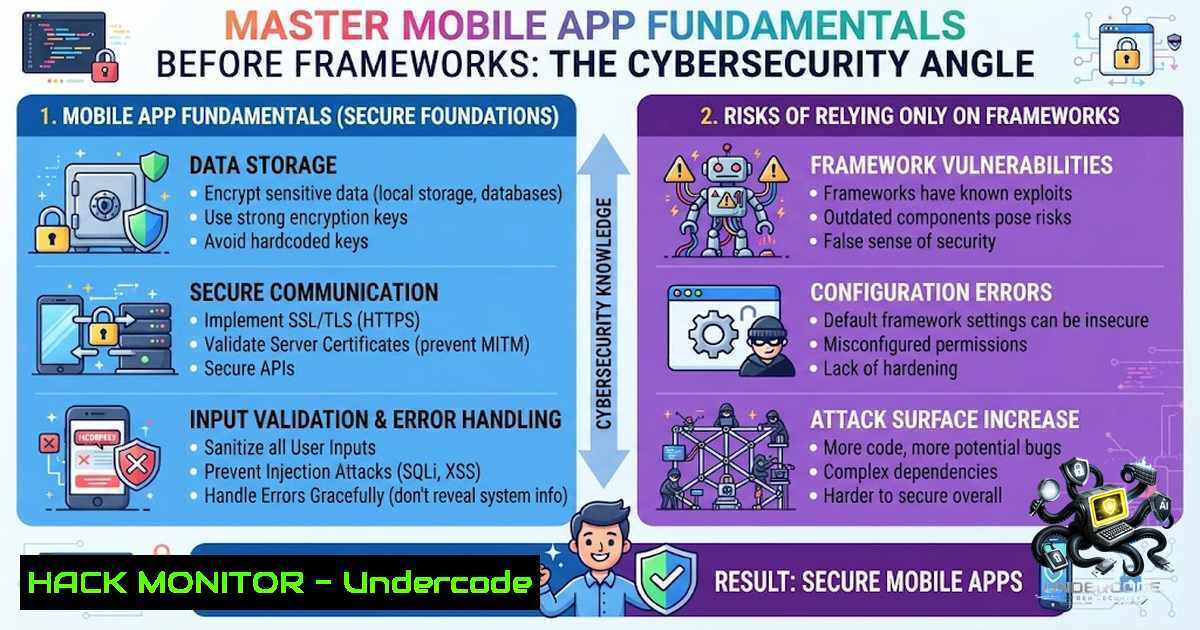
Most mobile developers jump straight into Flutter, React Native, or native development without understanding how a mobile app actually works behind the scenes. This knowledge gap is often the difference between someone who builds apps and someone who can solve complex production issues—and, more critically, between an app that is secure and one that is vulnerable to attack. Before mastering any framework, developers must learn core concepts like the app lifecycle, memory management, threads and concurrency, the event loop, the rendering pipeline, CPU vs GPU, networking basics, local storage, architecture patterns, and performance optimization. Frameworks will change; these fundamentals will not, and they form the bedrock of secure, resilient mobile applications.
Learning Objectives:
- Understand the mobile app lifecycle and its security implications, including background/foreground state transitions.
- Master memory management techniques to prevent common vulnerabilities like use-after-free and memory leaks.
- Grasp threading and concurrency models to avoid race conditions and deadlocks that can be exploited.
- Learn the event loop and rendering pipeline to optimize performance and reduce attack surfaces.
- Differentiate CPU vs GPU workloads to secure sensitive computations.
- Implement secure networking practices and local storage encryption.
- Apply architecture patterns that inherently promote security, such as MVVM with clear separation of concerns.
- Utilize performance optimization tools to identify and mitigate security-related performance bottlenecks.
You Should Know:
- App Lifecycle & State Management: The Foundation of Secure Transitions
The mobile app lifecycle—from launch to background, foreground, and termination—is a critical attack surface. When an app moves to the background, sensitive data may remain in memory or be improperly cached. When it returns to the foreground, improper state restoration can lead to session fixation or privilege escalation.
Step‑by‑step guide to secure lifecycle handling:
- On Android: Override
onPause(),onStop(), and `onDestroy()` to clear sensitive data from memory and cancel pending network requests. Use `onSaveInstanceState()` to store only non‑sensitive state. - On iOS: Implement `applicationDidEnterBackground:` and `applicationWillEnterForeground:` to encrypt cached data and invalidate sessions.
- Cross‑platform (Flutter): Use `WidgetsBindingObserver` to listen to `AppLifecycleState` changes and trigger security measures like clearing in‑memory tokens.
- Testing: Simulate background/foreground transitions and verify that session tokens are not exposed via logs or shared preferences.
- Command (Linux/macOS) to monitor app state changes: Use `adb logcat | grep -i lifecycle` on Android to observe lifecycle events in real time.
- Command (Windows) with Android Debug Bridge: `adb logcat | findstr /i lifecycle`
2. Memory Management: Preventing Leaks and Exploits
Memory mismanagement is a primary source of vulnerabilities, including use‑after‑free, double‑free, and buffer overflows. In managed languages like Kotlin (JVM) and Swift (ARC), these issues are less common but still occur due to reference cycles and improper handling of native code.
Step‑by‑step guide to secure memory practices:
- For Android (Kotlin/Java): Avoid holding static references to `Activity` or
Context; use `WeakReference` for callbacks. Leverage `LeakCanary` to detect leaks during development. - For iOS (Swift): Use weak and unowned references to break retain cycles in closures. Profile with Xcode’s Instruments (Leaks tool).
- For Flutter (Dart): Be mindful of `StreamController` and
ChangeNotifier; always cancel subscriptions and dispose of controllers indispose(). - Native Code (C/C++): If using NDK or Objective‑C++, use tools like AddressSanitizer (ASan) to detect memory corruption.
- Command (Linux) to check memory usage of a running app: `adb shell dumpsys meminfo
`
– Command (Windows) with ADB: `adb shell dumpsys meminfo`
– Tutorial: Set up LeakCanary in your Android project by adding `debugImplementation ‘com.squareup.leakcanary:leakcanary-android:2.x’` and running your app in debug mode. Any leaks will be reported in notifications.
- Threads & Concurrency: Avoiding Race Conditions and Deadlocks
Concurrency bugs can lead to data corruption, inconsistent state, and even remote code execution if an attacker can trigger a race condition. Understanding thread safety and synchronization is paramount.
Step‑by‑step guide to secure concurrency:
- Android: Use `Handler` and `Looper` for main thread operations; offload heavy tasks to `AsyncTask` (deprecated, use `Coroutines` or
RxJava). Synchronize access to shared mutable state using `synchronized` blocks or `Atomic` classes. - iOS: Use Grand Central Dispatch (GCD) with serial queues for thread‑safe access to shared resources. Avoid nested sync calls that can cause deadlocks.
- Flutter: Use `Isolate` for CPU‑intensive tasks; ensure communication via `SendPort` and `ReceivePort` is serialized.
- Testing: Use stress tests to provoke race conditions. Tools like `ThreadSanitizer` (TSan) can detect data races.
- Command (Linux) to view thread count: `adb shell ps -T
` or top -H -p <pid>. - Command (Windows) with ADB: `adb shell ps -T
`
– Tutorial: Implement a simple counter with and without synchronization; use `adb shell` to simulate concurrent calls and observe inconsistencies.
- Event Loop & Rendering Pipeline: Securing the UI Thread
The event loop processes user interactions and system events. If the main thread is blocked, the app becomes unresponsive (ANR on Android, hang on iOS), which can be a denial‑of‑service vector. Moreover, rendering pipeline vulnerabilities can lead to UI redressing or clickjacking.
Step‑by‑step guide to optimize and secure the event loop:
- Android: Never perform network or disk I/O on the main thread. Use `StrictMode` to detect violations during development.
- iOS: Use `performSelectorOnMainThread:` or `DispatchQueue.main.async` for UI updates. Profile with Time Profiler in Instruments.
- Flutter: Use `Future` and `async/await` with `compute()` for heavy lifting. Avoid `setState()` in tight loops.
- Security: Ensure that touch events are properly validated to prevent tapjacking; use `filterTouchesWhenObscured` on Android.
- Command (Linux) to check UI thread responsiveness: `adb shell dumpsys activity
| grep -i “displayed”`
– Tutorial: Create a Flutter app that performs a heavy computation on the main thread, observe the jank, then refactor usingcompute().
5. CPU vs GPU: Offloading Secure Computations
Understanding the division of labor between CPU and GPU is essential for performance and security. GPUs are optimized for parallel tasks but may not support the same security features (e.g., address space layout randomization, DEP). Sensitive computations like encryption should remain on the CPU.
Step‑by‑step guide to secure compute offloading:
- Android: Use `RenderScript` (deprecated) or `Vulkan` for GPU compute; ensure that sensitive data is not left in GPU memory after use.
- iOS: Use `Metal` for GPU compute; clear buffers after processing.
- Flutter: Use `dart:ffi` to call native CPU‑based libraries for crypto; avoid GPU for encryption.
- Testing: Profile CPU vs GPU usage with Android Profiler or Xcode’s GPU Report.
- Command (Linux) to monitor GPU usage: `adb shell dumpsys gfxinfo
`
– Tutorial: Implement image processing on both CPU and GPU, compare performance, and ensure that no sensitive pixel data remains in GPU caches.
- Networking Basics & Local Storage: Protecting Data in Transit and at Rest
Insecure networking and storage are among the top mobile vulnerabilities (OWASP Mobile Top 10). Developers must enforce HTTPS, certificate pinning, and secure local storage (e.g., EncryptedSharedPreferences, Keychain).
Step‑by‑step guide to secure networking and storage:
- Networking: Use HTTPS with TLS 1.2/1.3. Implement certificate pinning using `OkHttp` on Android or `URLSession` with `didReceive challenge` on iOS. For Flutter, use `Dio` with `HttpClient` and pinning.
- Local Storage: On Android, use `EncryptedSharedPreferences` and `Room` with SQLCipher. On iOS, use `Keychain` for secrets and `FileManager` with
NSFileProtectionComplete. For Flutter, useflutter_secure_storage. - Testing: Use a proxy like Burp Suite to intercept traffic and verify that certificates are pinned and data is encrypted.
- Command (Linux) to check network connections: `adb shell netstat -tupn | grep
`
– Command (Windows) with ADB: `adb shell netstat -tupn | findstr`
– Tutorial: Set up certificate pinning in an Android app using OkHttp and test with a self‑signed certificate to ensure the connection fails.
- Architecture Patterns & Performance Optimization: Building for Security and Scale
Architecture patterns like MVVM, MVP, and Clean Architecture promote separation of concerns, making it easier to isolate security logic (e.g., authentication, authorization). Performance optimization, when done correctly, reduces the attack surface by minimizing exposed components and reducing the time sensitive data is in memory.
Step‑by‑step guide to secure architecture and optimization:
- MVVM: Keep business logic in ViewModels, expose data via LiveData/StateFlow. Ensure that sensitive operations (e.g., login) are not triggered from the View layer.
- Clean Architecture: Use use cases/interactors to encapsulate business rules; inject repositories for data sources, allowing for easy swapping of secure implementations.
- Optimization: Use lazy loading for large assets; implement caching with expiration to avoid stale data. Profile startup time and reduce initial permissions.
- Security: Apply the principle of least privilege; request only necessary permissions at runtime.
- Command (Linux) to measure app startup time: `adb shell am start -W
/ `
– Tutorial: Refactor a legacy app to use MVVM with LiveData, and add a security layer that encrypts all data before persisting.
What Undercode Say:
- Fundamentals are framework‑agnostic: A developer with strong fundamentals can learn Flutter, React Native, Android, iOS, Kotlin, or Swift much faster than someone who only knows a framework. This is especially true for security, where the underlying OS and hardware constraints are universal.
- Revisiting core concepts is a continuous process: Even experienced engineers benefit from revisiting memory management, concurrency, and networking to stay ahead of emerging threats and platform changes.
- Security is not an afterthought: By integrating security into the fundamental understanding of app lifecycle, memory, and threading, developers can build resilient apps that withstand attacks from the ground up.
- Performance and security go hand in hand: Optimized code that respects the event loop and rendering pipeline is less likely to have exploitable bottlenecks or expose sensitive data during jank.
- Tooling is your ally: Use platform‑provided tools (LeakCanary, Instruments, StrictMode, ThreadSanitizer) to automate detection of vulnerabilities, freeing up time for higher‑level security design.
- Cross‑platform does not mean cross‑security: Flutter and React Native abstract many details, but developers must still understand the underlying platform’s security models to implement proper encryption, certificate pinning, and secure storage.
- The threat landscape evolves, fundamentals endure: While new CVEs and attack vectors emerge daily, the core principles of secure memory management, safe concurrency, and robust networking remain constant.
- Training and continuous learning are essential: Invest in courses that cover these fundamentals with a security focus, such as SANS SEC575 (Mobile Device Security) or OWASP Mobile Security Testing Guide.
- Community knowledge sharing: Engage with platforms like LinkedIn and GitHub to share insights and learn from others’ security post‑mortems.
- Build your foundation first: Everything else—frameworks, libraries, tools—becomes easier and more secure when you have a solid grasp of the basics.
Prediction:
- +1: As the mobile app market continues to grow, demand for developers who understand these fundamentals will increase, leading to higher salaries and more job security for those who invest in continuous learning.
- +1: Security‑focused fundamental training will become a standard part of computer science curricula and bootcamps, reducing the number of insecure apps deployed to app stores.
- -1: However, the rapid pace of framework releases may tempt new developers to skip fundamentals, leading to a wave of vulnerable apps that will require costly remediation and erode user trust.
- +1: AI‑powered static analysis tools will emerge that can automatically detect violations of these fundamental principles, making it easier for teams to enforce secure coding standards.
- -1: The increasing complexity of mobile OSes (Android 14, iOS 17) and their security features (e.g., permission models, background execution limits) will require developers to constantly update their fundamental knowledge, creating a skills gap.
- +1: Open‑source communities will develop more comprehensive checklists and training modules for these fundamentals, accelerating the upskilling of the global developer workforce.
- -1: Meanwhile, attackers will continue to exploit fundamental weaknesses (e.g., memory corruption in native libraries, race conditions in multi‑threaded code) as long as developers neglect these core concepts.
- +1: The integration of security into CI/CD pipelines (DevSecOps) will enforce fundamental checks (e.g., memory leaks, thread safety) automatically, raising the baseline security of all mobile apps.
- +1: Frameworks like Flutter and React Native will improve their tooling to expose more of these fundamentals, making it easier for developers to write secure code without deep platform expertise.
- +1: Ultimately, the developers who master these fundamentals today will be the ones leading the next generation of secure, high‑performance mobile applications, turning a potential vulnerability into a competitive advantage.
▶️ Related Video (82% Match):
🎯Let’s Practice For Free:
🎓 Live Courses & Certifications:
Join Undercode Academy for Verified Certifications
🚀 Request a Custom Project:
Secure, high-velocity infrastructure and disruptive technological engineering. Contact our engineering team for high-tier development and proprietary systems:
[email protected]
💎 Smart Architecture | 🛡️ Secure by Design | ⭐ Trusted by Thousands
IT/Security Reporter URL:
Reported By: Maaz Afzal – Hackers Feeds
Extra Hub: Undercode MoN
Basic Verification: Pass ✅


