Listen to this Post
Introduction:
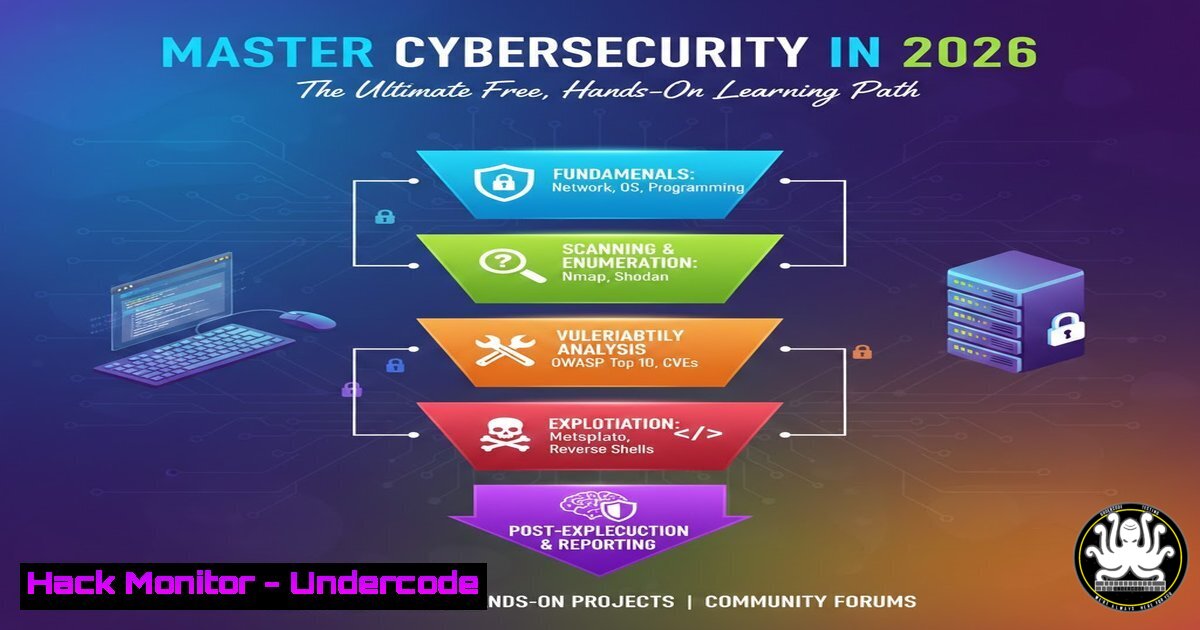
Breaking into cybersecurity requires practical skills, not just theoretical knowledge. In 2026, with threats evolving daily, building a strong foundation through hands-on practice is non-negotiable. This guide, curated from industry professionals, provides a structured, free learning path using the TryHackMe platform to transform you from a beginner into a competent security practitioner.
Learning Objectives:
- Establish core competency in Linux and Windows operating systems, the primary environments for both attack and defense.
- Understand essential networking protocols and how to assess systems for common vulnerabilities using industry-standard tools.
- Develop a structured hacker methodology and apply it in practical web application security challenges.
You Should Know:
1. Building Your Foundational Operating System Knowledge
A security professional must be fluent in the operating systems they are defending or assessing. This begins with mastering the command-line interface (CLI), which is the true control panel for any system.
Step‑by‑step guide explaining what this does and how to use it.
Start with the “Linux Fundamentals” rooms on TryHackMe. Before even booting a target machine, you must be comfortable in a Linux terminal.
Objective: Learn file system navigation, user privilege management, and basic bash scripting.
Core Commands to Master:
`pwd`, `ls`, `cd`: Navigate the filesystem.
grep, cat, less: Search and view file contents.
chmod, sudo, useradd: Manage file permissions and users.
ps, netstat, systemctl: View processes and manage services.
Transition to “Windows Fundamentals”. Security in Windows revolves around understanding its GUI and powerful CLI tools, user accounts, and the registry.
Objective: Understand Windows architecture, the PowerShell environment, and common misconfigurations.
Core Commands/Tools to Master:
ipconfig, netstat -ano: Network configuration and connection analysis.
`whoami`, `net user`: User account interrogation.
`Get-Process`, `Get-Service`: PowerShell commands for system enumeration.
The Windows Registry Editor (regedit): Understanding system configuration stores.
2. Decoding Network Communications for Security Analysis
Every cyber operation traverses a network. You must understand how data moves to identify malicious traffic or exfiltration.
Step‑by‑step guide explaining what this does and how to use it.
Use the “Introduction to Networking” and “HTTP in Detail” rooms. Begin by modeling the OSI/TCP-IP layers.
Hands-On Practice:
- Use `ping` and `traceroute` (or `tracert` on Windows) to map network connectivity.
- Analyze a web request. In a Linux terminal, use `curl -v https://example.com` to see the full HTTP headers and TLS handshake details.
- Understand DNS. Use `nslookup` or `dig` to perform A, MX, and TXT record lookups, crucial for footprinting a target domain.
3. Conducting Automated Vulnerability Assessments
Manual testing is key, but professionals leverage scanners to identify low-hanging fruit and prioritize efforts.
Step‑by‑step guide explaining what this does and how to use it.
The rooms on OpenVAS (open-source) and Nessus (industry standard) introduce Vulnerability Management (VM).
Typical Scanner Workflow:
- Installation & Setup: Deploy the scanner (e.g., OpenVAS is often pre-installed in Kali Linux). Start the services:
sudo systemctl start gvmd gsad. - Target Configuration: Define the IP address or range of the target system. Only scan systems you own or have explicit permission to test.
- Scan Policy: Choose a policy (e.g., “Full and fast”). This determines the thoroughness and types of checks.
- Launch & Analyze: Execute the scan. Review the report, focusing on CVSS scores and recommended remediations.
4. Adopting a Structured Attacker Mindset
Random hacking is ineffective. A documented methodology ensures thorough coverage and reproducibility.
Step‑by‑step guide explaining what this does and how to use it.
The “Hacker Methodology” room walks through the kill chain.
Practical Application Steps:
- Reconnaissance: Use `theHarvester` to gather emails and subdomains:
theHarvester -d example.com -b google. - Scanning & Enumeration: Use `nmap` for port scanning: `nmap -sV -sC -O
` to get service versions, run default scripts, and guess the OS. - Exploitation: Based on findings (e.g., an outdated Apache version), search for a public exploit in databases or frameworks like Metasploit.
- Post-Exploitation & Reporting: Document every command used and piece of evidence found.
-
Applying Skills in a Practical Web Application Hack
Theory culminates in practice. The “OWASP Juice Shop” room is a deliberately insecure web app covering the Top 10 risks.
Step‑by‑step guide explaining what this does and how to use it.
This is your final practical exam. Follow the methodology.
Example Challenge Walkthrough (Broken Authentication):
- Recon/Scan: The app is in front of you. Start by exploring all links and forms.
- Analyze: Attempt to log in. Intercept the request with OWASP ZAP (a tool from the resource list). Look for predictable credentials or session tokens.
- Exploit: You might find a “Forgot Password” feature that answers a security question. The answer might be found in the website’s HTML source code (Right-click -> View Page Source).
- Access: Use the reset password function with the gleaned answer to compromise an account. Document the flaw and the exploit path.
What Undercode Say:
- The Barrier to Entry Has Fundamentally Shifted. The core requirement for entering cybersecurity is no longer a costly degree but demonstrable, hands-on skill. Platforms like TryHackMe democratize access to real-world scenarios, making consistent practice the new currency.
- Foundational IT Knowledge is Non-Negotiable. Attempting to run advanced exploits without deep comfort in Linux, Windows, and networking is like building a skyscraper on sand. This curated path correctly forces mastery of fundamentals before introducing attack tools.
This resource list represents a strategic dismantling of the gatekeeping often associated with cybersecurity careers. By providing a free, progressive, and practical curriculum, it validates a new era of credentialing based on proven capability rather than traditional education alone. The inclusion of both attack (penetration testing) and assessment (vulnerability scanning) tools provides a balanced view of the security lifecycle. The ultimate takeaway is that the tools and knowledge are now accessible; the only remaining variable is the individual’s dedication and curiosity.
Prediction:
By 2027, the standard for entry-level cybersecurity hiring will pivot decisively towards portfolio-based assessment. Candidates will be expected to present not just certifications, but documented “playbooks” of completed labs, write-ups for simulated environments, and contributions to open-source security tools. This trend, accelerated by free platforms, will force traditional education to rapidly integrate more practical, offensive-defensive training, blurring the lines between academic coursework and direct job skill preparation. The professional who starts this hands-on journey now will be ahead of that curve.
▶️ Related Video (80% Match):
🎯Let’s Practice For Free:
IT/Security Reporter URL:
Reported By: Michael Eru – Hackers Feeds
Extra Hub: Undercode MoN
Basic Verification: Pass ✅


