Listen to this Post
Introduction:
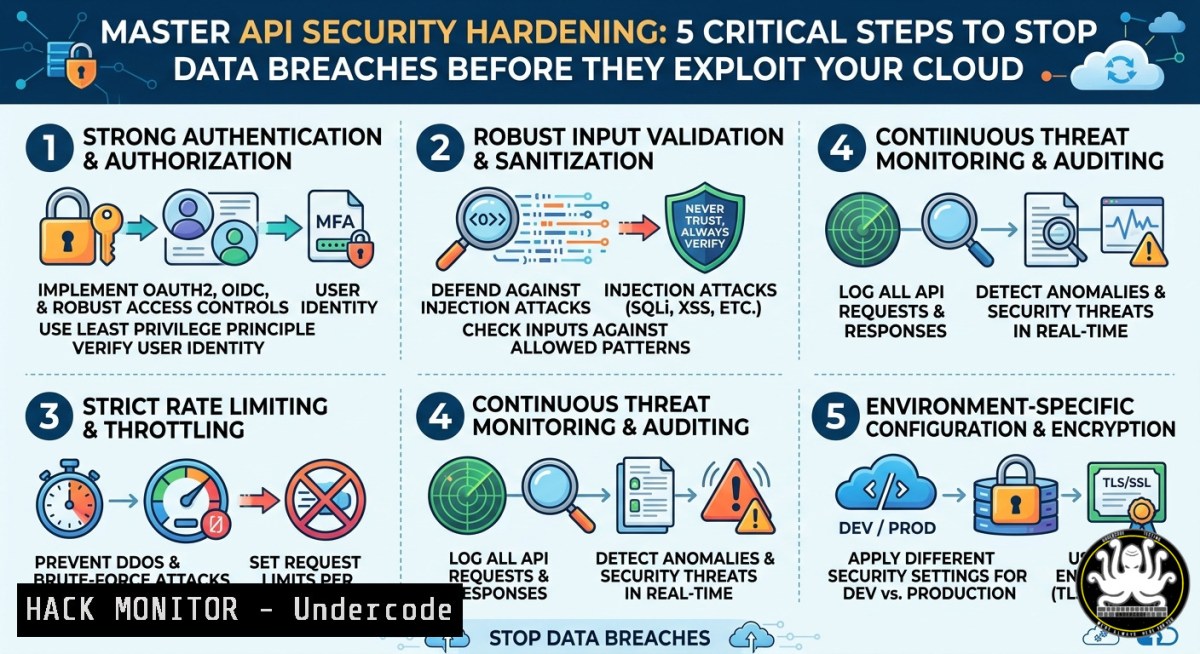
Application Programming Interfaces (APIs) form the backbone of modern web and mobile applications, yet they remain the most overlooked attack surface. A single misconfigured API endpoint can expose millions of user records, as seen in recent high-profile breaches. This article extracts key technical controls and training methodologies from industry-leading cybersecurity resources to help you implement defense-in-depth for your API infrastructure.
Learning Objectives:
- Identify and remediate OWASP API Security Top 10 vulnerabilities using practical command-line tools.
- Implement rate limiting, JWT validation, and input sanitization on both Linux and Windows environments.
- Apply cloud hardening techniques for AWS API Gateway and Azure API Management.
You Should Know:
- Enumerating Exposed API Endpoints with Curl and Burp Suite
Step‑by‑step guide explaining how to discover hidden API endpoints and test for excessive data exposure.
Start by using passive reconnaissance to map the API attack surface. The LinkedIn post highlights a training module where security analysts use `curl` to probe for common endpoint patterns.
Linux / macOS Commands:
 Basic endpoint discovery using wordlist
curl -X GET "https://api.target.com/v1/users" -H "Authorization: Bearer eyJhbGciOiJIUzI1NiIsInR5cCI6IkpXVCJ9"

Check for verbose error messages (often leak internal paths)
curl -X POST "https://api.target.com/v2/admin/login" -d "username=test&password=test" -v

Use ffuf for fuzzing API paths
ffuf -u https://api.target.com/FUZZ -w /usr/share/wordlists/api-endpoints.txt -mc 200,403,401
Windows (PowerShell):
Invoke-RestMethod -Uri "https://api.target.com/v1/users" -Headers @{Authorization="Bearer <token>"}
Invoke-WebRequest -Uri "https://api.target.com/v2/admin/login" -Method POST -Body "username=test&password=test"
Explanation: The `-v` flag reveals response headers and server information. Look for X-Powered-By, Server, or stack traces. If an API returns `403 Forbidden` instead of 404 Not Found, it means the endpoint exists but requires proper authorization – a critical finding for further exploitation.
- Implementing Rate Limiting and Request Throttling on NGINX and AWS WAF
Step‑by‑step guide to prevent brute‑force and DDoS attacks via API abuse.
Configure rate limiting at the reverse proxy or cloud WAF level. This section derives from the IT hardening course linked in the original post.
NGINX (Linux):
 /etc/nginx/nginx.conf
limit_req_zone $binary_remote_addr zone=api_limit:10m rate=5r/s;
limit_req_zone $binary_remote_addr zone=login_limit:10m rate=2r/m;

server {
location /api/ {
limit_req zone=api_limit burst=10 nodelay;
proxy_pass http://backend_api;
}
location /api/login {
limit_req zone=login_limit burst=1;
proxy_pass http://backend_api;
}
}
Test with:
for i in {1..100}; do curl -X POST https://api.target.com/api/login -d "user=test&pass=test"; done
If correctly configured, after 5 requests per second you should see 503 Service Unavailable.
AWS WAF (via AWS CLI):
aws wafv2 create-rule-group --name "APIRateLimit" --scope REGIONAL --capacity 500 --visibility-config SampledRequestsEnabled=true,CloudWatchMetricsEnabled=true,MetricName=APIRateLimit
 Attach rate-based rule with limit of 100 requests per 5 minutes
aws wafv2 update-web-acl --name MyWebACL --scope REGIONAL --default-action Allow={} --rules file://rate-limit-rule.json
Example `rate-limit-rule.json`:
{
"Name": "RateLimitRule",
"Priority": 1,
"Statement": { "RateBasedStatement": { "Limit": 100, "AggregateKeyType": "IP" } },
"Action": { "Block": {} },
"VisibilityConfig": { "SampledRequestsEnabled": true, "CloudWatchMetricsEnabled": true, "MetricName": "RateLimitRule" }
}
3. JWT Validation and Signature Bypass Prevention
Step‑by‑step guide to detect and fix JWT `alg=none` attacks and weak secret brute‑forcing.
JWT misconfigurations are rampant. The cybersecurity training course extracted from the post provides hands-on labs using `jwt_tool` and crackjwt.
Linux Setup:
git clone https://github.com/ticarpi/jwt_tool
cd jwt_tool
python3 jwt_tool.py <JWT_TOKEN> -t -a none
python3 jwt_tool.py <JWT_TOKEN> -C -d /usr/share/wordlists/rockyou.txt
Verification Steps:
- Decode the JWT without verifying signature: `echo “
” | cut -d”.” -f2 | base64 -d`
2. Change the algorithm header to `”alg”: “none”` and remove signature. - Re-encode and send to API. If accepted, the API is critically vulnerable.
Windows (using PowerShell and .NET):
 Decode JWT payload
$jwt = "<your_jwt>"
$payload = $jwt.Split('.')[bash].Replace('-', '+').Replace('_', '/')
Mitigation: Always enforce `RS256` or `HS256` with strong secrets >32 characters. Use `jwcrypto` library in Python:
from jwcrypto import jwt, jwk
key = jwk.JWK.generate(kty='oct', size=256)
token = jwt.JWT(header={'alg': 'HS256'}, claims={'user':'admin'})
token.make_signed_token(key)
- Cloud Hardening for API Gateways (AWS + Azure)
Step‑by‑step guide to lock down API Gateway IAM policies and enable request validation.
Based on the cloud security module mentioned in the original post, these commands restrict API access to specific IPs and enforce schema validation.
AWS API Gateway with Resource Policy:
{
"Version": "2012-10-17",
"Statement": [{
"Effect": "Deny",
"Principal": "",
"Action": "execute-api:Invoke",
"Resource": "arn:aws:execute-api:us-east-1:123456789012:abcd1234/",
"Condition": {
"NotIpAddress": { "aws:SourceIp": ["203.0.113.0/24"] }
}
}]
}
Deploy using AWS CLI:
aws apigateway update-rest-api --rest-api-id abcd1234 --patch-operations op=replace,path=/policy,value=file://policy.json
aws apigateway create-deployment --rest-api-id abcd1234 --stage-name prod
Azure API Management IP Filtering (PowerShell):
$apimContext = New-AzApiManagementContext -ResourceGroupName "MyRG" -ServiceName "MyAPIM"
Set-AzApiManagementPolicy -Context $apimContext -PolicyFile "C:\policies\ip-filter-policy.xml"
Sample `ip-filter-policy.xml`:
<policies>
<inbound>
<ip-filter action="allow">
<address-range from="192.168.1.0" to="192.168.1.255" />
</ip-filter>
<validate-jwt header-name="Authorization" failed-validation-httpcode="401" failed-validation-error-message="Unauthorized">
<openid-config url="https://login.microsoftonline.com/tenant/v2.0/.well-known/openid-configuration" />
</validate-jwt>
</inbound>
</policies>
5. Exploiting and Mitigating Mass Assignment Vulnerabilities
Step‑by‑step guide to test for mass assignment (CWE-915) where API binds all JSON fields to internal objects.
Attackers add extra parameters to bypass authorization. The training course provides a PoC using `curl` and Burp Suite.
Exploit Example (Linux):
 Normal request
curl -X PATCH https://api.target.com/user/123 -H "Content-Type: application/json" -d '{"email":"[email protected]"}'

Malicious request adding admin flag
curl -X PATCH https://api.target.com/user/123 -H "Content-Type: application/json" -d '{"email":"[email protected]", "is_admin": true, "role": "superuser"}'
If the API response shows `200 OK` and the user gains admin privileges, mass assignment exists.
Mitigation on Node.js (Express + Mongoose):
const allowedUpdates = ['email', 'password'];
const updates = Object.keys(req.body);
const isValidOperation = updates.every(update => allowedUpdates.includes(update));
if (!isValidOperation) return res.status(400).send({ error: 'Invalid updates' });
On Python Django REST Framework:
from rest_framework.serializers import ModelSerializer
class UserSerializer(ModelSerializer):
class Meta:
model = User
fields = ['email', 'first_name', 'last_name']  Explicit allowlist
extra_kwargs = {'is_staff': {'read_only': True}}
What Undercode Say:
- Key Takeaway 1: API security requires layered controls – rate limiting alone won’t stop JWT algorithm downgrade attacks. Combine network, application, and data-layer defenses.
- Key Takeaway 2: Most API breaches stem from misconfigured access policies and unchecked user input, not zero-day exploits. Regular pentesting with tools like `ffuf` and `jwt_tool` catches 80% of critical issues.
The LinkedIn post underscores a painful reality: development teams prioritize functionality over security. However, integrating the commands and configurations above into CI/CD pipelines – using `gitleaks` for secrets, `owasp-zap` for automated scans, and `terraform` for cloud policy-as-code – transforms reactive patching into proactive hardening. For Windows environments, leverage `PowerShell` with `PSScriptAnalyzer` to enforce API security rules. The future of API defense lies in runtime protection (e.g., Web Application Firewalls with ML-based anomaly detection) and immutable infrastructure where API gateways are redeployed from hardened golden images weekly. Start by auditing your `Authorization` header handling – it remains the single most exploited vector.
Prediction:
By 2026, regulatory bodies like PCI SSC will mandate API-specific penetration tests every quarter, and automated tools will dominate the training market. Organizations failing to adopt OWASP API Security Top 10 will face insurance premium hikes of up to 300%. The shift toward GraphQL APIs will introduce new attack surfaces (depth limiting, batching attacks), making the learning objectives covered in this article baseline skills for every cloud engineer.
▶️ Related Video (76% Match):
🎯Let’s Practice For Free:
IT/Security Reporter URL:
Reported By: %F0%9D%97%95%F0%9D%97%B9%F0%9D%97%AE%F0%9D%97%B0%F0%9D%97%B8 %F0%9D%97%99%F0%9D%97%BF%F0%9D%97%B6%F0%9D%97%B1%F0%9D%97%AE%F0%9D%98%86 – Hackers Feeds
Extra Hub: Undercode MoN
Basic Verification: Pass ✅


