
Listen to this Post
Introduction:
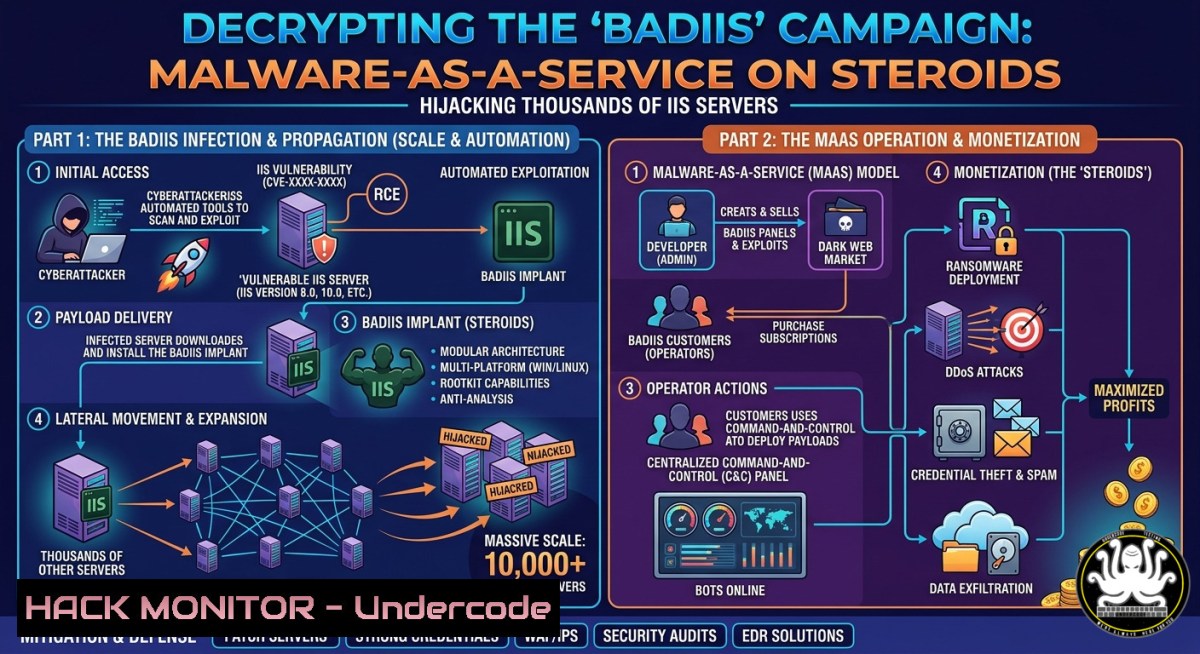
A sophisticated, multi-year campaign leveraging a malware variant known as BadIIS has been actively compromising Microsoft Internet Information Services (IIS) servers globally, turning legitimate web infrastructure into covert traffic redirection nodes. Operating under a Malware-as-a-Service (MaaS) business model, this campaign primarily targets the Asia-Pacific region but has also successfully breached networks across North America, Europe, and South Africa.
Learning Objectives:
- Understand the technical architecture of BadIIS, including its persistence mechanisms, C2 obfuscation, and modular attack capabilities.
- Learn to identify indicators of compromise (IoCs) such as specific PDB strings, Windows service names, and user-agent strings.
- Master step-by-step defensive techniques, including IIS log analysis, applying Group Policy hardening, and configuring Web Application Firewalls (WAFs) to block malicious redirection.
You Should Know:
- Unpacking BadIIS: The Malware, The Builder, and The “lwxat” Fingerprint
This campaign is not the work of a single actor but a commoditized toolset, with Cisco Talos assessing it as a MaaS platform marketed to Chinese-speaking cybercrime groups. The malware, identifiable by embedded “demo.pdb” strings in its code, has been under active development since at least September 2021, with the latest sample compiled as recently as January 2026.
The MaaS Builder: At the heart of the ecosystem is a dedicated builder tool that allows customers to generate tailored payloads. This builder offers four main capabilities: traffic redirection to illicit sites (gambling, adult content), reverse proxying for search engine crawlers (SEO manipulation), full content hijacking, and backlink injection for SEO fraud.
Operational Security (OPSEC) Failure: The developer, operating under the alias “lwxat,” has repeatedly left this handle embedded in the builder, HTTP user-agent strings, and authentication mechanisms. This consistent OPSEC failure has provided researchers with a durable thread to track the campaign’s evolution over four years.
Persistence & Evasion: The malware masquerades as a legitimate Windows service, with documented instances using names like “Winlogin” and “FaxService” to blend in. To conceal C2 server addresses, it combines Base64 encoding with a single-byte XOR key (0x3), complicating static analysis.
Defender’s Guide: Detecting BadIIS with PowerShell and Log Analysis
The first line of defense is proactive threat hunting. Use the following PowerShell script to scan for known BadIIS persistence and PDB artifacts.
 Scan for malicious BadIIS service names
Get-Service | Where-Object {$_.Name -in @('Winlogin', 'FaxService')}

Scan for known BadIIS PDB file paths often used by the "demo.pdb" variant
$badIisPaths = @(
"C:\Users\Desktop\demo.pdb",
"C:\dll-no503\Release\demo.pdb",
"C:\兼容百度浏览器+劫持robots.txt\x64\Release\demo.pdb"
)

foreach ($path in $badIisPaths) {
if (Test-Path $path) {
Write-Host "[!] Potential BadIIS artifact found: $path" -ForegroundColor Red
Remove-Item -Path $path -Force
}
}

Detect suspicious network connections to known C2 patterns
Get-NetTCPConnection -State Established | Where-Object {$_.RemotePort -in @('80', '443')} | Select-Object LocalAddress, RemoteAddress, RemotePort, OwningProcess | Format-Table -AutoSize
- The Anatomy of a Web Attack: From Compromise to Malicious Redirection
Once BadIIS is deployed, the attack unfolds in a multi-stage process, leveraging the IIS server as an unwitting proxy. The malware intercepts web traffic at the application level, enabling two distinct modes of operation.
Client-Side Redirection: For human visitors, BadIIS injects JavaScript redirectors into the HTTP response stream. When a user visits a compromised legitimate site, the injected JavaScript silently forwards them to attacker-controlled spam infrastructure, such as illegal gambling or adult content platforms, often without any visible change to the original site’s URL in the address bar.
Search Engine Deception (Reverse Proxy): For search engine crawlers (e.g., Googlebot), BadIIS acts as a reverse proxy. When a crawler requests a page, the malware fetches illicit content from the attacker’s C2 server and serves it directly to the crawler, making fraudulent pages appear to have the authority of the legitimate domain, thereby poisoning search rankings.
IIS Module Hijacking: The malware achieves this by planting a malicious module within the IIS server’s processing pipeline. This allows it to inspect and modify every HTTP request and response, effectively acting as middleware to perform its redirection and SEO fraud operations.
Step-by-Step Guide: Analyzing IIS Logs for Malicious Redirection Patterns
Administrators should analyze their `C:\inetpub\logs\LogFiles` directory for anomalies. Use the `LogParser` tool (a Microsoft utility) or PowerShell to identify redirection patterns.
 Using PowerShell to analyze W3C logs for unusual 302 redirects or foreign referrers
$logPath = "C:\inetpub\logs\LogFiles\W3SVC1.log"
$entries = Get-Content $logPath | Select-String -Pattern "GET" -Context 0,0

Look for suspicious user-agent strings associated with BadIIS
$entries | Select-String -Pattern "lwxatisme"

Parse entries to find high-frequency redirects to suspicious domains
$entries | ForEach-Object {
if ($_ -match "302.(http[bash]?://(?:[a-zA-Z]|[0-9]|[$-_@.&+])+)") {
$redirectedUrl = $matches[bash]
Write-Host "Redirect to suspicious domain: $redirectedUrl"
}
}
- Hardening the Digital Fortress: A Multi-Layered Defense Strategy
Given the MaaS nature of BadIIS, a single detection is insufficient; organizations must adopt a continuous operational defense strategy.
IIS Hardening (The CIS Benchmark Approach):
Application Pool Isolation: Configure each web application to run under a unique application pool with a least-privilege identity (e.g., ApplicationPoolIdentity), not `NetworkService` or LocalSystem. This contains a breach.
Request Filtering & URLScan: Enable request filtering to block double-encoding attacks and specific HTTP verbs (TRACE, DEBUG). Restrict the size of URLs, query strings, and HTTP headers to prevent buffer overflows.
Remove Unnecessary Features: Disable WebDAV, ASP, and other unused IIS modules to reduce the attack surface.
Network & Endpoint Controls:
Firewall Egress Filtering: At the perimeter firewall, block all outbound traffic from IIS servers to the internet, except for necessary updates and defined whitelisted domains. This breaks the malware’s C2 communication channel.
Endpoint Detection & Response (EDR): Deploy EDR agents with custom rules to monitor for the creation of services named `Winlogin` or `FaxService` and alert on processes launching `rundll32.exe` with suspicious command-line arguments.
IIS Hardening Commands (PowerShell as Administrator):
 Disable unnecessary IIS features (e.g., WebDAV, ASP)
Disable-WindowsOptionalFeature -Online -FeatureName "IIS-WebDAV"
Disable-WindowsOptionalFeature -Online -FeatureName "IIS-ASP"

Enforce TLS 1.2 and disable weak protocols (requires registry changes)
New-Item 'HKLM:\SYSTEM\CurrentControlSet\Control\SecurityProviders\SCHANNEL\Protocols\TLS 1.2\Server' -Force | Out-Null
Set-ItemProperty -Path 'HKLM:\SYSTEM\CurrentControlSet\Control\SecurityProviders\SCHANNEL\Protocols\TLS 1.2\Server' -Name 'Enabled' -Value 1

Install and configure URLScan (from IIS 6.0 Resource Kit tools)
 This example shows adding a custom rule to block the "lwxatisme" user-agent
Add-Content -Path "C:\Windows\System32\inetsrv\urlscan\UrlScan.ini" -Value "[bash]`nlwxatisme=lwxatisme"
- The MaaS Threat Landscape: Why This Campaign is a Systemic Risk
The BadIIS campaign is a prime example of the “commoditization of cybercrime.” Its MaaS model means that multiple independent criminal groups are running parallel campaigns simultaneously, each with custom configurations.
Decentralized Attribution: Because multiple groups use the same underlying platform, taking down one campaign does not disrupt others. This makes law enforcement and remediation efforts significantly more complex.
Continuous Innovation: The developer’s reaction to specific antivirus products (like Norton) proves the malware is under active maintenance, with feature branching and iterative updates aimed at evading detection. The PDB paths reveal a sustained, multi-year development effort spanning from at least September 2021 to January 2026.
Global Supply Chain Risk: By compromising legitimate IIS servers, attackers poison the supply chain of trust. Users visiting a compromised site believe it is safe, making them vulnerable to secondary drive-by downloads or scams.
- The Indispensable Role of a Web Application Firewall (WAF)
While hardening is crucial, a WAF provides the real-time, adaptive layer of defense necessary to block the dynamic redirection and injection techniques used by BadIIS.
Virtual Patching: A WAF can apply a virtual patch to block the specific SQL injection or file inclusion vulnerabilities that BadIIS likely uses for initial access, without needing to immediately update the underlying IIS server.
Outbound Response Inspection: A modern WAF can inspect outbound HTTP responses. It can detect and block the injected JavaScript redirectors by looking for patterns like `window.location.href` redirection, meta http-equiv="refresh", or embedded iframes pointing to known malicious domains.
CSP Enforcement: Configure a Content Security Policy (CSP) header on the WAF to explicitly define which domains scripts can be loaded from. This effectively prevents any malicious, injected script from executing in a user’s browser.
WAF Mitigation Commands (Conceptual – Based on F5 ASM):
 Example on a Linux-based WAF using ModSecurity (core rule set)
 Add to your ModSecurity configuration to block "lwxatisme" user-agent
SecRule REQUEST_HEADERS:User-Agent "lwxatisme" \
"id:100001, phase:1, deny, status:403, logdata:'Blocked BadIIS User-Agent', msg:'BadIIS Campaign Detected'"

Rule to block responses containing malicious JavaScript redirectors
SecRule RESPONSE_BODY "(window.location.href.https?:\/\/..(xyz|top|club))" \
"id:100002, phase:4, deny, status:500, msg:'Malicious Redirect Injection Blocked'"
What Undercode Say:
Key Takeaway 1: The “demo.pdb” BadIIS variant is a sophisticated MaaS platform, not a one-off attack, and its continued development since 2021 signals a persistent, evolving threat.
Key Takeaway 2: Proactive defense is paramount; relying solely on periodic patches is futile against this MaaS model. Organizations must implement continuous threat hunting, SIEM alerting on specific IoCs (like the `lwxatisme` user-agent), and strict egress filtering to break the kill chain.
Prediction:
As MaaS platforms like BadIIS continue to refine their operational security (OPSEC) and incorporate anti-analysis techniques, we will see a rise in “living-off-the-land” (LotL) attacks on web servers. Defenders must shift from signature-based detection to behavior-based analytics, focusing on anomalies in HTTP traffic patterns, unexpected module loads in IIS, and deviations from established server baselines, as the next generation of malware will increasingly weaponize the very tools and protocols designed to secure the web.
🎯Let’s Practice For Free:
IT/Security Reporter URL:
Reported By: Varshu25 Badiis – Hackers Feeds
Extra Hub: Undercode MoN
Basic Verification: Pass ✅


