
Listen to this Post
Introduction:
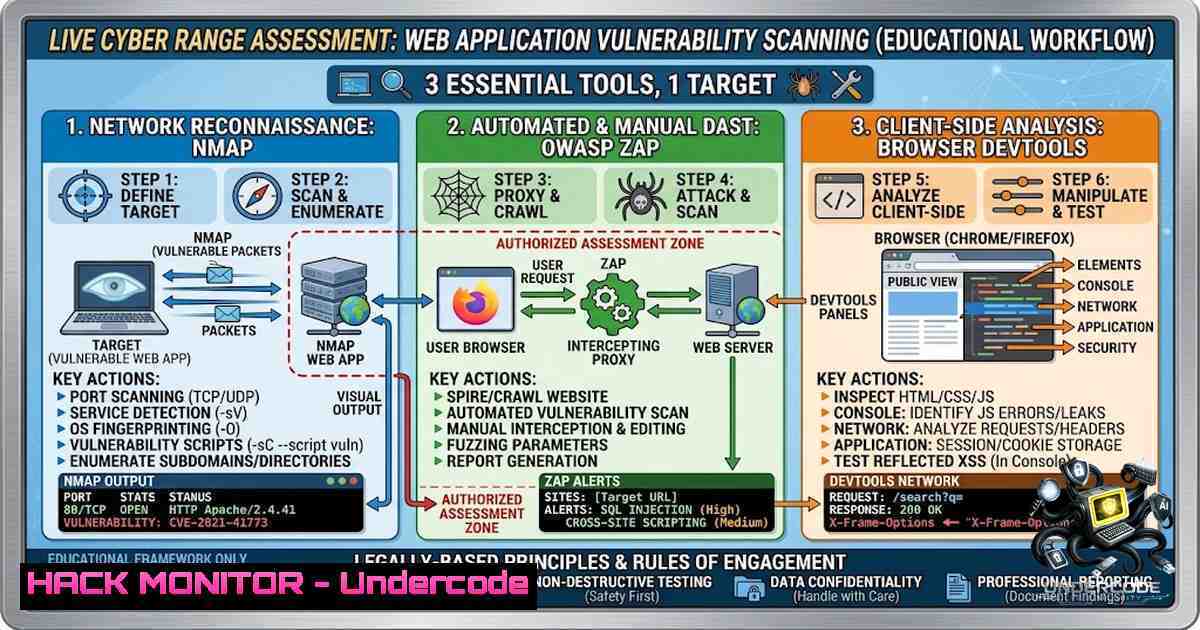
In the ever-evolving landscape of cybersecurity, web applications remain the primary attack vector for data breaches and unauthorized access. A proactive vulnerability assessment is the cornerstone of a robust security posture, involving systematic scanning and analysis to identify weaknesses before malicious actors exploit them. This article walks through a live practical assessment performed on testphp.vulnweb.com, a deliberately vulnerable testing environment, utilizing industry-standard tools like Nmap for network mapping, OWASP ZAP for automated security scanning, and Browser Developer Tools for client-side analysis.
Learning Objectives & Secrets:
- Objective 1: Comprehensive Reconnaissance with Nmap. Learn how to perform non-intrusive port scanning and service detection to map the attack surface of a target web server.
- Objective 2 Secret Tips: Advanced ZAP Scanning. Discover how to configure OWASP ZAP for both passive and active scanning, including how to authenticate and manage sessions to uncover deep-seated vulnerabilities like SQLi and XSS.
- Objective 3 Secret Tips: Client-Side Exploitation with DevTools. Master the use of browser DevTools to inspect and manipulate DOM elements, cookies, and network requests to identify client-side flaws such as insecure data storage and lack of HTTPS enforcement.
You Should Know:
1. Network Reconnaissance with Nmap Command-Line Essentials
Nmap is the Swiss Army knife for network exploration. The first step in any vulnerability assessment is understanding what services are running. For a web application, identifying open ports and the server’s operating system is crucial.
Step‑by‑Step Guide:
- Step 1: Launch your terminal or command prompt.
- Step 2: Perform a basic port scan to discover open ports. Use the command:
nmap -sV -p- -T4 testphp.vulnweb.com. The `-sV` flag enables version detection, `-p-` scans all 65,535 ports, and `-T4` speeds up the scan. - Step 3: Analyze the output. You will typically see port 80 (HTTP) open, revealing the web server software and version. This information is vital for identifying known vulnerabilities associated with that specific version.
- Step 4 (Windows equivalent): On PowerShell, if you have Nmap installed, the same syntax applies. For a quicker scan on a local network, you can use `nmap -sn 192.168.1.0/24` to discover live hosts.
- Step 5 (Advanced Tip): Use Nmap scripts to probe for specific vulnerabilities. For instance, `nmap –script=http-sql-injection.nse -p 80 testphp.vulnweb.com` can attempt to detect SQL injection flaws directly.
2. Automated Web Application Scanning with OWASP ZAP
OWASP ZAP (Zed Attack Proxy) is a free, open-source web application security scanner. It acts as a man-in-the-middle between your browser and the target application, intercepting and analyzing requests. For an active scan, ZAP aggressively probes for vulnerabilities.
Step‑by‑Step Guide:
- Step 1: Launch OWASP ZAP. The desktop interface provides a wealth of features. Set your browser to use ZAP as a proxy (default localhost on port 8080).
- Step 2: Access the target URL (`http://testphp.vulnweb.com`) through your configured browser. ZAP will automatically spider the site, building a hierarchical map of all accessible pages and resources (the “Site Tree”).
- Step 3: Right-click on the root node in the Site Tree and select “Active Scan”. This initiates an automated attack vector, sending malicious payloads to every parameter to test for SQL Injection, Cross-Site Scripting, and other OWASP Top 10 vulnerabilities.
- Step 4: Review the “Alerts” tab in ZAP. For a vulnerability like “SQL Injection,” ZAP will highlight the specific URL, parameter, and provide evidence in the request/response pane.
- Step 5 (Configuration Secrets): For better results, define a context. Right-click the target and choose “Include in Context.” This tells ZAP to focus scanning on specific URLs, avoiding logout or out-of-scope links. Ensure to disable the “authentication” option in the scan policy if you’re not logged in, or configure session management if you are.
- Step 6 (Command Line Alternative for CI/CD): In a Linux environment, you can run ZAP headlessly for automation: `zap-cli -p 8090 active-scan -r http://testphp.vulnweb.com`. This is great for integrating security scans into a DevOps pipeline.
3. Client-Side Analysis with Browser Developer Tools
While server-side scanners find server flaws, client-side tools are indispensable for identifying insecure data handling, weak cookies, and improper front-end logic. DevTools (accessible via F12) are standard on all modern browsers.
Step‑by‑Step Guide:
- Step 1: Open Developer Tools and navigate to the “Network” tab. Reload the webpage. Inspect the headers of the main request.
- Step 2: Look for `Set-Cookie` headers. Observe if the cookie is missing the `Secure` flag (meaning it’s sent over HTTP, exposing it to packet sniffing) or the `HttpOnly` flag (which would prevent JavaScript access).
- Step 3: Navigate to the “Storage” tab (or “Application” tab). Review stored data like Local Storage and Session Storage. If sensitive data like an authentication token is stored in plaintext here, it’s a vulnerability.
- Step 4: Go to the “Elements” tab and right-click on a form input field. Select “Edit as HTML” and alter the `maxlength` attribute or `type` attribute to test for input validation bypasses. For example, changing a text field to accept long strings can help test for a buffer overflow.
- Step 5 (Command Line/Tutorial): To verify HTTPS issues, you can use a command-line tool like `curl -I http://testphp.vulnweb.com` to quickly see if the server redirects to HTTPS. If it doesn’t, the login is unencrypted.
4. Vulnerability Exploitation and Mitigation: SQL Injection
The scan on `testphp.vulnweb.com` revealed a classic SQL Injection vulnerability. This flaw occurs when user input is incorrectly filtered for SQL statements.
Step‑by‑Step Guide to Exploit:
- Step 1: Navigate to a product page (e.g., `http://testphp.vulnweb.com/artists.php?artist=1`).
- Step 2: Append a single quote to the URL:
artist=1'. If the page returns a database error, the injection point is confirmed. - Step 3 (Manual Payload): Use a union-based query to enumerate database names. Example:
artist=1 UNION SELECT 1,2,group_concat(schema_name) FROM information_schema.schemata. - Mitigation: The primary fix is the use of parameterized queries (prepared statements). In PHP, this means using PDO (PHP Data Objects) or MySQLi with bound parameters, which separates SQL logic from data input.
5. Vulnerability Exploitation and Mitigation: Cross-Site Scripting (XSS)
XSS allows attackers to inject malicious scripts into web pages viewed by other users. This was identified during the assessment.
Step‑by‑Step Guide to Exploit:
- Step 1: Find a search box or any input field that reflects the user input back to the page.
- Step 2: Enter a simple payload:
<script>alert('XSS')</script>. If an alert box appears, it’s a classic Reflected XSS. - Mitigation: The solution is output encoding. All user-supplied data must be encoded before rendering in the browser. In a web context, using functions like `htmlspecialchars()` in PHP or similar libraries in other frameworks prevents the browser from interpreting the input as executable HTML or JavaScript.
6. Security Hardening: Enforcing HTTPS
The assessment noted an “unencrypted login” vulnerability. This is critical when dealing with sensitive data.
Step‑by‑Step Guide to Secure:
- Step 1 (Apache – Linux): Obtain an SSL/TLS certificate (e.g., Let’s Encrypt). In the Apache configuration file (httpd.conf), enable the SSL module and point to the certificate files.
- Step 2: Configure a redirect rule to force all HTTP traffic to HTTPS. Add this to your `.htaccess` file: `RewriteCond %{HTTPS} off` followed by
RewriteRule ^(.)$ https://%{HTTP_HOST}%{REQUEST_URI} [L,R=301]. - Step 3 (Windows Server – IIS): In IIS Manager, select the site, open “SSL Settings”, and check “Require SSL”. Also, set the client certificates to “Ignore” unless required.
What Undercode Say:
Key Takeaway 1: Vulnerability assessment is a systematic process, not a one-click operation. Effective scanning relies on a blend of automated tools (ZAP) and manual verification (DevTools) to reduce false positives and uncover deep-seated logic flaws. The discovery of a “low-hanging fruit” like a missing Secure flag on a cookie is often a precursor to more severe issues like session hijacking.
Key Takeaway 2: Understanding the full “kill chain” is essential. The Nmap scan reveals the attack surface, ZAP identifies the flaw, and DevTools provides the context for exploitation. To truly secure an application, a developer must understand how to simulate an attack using these tools before writing a single line of mitigation code. The presence of an unencrypted login in a modern application highlights a continued disregard for foundational security principles, emphasizing the need for mandatory security training in the software development lifecycle.
Analysis: The combination of tooling shows a mature approach to cybersecurity. It moves beyond basic vulnerability scanning and integrates active reconnaissance, which is the industry standard for penetration testing. The student’s work demonstrates not just technical proficiency with the tools but also the critical thinking required to analyze the output and propose remediation.
Prediction:
- +1 The increasing accessibility and automation of security tools like ZAP will empower a new generation of security professionals, bridging the skills gap and allowing for more frequent security testing during the development phase (DevSecOps).
- -1 However, the over-reliance on automation without manual verification will lead to “alert fatigue” and potentially overlook complex business logic vulnerabilities that only human intuition and creativity can find.
- +1 Training courses and internships focusing on these fundamental skills will create a more resilient digital ecosystem, as understanding the attacker’s mindset is the first line of defense.
- -1 As AI models are increasingly integrated into development, they will also be targeted. We will likely see a rise in “AI prompt injection” attacks that exploit the natural language processing capabilities of systems, making traditional scanners like ZAP insufficient without AI-specific security layers.
▶️ Related Video (80% Match):
🎯Let’s Practice For Free:
🎓 Live Courses & Certifications:
Join Undercode Academy for Verified Certifications
🚀 Request a Custom Project:
Secure, high-velocity infrastructure and disruptive technological engineering. Contact our engineering team for high-tier development and proprietary systems:
[email protected]
💎 Smart Architecture | 🛡️ Secure by Design | ⭐ Trusted by Thousands
IT/Security Reporter URL:
Reported By: https://lnkd.in/p/eJVVcUn8 – Hackers Feeds
Extra Hub: Undercode MoN
Basic Verification: Pass ✅


