
Listen to this Post
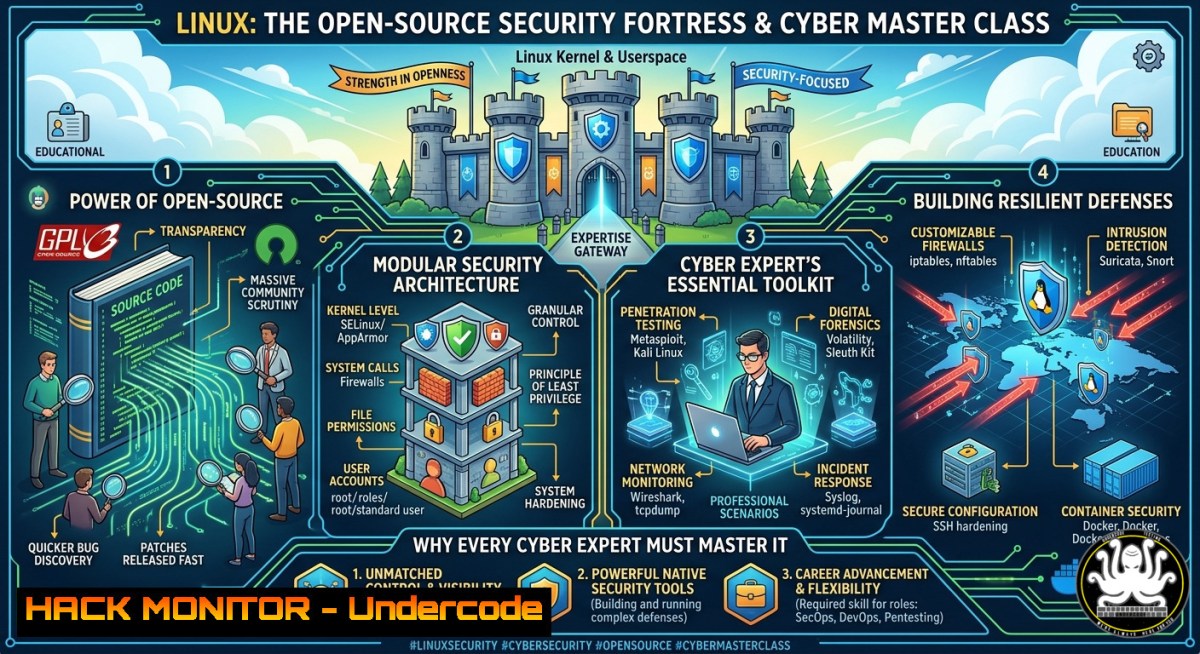
Introduction:
Linux is not merely an operating system—it is the world’s largest collaborative security model. Its transparent, peer-reviewed architecture consistently outperforms closed systems in reliability and resilience, making it the backbone of modern cybersecurity, cloud infrastructure, and AI development. For IT professionals, mastering Linux means mastering the tools and techniques that defend against today’s most sophisticated cyber threats.
Learning Objectives:
- Identify and compare historical Linux distributions to understand their security evolution.
- Execute system hardening commands and configure security controls on Linux and Windows (WSL).
- Apply Linux-based penetration testing, API security, and cloud hardening techniques using real-world tools.
You Should Know:
- The Evolutionary Path of Linux Distros: From SLS to Modern Security Powerhouses
The discussion on LinkedIn highlights a journey starting with the Softlanding Linux System (SLS)—the first complete Linux distribution—followed by Slackware (1993), which remains active today. Early adopters recall Mandrake (later Mandriva) dual-booted with Windows ME, Red Hat 5.2, Debian 2.3, and Ubuntu 10.04. Each distro introduced critical security innovations: Slackware’s minimalism reduced attack surface; Red Hat popularized package signing (RPM-GPG); Debian established a rigorous security team; and Ubuntu brought mandatory access controls via AppArmor.
Step‑by‑step guide to explore this history and extract security lessons:
– Inspect distribution lineage: Visit the Wikipedia URL provided: https://en.wikipedia.org/wiki/Softlanding_Linux_System`. Read about SLS’s role as the first distro that combined kernel, utilities, and installer.
- Analyze legacy security features in modern Linux (on any current distro like Ubuntu 22.04+):
 Check which package signing keys are trusted
apt-key list  Debian/Ubuntu
rpm -qa gpg-pubkey  RHEL/Fedora
- Simulate a legacy environment using Docker to test old distro behaviors (e.g., Slackware 14.2):
docker pull vbeffa/slackware:latest
docker run -it vbeffa/slackware /bin/bash
- Understand why transparency matters: Compare the closed-source Windows update model vs. Linux security advisory mailing lists (e.g.,oss-security). Subscribe viaecho “subscribe” | mail [email protected]`.
2. Essential Linux Commands for System Hardening
Hardening a Linux system reduces vulnerabilities by disabling unnecessary services, enforcing least privilege, and monitoring integrity. Below are verified commands that every cybersecurity expert must know.
Step‑by‑step hardening guide (run as root or with sudo):
– Update the system and enable automatic security patches:
 Debian/Ubuntu
sudo apt update && sudo apt upgrade -y
sudo dpkg-reconfigure --priority=low unattended-upgrades
 RHEL/CentOS
sudo yum update -y && sudo yum install yum-cron -y
sudo systemctl enable yum-cron --now
– Harden SSH configuration (edit /etc/ssh/sshd_config):
sudo sed -i 's/PermitRootLogin yes/PermitRootLogin no/' /etc/ssh/sshd_config
sudo sed -i 's/PasswordAuthentication yes/PasswordAuthentication no/' /etc/ssh/sshd_config
sudo systemctl restart sshd
– Configure a strict firewall with iptables/nftables:
 Allow established connections, SSH, HTTP/HTTPS, drop everything else
sudo iptables -A INPUT -m conntrack --ctstate ESTABLISHED,RELATED -j ACCEPT
sudo iptables -A INPUT -p tcp --dport 22 -j ACCEPT
sudo iptables -A INPUT -p tcp --dport 80,443 -j ACCEPT
sudo iptables -A INPUT -j DROP
sudo apt install iptables-persistent -y && sudo netfilter-persistent save
– Enforce mandatory access controls: On Ubuntu, enable AppArmor; on RHEL, enable SELinux:
sudo aa-enforce /etc/apparmor.d/  AppArmor
sudo setenforce 1 && sudo sed -i 's/SELINUX=disabled/SELINUX=enforcing/' /etc/selinux/config  SELinux
- Windows Subsystem for Linux (WSL): Bridging the Gap for Cyber Defense
Windows environments need Linux security tooling. WSL2 provides a full kernel, enabling native execution of Linux commands, penetration testing suites, and hardening scripts directly on Windows.
Step‑by‑step setup and security usage:
- Install WSL2 (PowerShell as Admin):
dism.exe /online /enable-feature /featurename:Microsoft-Windows-Subsystem-Linux /all /norestart
dism.exe /online /enable-feature /featurename:VirtualMachinePlatform /all /norestart
wsl --set-default-version 2
- Install a security‑focused distribution (e.g., Kali Linux):
wsl --install -d kali-linux
- Launch Kali WSL and perform basic recon (inside WSL terminal):
sudo apt update && sudo apt install nmap -y
nmap -sV -p- 192.168.1.1  Scan your local router for open ports
- Share files between Windows and Linux securely:
Access Windows drives from WSL
cd /mnt/c/Users/YourName/Desktop
Copy a suspicious file for analysis
cp /mnt/c/Users/YourName/Downloads/malware.exe /home/kali/samples/
file malware.exe  Determine file type
- Harden WSL itself: Disable interop if not needed (prevents Windows binaries from launching inside WSL):
echo "[bash] enabled=false" | sudo tee -a /etc/wsl.conf
Then restart WSL from PowerShell: wsl --terminate <distro>
- Linux as a Penetration Testing Platform: Tools and Commands
Many professionals in the LinkedIn thread mentioned early distros like Slackware and Mandrake—today, Kali Linux (successor to BackTrack) is the industry standard for ethical hacking. Below are commands for vulnerability assessment and exploitation (use only on authorized systems).
Step‑by‑step reconnaissance and exploitation guide:
- Install Kali Linux (or add Kali tools to Ubuntu via
katoolin):sudo apt install kali-linux-headless For minimal CLI tools
- Network discovery with Nmap:
sudo nmap -sn 192.168.1.0/24  Ping sweep to find live hosts
sudo nmap -sS -A -p- 192.168.1.100  Stealth SYN scan with OS detection
- Brute‑force SSH credentials (e.g., using Hydra on a test lab):
hydra -l admin -P /usr/share/wordlists/rockyou.txt ssh://192.168.1.100 -t 4
- Exploit a known vulnerability using Metasploit:
msfconsole -q
use exploit/unix/ssh/sshexec
set RHOSTS 192.168.1.100
set USERNAME root
set PASSWORD toor
exploit
- Post‑exploitation hardening check: After gaining access, run `linux-exploit-suggester` to identify missing patches:
curl -s https://raw.githubusercontent.com/mzet-/linux-exploit-suggester/master/linux-exploit-suggester.sh | bash
5. Cloud Hardening with Linux: Securing Virtual Machines
Cloud providers (AWS, Azure, GCP) run predominantly on Linux. Hardening cloud VMs requires identity management, network controls, and automated compliance checks.
Step‑by‑step cloud hardening for an Ubuntu 22.04 VM:
- Ensure no default cloud‑user passwords – always use SSH keys. Generate and deploy a key:
ssh-keygen -t ed25519 -C "[email protected]"
ssh-copy-id -i ~/.ssh/id_ed25519.pub user@<cloud-vm-ip>
- Configure fail2ban to block brute‑force attacks on SSH and web services:
sudo apt install fail2ban -y
sudo cp /etc/fail2ban/jail.conf /etc/fail2ban/jail.local
sudo systemctl enable fail2ban --now
sudo fail2ban-client status sshd
- Set up automatic security updates for cloud VMs:
sudo apt install unattended-upgrades -y
sudo dpkg-reconfigure --priority=low unattended-upgrades
- Harden the cloud network using cloud‑native security groups (example AWS CLI command to restrict SSH to your IP):
aws ec2 authorize-security-group-ingress --group-id sg-12345678 --protocol tcp --port 22 --cidr YOUR_PUBLIC_IP/32
- Run a compliance audit with Lynis:
sudo apt install lynis -y
sudo lynis audit system
Review the report at /var/log/lynis.log
6. API Security on Linux Servers
APIs are prime attack targets. Linux servers hosting APIs need reverse proxy configurations, rate limiting, and TLS hardening.
Step‑by‑step guide using Nginx as an API gateway (Ubuntu):
– Install Nginx:
sudo apt install nginx -y
– Configure rate limiting to prevent DDoS/brute‑force (edit /etc/nginx/nginx.conf):
limit_req_zone $binary_remote_addr zone=login:10m rate=5r/m;
server {
location /api/login {
limit_req zone=login burst=10 nodelay;
proxy_pass http://localhost:3000;
}
}
– Enforce TLS 1.3 only and disable weak ciphers (obtain Let’s Encrypt cert):
sudo apt install certbot python3-certbot-nginx -y
sudo certbot --nginx -d api.yourdomain.com
Then edit the Nginx SSL block:
ssl_protocols TLSv1.3;
ssl_ciphers TLS_AES_256_GCM_SHA384:TLS_CHACHA20_POLY1305_SHA256;
– Add an API key validation layer using Nginx’s `map` module:
map $http_apikey $valid_api_key {
default 0;
"your-secret-key-here" 1;
}
server {
if ($valid_api_key = 0) {
return 403;
}
}
– Test API security with curl:
curl -H "apikey: your-secret-key-here" https://api.yourdomain.com/data
7. Vulnerability Mitigation: Patching and Auditing on Linux
Proactive patching and rootkit detection are critical. The LinkedIn thread shows nostalgia for old distros, but unpatched legacy systems are dangerous. Here’s a modern mitigation workflow.
Step‑by‑step vulnerability management:
- Automated patching across distributions:
Debian/Ubuntu: enable automatic security updates (already covered)
RHEL/CentOS: use dnf-automatic
sudo dnf install dnf-automatic -y
sudo systemctl enable --now dnf-automatic.timer
- Detect rootkits with chkrootkit and rkhunter:
sudo apt install chkrootkit rkhunter -y
sudo chkrootkit
sudo rkhunter --check --sk
- Scan for vulnerabilities using Lynis (as shown) and OpenVAS (for deeper scanning):
Install Greenbone Vulnerability Management (formerly OpenVAS)
sudo apt install gvm -y
sudo gvm-setup  Follow interactive setup
sudo gvm-start
- Monitor system integrity with AIDE (Advanced Intrusion Detection Environment):
sudo apt install aide -y
sudo aideinit
sudo mv /var/lib/aide/aide.db.new /var/lib/aide/aide.db
sudo aide --check  Run after any suspected breach
- Create a cron job for weekly audits:
echo "0 2 0 root /usr/bin/lynis audit system --cronjob" | sudo tee -a /etc/crontab
What Undercode Say:
- Transparency builds trust, but only with active validation. The open nature of Linux allows millions of eyes to audit code, yet enterprises must still perform their own hardening and continuous monitoring. Blindly trusting any OS—open or closed—is a recipe for breach.
- Legacy knowledge informs modern defense. Understanding distributions like Slackware or Mandrake teaches minimalism and manual configuration—skills that directly translate to securing containerized environments (e.g., Alpine Linux) and embedded IoT devices. The past is a blueprint for resilience.
Analysis: The LinkedIn discussion celebrating early Linux distros isn’t just nostalgia; it’s a reminder that security architecture has deep roots. The transition from SLS to systemd, from manual package compilation to signed repositories, mirrors the evolution of cyber threats. Today’s professionals must bridge this history with current tools—WSL for cross-platform work, cloud hardening for IaaS, and AI-driven audits (e.g., Lynis with custom plugins). As AI-generated attacks grow, Linux’s scriptable, transparent nature becomes even more valuable: defenders can automate responses and share signatures instantly. However, the same transparency aids attackers—hence the need for relentless patching and the exact commands detailed above.
Prediction:
In the next three years, Linux will power over 90% of AI security orchestration platforms, with automated penetration testing tools running on hardened kernels. However, supply chain attacks against package repositories (npm, PyPI, APT) will escalate, forcing the adoption of immutable Linux distributions (like Fedora Silverblue) and in‑memory verification of binaries. Cybersecurity certifications will shift from GUI‑based training to pure command‑line Linux proficiency, and Windows security teams will universally adopt WSL as their primary forensic and response environment. Those who fail to master Linux hardening will find their cloud workloads compromised within hours of deployment.
▶️ Related Video (82% Match):
🎯Let’s Practice For Free:
IT/Security Reporter URL:
Reported By: Lamirkhanian Linux – Hackers Feeds
Extra Hub: Undercode MoN
Basic Verification: Pass ✅


