Listen to this Post
Introduction:
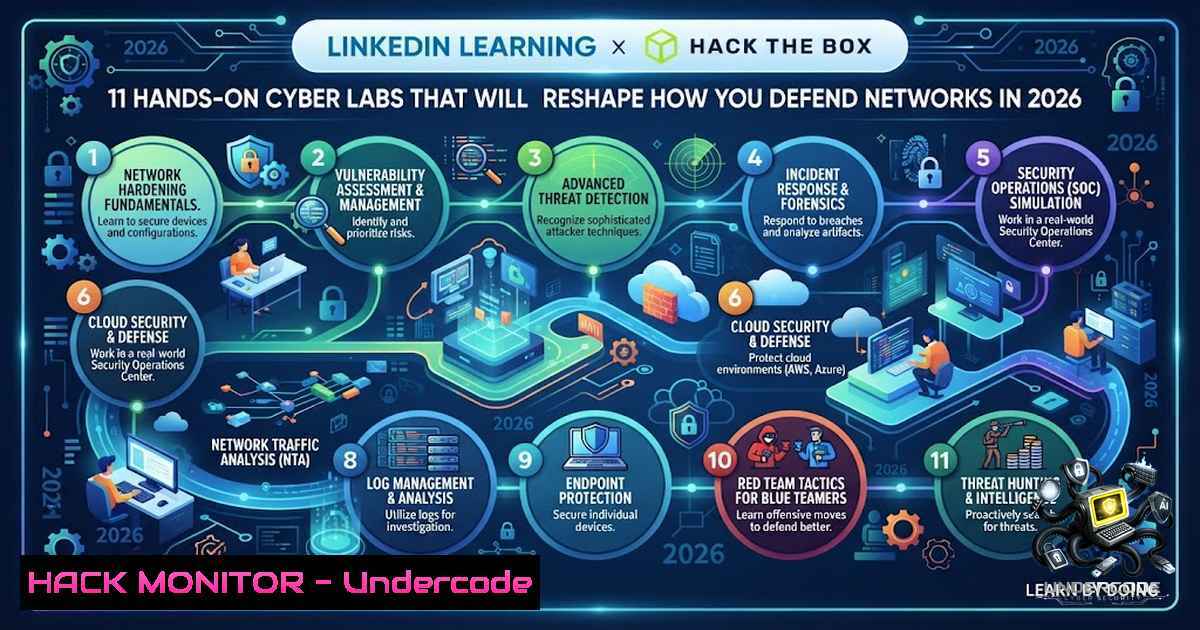
The cybersecurity talent gap has reached a critical inflection point. LinkedIn data reveals that while hiring for cybersecurity skills has surged by 75% year-over-year, the number of professionals adding cybersecurity to their profiles has grown by only 4%. This widening disparity between demand and supply demands a fundamental shift in how security professionals are trained. In response, LinkedIn Learning has launched 11 hands-on Cybersecurity Training Labs powered by Hack The Box, delivering over 80 hours of immersive, performance-based training directly within the LinkedIn Learning platform—no additional registration required.
These labs represent a paradigm shift from passive video-based learning to active, scenario-driven skill development. Learners now practice defending against and responding to threats in simulated attack environments, covering everything from network enumeration and threat hunting to vulnerability assessment, incident response, and SIEM fundamentals. With Hack The Box having already trained over 3.5 million cybersecurity professionals globally, this integration brings enterprise-grade, performance-based cybersecurity education to millions of professionals worldwide.
Learning Objectives:
- Master real-world cybersecurity skills through hands-on practice in simulated Red and Blue Team scenarios
- Develop proficiency in network enumeration, threat hunting, vulnerability assessment, incident response, and SIEM operations
- Validate technical competencies through interactive self-assessments and summative exams embedded within each lab
You Should Know:
- Understanding the LinkedIn Learning + Hack The Box Integration
The partnership between LinkedIn Learning and Hack The Box represents a strategic response to the cybersecurity skills gap. Hack The Box, described as “the global leader in cybersecurity upskilling,” has integrated its HTB Academy’s performance-based, scenario-driven labs into LinkedIn Learning’s trusted platform. Haris Pylarinos, Founder & CEO of Hack The Box, emphasized that this collaboration enables professionals to “build real-world expertise and gives enterprises a trusted way to validate and scale cybersecurity readiness”.
The 11 English-language labs are fully embedded within LinkedIn Learning, meaning learners simply open the course in their browser and start practicing immediately. This removes traditional barriers to entry—no separate registration, no complex setup, no infrastructure management. Each lab includes interactive self-assessments and summative exams to validate skills acquisition.
Practical Exercise: Accessing and Navigating a Lab
1. Log in to your LinkedIn Learning account
- Search for “Cybersecurity Training Labs” or navigate to the dedicated labs section
- Select a lab aligned with your skill level and learning objectives
- Launch the lab directly in your browser—no additional software installation required
- Follow the guided scenario instructions to complete tasks and challenges
- Submit your work for automated validation through interactive assessments
Pro Tip: These labs simulate both offensive (Red Team) and defensive (Blue Team) scenarios, allowing learners to understand attack methodologies while developing defensive countermeasures.
2. Network Enumeration and Reconnaissance Fundamentals
Network enumeration is the cornerstone of both offensive security and defensive hardening. Understanding how attackers discover and map network infrastructure is essential for building effective defenses. These labs provide hands-on practice with industry-standard enumeration techniques in controlled, risk-free environments.
Linux Command Examples for Network Enumeration:
 Nmap - Comprehensive network scanning
nmap -sV -sC -A -T4 192.168.1.0/24
 -sV: Version detection | -sC: Default scripts | -A: OS/version detection | -T4: Aggressive timing

Masscan - High-speed port scanning
masscan -p1-65535 --rate=10000 192.168.1.0/24 -oJ scan_results.json

Netcat - Banner grabbing
nc -zv 192.168.1.10 1-1000 2>&1 | grep succeeded

DNS enumeration with dig
dig axfr @ns1.target.com target.com
 Zone transfer attempt - should be restricted

SNMP enumeration
snmpwalk -v2c -c public 192.168.1.10 1.3.6.1.2.1.1
 Community string "public" is default and should be changed

SMB enumeration
enum4linux -a 192.168.1.10
 Enumerates users, shares, and SMB information
Windows Command Examples:
 Port scanning with Test-1etConnection
Test-1etConnection -ComputerName 192.168.1.10 -Port 445

Network discovery
net view \192.168.1.10

DNS enumeration
nslookup -type=MX target.com

ARP table inspection
arp -a
Step-by-Step Guide: Basic Network Reconnaissance
- Identify live hosts: Use `nmap -sn 192.168.1.0/24` to perform a ping sweep
- Discover open ports: Run `nmap -sS -p- 192.168.1.10` for stealth SYN scan
- Banner grabbing: Use `nc -v 192.168.1.10 22` to identify SSH service versions
- OS fingerprinting: Use `nmap -O 192.168.1.10` to identify operating systems
- Service enumeration: Run `nmap -sV -p 22,80,443,445 192.168.1.10` for service version detection
- Document findings: Create a structured report of discovered assets, services, and potential vulnerabilities
3. Threat Hunting and Incident Response
Threat hunting—the proactive search for malicious activity that has evaded existing security controls—is increasingly critical as attack sophistication grows. These labs simulate threat hunting scenarios where learners analyze logs, detect anomalies, and respond to security incidents in real-time.
Linux Log Analysis Commands:
 SSH authentication log analysis
grep "Failed password" /var/log/auth.log | awk '{print $9}' | sort | uniq -c | sort -1r

Web server log analysis - identify suspicious patterns
cat /var/log/nginx/access.log | grep -E "(..\/|wp-admin|sql|union|select)" | cut -d' ' -f1 | sort | uniq -c | sort -1r

System log monitoring with journalctl
journalctl -xe -p 3 -1 50
 -p 3: Priority level 3 (errors) | -1 50: Last 50 entries

Find suspicious processes
ps aux | grep -v "^USER" | awk '{print $2, $11}' | while read pid cmd; do
if [ ! -f "/proc/$pid/exe" ]; then
echo "Suspicious: $pid $cmd"
fi
done

Check for unauthorized SUID binaries
find / -perm -4000 -type f 2>/dev/null
Windows PowerShell Commands for Incident Response:
 Get recent security events
Get-WinEvent -FilterHashtable @{LogName='Security'; ID=4624,4625; StartTime=(Get-Date).AddDays(-7)} | Select-Object TimeCreated, @{N='User';E={$<em>.Properties[bash].Value}}, @{N='IP';E={$</em>.Properties[bash].Value}}

Check for suspicious scheduled tasks
Get-ScheduledTask | Where-Object {$<em>.State -1e 'Disabled'} | ForEach-Object { $</em>.TaskName; $_.Actions }

Examine running processes
Get-Process | Where-Object {$<em>.Path -like "temp" -or $</em>.Path -like "downloads"} | Select-Object Name, Id, Path

Check Windows Defender detections
Get-MpThreatDetection | Where-Object {$_.DetectionTime -gt (Get-Date).AddDays(-7)} | Select-Object ThreatName, Resources, DetectionTime
Step-by-Step Guide: Basic Threat Hunting Workflow
- Establish a hypothesis: Define what you’re looking for (e.g., “Are there signs of credential brute-forcing?”)
- Collect relevant data: Gather logs from authentication systems, firewalls, and endpoint detection tools
- Analyze for anomalies: Use statistical methods to identify deviations from baseline behavior
- Correlate events: Connect seemingly unrelated events to identify attack chains
- Investigate findings: Deep-dive into suspicious activities to confirm or rule out threats
- Document and respond: Record findings and initiate appropriate response actions
4. Vulnerability Assessment and Management
Identifying and prioritizing vulnerabilities is foundational to any security program. These labs provide hands-on experience with vulnerability scanning, analysis, and remediation planning.
Linux Vulnerability Scanning Commands:
 Nmap vulnerability script scanning
nmap --script vuln -sV 192.168.1.10

OpenVAS/GVM scan (requires installation)
gvm-cli --gmp-username admin --gmp-password password socket --socketpath /var/run/gvmd.sock --xml "<create_task>...</create_task>"

Lynis - System audit
lynis audit system
 Comprehensive security audit for Linux systems

Check for outdated packages
apt list --upgradable 2>/dev/null
 Or for RHEL/CentOS
yum check-update

Check for open ports and associated services
ss -tulpn | grep LISTEN
Windows Vulnerability Assessment Commands:
 Windows Update status
Get-WUHistory | Select-Object , Date, Result | Sort-Object Date -Descending | Select-Object -First 20

Installed applications - look for outdated software
Get-WmiObject -Class Win32_Product | Select-Object Name, Version, Vendor

Check firewall rules
New-1etFirewallRule -DisplayName "Block Port" -Direction Inbound -LocalPort 445 -Action Block
 Example of creating a rule to block SMB

Security baseline assessment (requires Windows Security Compliance Toolkit)
 Use PowerShell DSC or LGPO to audit Group Policy settings
Step-by-Step Guide: Vulnerability Assessment Process
- Asset discovery: Identify all systems and services within scope
- Vulnerability scanning: Run automated scanners to identify known vulnerabilities
- Manual verification: Validate findings to eliminate false positives
- Risk prioritization: Assess each vulnerability based on CVSS scores, exploitability, and business impact
- Remediation planning: Develop action plans for addressing high-priority vulnerabilities
- Verification scanning: Re-scan after remediation to confirm vulnerabilities are addressed
5. SIEM Fundamentals and Log Management
Security Information and Event Management (SIEM) systems are central to modern security operations. These labs cover SIEM fundamentals, including log aggregation, correlation, and alerting.
Linux Log Aggregation Commands:
 Centralized logging with rsyslog
 /etc/rsyslog.conf - Add remote logging
. @192.168.1.100:514
 Forward all logs to remote SIEM

Log rotation configuration
 /etc/logrotate.conf - Example configuration
/var/log/security/.log {
daily
rotate 30
compress
notifempty
create 0640 root adm
}

Search logs with grep and regex
grep -E "ERROR|WARN|CRIT" /var/log/.log | awk '{print $1, $2, $5}' | sort | uniq -c

Real-time log monitoring with tail
tail -f /var/log/auth.log | grep --line-buffered "Accepted" | while read line; do
echo "$(date): $line" >> /var/log/security_monitor.log
done
Windows Event Log Management:
 Configure Windows Event Forwarding
wecutil qc /q

Export security events to CSV
Get-WinEvent -LogName Security -MaxEvents 1000 | Export-Csv -Path C:\logs\security_events.csv -1oTypeInformation

Create custom event subscription
New-EventLog -LogName Security -Source "CustomMonitor"

Real-time event monitoring
Register-EngineEvent -SupportEvent -Action { Write-Host "Event detected: $event" } -Timeout 60
Step-by-Step Guide: Basic SIEM Implementation
- Log source identification: Catalog all systems and applications generating logs
- Log collection setup: Configure centralized log aggregation using tools like rsyslog, syslog-1g, or Windows Event Forwarding
3. Normalization: Standardize log formats for consistent analysis
- Correlation rule development: Create rules to identify suspicious patterns across multiple sources
- Alert configuration: Set up notifications for critical security events
- Dashboards and reporting: Build visualization for monitoring and compliance reporting
- Continuous tuning: Refine rules and thresholds based on operational experience
6. Cloud Security Hardening
As organizations migrate to cloud environments, securing cloud infrastructure becomes paramount. These labs address cloud-specific security challenges and hardening techniques.
AWS CLI Security Commands:
 Check S3 bucket permissions
aws s3api get-bucket-acl --bucket your-bucket-1ame
aws s3api get-bucket-policy --bucket your-bucket-1ame

List IAM users with administrative access
aws iam list-users --query 'Users[?contains(???, <code>AdministratorAccess</code>)]'

Enable CloudTrail for audit logging
aws cloudtrail create-trail --1ame SecurityTrail --s3-bucket-1ame your-bucket --is-multi-region-trail

Check security group rules
aws ec2 describe-security-groups --query 'SecurityGroups[?length(IpPermissions[?contains(IpRanges[].CidrIp, <code>0.0.0.0/0</code>)]) > <code>0</code>]'
Azure CLI Security Commands:
 Check Azure AD role assignments
az role assignment list --all --query "[?principalType=='User']"

Enable Azure Security Center
az security auto-provisioning-setting update --1ame default --auto-provision On

Check network security group rules
az network nsg list --query '[].securityRules[?access==<code>Allow</code> && sourceAddressPrefix==``]'

Enable diagnostic logs for key vault
az monitor diagnostic-settings create --1ame SecurityLogs --resource /subscriptions/.../resourceGroups/.../providers/Microsoft.KeyVault/vaults/... --logs "[{category:AuditEvent,enabled:true}]"
Step-by-Step Guide: Cloud Security Hardening
- Identity and access management: Implement principle of least privilege, enable MFA, regularly review permissions
- Network security: Restrict inbound/outbound traffic, implement VPC/VNet segmentation, use security groups and network ACLs
- Data protection: Enable encryption at rest and in transit, implement proper key management
- Logging and monitoring: Enable comprehensive audit logging, configure alerts for suspicious activities
- Compliance and governance: Apply security policies through infrastructure-as-code, regularly audit configurations
- Incident response readiness: Develop and test cloud-specific incident response procedures
Pro Tip: The labs simulate cloud-1ative attack scenarios, allowing learners to practice detecting and responding to misconfigurations, privilege escalations, and data exfiltration attempts.
7. AI-Enhanced Cybersecurity and Future Skills
As AI transforms both cyber defense and attack strategies, professionals must understand how to leverage AI for security operations while defending against AI-powered threats. These labs incorporate AI-relevant scenarios, reflecting the evolving threat landscape.
Practical AI Security Considerations:
 Example: Using machine learning for anomaly detection (conceptual)
 Python script using scikit-learn for network anomaly detection
from sklearn.ensemble import IsolationForest
import numpy as np

Load network traffic features
X = np.load('network_features.npy')
model = IsolationForest(contamination=0.1)
predictions = model.fit_predict(X)
 -1 indicates anomalies
Step-by-Step Guide: AI Security Readiness
- Understand AI attack vectors: Learn about adversarial ML, data poisoning, and model extraction attacks
- Implement AI governance: Establish policies for AI/ML system security, privacy, and ethics
- Secure AI pipelines: Protect training data, model artifacts, and inference endpoints
- Monitor AI systems: Implement logging and monitoring for AI/ML systems to detect anomalies
- Leverage AI for defense: Use AI-powered tools for threat detection, response automation, and security analytics
- Stay current: Continuously update knowledge on emerging AI threats and defensive techniques
What Undercode Say:
- Key Takeaway 1: LinkedIn Learning’s integration with Hack The Box delivers 11 hands-on labs with over 80 hours of practical cybersecurity training, addressing the critical gap between theoretical knowledge and real-world application. This marks a significant milestone in making performance-based cybersecurity education accessible to professionals at scale.
-
Key Takeaway 2: The labs cover essential modern cybersecurity domains—network enumeration, threat hunting, vulnerability assessment, incident response, and SIEM fundamentals—providing comprehensive skill development for both offensive and defensive security roles. The embedded interactive assessments validate skill acquisition, ensuring learners can demonstrate competency.
Analysis: The widening cybersecurity talent gap—75% year-over-year growth in hiring versus only 4% growth in skilled professionals—demands innovative training solutions. Traditional video-based learning alone cannot develop the practical skills needed to defend against sophisticated attacks. This partnership between LinkedIn Learning and Hack The Box addresses this gap by providing hands-on, scenario-driven training in a trusted, accessible platform. For organizations, this offers a scalable way to upskill security teams and validate readiness. For individual professionals, it provides a low-barrier pathway to developing in-demand security skills that translate directly to job performance. As AI continues to reshape the threat landscape, this practical, hands-on approach to cybersecurity education will become increasingly essential for building resilient security teams.
Prediction:
- +1: This integration will significantly accelerate cybersecurity workforce development, potentially reducing the skills gap by enabling millions of professionals to gain practical experience without the traditional barriers of cost, access, or infrastructure requirements.
-
+1: Organizations will increasingly adopt platform-based hands-on training as a standard for security team development, moving away from certification-only approaches toward performance-based skill validation.
-
-1: Traditional cybersecurity education providers may face disruption as hands-on, platform-integrated training becomes the new baseline, potentially rendering some legacy training models obsolete.
-
+1: The AI-enhanced scenarios within these labs will prepare security professionals for emerging threats, ensuring the workforce remains resilient against evolving attack techniques.
-
-1: Organizations that fail to invest in hands-on cybersecurity training for their teams will fall further behind in their defensive capabilities, exacerbating the security readiness gap.
▶️ Related Video (70% Match):
https://www.youtube.com/watch?v=0DuJnPxKfBg
🎯Let’s Practice For Free:
🎓 Live Courses & Certifications:
Join Undercode Academy for Verified Certifications
🚀 Request a Custom Project:
Secure, high-velocity infrastructure and disruptive technological engineering. Contact our engineering team for high-tier development and proprietary systems:
[email protected]
💎 Smart Architecture | 🛡️ Secure by Design | ⭐ Trusted by Thousands
IT/Security Reporter URL:
Reported By: Were Back – Hackers Feeds
Extra Hub: Undercode MoN
Basic Verification: Pass ✅


