
Listen to this Post
Introduction:
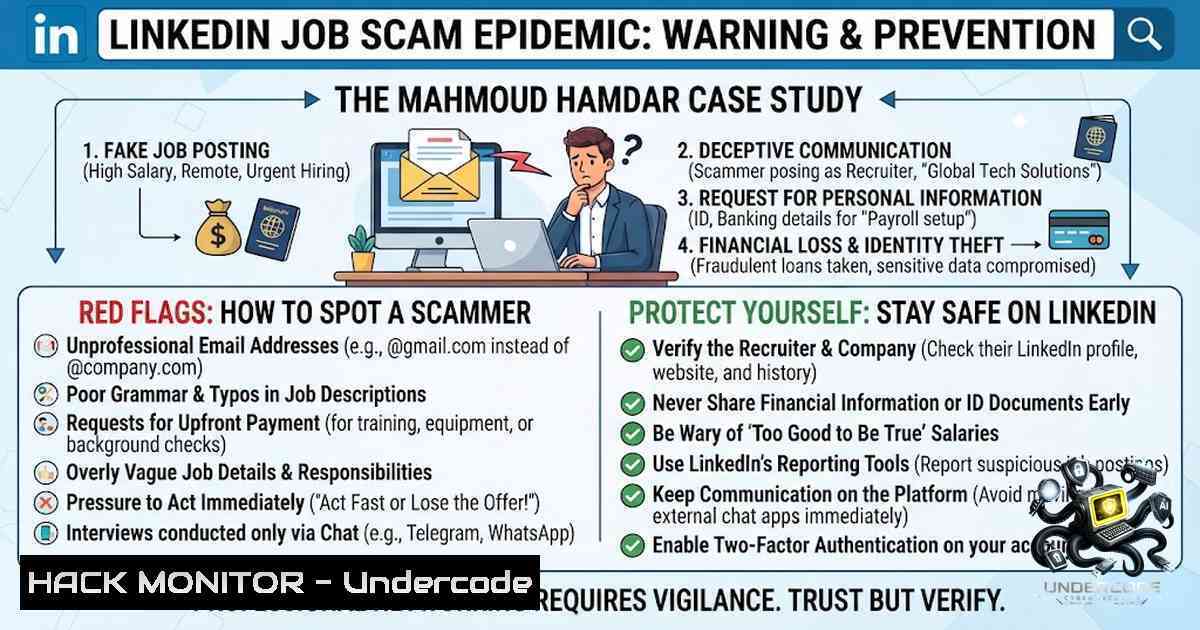
The professional networking giant LinkedIn has become a fertile hunting ground for cybercriminals, with job scams surging by over 400% in the past two years. The recent case involving Mahmoud Hamdar serves as a stark reminder that even the most polished profiles can be elaborate facades designed to steal personal data, money, and identities. As remote work normalizes digital-first hiring, understanding the anatomy of these scams is no longer optional – it’s a critical cybersecurity skill for every professional.
Learning Objectives:
- Identify red flags in fraudulent job postings and recruiter communications on LinkedIn
- Deploy OSINT (Open Source Intelligence) techniques to verify employer legitimacy
- Implement technical countermeasures to protect personal and financial information
- Execute proper incident response protocols when encountering or falling victim to a job scam
You Should Know:
- The Anatomy of a LinkedIn Job Scam – From Mahmoud Hamdar to Modern Fraud Operations
The Mahmoud Hamdar case, while specific, reflects a broader, systemic exploitation of job seekers’ vulnerabilities. Scammers create hyper-realistic LinkedIn profiles, often stealing photos and credentials from real professionals. They target users who are “Open to Work,” offering high-paying remote roles that require minimal experience – the classic “too good to be true” proposition.
These fraudulent recruiters typically follow a predictable pattern: an unsolicited InMail or connection request, a brief “interview” conducted via text or recorded video, and then a request for sensitive information or upfront payments for “training,” “background checks,” or “equipment”. In many cases, the scam extends to fake websites mimicking legitimate companies, complete with stolen branding and TLS certificates to appear secure.
Step‑by‑Step Guide: How to Verify a LinkedIn Recruiter’s Legitimacy
Step 1: Profile Deep Dive
- Examine the profile’s creation date and activity history. Profiles created within the last 30 days with minimal connections are high-risk.
- Check for endorsements and recommendations – are they from real, verifiable professionals? Scammers often create sock puppet accounts to endorse each other.
Step 2: Reverse Image Search
- Download the profile picture and run it through Google Images or TinEye. If the same photo appears under multiple names or on stock photo websites, it’s a red flag.
Step 3: Domain and Email Verification
- Legitimate recruiters use corporate email domains. Never trust Gmail, Yahoo, or other free email services for official hiring communications.
- Use the following Linux command to check email header authenticity (for emails you’ve received):
 Extract and analyze email headers
cat email_header.txt | grep -E "Received:|From:|Return-Path:|Authentication-Results:"

Check SPF, DKIM, and DMARC records for a domain
dig +short TXT example.com | grep -E "spf|dkim|dmarc"
Step 4: Company Verification
- Navigate to the company’s official website (not the link provided in the message). Cross-reference the job posting on the company’s official careers page.
- Call the company’s publicly listed phone number and ask to be connected to HR to verify the recruiter’s identity.
- OSINT Arsenal: Technical Tools to Unmask Fraudulent Employers
Open Source Intelligence (OSINT) is your first line of defense. By leveraging freely available tools, you can verify an employer’s digital footprint before sharing any personal information.
Step‑by‑Step Guide: OSINT Investigation Workflow
Step 1: Domain Reputation Check
Use the following commands and tools to assess a domain’s trustworthiness:
 Check domain age and registration details (Linux)
whois example.com

Check domain reputation using VirusTotal API (replace with your API key)
curl -X GET "https://www.virustotal.com/api/v3/domains/example.com" -H "x-apikey: YOUR_API_KEY"

Check if the domain appears in known threat intelligence feeds
curl -s "https://urlhaus.abuse.ch/downloads/csv/" | grep "example.com"
Step 2: Social Media Cross-Referencing
- Search for the company name on LinkedIn, Twitter, and Facebook. Look for consistent branding, employee count, and recent activity.
- Use the following Python script to automate basic social media presence checks (run in a Python environment):
import requests

def check_social_presence(company_name):
platforms = {
"LinkedIn": f"https://www.linkedin.com/company/{company_name}",
"Twitter": f"https://twitter.com/{company_name}",
"Facebook": f"https://www.facebook.com/{company_name}"
}
for platform, url in platforms.items():
try:
response = requests.get(url, timeout=5)
status = "Active" if response.status_code == 200 else "Inactive/Not Found"
print(f"{platform}: {status} - {url}")
except:
print(f"{platform}: Error checking")
Step 3: Breach Data Correlation
- Use `haveibeenpwned.com` to check if the email address used by the “recruiter” has appeared in known data breaches.
- On Windows, use PowerShell to query breach data:
 PowerShell command to check breach status (requires HaveIBeenPwned API key)
$apiKey = "YOUR_API_KEY"
$email = "[email protected]"
$headers = @{"hibp-api-key" = $apiKey}
Invoke-RestMethod -Uri "https://haveibeenpwned.com/api/v3/breachedaccount/$email" -Headers $headers
3. Social Engineering Defense: Psychological and Technical Countermeasures
Scammers exploit human psychology – urgency, fear of missing out, and the desperation of job hunting. Technical defenses are crucial, but they must be paired with behavioral awareness.
Step‑by‑Step Guide: Building a Social Engineering Defense Layer
Step 1: The “Slow Down” Protocol
- Legitimate hiring processes take time. Any request for immediate action – “This position will be filled today” – is a manipulation tactic.
- Implement a mandatory 24-hour waiting period before responding to any request for personal information or payment.
Step 2: Multi-Factor Authentication (MFA) Everywhere
- Enable MFA on your LinkedIn account using an authenticator app (Google Authenticator, Authy) rather than SMS, which is vulnerable to SIM-swapping.
- Use a password manager to generate and store unique, complex passwords for each platform.
Step 3: Secure Communication Channels
- Insist on video calls or phone interviews. Scammers prefer text-based communication to avoid detection.
- Use the following command on Linux to verify the security of a website’s TLS certificate before entering any personal data:
 Check SSL/TLS certificate details
openssl s_client -connect example.com:443 -servername example.com </dev/null 2>/dev/null | openssl x509 -text -1oout | grep -E "Subject:|Issuer:|Not Before|Not After"
Step 4: Payment and Financial Data Red Flags
- Never share bank account numbers, credit card details, or PayPal/Venmo/Zelle credentials with a new employer.
- Legitimate employers never ask for upfront payments for training, equipment, or background checks.
- Windows and Linux Hardening Against Phishing and Malware
Many job scams involve malicious attachments or links that install malware, keyloggers, or ransomware. Hardening your operating system reduces the attack surface.
Step‑by‑Step Guide: OS Hardening for Job Seekers
Windows Hardening Commands (PowerShell – Run as Administrator)
 Enable Windows Defender real-time protection
Set-MpPreference -DisableRealtimeMonitoring $false

Block all scripts from running in the user's temp folder
Set-ExecutionPolicy -ExecutionPolicy Restricted -Scope CurrentUser

Enable controlled folder access to protect against ransomware
Set-MpPreference -EnableControlledFolderAccess Enabled

Disable PowerShell script execution for non-administrators
Set-ItemProperty -Path "HKLM:\SOFTWARE\Policies\Microsoft\Windows\PowerShell" -1ame "EnableScripts" -Value 0

Enable Windows Firewall with advanced security
Set-1etFirewallProfile -Profile Domain,Public,Private -Enabled True

Block all inbound connections by default
Set-1etFirewallProfile -Profile Domain,Public,Private -DefaultInboundAction Block
Linux Hardening Commands (Run as root)
 Enable and configure UFW (Uncomplicated Firewall)
ufw default deny incoming
ufw default allow outgoing
ufw enable

Disable unnecessary services
systemctl list-unit-files --type=service --state=enabled | grep -v "essential" | awk '{print $1}' | xargs -I {} systemctl disable {}

Set strict permissions on sensitive files
chmod 600 /etc/shadow
chmod 644 /etc/passwd

Install and configure fail2ban to prevent brute-force attacks
apt-get install fail2ban -y
systemctl enable fail2ban
systemctl start fail2ban

Enable auditd to monitor critical file changes
auditctl -w /etc/passwd -p wa -k identity_changes
auditctl -w /etc/shadow -p wa -k identity_changes
- Incident Response: What to Do When You’ve Been Scammed
If you suspect you’ve fallen victim to a job scam, immediate action is critical to mitigate damage.
Step‑by‑Step Guide: Incident Response Protocol
Step 1: Containment
- Immediately change passwords for all online accounts, starting with email and financial institutions.
- Enable MFA on all accounts that support it.
- Run a full antivirus and anti-malware scan on your computer. On Windows, use:
 Full system scan with Windows Defender
Start-MpScan -ScanType FullScan
On Linux, use:
 Update ClamAV and run a full system scan
freshclam
clamscan -r --bell -i /
Step 2: Eradication
- If malware is detected, isolate the affected machine from the network and follow the removal instructions provided by your security software.
- Consider a clean OS reinstall if the infection is severe.
Step 3: Recovery and Reporting
- Contact your bank and credit card companies to flag potential fraudulent transactions.
- Report the scam to:
- The Federal Trade Commission (FTC) at reportfraud.ftc.gov
- LinkedIn’s Safety Center to report the fake recruiter profile
- Local law enforcement (campus police if you’re a student)
- Monitor your credit reports for any unauthorized accounts opened in your name.
6. Proactive Defense: Building a Career Cybersecurity Mindset
Prevention is always better than cure. Developing a cybersecurity mindset transforms you from a potential victim into a resilient professional.
Step‑by‑Step Guide: Long-Term Cybersecurity Hygiene
Step 1: Regular Digital Audits
- Perform quarterly audits of your online presence. Google your name and email address to see what information is publicly available.
- Use the following Python script to check if your email appears in known breaches:
import requests

def check_breach(email):
url = f"https://haveibeenpwned.com/api/v3/breachedaccount/{email}"
response = requests.get(url)
if response.status_code == 200:
breaches = response.json()
print(f"⚠️ Your email appears in {len(breaches)} breaches:")
for breach in breaches:
print(f" - {breach['Name']} ({breach['BreachDate']})")
elif response.status_code == 404:
print("✅ No breaches found for this email.")
else:
print("❌ Error checking breach status.")

check_breach("[email protected]")
Step 2: Continuous Education
- Subscribe to cybersecurity newsletters (Krebs on Security, SANS NewsBites).
- Take free online courses on social engineering and OSINT from platforms like Cybrary or SANS.
Step 3: Network Verification Protocol
- Create a personal checklist for every new recruiter interaction:
- [ ] Profile age > 6 months
- [ ] 500+ connections with verifiable mutual contacts
- [ ] Corporate email domain matches company website
- [ ] Company website has valid SSL certificate
- [ ] Job posting appears on official careers page
- [ ] No requests for payment or sensitive financial data
What Undercode Say:
- Key Takeaway 1: The Mahmoud Hamdar case is not an isolated incident but a symptom of a systemic failure in platform security and user awareness. Scammers are becoming increasingly sophisticated, using AI-generated profiles and deepfake videos to appear legitimate.
-
Key Takeaway 2: Technical defenses – OSINT tools, email verification, and system hardening – are essential, but they must be complemented by behavioral changes. The human element remains the weakest link in cybersecurity, and education is the most effective countermeasure.
Analysis:
The intersection of job seeking and cybersecurity presents a unique vulnerability. Job seekers are emotionally invested, financially pressured, and often willing to overlook red flags in pursuit of an opportunity. Scammers exploit this psychological state with surgical precision. The technical solutions outlined above – from email header analysis to OS hardening – provide a robust defense, but they require consistent application. The rise of AI-generated content will only make these scams more convincing, necessitating a multi-layered approach that combines technology, education, and policy. Organizations must also bear responsibility by implementing stricter verification processes for job postings and recruiter accounts. Ultimately, the fight against job scams is a collective effort that demands vigilance from individuals, platforms, and regulators alike.
Prediction:
- +1 Increased regulatory scrutiny on professional networking platforms will lead to mandatory identity verification for recruiter accounts within the next 18 months, significantly reducing the volume of fake job postings.
-
+1 The integration of AI-powered scam detection tools directly into LinkedIn and other platforms will become standard, automatically flagging suspicious profiles and messages in real-time.
-
-1 As defenses improve, scammers will pivot to more sophisticated tactics, including voice cloning and AI-generated video interviews, making it exponentially harder for the average user to distinguish real from fake.
-
-1 The financial and emotional toll of job scams will continue to rise, with global losses exceeding $500 billion annually by 2028, unless comprehensive education and technical measures are implemented at scale.
-
+1 Cybersecurity awareness will become a mandatory component of career counseling and professional development programs, equipping the next generation of job seekers with the skills to navigate the digital job market safely.
▶️ Related Video (66% Match):
https://www.youtube.com/watch?v=63o6Ng_FhOU
🎯Let’s Practice For Free:
🎓 Live Courses & Certifications:
Join Undercode Academy for Verified Certifications
🚀 Request a Custom Project:
Secure, high-velocity infrastructure and disruptive technological engineering. Contact our engineering team for high-tier development and proprietary systems:
[email protected]
💎 Smart Architecture | 🛡️ Secure by Design | ⭐ Trusted by Thousands
IT/Security Reporter URL:
Reported By: Mahmoud Hamdar – Hackers Feeds
Extra Hub: Undercode MoN
Basic Verification: Pass ✅


