Listen to this Post
Introduction:
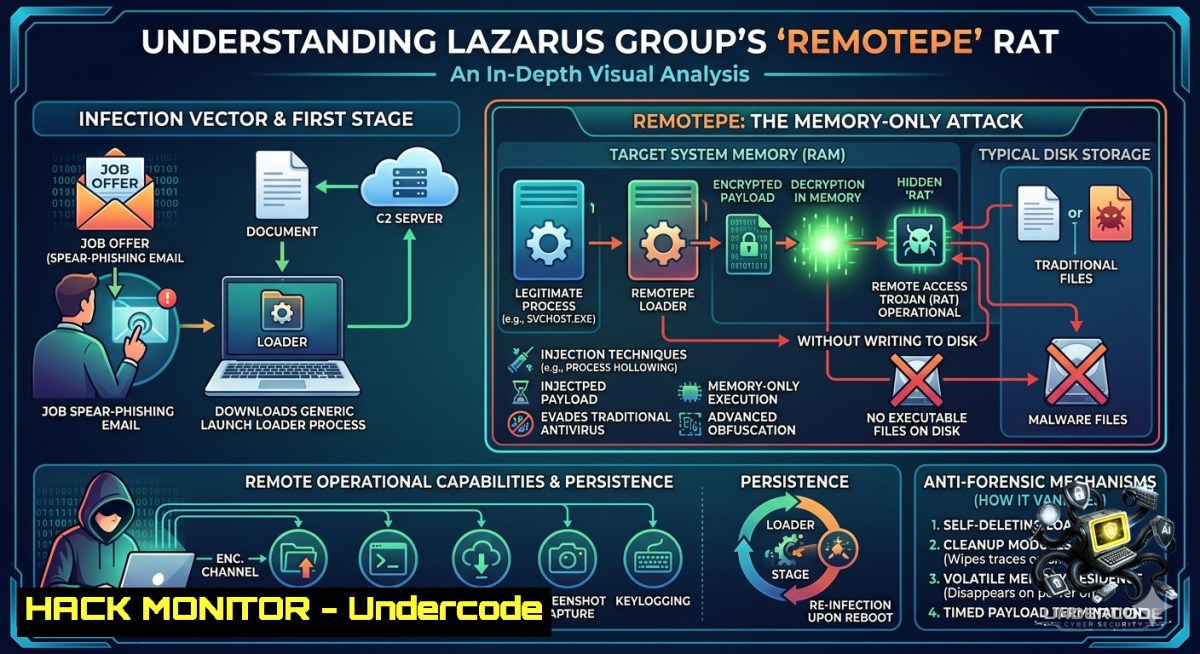
North Korea’s Lazarus Group has escalated its arsenal with a new fileless remote access trojan (RAT) named RemotePE, designed to operate entirely within system memory without leaving forensic artifacts on disk. Leveraging a multi-stage attack chain that abuses the Windows Data Protection API (DPAPI) and employs advanced evasion techniques like Hell’s Gate and ETW patching, this malware represents a paradigm shift in stealth, making it virtually invisible to traditional endpoint security solutions.
Learning Objectives:
– Analyze the Multi-Stage Chain: Understand how DPAPILoader, RemotePELoader, and RemotePE work in concert to deploy a memory-only RAT.
– Master Evasion Techniques: Learn the mechanics behind Hell’s Gate syscall resolution and Event Tracing for Windows (ETW) patching.
– Develop Detection Capabilities: Acquire hands-on skills using memory forensics with Volatility 3 to identify and respond to fileless malware infections.
You Should Know
1. Dissecting the Attack Chain: Step-by-Step Technical Breakdown
The RemotePE infection sequence unfolds in three distinct stages, each designed to progressively load the next component while evading detection.
– Stage 1: DPAPILoader (Persistence & Decryption)
– The attack begins with a DLL named `Iassvc.dll`, masquerading as a legitimate Windows Server component (`iassvcs.dll`). It is installed as a service named “Internet Authentication Service,” set to auto-start with the system.
– The loader searches for files in `C:\ProgramData\Microsoft\Windows\DeviceMetadataStore\en-US\.`, skipping legitimate Cabinet files and decrypting larger blobs using DPAPI, followed by an XOR with `0x8D`. This “environmental keying” ensures the payload is useless without the victim’s specific DPAPI keys.
– Stage 2: RemotePELoader (C2 Communication & Evasion)
– Once decrypted, RemotePELoader activates. It first applies evasion techniques (discussed in detail below) before reading a configuration file from the same `DeviceMetadataStore` path, which contains C2 URLs, sleep intervals, and proxy settings.
– It then enters a C2 polling loop, communicating via HTTP POST with a unique set of cookies (e.g., `MSCC`, `MSFPC`, `at_check`). The C2 communication is encrypted using AES-GCM, with keys derived from a Mersenne Twister PRNG seeded with a random value. The operator must manually approve payload delivery, indicating an “actor-in-the-loop” model.
– Stage 3: RemotePE (Final-Stage Memory-Only RAT)
– The final stage is a full-featured RAT written in C++ that executes entirely in memory, never touching the disk. It uses a multi-threaded architecture to handle C2 communication and command execution.
– RemotePE supports six command categories: configuration management, console operations, file exploration, process manipulation, timing control, and a no-op ping. A notable feature is its plugin system, allowing operators to dynamically register and unload “shellcodified DLLs”.
Practical Commands for Analysis: Security analysts can use the following commands to triage a system for indicators of compromise (IOCs):
 Check for the malicious service (Windows)
sc query "Internet Authentication Service"
reg query HKLM\SYSTEM\CurrentControlSet\Services\Iassvc

 Search for known file paths used by the malware
dir C:\ProgramData\Microsoft\Windows\DeviceMetadataStore\en-US\ /a /s

 Use Sysinternals Autoruns to check for suspicious services
autoruns.exe /accepteula

 Linux memory acquisition for offline analysis
sudo dd if=/dev/mem of=memory.dump bs=1M
2. Deep Dive into Evasion: Hell’s Gate and ETW Patching
RemotePE employs two sophisticated techniques to bypass userland EDR hooks and evade security monitoring.
Hell’s Gate / TartarusGate (Direct Syscalls): RemotePELoader dynamically resolves Windows syscall numbers at runtime by scanning the loaded `ntdll.dll` for syscall stubs. It then uses these numbers to invoke syscalls directly, bypassing the standard Windows API and any hooks that EDRs have placed on functions like `NtOpenSection` and `NtMapViewOfSection`. This technique allows the malware to remap clean copies of DLLs from `KnownDlls`, effectively unhooking userland security products.
ETW Patching (Silencing Telemetry): RemotePE patches the `EtwEventWrite` function in the current process by overwriting its first bytes with `48 33 C0 C3` (`XOR RAX, RAX; RET`). This causes the function to immediately return a success code, suppressing all ETW event generation and starving security tools that rely on this telemetry for detection.
Simulating ETW Patching in a Lab (Educational Use Only): The following PowerShell snippet demonstrates the principle of ETW bypass for authorized testing:
 Load the required Windows API
$method = [bash].Assembly.GetType('System.Management.Automation.PSObject').GetMethod('GetMember', [Reflection.BindingFlags]'NonPublic,Instance')
 This is a simplified example; real ETW bypasses involve patching EtwEventWrite in ntdll.dll
Add-Type @"
using System;
using System.Runtime.InteropServices;
public class ETWBypass {
[DllImport("ntdll.dll")]
public static extern int NtRaiseHardError(int ErrorStatus, int NumberOfParameters, int UnicodeStringParameterMask, IntPtr Parameters, int ValidResponseOptions, out int Response);
}
"@
 A real bypass would use a patch like: (byte[])(0x48,0x33,0xC0,0xC3)
Write-Host "Conceptual demonstration only – do not use maliciously."
3. Detecting the Undetectable: Memory Forensics with Volatility 3
Since RemotePE never writes to disk, traditional file-based scans fail. Memory forensics becomes essential. The `etwpatch` plugin for Volatility 3 is specifically designed to detect ETW patching in memory dumps.
Step-by-Step Memory Analysis with Volatility 3:
1. Acquire Memory: Use a tool like `DumpIt` or `Magnet RAM Capture` to obtain a memory dump.
2. Install Volatility 3:
git clone https://github.com/volatilityfoundation/volatility3.git
cd volatility3
python3 vol.py -f /path/to/memory.dump windows.info
3. Detect ETW Patching:
python3 vol.py -f memory.dump windows.etwpatch
This plugin examines the first opcode of ETW-related functions in `ntdll.dll` and `advapi32.dll`. A `RET` (0xC3) or `JMP` at the function start is a clear indicator of patching.
4. List Running Processes:
python3 vol.py -f memory.dump windows.psscan > processes.txt
Compare output with `windows.pslist` to find hidden processes (those not in the active list).
5. Extract Suspicious DLLs:
python3 vol.py -f memory.dump windows.modscan
python3 vol.py -f memory.dump windows.dumpfiles --pid <PID>
Look for the presence of `Iassvc.dll` in unexpected locations or services running from unusual paths.
4. Fortifying Your Defenses: Mitigation and Hardening Strategies
While detecting fileless malware is challenging, proactive hardening can significantly reduce the attack surface.
Mitigation Measures:
– DPAPI Hardening: Since RemotePE relies on DPAPI decryption, restrict access to DPAPI master keys. Use tools like `dpapimig` to limit key accessibility. Implement Credential Guard to isolate DPAPI secrets from the operating system.
– ETW Monitoring: Deploy ETW-based monitoring solutions that can detect patching attempts. The `etwpatch` Volatility plugin can be used in a detection pipeline on memory captures.
– Endpoint Detection and Response (EDR): Configure EDRs to monitor for direct syscall patterns typical of Hell’s Gate. Look for sequences that bypass `ntdll.dll` hooks.
– Network Hardening: Block known C2 domains like `aes-secure[.]net` at the network perimeter. Implement SSL inspection to decrypt and inspect HTTPS traffic where possible.
– User Awareness: Train employees to recognize social engineering tactics, as the initial compromise often comes via Telegram or fake job interviews.
Linux Hardening Commands (for cross-platform defense):
 Monitor for unusual network connections
ss -tunap | grep ESTABLISHED

 Use auditd to track suspicious process executions
auditctl -w /tmp -p rwx -k temp_exec
auditctl -w /proc -p rwx -k proc_mon

 Check for DNS tunneling or beaconing
tcpdump -i eth0 -1 'port 53' -c 1000
5. Simulating the Attack: Lab Setup and Emulation for Blue Teams
Understanding the adversary is key to defense. Setting up a safe lab environment to emulate RemotePE’s tactics is crucial.
Lab Requirements:
– A Windows 10/11 or Windows Server VM (no internet access in initial setup).
– A Linux analysis machine (e.g., Ubuntu).
– Network isolation (e.g., using VirtualBox’s “Internal Network” mode).
Emulation Steps:
1. Deploy DPAPILoader: Compile a benign test version of a DLL that mimics DPAPI decryption (do not use actual malware). Use `libpeconv` for reflective loading.
// Conceptual example: Decrypting with DPAPI
DATA_BLOB EncryptedBlob, DecryptedBlob;
CryptUnprotectData(&EncryptedBlob, NULL, NULL, NULL, NULL, 0, &DecryptedBlob);
2. Simulate C2: Use a Python script to emulate the RemotePELoader C2 server. The server should respond to check-in requests with a JSON object containing a session ID and later deliver a benign payload (e.g., a message box DLL).
3. Memory Capture: After executing the simulated loader, capture the VM’s memory using `DumpIt.exe`.
4. Detection Exercise: Use Volatility 3 to find the injected DLL and the patched ETW functions. Practice extracting the configuration from memory using the `windows.malfind` plugin.
Caution: This simulation must be performed in a completely isolated, non-production environment. Do not use actual malicious code or connect to real C2 servers.
What Undercode Say:
– Key Takeaway 1: The Lazarus Group has successfully operationalized a “pure” fileless malware, demonstrating that environmental keying and in-memory execution can defeat signature-based detection and complicate forensic recovery.
– Key Takeaway 2: Blue teams must pivot from disk-centric to memory-centric incident response. Tools like Volatility 3, especially the `etwp patch` plugin, are no longer optional but essential for modern DFIR.
Expected Output:
The defensive posture against APT groups like Lazarus must evolve continuously. RemotePE’s design shows that focusing solely on file-based artifacts leaves a massive blind spot. Memory forensics, behavioral analysis of syscalls, and proactive hardening of security features like DPAPI and ETW are the new battlegrounds.
Prediction:
– -1 The proliferation of memory-only malware will render traditional antivirus and many first-generation EDRs obsolete, leading to an increased volume of undetected long-term compromises.
– -1 The complexity of detection will create a significant skills gap in the cybersecurity workforce, as memory forensics requires advanced knowledge beyond basic security operations.
– +1 This will drive rapid innovation in memory analysis tools (e.g., Volatility 4) and cloud-based sandboxing that can capture and analyze ephemeral memory states at scale.
– +1 Security vendors will be forced to integrate dynamic syscall monitoring and kernel-level ETW protection into their core products, potentially leading to more robust operating system-level defenses against userland bypasses.
▶️ Related Video (84% Match):
🎯Let’s Practice For Free:
🎓 Live Courses & Certifications:
[Join Undercode Academy for Verified Certifications](https://undercode.co.uk/certifications/)
🚀 Request a Custom Project:
Secure, high-velocity infrastructure and disruptive technological engineering. Contact our engineering team for high-tier development and proprietary systems:
[[email protected]](mailto:[email protected])
💎 Smart Architecture | 🛡️ Secure by Design | ⭐ Trusted by Thousands
IT/Security Reporter URL:
Reported By: [Mohit Hackernews](https://www.linkedin.com/posts/mohit-hackernews_lazarus-deployed-a-new-memory-only-rat-share-7464612960343146496-liMv/) – Hackers Feeds
Extra Hub: Undercode MoN
Basic Verification: Pass ✅
🔐JOIN OUR CYBER WORLD [ CVE News • HackMonitor • UndercodeNews ]
[💬 Whatsapp](https://undercode.help/whatsapp) | [💬 Telegram](https://t.me/UndercodeCommunity)
📢 Follow UndercodeTesting & Stay Tuned:
[𝕏 formerly Twitter 🐦](https://x.com/undercodeupdate) | [@ Threads](https://www.threads.net/@undercodetesting) | [🔗 Linkedin](https://www.linkedin.com/company/undercodetesting/) | [🦋BlueSky](https://bsky.app/profile/undercode.bsky.social)


