Listen to this Post
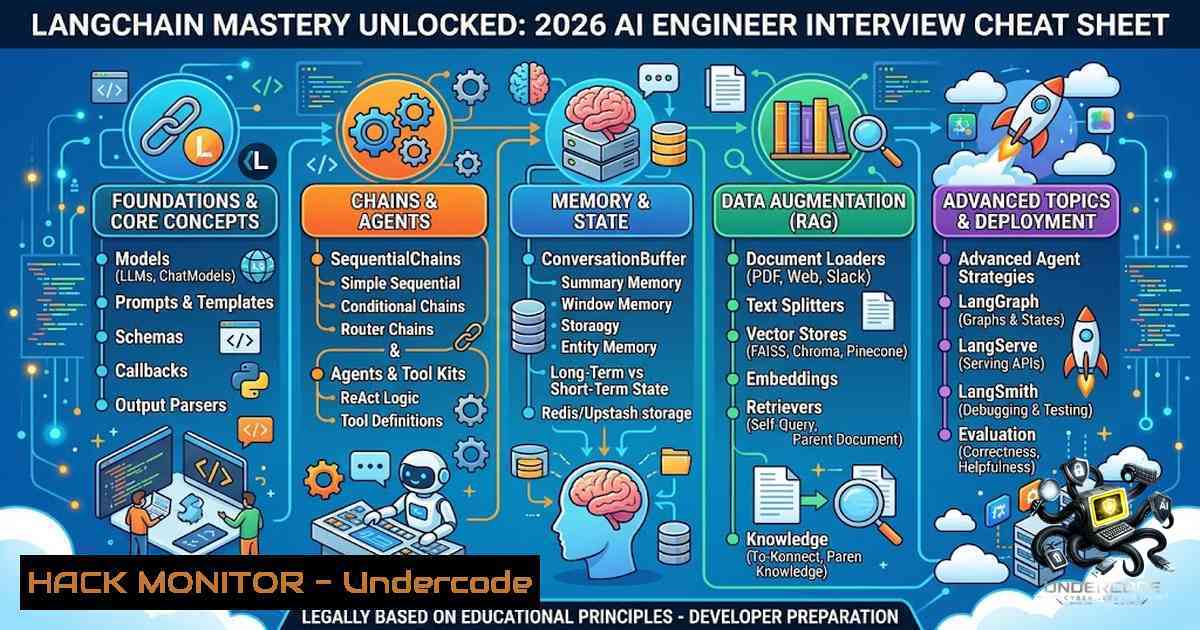
Introduction:
LangChain has rapidly become the industry-standard framework for building production-ready applications powered by Large Language Models (LLMs). It provides a modular and declarative way to orchestrate complex AI workflows, from simple chat interfaces to sophisticated Retrieval-Augmented Generation (RAG) pipelines and autonomous agents. Mastering LangChain’s core components—from document loaders and vector databases to LCEL and memory—is essential for any AI engineer preparing for interviews or building real-world generative AI solutions.
Learning Objectives:
- Understand the end-to-end LangChain architecture and how its components interact within a typical RAG pipeline.
- Gain hands-on proficiency with Document Loaders, Text Splitters, Embeddings, and Vector Stores for data ingestion and indexing.
- Master LangChain Expression Language (LCEL) for declarative and scalable chain composition.
- Learn to implement conversational memory, build custom agents with tools, and deploy a complete RAG system.
1. LangChain Architecture and Core Components
LangChain simplifies LLM application development through a modular architecture. The standard workflow follows a clear pipeline: Load → Split → Embed → Store → Retrieve → Generate. Understanding each step is critical.
- Document Loaders: These ingest data from various sources—PDFs, websites, databases, and cloud storage—into LangChain’s standard `Document` format.
- Text Splitters: Large documents are broken into smaller, manageable chunks that fit within an LLM’s context window. The `RecursiveCharacterTextSplitter` is recommended for most use cases.
- Embeddings: Text chunks are converted into numerical vector representations using embedding models (e.g., OpenAI, Hugging Face).
- Vector Databases: These vectors are stored in specialized databases like Chroma or FAISS for efficient similarity search.
- Retrievers: These query the vector store to fetch the most relevant document chunks for a given user question.
- Chains & Agents: Chains sequence multiple LLM calls or tools, while Agents use an LLM to decide which tools to call and in what order.
- Memory: Enables stateful conversations by persisting chat history across interactions.
- LCEL (LangChain Expression Language): A declarative way to compose chains using the pipe operator (
|), making code more readable and scalable.
2. Building Your First LCEL Chain
LangChain Expression Language (LCEL) is the modern, recommended way to build chains. It uses a Unix-style pipe operator (|) to pass data from one component to the next.
Step-by-Step Guide:
1. Install Dependencies:
pip install langchain langchain-openai
2. Set Up Environment:
Ensure your OpenAI API key is set as an environment variable:
export OPENAI_API_KEY="your-api-key-here"
3. Create a Basic LCEL Chain:
This chain connects a prompt template, an LLM, and an output parser.
from langchain_openai import ChatOpenAI
from langchain_core.prompts import ChatPromptTemplate
from langchain_core.output_parsers import StrOutputParser

<ol>
<li>Define the prompt template
prompt = ChatPromptTemplate.from_template(
"You are a helpful assistant. Answer the following question: {question}"
)</p></li>
<li><p>Initialize the LLM
llm = ChatOpenAI(model="gpt-4o-mini")</p></li>
<li><p>Define the output parser
parser = StrOutputParser()</p></li>
<li><p>Build the chain using the pipe operator
chain = prompt | llm | parser</p></li>
<li><p>Invoke the chain
response = chain.invoke({"question": "Tell me about LangChain"})
print(response)
4. Inspect Input/Output Schemas:
Every LCEL chain exposes its input and output schemas, which is invaluable for debugging.
print(chain.input_schema.schema())
print(chain.output_schema.schema())
3. Implementing a Complete RAG Pipeline
RAG enhances LLM responses by grounding them in external knowledge, preventing hallucinations and providing verifiable citations.
Step-by-Step Guide to Build a RAG System:
1. Install Required Libraries:
pip install langchain langchain-community chromadb faiss-cpu openai pypdf
2. Load and Split Documents:
Use a `PyPDFLoader` to load a PDF and `RecursiveCharacterTextSplitter` to chunk it.
from langchain_community.document_loaders import PyPDFLoader
from langchain_text_splitters import RecursiveCharacterTextSplitter

loader = PyPDFLoader("path/to/your/document.pdf")
documents = loader.load()

text_splitter = RecursiveCharacterTextSplitter(
chunk_size=1000,
chunk_overlap=200,
length_function=len,
)
chunks = text_splitter.split_documents(documents)
3. Create Embeddings and Store in Vector Database:
Convert chunks to vectors and store them in a FAISS index.
from langchain_openai import OpenAIEmbeddings
from langchain_community.vectorstores import FAISS

embeddings = OpenAIEmbeddings(model="text-embedding-3-small")
vectorstore = FAISS.from_documents(chunks, embeddings)
4. Set Up the Retriever:
Create a retriever from the vector store to fetch relevant documents.
retriever = vectorstore.as_retriever(search_kwargs={"k": 4})
5. Build the RAG Chain:
Combine the retriever, a prompt template, and an LLM using LCEL.
from langchain_core.prompts import ChatPromptTemplate
from langchain_core.runnables import RunnablePassthrough
from langchain_openai import ChatOpenAI
from langchain_core.output_parsers import StrOutputParser

template = """
You are a helpful assistant. Answer the question based solely on the following context:
{context}

Question: {question}
"""
prompt = ChatPromptTemplate.from_template(template)
llm = ChatOpenAI(model="gpt-4o-mini")
parser = StrOutputParser()

def format_docs(docs):
return "\n\n".join(doc.page_content for doc in docs)

rag_chain = (
{"context": retriever | format_docs, "question": RunnablePassthrough()}
| prompt
| llm
| parser
)

response = rag_chain.invoke("What is the main topic of the document?")
print(response)
4. Adding Memory to Your Chains
By default, LLMs are stateless and do not remember previous interactions. LangChain provides memory mechanisms to maintain conversation history.
Step-by-Step Guide for Conversational Memory:
1. Install Additional Dependencies:
pip install langchain-community
2. Implement `RunnableWithMessageHistory`:
Wrap your chain with a message history class to persist chat history across sessions.
from langchain_core.runnables.history import RunnableWithMessageHistory
from langchain_community.chat_message_histories import ChatMessageHistory

store = {}

def get_session_history(session_id: str):
if session_id not in store:
store[bash] = ChatMessageHistory()
return store[bash]

Assume 'chain' is your existing LCEL chain
chain_with_memory = RunnableWithMessageHistory(
chain,
get_session_history,
input_messages_key="question",  Key for the user input
history_messages_key="history",  Key for the history in the prompt
)

Invoke with a session_id to maintain memory
response = chain_with_memory.invoke(
{"question": "My name is Alice."},
config={"configurable": {"session_id": "user_123"}}
)
print(response)
5. Creating Custom Agents with Tools
Agents extend LLMs by giving them access to external tools. They use an LLM to decide which tools to call, in what order, and how to interpret the results.
Step-by-Step Guide to Build a Simple Agent:
1. Define a Custom Tool:
Use the `@tool` decorator to turn any Python function into a LangChain tool.
from langchain_core.tools import tool

@tool
def multiply(a: int, b: int) -> int:
"""Multiply two integers together."""
return a  b

@tool
def add(a: int, b: int) -> int:
"""Add two integers together."""
return a + b

tools = [multiply, add]
- Bind Tools to the LLM and Create an Agent:
Bind the tools to the model and create an agent that can call them.from langchain_openai import ChatOpenAI from langchain.agents import create_agent</li> </ol> llm = ChatOpenAI(model="gpt-4o-mini") llm_with_tools = llm.bind_tools(tools) agent = create_agent(llm, tools)
3. Invoke the Agent:
The agent will automatically decide which tool to use based on the user’s question.
response = agent.invoke({"messages": [("user", "What is 5 times 3?")]})
print(response)
What Undercode Say:
- Modularity is Key: LangChain’s strength lies in its modular design. Understanding how each component—loaders, splitters, embeddings, vector stores, and retrievers—fits together is more important than memorizing syntax. This modularity allows for easy swapping of models and databases.
- LCEL is the Future: The shift to LCEL represents a significant improvement in how chains are built and maintained. Its declarative nature, using the pipe operator, makes code cleaner, more readable, and easier to debug. Mastery of LCEL is a must for any serious LangChain developer.
- RAG is the Killer App: Retrieval-Augmented Generation is arguably the most important practical application of LangChain today. It directly addresses the core limitations of LLMs—hallucinations and lack of up-to-date knowledge—by grounding responses in external, verifiable data.
- Hands-On Practice is Essential: Theory alone is insufficient. Building real projects, even simple ones like a PDF question-answering bot, is the most effective way to internalize LangChain’s concepts and prepare for technical interviews.
Prediction:
- +1 LangChain will continue to dominate as the primary orchestration framework for enterprise AI, solidifying its position as the “TensorFlow of LLMs” due to its extensive integrations and active community.
- +1 The demand for AI Engineers proficient in LangChain, RAG, and agentic workflows will surge, making these skills among the most valuable in the tech industry over the next 3-5 years.
- +1 LCEL will become the standard for all LangChain development, deprecating older, less intuitive chain-building methods and enabling more complex, production-grade applications.
- -1 As LangChain rapidly evolves, there is a risk of fragmentation and breaking changes, requiring developers to continuously update their knowledge and codebases to keep pace with the latest API revisions.
▶️ Related Video (84% Match):
🎯Let’s Practice For Free:
🎓 Live Courses & Certifications:
Join Undercode Academy for Verified Certifications
🚀 Request a Custom Project:
Secure, high-velocity infrastructure and disruptive technological engineering. Contact our engineering team for high-tier development and proprietary systems:
[email protected]
💎 Smart Architecture | 🛡️ Secure by Design | ⭐ Trusted by ThousandsIT/Security Reporter URL:
Reported By: Deepak Yadav – Hackers Feeds
Extra Hub: Undercode MoN
Basic Verification: Pass ✅🔐JOIN OUR CYBER WORLD [ CVE News • HackMonitor • UndercodeNews ]
📢 Follow UndercodeTesting & Stay Tuned:


