Listen to this Post
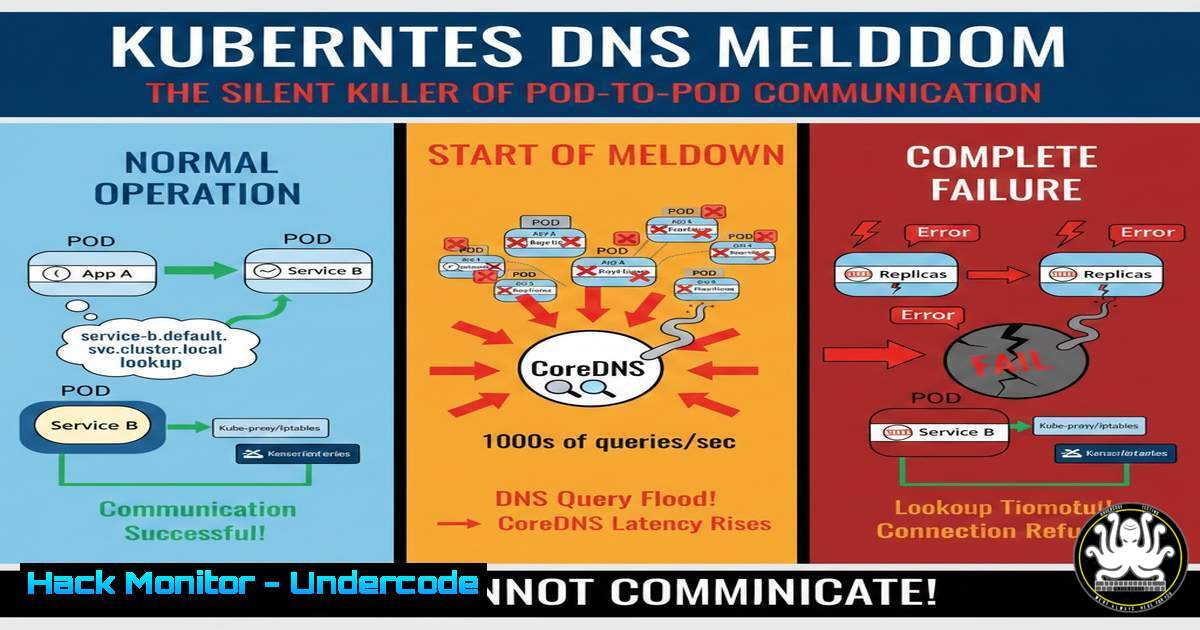
Introduction:
In the intricate ecosystem of Kubernetes, service discovery is the linchpin that holds microservices together. When this fails, applications don’t crash with loud, obvious errors; they silently degrade, throwing vague “no such host” or “temporary failure in name resolution” errors. This often leads engineers down a rabbit hole of checking service health and network policies, when the true culprit is a misconfigured or overloaded CoreDNS. Understanding how to diagnose and prevent DNS failures is critical for maintaining resilient cloud-native infrastructure.
Learning Objectives:
- Understand the role of CoreDNS in Kubernetes service discovery and the full FQDN resolution flow.
- Master debugging techniques using
kubectl exec,nslookup, and log analysis to isolate DNS failures. - Implement production-grade fixes, including resource optimization, scaling, and network policy auditing for DNS.
You Should Know:
1. Understanding the CoreDNS Resolution Flow in Kubernetes
In Kubernetes, services are not accessed by IP alone. When a Pod attempts to reach service-name, the local resolver checks /etc/resolv.conf, which points to the Cluster DNS service (CoreDNS). CoreDNS then appends the namespace and domain to form the fully qualified domain name (FQDN): service-name.namespace.svc.cluster.local. This resolves to the service’s ClusterIP, which `kube-proxy` then translates to the endpoint of a healthy target Pod.
– What this does: It decouples service location from the underlying Pod IPs, allowing for dynamic scaling and self-healing.
– How to use/verify it: To see the resolution path in action, exec into a temporary debug Pod and run a DNS query.
- Step‑by‑Step Guide: Debugging DNS from Inside a Pod
When a Pod reportsno such host, the first step is to verify resolution from within the network namespace of an affected Pod.
– Step 1: Exec into the Pod or a debug container.
If the Pod has basic networking tools, use:
kubectl exec -it <pod-name> -- nslookup kubernetes.default.svc.cluster.local
If the Pod is bare bones (e.g., distroless), launch a temporary debug Pod in the same namespace:
kubectl run -it --rm debug --image=nicolaka/netshoot --restart=Never -- nslookup kubernetes.default
– Step 2: Inspect the local resolver configuration.
kubectl exec -it <pod-name> -- cat /etc/resolv.conf
This should show `nameserver` pointing to the CoreDNS service IP (usually `kube-dns` in the `kube-system` namespace) and search domains like namespace.svc.cluster.local.
– Step 3: Check for cross-namespace resolution issues.
If calling a service in another namespace, you must use the FQDN or the shortname with the full namespace. Test this specifically:
kubectl exec -it debug -- nslookup my-api.other-namespace.svc.cluster.local
- Analyzing Root Causes: CoreDNS Logs, OOMKills, and NetworkPolicy
Once initial connectivity is confirmed, the next step is to check the health of the CoreDNS Pods themselves.
– Check CoreDNS Pod Status:
kubectl get pods -n kube-system -l k8s-app=kube-dns
Look for `CrashLoopBackOff`, `Pending`, or high restart counts.
- Check for OOMKills: A common cause is CoreDNS running out of memory under load.
kubectl describe pod <coredns-pod> -n kube-system | grep -A 10 "Last State"
If you see
OOMKilled, the memory limit is too low for the query volume. - View CoreDNS Logs:
kubectl logs -n kube-system -l k8s-app=kube-dns --tail=50
Look for plugin errors, timeouts, or permission denied messages.
- Audit Network Policies:
Check if any `NetworkPolicy` in the cluster is blocking UDP/TCP traffic on port 53 to or from the CoreDNS Pods.kubectl get networkpolicy --all-namespaces | grep -i dns
You may need to inspect individual policies to ensure they allow egress to port 53 on the CoreDNS service.
4. Production Fixes: Hardening CoreDNS Against Failure
Preventing DNS failures requires proactive configuration changes based on cluster load and usage patterns.
– Increase Memory Limits and Requests:
Edit the CoreDNS deployment:
kubectl edit deployment coredns -n kube-system
Under spec.template.spec.containers.resources, adjust the `limits` and `requests` for memory. A baseline for a medium-sized cluster might be `requests: 100Mi` and limits: 256Mi, but monitor usage to fine-tune.
– Scale CoreDNS Horizontally:
Increase the number of replicas to handle failover and load:
kubectl scale deployment coredns -n kube-system --replicas=3
– Implement Pod Anti-Affinity:
Ensure CoreDNS Pods are spread across different nodes to avoid a single point of failure.
– Monitor DNS Performance:
Set up monitoring (e.g., Prometheus) to scrape CoreDNS metrics and alert on high latency or error rates.
- Advanced Security: DNS Spoofing and Cache Poisoning Mitigation
From a cybersecurity perspective, a compromised DNS can lead to traffic redirection to malicious services. While Kubernetes internal DNS is generally secure, misconfigurations can be exploited.
– Verify DNSSEC and Trust: CoreDNS supports DNSSEC validation for external lookups. Ensure it is enabled if the cluster relies on external DNS resolution for anything sensitive.
– Prevent Cache Poisoning: CoreDNS has built-in protections, but ensure you are running the latest patched version to mitigate vulnerabilities like CVE-2020-8559 (kubelet redirect) or other DNS protocol attacks.
– Restrict DNS Access via NetworkPolicy:
Implement a strict default deny NetworkPolicy and then explicitly allow egress to CoreDNS.
apiVersion: networking.k8s.io/v1
kind: NetworkPolicy
metadata:
name: allow-dns-access
spec:
podSelector: {}  Apply to all pods in the namespace
policyTypes:
- Egress
egress:
- to:
- namespaceSelector:
matchLabels:
kubernetes.io/metadata.name: kube-system
podSelector:
matchLabels:
k8s-app: kube-dns
ports:
- port: 53
protocol: UDP
- port: 53
protocol: TCP
- The Linux Admin’s Perspective: Manual DNS Debugging Commands
Even within Kubernetes, the underlying Linux networking stack is what ultimately handles resolution. These commands can be run from a node to check if the issue is host-level or cluster-level.
– Check Host Resolver: On a Kubernetes node, verify it can reach the CoreDNS ClusterIP.
dig @<coredns-cluster-ip> kubernetes.default.svc.cluster.local
– Check Conntrack for DNS Issues: DNS relies on UDP. Sometimes connection tracking tables can get full or corrupted.
conntrack -L | grep 53
– Monitor tcpdump on the Node for DNS Traffic:
tcpdump -i any -n port 53
This allows you to see if queries are leaving the node and if responses are coming back. This is the ultimate tool for proving a network policy or node-level firewall is blocking traffic.
What Undercode Say:
- Key Takeaway 1: DNS is a Control Plane Dependency. CoreDNS is not just another application; it is the nervous system of the cluster. Treat its health and security with the same rigor as the API server.
- Key Takeaway 2: Logs Before Assumptions. Never assume a service is down just because a connection fails. Always start debugging with a DNS query from inside the Pod’s context. The majority of “network connectivity” issues in Kubernetes are actually DNS resolution failures caused by resource starvation or policy blocks.
The failure pattern is insidious because applications remain “healthy” from a liveness probe perspective, but they are functionally blind. This leads to cascading failures where upstream services retry, time out, and eventually collapse under the weight of waiting for resolutions that will never come. Engineers must shift their mindset to treat a CoreDNS restart as a critical incident requiring immediate investigation, not just an auto-healing event to ignore. A holistic approach combining resource management, network policy auditing, and continuous monitoring of DNS metrics is the only way to prevent the silent killer from taking down production traffic.
Prediction:
As service meshes like Istio and Linkerd gain further adoption, we will see a shift in the DNS landscape. The reliance on CoreDNS will evolve into a more sophisticated interplay where the sidecar proxy handles service discovery via its own control plane, potentially bypassing kube-dns for internal mesh traffic. However, this does not eliminate the risk; it merely shifts it. The next generation of outages will likely stem from misconfigurations in the service mesh’s DNS proxying capabilities or incompatibilities with the underlying CoreDNS configuration. The industry will need to develop unified observability tools that can trace a DNS query from a Pod, through the sidecar, to CoreDNS, and out to an external resolver to truly debug the complex networking stacks of the future.
▶️ Related Video (90% Match):
🎯Let’s Practice For Free:
IT/Security Reporter URL:
Reported By: Adityajaiswal7 Devops – Hackers Feeds
Extra Hub: Undercode MoN
Basic Verification: Pass ✅


