Listen to this Post
Introduction:
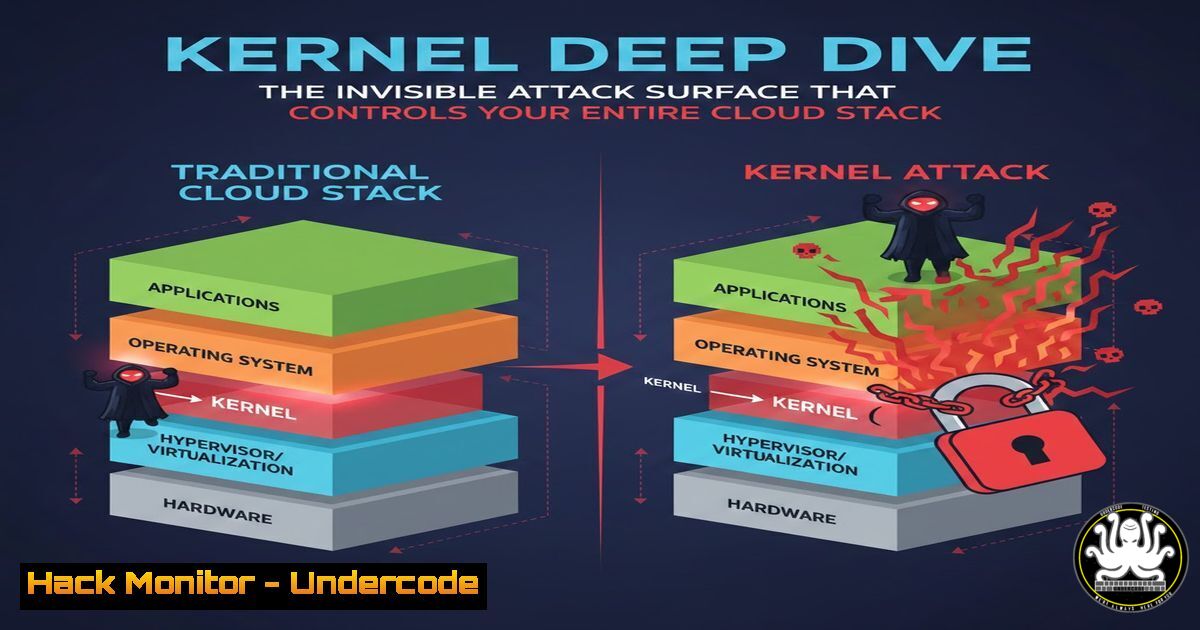
While DevOps engineers frequently interact with containers, pods, and cloud instances, the silent arbiter of all these technologies remains largely overlooked: the Linux kernel. From a cybersecurity perspective, the kernel is the ultimate trust boundary; it is the ring-zero code responsible for enforcing isolation between processes, managing memory permissions, and handling network traffic. A single vulnerability in this layer—such as a privilege escalation bug (CVE-2022-0847, aka “Dirty Pipe”) or a namespace breakout—can compromise an entire host, jeopardizing every container and application running on it. Understanding the kernel is no longer just systems administration; it is the frontline of defense-in-depth.
Learning Objectives:
- Objective 1: Distinguish between user space and kernel space, identifying the security implications of system calls.
- Objective 2: Master command-line techniques to inspect kernel parameters, modules, and security configurations.
- Objective 3: Analyze how containerization technologies (Docker, Kubernetes) leverage kernel features for isolation and where those isolation mechanisms can fail.
- User Space vs. Kernel Space: The Privilege Boundary
The core concept explained in the original post is the rigid separation between user applications and the hardware. In Linux, this is enforced by the CPU itself through different execution modes (Ring 3 for User Space, Ring 0 for Kernel Space). Applications like Chrome run in User Space with restricted access. When Chrome needs to write a file to disk, it triggers a software interrupt (a system call) that switches the CPU to Kernel Mode to perform the action.
Why it matters for Security: If an attacker exploits a bug in Chrome, they gain control of a User Space process. To truly own the machine, they must “break out” to Kernel Space. This is typically achieved by exploiting a vulnerability in a system call handler.
Step‑by‑step guide to observing system calls:
To see this bridge in action, we can use the `strace` utility. This command traces the system calls made by a program.
1. Create a simple test file:
echo "Hello Kernel" > test.txt
- Trace the `cat` command as it reads the file:
strace -o cat_trace.log cat test.txt
3. Analyze the output:
grep -E "openat|read|write" cat_trace.log
Explanation:
openat(AT_FDCWD, "test.txt", O_RDONLY): This is the system call requesting the kernel to open the file.read(3, "Hello Kernel\n", 131072): This requests the kernel to copy data from its internal file cache (or disk) into the User Space buffer.write(1, "Hello Kernel\n", 13): This asks the kernel to take the data from User Space and write it to STDOUT (the terminal).
Every interaction with hardware, memory, or protected resources goes through these gates. From a blue team perspective, abnormal sequences of syscalls (e.g., a web server suddenly executing execve) can be a strong indicator of compromise.
2. Inspecting the Kernel: Version, Modules, and Parameters
Knowing your kernel is as important as knowing your software dependencies. Outdated kernels contain known vulnerabilities (CVEs). Furthermore, the kernel is modular; drivers and features can be loaded and unloaded dynamically, which can introduce or reduce attack surface.
Step‑by‑step guide to kernel reconnaissance (Linux):
1. Check Kernel Version and Build:
uname -a
 Example Output: Linux hostname 5.4.0-26-generic 30-Ubuntu SMP
The `-generic` indicates it’s a distribution kernel. Knowing the exact version allows you to check for known exploits (e.g., searchsploit 5.4.0).
2. List Loaded Kernel Modules:
lsmod | head -10
`lsmod` reads from /proc/modules. Each module here is code running with kernel privileges. A suspicious module (like a rootkit) might appear here, though sophisticated rootkits hide themselves.
3. View/Modify Kernel Runtime Parameters:
The kernel’s behavior is controlled via sysctl variables.
 View IPv4 forwarding status (critical for container networking)
sysctl net.ipv4.ip_forward

View security-related settings for kernel pointers
sysctl kernel.kptr_restrict
 Value 2: prevents leaking kernel addresses to non-root users (hardening)
Windows Equivalent (for comparison):
While Windows uses the NT kernel, administrators inspect it via different tools:
 Get OS version and build (kernel version)
Get-ComputerInfo | Select WindowsProductName, WindowsVersion, OsHardwareAbstractionLayer

List loaded drivers (kernel modules)
Get-WindowsDriver -Online | Select Driver, ProviderName, Version
- The Kernel and Containers: The Illusion of Isolation
The original post correctly states that containers share the host kernel. This is the single most important security concept in cloud native computing. Docker is not a virtual machine; it is a collection of processes running on the host, constrained by kernel features.
Key Kernel Features Enabling Containers:
- Namespaces: Provide isolation. They make a process believe it has its own PID tree (PID namespace), network stack (NET namespace), mount points (MNT namespace), etc.
- Cgroups (Control Groups): Limit and meter resources (CPU, memory, disk I/O).
- Seccomp (Secure Computing Mode): Filters system calls. It allows you to create a deny-list or allow-list of syscalls that a containerized process can use.
Step‑by‑step guide to visualizing container isolation:
1. Run a background container:
docker run -d --name test_container alpine sleep 3600
2. Find the container’s PID on the host:
 Inspect the container and get the main process PID
CONTAINER_PID=$(docker inspect test_container -f '{{.State.Pid}}')
echo "Container process runs as host PID: $CONTAINER_PID"
- Examine the container’s namespace from the host perspective:
Check the network namespace of that process
sudo ls -la /proc/$CONTAINER_PID/ns/
Output: lrwxrwxrwx ... net -> 'net:[bash]'
This shows that the process is in a unique network namespace (inode
4026532381), separate from the host’s default namespace.
4. Attempt to break isolation (simulating an attack):
If the kernel is vulnerable, a process in the container might escape the namespace. A standard attempt is to try and kill a host process.
 Enter the container
docker exec -it test_container sh

Inside the container, try to kill PID 1 on the host (usually systemd)
 This will fail because the PID namespace is isolated.
kill -9 1
 Output: /bin/sh: 1: kill: No such process
This fails because the container only sees its own remapped PIDs. However, a kernel exploit could break this abstraction by directly manipulating kernel memory.
4. Kernel Hardening: Essential Security Controls
A default kernel configuration prioritizes compatibility over security. Hardening involves restricting unnecessary features and enabling exploit mitigation technologies.
Step‑by‑step guide to basic kernel hardening:
1. Enable and verify SELinux (or AppArmor):
These are Linux Security Modules (LSMs) that enforce mandatory access controls (MAC) beyond standard Unix permissions.
 For Red Hat derivatives (CentOS/RHEL/Fedora)
getenforce
 Should return 'Enforcing'

For Debian/Ubuntu (AppArmor)
sudo aa-status | head -5
2. Restrict Kernel Log Access:
Prevent unprivileged users from viewing kernel messages (dmesg), which can contain sensitive memory addresses.
 Add to /etc/sysctl.d/99-security.conf
echo "kernel.dmesg_restrict = 1" | sudo tee -a /etc/sysctl.d/99-security.conf
sudo sysctl -p /etc/sysctl.d/99-security.conf
3. Disable Unused Filesystems:
Reducing the number of available filesystems reduces the attack surface for exploitation (e.g., preventing the loading of a vulnerable CIFS module).
 Blacklist the cramfs module (rarely used in servers)
echo "install cramfs /bin/true" | sudo tee -a /etc/modprobe.d/disable-unused-fs.conf
 Unload if currently loaded
sudo modprobe -r cramfs 2>/dev/null
5. Monitoring Kernel Events: Auditd and eBPF
Traditional security monitoring relies on logs from user-space applications. However, for detecting kernel-level attacks (like rootkits modifying syscall tables), we need to monitor the kernel itself. Auditd is the standard framework, while eBPF (extended Berkeley Packet Filter) represents the cutting edge.
Step‑by‑step guide to auditing kernel events:
- Add an Audit rule to monitor privilege escalation:
Monitor all `execve` system calls (which execute new programs) made by non-root users.sudo auditctl -a always,exit -S execve -F uid!=0
2. Simulate a user action:
 Switch to a non-privileged user
su - nobody -s /bin/bash -c "ls"
3. Search the audit log:
sudo ausearch -sc execve -ui $(id -u nobody) --interpret
This will show exactly what binaries were executed, when, and by whom, providing a tamper-resistant log of system activity. eBPF tools like `trace` or `bpftrace` can do this with lower overhead and more flexibility.
What Undercode Say:
- Key Takeaway 1: The kernel is the ultimate single point of failure in cloud security. A compromise here bypasses all application-level security (WAFs, authentication) and container isolation.
- Key Takeaway 2: Security in depth requires “hardening the basement.” Disabling unused kernel modules, restricting syscalls via seccomp, and enforcing MAC with SELinux are not optional extras—they are the controls that stop a web app vulnerability from becoming a data center breach.
- Analysis: The industry shift towards eBPF for observability and security (tools like Cilium, Falco, and Pixie) underscores the kernel’s critical role. By allowing security teams to run sandboxed programs inside the kernel, eBPF provides unprecedented visibility into system behavior without modifying application code. As we move toward confidential computing and enclaves, the kernel remains the trusted execution environment we must defend.
Prediction:
The next major wave of cloud-native attacks will not target application logic, but the “thin line” of the host kernel. As serverless and container adoption saturates the market, threat actors will increasingly focus on kernel vulnerabilities that allow for “breakout” from multi-tenant environments. We will likely see a resurgence of research into kernel privilege escalation (LPE) exploits targeting cloud providers’ infrastructure, forcing a shift toward “kernel live patching” (like Ksplice or kpatch) as a standard operational procedure rather than a niche tool.
▶️ Related Video (82% Match):
🎯Let’s Practice For Free:
IT/Security Reporter URL:
Reported By: Saipraneeths Linux – Hackers Feeds
Extra Hub: Undercode MoN
Basic Verification: Pass ✅


