Listen to this Post
Introduction:
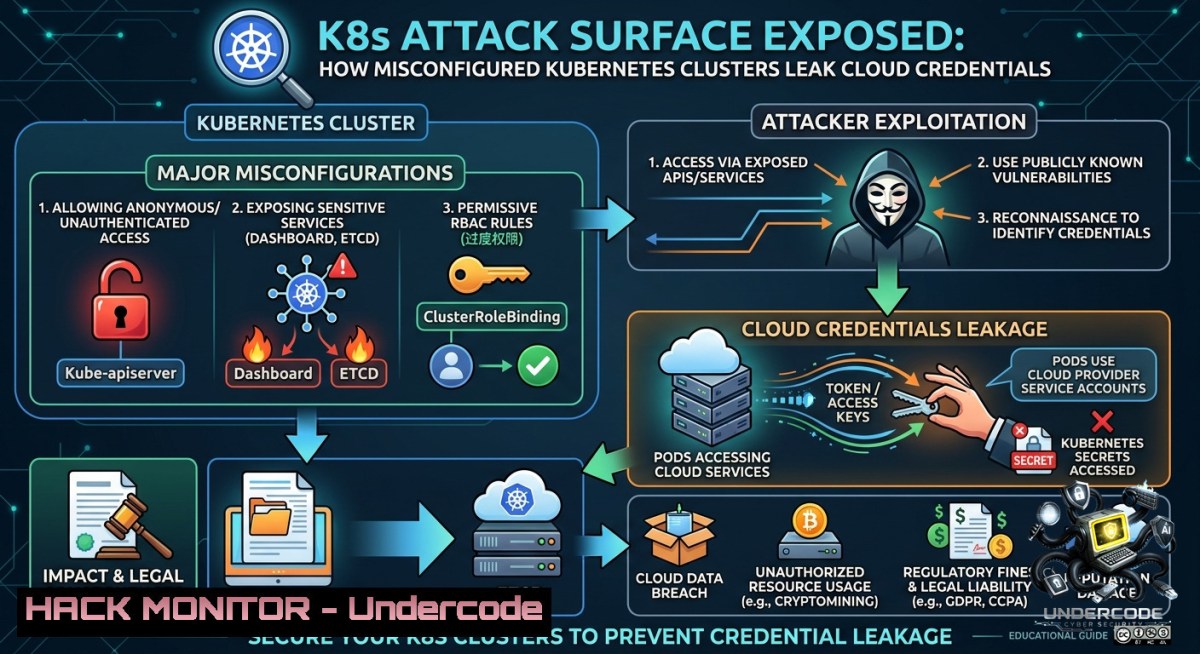
Kubernetes (K8s) has become the de facto orchestration platform for containerized workloads, but its complex architecture introduces a sprawling attack surface. Misconfigured RBAC, exposed API servers, and insecure secrets management are now leading causes of cloud data breaches—turning your orchestration efficiency into a hacker’s playground.
Learning Objectives:
– Identify critical security misconfigurations in Kubernetes control plane components (etcd, kube-apiserver, kubelet).
– Apply hardening commands and policies to mitigate API server exposure and RBAC privilege escalation.
– Implement real-time monitoring and vulnerability exploitation prevention using open-source tools like kube-hunter and trivy.
You Should Know:
1. Hardening the Kubernetes API Server Against Unauthenticated Access
The kube-apiserver is the brain of your cluster. Leaving it accessible to the internet without strict authentication is like giving away root. Many breaches start with a simple `kubectl get pods –insecure-skip-tls-verify` against an exposed API endpoint.
Step-by-step guide to secure the API server:
– Verify current API server bindings: `ps aux | grep kube-apiserver` (Linux control plane node). Look for `–insecure-bind-address` or `–insecure-port` – these must be removed.
– Enforce TLS and disable anonymous auth: Add flags `–anonymous-auth=false`, `–authorization-mode=RBAC,Node`, `–tls-cert-file` and `–tls-private-key-file`.
– Use `kubectl config view –raw` to check client certificates. For Windows admins, use `kubectl.exe` similarly via PowerShell.
– Restrict network access: On cloud providers (AWS EKS, Azure AKS, GCP GKE), configure API server endpoint to “Private Only” or limit source IPs via security groups.
– Test with a non-authenticated request: `curl -k https://
2. Mitigating etcd Exposure – The Crown Jewel of Secrets
etcd stores all cluster state, including raw secrets (TLS keys, cloud tokens). An attacker who reaches etcd can exfiltrate everything. Default deployments often leave etcd unencrypted at rest and open on localhost only – but misconfigurations widen that.
Step-by-step guide to protect etcd:
– On Linux control plane, check etcd listening ports: `ss -tlnp | grep 2379`. Only `127.0.0.1:2379` is safe; `0.0.0.0:2379` is a red flag.
– Enable etcd peer and client TLS: Edit `/etc/kubernetes/manifests/etcd.yaml` (static pod) to add `–cert-file`, `–key-file`, `–peer-cert-file`, `–peer-key-file`, and `–client-cert-auth=true`.
– Encrypt secrets at rest: In `kube-apiserver` configuration, set `–encryption-provider-config` pointing to a YAML with `aescbc` or `kms` provider. Example:
apiVersion: apiserver.config.k8s.io/v1
kind: EncryptionConfiguration
resources:
- resources:
- secrets
providers:
- aescbc:
keys:
- name: key1
secret: <base64-encoded-32-byte-key>
- identity: {}
– Rotate encryption keys quarterly using `kubectl get secrets –all-1amespaces -o json | kubectl replace -f -` after key change.
– Windows nodes (if any) – etcd is not run on Windows but ensure network segmentation from Linux control plane.
3. RBAC Exploitation and Least Privilege Enforcement
Overly permissive ClusterRoles and service account tokens mounted by default inside pods allow lateral movement. Attackers who compromise a single pod can use its token to list secrets or create privileged containers.
Step-by-step guide to lock down RBAC:
– Audit existing RBAC: `kubectl get clusterroles,clusterrolebindings -o yaml | grep -A5 “rules:”`. Look for “ verbs on `secrets`, `pods/exec`.
– Remove automount of service account token: In each deployment spec, set `automountServiceAccountToken: false`. For pods that legitimately need API access, create dedicated service accounts with narrowly scoped roles.
– Restrict `kubectl exec` to specific namespaces: Use a `ValidatingAdmissionWebhook` or OPA Gatekeeper. Example Gatekeeper constraint to deny `exec` on privileged pods.
– Simulate a compromised pod: `kubectl run attacker –image=alpine -it –rm — sh` then `cat /var/run/secrets/kubernetes.io/serviceaccount/token` and use `curl -k -H “Authorization: Bearer
– Remediate by binding roles only to specific service accounts, not default, and never use `cluster-admin` except for absolute necessities.
4. Container Image Vulnerabilities and Supply Chain Attacks
Attackers inject malicious code into base images or dependencies. Once deployed, they can escalate via kernel exploits or cloud metadata endpoints. Trivy and Grype are essential scanners.
Step-by-step guide to image hardening:
– Scan images before deployment: `trivy image yourregistry/app:latest –severity CRITICAL,HIGH –exit-code 1`. Integrate into CI/CD (GitHub Actions, GitLab CI).
– Use distroless or scratch images where possible – they lack shells and package managers, reducing attack surface.
– Enforce image allowlists using `ImagePolicyWebhook` or OPA. Example OPA rule: `deny
 { input.review.object.spec.containers[bash].image != "allowed-registry.com/" }`.
- For Windows containers, ensure base images are regularly patched via `docker pull mcr.microsoft.com/windows/servercore:ltsc2022` and run `Invoke-Expression (New-Object Net.WebClient).DownloadString('https://raw.githubusercontent.com/microsoft/WindowsContainers/main/Security/Baseline.ps1')` inside the Dockerfile.
- Block privilege escalation: In securityContext set `allowPrivilegeEscalation: false`, `privileged: false`, `readOnlyRootFilesystem: true`.

<h2 style="color: yellow;">5. Exposed Kubernetes Dashboard and Metrics Server</h2>

The default Kubernetes dashboard (metrics-server or web UI) is frequently left with `--enable-insecure-login` or default admin tokens. Shodan scans show thousands of unprotected dashboards.

<h2 style="color: yellow;">Step-by-step guide to secure dashboards:</h2>
- Never expose dashboard via NodePort or LoadBalancer. Use `kubectl proxy` or `kubectl port-forward` only for temporary admin access.
- Check for exposed dashboards: `nmap -p 30000-32767 <cluster_ip_range> --script=http-title` for NodePort ranges.
- If dashboard is required, enforce OIDC or mTLS authentication. Remove the `--enable-skip-login` flag.
- For metrics-server, restrict to read-only and use `--kubelet-preferred-address-types=InternalIP` to avoid leaking external endpoints.
- Quick remediation: Delete dashboard deployment if not used: `kubectl delete deployment kubernetes-dashboard -1 kube-system`. Or apply network policy to deny ingress from all IPs except admin jumpbox.

6. Cloud Metadata API Mitigation – Stop Pods from Stealing IAM Roles

A common K8s exploit: a compromised pod queries the cloud metadata endpoint (169.254.169.254) and steals the node’s IAM role credentials. From there, attackers pivot to cloud resources.

<h2 style="color: yellow;">Step-by-step guide to block metadata access:</h2>
- On AWS EKS, use `HostNetwork` block in pod security policy or OPA: `deny[bash] { input.review.object.spec.hostNetwork == true }`. Also add `--disable-metadata-api` via kubelet config (not available for managed nodes, use network policy).
- Implement egress network policy to block 169.254.169.254:
[bash]
apiVersion: networking.k8s.io/v1
kind: NetworkPolicy
metadata:
name: block-metadata
spec:
podSelector: {}
policyTypes:
- Egress
egress:
- to:
- ipBlock:
cidr: 0.0.0.0/0
except:
- 169.254.169.254/32
– On GCP GKE, enable Workload Identity and disable legacy Compute Engine service account access on nodes. On Azure AKS, use Pod Managed Identities without node identity.
– Test: Inside pod, `curl -s http://169.254.169.254/latest/meta-data/iam/security-credentials/`. If you see JSON, metadata is exposed – apply network policy immediately.
7. Auditing with Open Source Tooling: Kube-hunter and Falco
Passive and active scanning helps you discover misconfigurations before attackers do. Kube-hunter runs remotely to find weak points; Falco monitors runtime anomalies.
Step-by-step guide to run audits:
– Run kube-hunter remotely: `docker run -it –rm aquasec/kube-hunter –remote
– For internal scanning (inside cluster): `docker run -it –rm aquasec/kube-hunter –pod` (requires service account). It will report risks like exposed etcd, anonymous API access, and weak authentication.
– Install Falco on Linux nodes: `helm repo add falcosecurity https://falcosecurity.github.io/charts && helm install falco falcosecurity/falco –set falco.jsonOutput=true`. Then review events: `kubectl logs -l app.kubernetes.io/name=falco`.
– Example Falco rule to detect metadata API call: `- macro: metadata_api` condition: `fd.sip=169.254.169.254`. Output: `”Metadata API access from pod %container.id”`.
– For Windows nodes, use Sysmon for Containers to log process creation and network connections, then forward to SIEM.
What Undercode Say:
– Key Takeaway 1: Kubernetes security is 80% configuration management. The difference between a resilient cluster and a breach often comes down to disabling `automountServiceAccountToken` and encrypting etcd – two simple changes.
– Key Takeaway 2: Visibility kills exploitation. Running weekly kube-hunter scans and deploying Falco reduces mean time to detect (MTTD) from weeks to minutes. Most cluster compromises go unnoticed because teams don’t monitor API audit logs.
+ Analysis: The core issue is that DevOps velocity often overrides security defaults. Many tutorials expose dashboards or use insecure flags for convenience. Attackers weaponize these patterns using automated scanners. The rise of AI-assisted pentesting means that a misconfigured K8s cluster can be identified and fully owned within hours. Hardening must shift left – into CI/CD pipelines and admission controllers. Linux and Windows container hosts share the same risks around metadata and RBAC, but Windows adds legacy protocol exposure (SMB, RDP) inside clusters. Ultimately, treating your K8s API server as a public-facing application with zero trust – requiring mutual TLS for every connection – is the only sustainable defense.
Expected Output:
A hardened cluster will return `401 Unauthorized` for any unauthenticated `curl https://kube-apiserver:6443/version`, and Falco will alert on `”Metadata API access from pod attacker-pod”` when the network policy blocks egress. Running `kubectl auth can-i list secrets –as=system:serviceaccount:default:attacker` should return `no` after proper RBAC.
Prediction:
– -1: Without widespread adoption of admission controllers like Kyverno and runtime security, K8s breaches will triple by 2027, driven by AI-generated attack scripts that chain exposed API servers to cryptocurrency mining and data exfiltration.
– +1: The CNCF’s security maturity model and mandatory pod security standards (PSS) will become baseline requirements for SOC2 and ISO 27001, forcing enterprises to adopt automated policy-as-code and reducing misconfigurations by 60% in regulated industries.
▶️ Related Video (84% Match):
🎯Let’s Practice For Free:
🎓 Live Courses & Certifications:
[Join Undercode Academy for Verified Certifications](https://undercode.co.uk/certifications/)
🚀 Request a Custom Project:
Secure, high-velocity infrastructure and disruptive technological engineering. Contact our engineering team for high-tier development and proprietary systems:
[[email protected]](mailto:[email protected])
💎 Smart Architecture | 🛡️ Secure by Design | ⭐ Trusted by Thousands
IT/Security Reporter URL:
Reported By: [Adityajaiswal7 K8s](https://www.linkedin.com/posts/adityajaiswal7_k8s-architecture-devops-shack-ugcPost-7468877806181978112-NMsa/) – Hackers Feeds
Extra Hub: Undercode MoN
Basic Verification: Pass ✅
🔐JOIN OUR CYBER WORLD [ CVE News • HackMonitor • UndercodeNews ]
[💬 Whatsapp](https://undercode.help/whatsapp) | [💬 Telegram](https://t.me/UndercodeCommunity)
📢 Follow UndercodeTesting & Stay Tuned:
[𝕏 formerly Twitter 🐦](https://x.com/undercodeupdate) | [@ Threads](https://www.threads.net/@undercodetesting) | [🔗 Linkedin](https://www.linkedin.com/company/undercodetesting/) | [🦋BlueSky](https://bsky.app/profile/undercode.bsky.social)


