
Listen to this Post
Introduction:
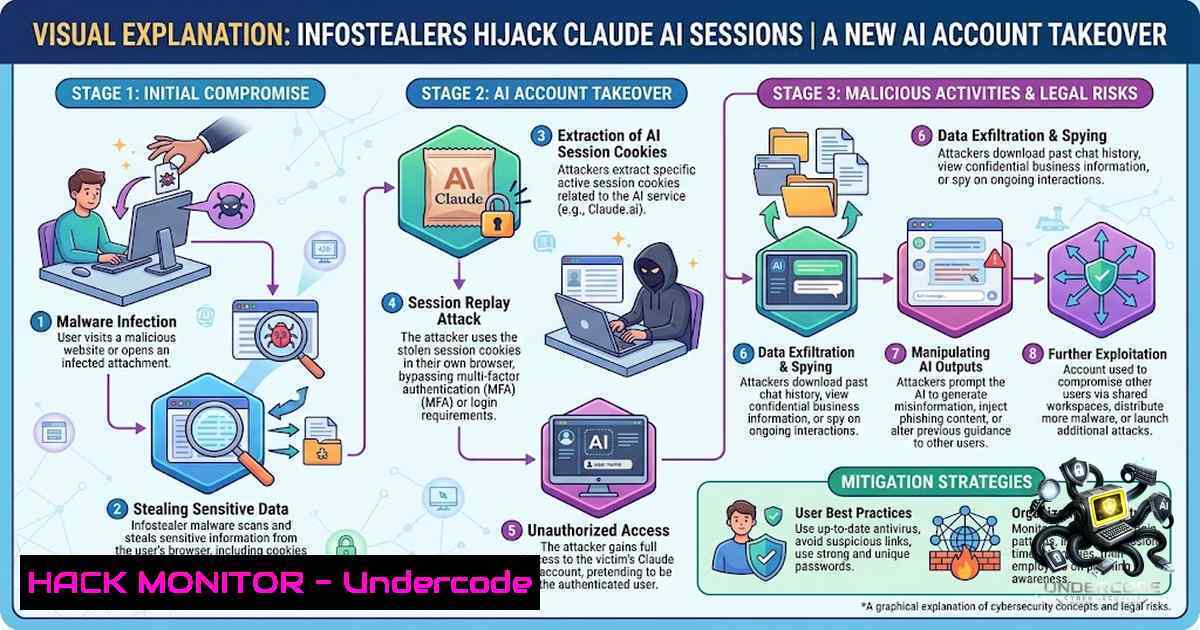
The convergence of artificial intelligence and cybersecurity has created a new battleground where threat actors are no longer content with stealing passwords—they are now stealing authenticated browser sessions to hijack AI accounts. In late August 2026, Anthropic, the developer of the Claude AI assistant, began notifying users that commodity infostealer malware had been used to copy active Claude login sessions directly from compromised browsers, enabling attackers to bypass multi-factor authentication (MFA) entirely. This campaign represents a significant shift in how cybercriminals view AI subscriptions: not as niche tools, but as valuable commodities worth draining for resale, phishing operations, and malware development.
Learning Objectives & Secrets:
- Objective 1: Understand the Session Hijacking Attack Vector. Learn how infostealer malware extracts authenticated browser cookies and session tokens to bypass credentials and MFA, rendering traditional authentication controls ineffective.
-
Objective 2 Secret Tip: Detect Compromise Through Usage Anomalies. Monitor your Claude usage dashboard for unexplained consumption—if your usage limits appear to refill and drain while you are inactive, this is a telltale sign of session theft.
-
Objective 3 Secret Tip: Implement Post-Compromise Recovery Correctly. Simply signing out of Claude does not remove the underlying malware. To prevent recurring theft, you must scan and clean your device before logging back in and changing credentials.
You Should Know:
1. How Infostealers Bypass MFA and Session Cookies
Infostealer malware operates by harvesting data stored locally on an infected machine, including browser-saved passwords, login cookies, session tokens, and credentials from other applications. Unlike credential theft, where an attacker must guess or phish a password and then defeat MFA, session hijacking allows the attacker to replay an already-authenticated browser session. When a user logs into Claude, the service issues a session cookie that keeps them signed in. Infostealers copy this cookie, and an attacker who replays it is treated by Claude as an already-logged-in user.
Anthropic has identified multiple malware families in this campaign: Vidar, Lumma (LummaC2), StealC, RedLine, and Acreed on Windows, and Atomic Stealer (AMOS) on a smaller number of macOS machines. The malware typically arrives through unofficial downloads, pirated software, or malicious apps, then quietly exfiltrates browser data to attacker-controlled infrastructure.
Step‑by‑step guide: Detecting and Investigating Session Cookie Theft
- Check your Claude usage history. Log into Claude and review your usage dashboard. Look for consumption patterns that do not align with your activity. If credits were consumed during hours you were offline, this is a red flag.
-
Review active sessions. Navigate to your Claude account settings and review all active sessions. Terminate any sessions you do not recognize.
-
Inspect browser extensions. In Chrome, navigate to `chrome://extensions/` and remove any unfamiliar or suspicious extensions. In Firefox, go to
about:addons. -
Check for browser data exfiltration. On Windows, open Event Viewer (
eventvwr.msc) and review security logs for unusual process executions. On macOS, check Console for unexpected background processes. -
Monitor for C2 communications. Use network monitoring tools like Wireshark or Windows Defender Firewall logs to identify outbound connections to suspicious IP addresses, which may indicate data exfiltration.
-
The Financial Impact: Usage Credits and Auto-Reload Exploitation
Paid Claude plans offer additional “Usage Credits” that allow subscribers to continue using the service beyond their plan’s session limit through consumption-based billing at standard API rates. Users can enable auto-reload, which automatically purchases more prepaid credits when the balance falls below a threshold. In a session-hijacking scenario, an attacker can:
- Consume the account’s included allowance and any available Usage credits
- Trigger additional purchases if auto-reload is enabled
- Drain the victim’s financial resources while using premium AI capacity for free
The stolen Claude capacity can then be weaponized to write and refine phishing content, build campaign infrastructure, develop or obfuscate malware, and improve delivery methods.
Step‑by‑step guide: Securing Payment Methods and Usage Controls
- Disable auto-reload immediately. In your Claude account billing settings, disable the auto-reload feature to prevent automatic credit purchases.
-
Set a strict monthly spending limit. Configure a conservative monthly spending limit that caps unauthorized usage even if a session is hijacked.
-
Remove saved payment methods after each session. Consider not storing payment details persistently in your Claude account. Re-enter them only when needed.
-
Monitor bank and credit card statements. Check for unauthorized charges from Anthropic or related processors.
-
Enable transaction alerts. Set up SMS or email alerts for any charges above a threshold to detect fraudulent activity in real time.
3. Endpoint Hardening Against Infostealer Malware
Since infostealers operate locally on the victim’s machine, endpoint security is the first line of defense. The malware targets browser-stored data across Chromium-family browsers (Chrome, Edge, Brave) and Firefox, extracting login credentials, session cookies, autofill data, and form history.
Step‑by‑step guide: Hardening Your Browser and Endpoint
Linux (Ubuntu/Debian):
 Update system packages
sudo apt update && sudo apt upgrade -y

Install and run ClamAV for malware scanning
sudo apt install clamav clamav-daemon -y
sudo freshclam  Update virus definitions
sudo clamscan -r --bell -i /home/

Check for suspicious cron jobs
crontab -l
sudo crontab -l

Review active network connections
sudo netstat -tunap | grep ESTABLISHED

Check for unauthorized systemd services
systemctl list-units --type=service --all | grep -E "(vida|steal|red|acre|atom)"
Windows (PowerShell as Administrator):
 Run Microsoft Defender offline scan
Start-MpWDOScan

Perform a full system scan
Start-MpScan -ScanType FullScan

Review scheduled tasks for suspicious entries
Get-ScheduledTask | Where-Object {$_.TaskPath -1otlike "Microsoft"}

Check for recently created files in temp directories
Get-ChildItem -Path C:\Users\AppData\Local\Temp -Recurse | Where-Object {$_.LastWriteTime -gt (Get-Date).AddDays(-7)}

Review startup items
Get-CimInstance -ClassName Win32_StartupCommand

Check for unusual outbound connections
Get-1etTCPConnection | Where-Object {$_.State -eq "Established"} | Select-Object LocalAddress, LocalPort, RemoteAddress, RemotePort, OwningProcess
macOS (Terminal):
 Check for launch agents and daemons
ls -la ~/Library/LaunchAgents/
ls -la /Library/LaunchDaemons/

Review login items
osascript -e 'tell application "System Events" to get the name of every login item'

Check for suspicious kernel extensions
kextstat | grep -v com.apple

Run built-in malware removal tool
sudo spctl --assess --verbose /Applications/
4. Browser Security: Cookie Isolation and Session Management
Since infostealers extract session cookies directly from browser storage, implementing browser-level security controls is critical. Modern browsers offer several features that can mitigate session cookie theft.
Step‑by‑step guide: Securing Browser Sessions
- Enable cookie encryption. In Chrome, navigate to `chrome://flags/enable-encrypted-cookies` and enable encrypted cookies (if available in your version). In Firefox, go to `about:config` and set `network.cookie.cookieBehavior` to `1` (reject third-party cookies) or `4` (reject all cookies except from same-site).
-
Use container tabs (Firefox Multi-Account Containers). Isolate Claude sessions in a dedicated container to prevent cross-site cookie leakage.
-
Clear cookies on browser exit. In Chrome settings, under “Privacy and security” > “Cookies and other site data,” select “Clear cookies and site data when you close all windows.” In Firefox, go to `about:preferencesprivacy` and set “Clear history when Firefox closes” with “Cookies” selected.
-
Use a dedicated browser for AI services. Consider using a separate browser profile or a different browser entirely for Claude and other sensitive AI platforms. This limits the exposure of session cookies if other browsing activities lead to infection.
-
Install Malwarebytes Browser Guard. This free extension warns when a site attempts to copy something to your clipboard, providing an additional layer of defense against clipboard-based infostealer delivery.
5. Post-Compromise Recovery: The Complete Remediation Checklist
Anthropic has taken proactive measures, including signing affected users out of all active sessions, removing saved payment methods, and refunding unauthorized charges. However, the company explicitly warns: “Signing you out of Claude stops the stolen sessions, but it doesn’t remove the malware. If it’s still on your computer, your next login session could be stolen the same way”.
Step‑by‑step guide: Complete Remediation Workflow
- Disconnect from the internet. Immediately disconnect the infected device from Wi-Fi and Ethernet to prevent further data exfiltration.
-
Boot into safe mode. On Windows, restart and press F8, then select “Safe Mode with Networking.” On macOS, restart and hold Shift until the Apple logo appears.
-
Run multiple malware scans. Use at least two different antivirus solutions:
– Windows: Microsoft Defender Full Scan + Malwarebytes
– macOS: Malwarebytes for Mac + built-in XProtect
– Linux: ClamAV + Rkhunter
- Change passwords from a secure, known-clean device. Do not change passwords on the infected machine—the new credentials could be immediately stolen.
-
Enable 2FA on your Claude-linked email account. Since the email account is often the recovery vector, securing it is paramount.
-
Revoke all active sessions across all services. For Google accounts, go to `myaccount.google.com/security` and sign out all other sessions. For Microsoft, go to
account.microsoft.com/security. -
Re-enter payment details only after confirming the machine is clean. Do not add payment methods until you are certain the malware has been fully removed.
-
Consider a full OS reinstall. If you cannot confirm the device is clean, the safest option is to back up personal files (scanning them first) and perform a clean OS installation.
-
Enterprise Defenses: Detecting AI Account Takeover at Scale
For organizations using Claude or other AI platforms, detecting session hijacking requires a combination of identity threat detection and response (ITDR) and user and entity behavior analytics (UEBA).
Step‑by‑step guide: Enterprise Detection and Response
- Monitor for Impossible Travel. If a Claude session originates from an IP address in a different geographic region within minutes of a legitimate session, this indicates session cookie replay.
-
Track Usage Velocity. Sudden spikes in API usage or prompt volume outside normal business hours should trigger alerts.
-
Implement Conditional Access Policies. Restrict Claude access to managed devices and trusted IP ranges using your identity provider (Azure AD, Okta, etc.).
-
Deploy Endpoint Detection and Response (EDR). Solutions like Microsoft Defender for Endpoint, CrowdStrike, or SentinelOne can detect infostealer behavior patterns, including browser data extraction and outbound C2 communications.
-
Conduct Regular Browser Hygiene Audits. Periodically review browser extensions, saved passwords, and cookie policies across the organization.
What Undercode Say:
-
Key Takeaway 1: Session hijacking renders traditional MFA obsolete. The industry must move toward continuous authentication and behavioral biometrics to detect session replay attacks, as infostealers now treat AI subscriptions as prime targets.
-
Key Takeaway 2: Endpoint security is the new perimeter. Since infostealers operate locally, organizations must prioritize endpoint hardening, browser security, and user education over traditional network-based controls. The Claude incident demonstrates that even the most secure cloud platform cannot protect users from compromised endpoints.
-
Analysis: This campaign marks a pivotal moment where AI platforms become first-class targets in the cybercriminal economy. The attackers are not exploiting vulnerabilities in Anthropic’s infrastructure but rather the fundamental weakness of session-based authentication in a world where endpoint compromise is rampant. The financial model of AI services—consumption-based billing with auto-reload—creates a direct monetization path for attackers. As AI adoption accelerates, we can expect more sophisticated infostealer variants specifically engineered to target AI sessions, browser-stored API keys, and even AI-generated outputs. Organizations must treat AI accounts with the same security rigor as financial systems, implementing zero-trust architectures that continuously validate sessions rather than trusting a static cookie. The response from Anthropic—proactive session revocation, payment method removal, and refunds—sets a positive precedent, but the burden ultimately falls on users to secure their endpoints.
Prediction:
-
+1 Organizations will accelerate adoption of passwordless authentication and continuous session validation, reducing reliance on long-lived session cookies within 12-18 months.
-
-1 Infostealer-as-a-Service offerings will add dedicated AI session stealing modules, making this attack vector more accessible to low-skill cybercriminals.
-
+1 AI platforms will introduce mandatory device attestation and hardware-backed session security (e.g., WebAuthn) to prevent cookie replay attacks.
-
-1 The financial impact of AI account takeover will drive cyber insurance premiums higher for organizations using AI services, as insurers begin to quantify this risk.
-
+1 Browser vendors will implement more robust cookie encryption and isolation mechanisms, making session cookie extraction significantly harder for infostealers.
-
-1 Attackers will pivot to targeting AI-generated outputs and proprietary prompts stored in browser history, creating new data exfiltration vectors.
-
+1 The Claude incident will serve as a wake-up call for the AI industry, leading to standardized security frameworks for AI service providers.
-
-1 Consumers may face “usage drain” attacks becoming as common as credit card fraud, requiring new consumer protection regulations for AI subscription services.
▶️ Related Video (88% Match):
https://www.youtube.com/watch?v=-sIkZBP3qTg
🎯Let’s Practice For Free:
🎓 Live Courses & Certifications:
Join Undercode Academy for Verified Certifications
🚀 Request a Custom Project:
Secure, high-velocity infrastructure and disruptive technological engineering. Contact our engineering team for high-tier development and proprietary systems:
[email protected]
💎 Smart Architecture | 🛡️ Secure by Design | ⭐ Trusted by Thousands
IT/Security Reporter URL:
Reported By: https://lnkd.in/p/eW6XF7hv – Hackers Feeds
Extra Hub: Undercode MoN
Basic Verification: Pass ✅


