Listen to this Post
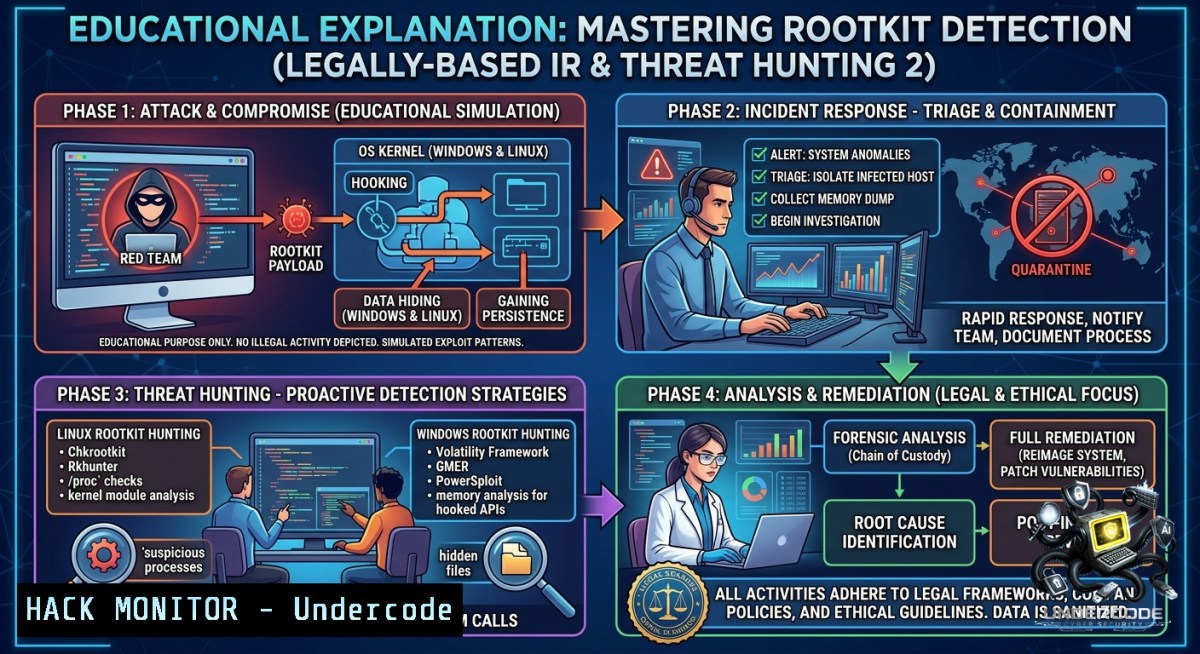
Introduction:
As cyber adversaries increasingly deploy memory-resident rootkits and fileless malware, traditional antivirus and endpoint detection tools fall short. Modern incident responders must proactively hunt for hidden threats using behavioral analysis, memory forensics, and low-level system introspection. The upcoming “Incident Response and Threat Hunting 2” training (starting July 4, 2026) by Alexandre Borges and Blackstorm Security delivers technically dense, hands-on methodologies to detect complex malware on both Windows and Linux environments using real-world breach scenarios.
Learning Objectives:
– Detect and dismantle kernel-mode rootkits and user-mode hooking techniques on Windows using live memory analysis.
– Perform Linux threat hunting by analyzing syscall tables, kprobes, and eBPF-based rootkits.
– Apply practical digital forensics and incident response (DFIR) workflows to identify persistence, lateral movement, and covert data exfiltration.
You Should Know:
1. Detecting Hidden Processes & Kernel Callbacks on Windows
Windows rootkits often hide processes by hooking kernel structures like `PsActiveProcessHead` or using DKOM (Direct Kernel Object Manipulation). To hunt these, responders must compare outputs from different sources—APIs vs. raw memory enumeration.
Step‑by‑step guide:
– List processes using user‑mode tools (can be subverted):
tasklist /v
Get-Process | Format-Table -AutoSize
– Query the Windows kernel using Sysinternals LiveKD to dump active process links without trusting hooked APIs:
livekd -w -p > kernel_process_list.txt
– Use Volatility 3 against a memory dump to walk the `ACTIVE_PROCESS_LINKS` list manually:
 Dump process list from windows.memmap.PsActiveProcessHead
vol -f memory.dmp windows.psscan.PsScan
– Check for process hiding discrepancies: Compare API output (`tasklist`) against `pslist` from Sysinternals (direct kernel query):
pslist -t
– List kernel callbacks where rootkits register for stealth:
fltmc Filter manager callbacks for file hiding
– Disable callback interference via Windows Defender Attack Surface Reduction (ASR) or manually unload malicious drivers:
sc query type= driver state= all | findstr /i "malware"
sc stop [bash]
What it does: These commands reveal processes hidden by DKOM, detect abnormal kernel callbacks, and isolate rootkits that evade standard process listing.
2. Hunting Linux Rootkits Using Syscall Table Integrity Checks
Linux rootkits often overwrite system call table entries or redirect `sys_call_table` via kprobes. A baseline comparison of the syscall table against known kernel symbols identifies tampering.
Step‑by‑step guide:
– Extract current syscall addresses from `/proc/kallsyms` (root required):
sudo grep sys_call_table /proc/kallsyms
– Retrieve the original syscall table from the running kernel’s System.map (if available) or use `kallsyms` with a clean boot:
cat /boot/System.map-$(uname -r) | grep sys_call_table
– Write a simple kernel module to compare expected vs. actual syscall pointers. Example snippet (compile with `make`):
include <linux/kallsyms.h>
void detect_syscall_hook(void) {
unsigned long syscall_table = (unsigned long )kallsyms_lookup_name("sys_call_table");
printk(KERN_INFO "SYS_READ expected: 0x%px, actual: 0x%px\n", (void )syscall_table[bash], (void )syscall_table[bash]);
}
– Use `ftrace` to detect inline hooks:
cd /sys/kernel/debug/tracing
echo "sys_read" > set_ftrace_filter
echo function > current_tracer
cat trace  Check for abnormal pre/post handlers inserted by rootkits
– Hunt for LD_PRELOAD‑based user‑land rootkits:
sudo grep -H "LD_PRELOAD" /proc//environ 2>/dev/null
What it does: This method uncovers system call table hooking, detects kprobe‑based rootkits, and identifies user‑land preload compromises—critical for Linux incident response.
3. Memory Forensics for Rootkit Unmasking Using Volatility & Rekall
Live memory captures contain artifacts of hidden processes, injected code, and unlinked kernel modules. Volatility provides plugins to enumerate these anomalies.
Step‑by‑step guide (Linux/Windows cross‑platform):
– Acquire memory with LiME on Linux or `winpmem` on Windows:
 Linux
sudo insmod lime.ko "path=./memdump.raw format=raw"
 Windows (admin)
winpmem_mini_x64.exe memdump.raw
– Detect hidden processes with Volatility `psxview` (cross‑view from 7 sources):
vol -f memdump.raw windows.psxview.PsXview
– Find unlinked kernel modules (rootkits that remove themselves from the loaded module list):
vol -f memdump.raw windows.modscan.ModScan
– Scan for inline kernel hooks using the `apihooks` plugin (Windows):
vol -f memdump.raw windows.apihooks.Apihooks --pid [bash]
– Extract and analyze malicious shellcode from the dump’s memory regions:
vol -f memdump.raw windows.malfind.Malfind --dump
– For Linux, use `linux_psxview` and `linux_hidden_modules`:
vol -f memdump.raw linux.linux_psxview.LinuxPsxview
vol -f memdump.raw linux.linux_hidden_modules.LinuxHiddenModules
What it does: These steps uncover processes and modules that traditional OS APIs hide, detect code injection, and locate persistent kernel implants that survive reboot.
4. Real‑Time Threat Hunting with Sysmon and eBPF
Proactive hunting requires event telemetry. On Windows, Sysmon captures process creation, network connections, and file writes; on Linux, eBPF offers deep observability without kernel module risks.
Step‑by‑step guide:
– Install and configure Sysmon with a comprehensive config (SwiftOnSecurity’s):
.\Sysmon64.exe -accepteula -i sysmonconfig.xml
– Query Sysmon events for suspicious process ancestry (e.g., Office spawning PowerShell):
Get-WinEvent -FilterHashtable @{LogName='Microsoft-Windows-Sysmon/Operational'; ID=1} | Where-Object {$_.Message -match "powershell.exe" -and $_.Message -match "WINWORD.EXE"}
– Enable eBPF tracepoints on Linux to monitor `execve` without performance overhead:
 Using bpftrace
sudo bpftrace -e 'tracepoint:syscalls:sys_enter_execve { printf("%s executed %s\n", comm, str(args->filename)); }'
– Detect rootkit-like file modifications using `auditd`:
sudo auditctl -w /etc/ld.so.preload -p wa -k ldpreload_hunt
sudo ausearch -k ldpreload_hunt
– Combine Sysmon and eBPF logs in a SIEM (e.g., Splunk) to correlate process trees and fileless execution patterns.
What it does: This real‑time approach generates a forensic trail that reveals sophisticated adversarial behavior, enabling hunters to pivot from static indicators to behavioral anomalies.
5. Cloud & Endpoint Hardening Against Rootkit Deployment
Preventing initial rootkit installation is as critical as detection. Hardening configurations block common persistence vectors (e.g., unsigned drivers, kernel module loading).
Step‑by‑step guide:
– Windows: Enable Hypervisor‑Protected Code Integrity (HVCI) and Memory Integrity:
Set-ItemProperty -Path "HKLM:\SYSTEM\CurrentControlSet\Control\DeviceGuard\Scenarios\HypervisorEnforcedCodeIntegrity" -1ame "Enabled" -Value 1
– Block unsigned drivers using Driver Blocklist:
reg add "HKLM\SYSTEM\CurrentControlSet\Control\Session Manager\Memory Management" /v DriverBlocklist /t REG_DWORD /d 1 /f
– Linux: Lockdown module loading (set `kernel.modules_disabled=1` via sysctl, but requires reboot):
echo 1 | sudo tee /proc/sys/kernel/modules_disabled Cannot be undone until reboot
– Restrict eBPF program loading to privileged users only (prevent unprivileged BPF rootkits):
sudo sysctl -w kernel.unprivileged_bpf_disabled=1
– Harden GRUB to prevent boot‑kits from modifying kernel command line:
sudo grub-mkpasswd-pbkdf2 Set password, then add --superusers to /etc/grub.d/40_custom
– Use SELinux/AppArmor to confine kernel modules:
 For AppArmor, create profile to deny module loading by non‑kernel processes
sudo aa-genprof /sbin/insmod
What it does: These hardening measures prevent the initial drop of kernel‑level malware, reduce the attack surface for rootkits, and enforce integrity checks at boot and runtime.
6. Post‑Training Incident Simulation with Real Malware Samples
To validate detection skills, responders should test against captured rootkit samples in isolated environments (e.g., REMnux, FlareVM).
Step‑by‑step guide:
– Set up a safe sandbox using VirtualBox with snapshots. Disable network or use host‑only NAT.
– Retrieve a known Linux rootkit (e.g., Diamorphine) from GitHub for research:
git clone https://github.com/m0nad/Diamorphine
make
sudo insmod diamorphine.ko
– Deploy the Windows Turla rootkit (from malware repos like MalwareBazaar) and execute.
– Hunt using the commands from Sections 1–4 to detect hidden processes, syscall hooks, and kernel callbacks.
– Document TTPs (MITRE ATT&CK tactics: TA0005 Defense Evasion, TA0004 Privilege Escalation).
– Create a YARA rule to detect the rootkit’s unique strings or byte patterns:
rule Diamorphine_Signature {
strings:
$s1 = "diamorphine" ascii wide
$s2 = "fake_module" ascii
condition:
any of them
}
What it does: Practical simulation builds muscle memory for detecting real advanced persistent threats (APTs) and validates the techniques taught in the Blackstorm Security training.
What Undercode Say:
– Real‑world incident response requires low‑level OS knowledge—tooling alone will fail against kernel‑mode rootkits.
– The Blackstorm Security course’s emphasis on printed, constantly updated materials and extended Q&A differentiates it from video‑only trainings.
Analysis: The post highlights a critical gap in current cybersecurity education: many courses rely on slides and scripted demos, leaving responders unprepared for live rootkit confrontations. By providing physical kits and real‑world examples, the training addresses memory forensics, cross‑platform hunting, and post‑training doubt resolution. The mention of both Windows and Linux rootkits is especially timely, as hybrid environments are now the norm in enterprise and cloud. For professionals seeking to move beyond “alert fatigue,” this course offers the depth needed to become a proactive threat hunter.
Expected Output:
Prediction:
+1 As rootkits increasingly leverage trusted kernel mechanisms (eBPF, WDF), demand for hands-on, anti‑evasion training will surge—certifications like this will become mandatory for DFIR roles.
-1 However, many organizations still underinvest in proactive hunting, relying on EDRs alone; those that skip deep technical training will face prolonged dwell times and undetected breaches.
▶️ Related Video (82% Match):
🎯Let’s Practice For Free:
🎓 Live Courses & Certifications:
[Join Undercode Academy for Verified Certifications](https://undercode.co.uk/certifications/)
🚀 Request a Custom Project:
Secure, high-velocity infrastructure and disruptive technological engineering. Contact our engineering team for high-tier development and proprietary systems:
[[email protected]](mailto:[email protected])
💎 Smart Architecture | 🛡️ Secure by Design | ⭐ Trusted by Thousands
IT/Security Reporter URL:
Reported By: [Aleborges Malware](https://www.linkedin.com/posts/aleborges_malware-malwareanalysis-cybersecurity-share-7466640558950723584-qMrD/) – Hackers Feeds
Extra Hub: Undercode MoN
Basic Verification: Pass ✅
🔐JOIN OUR CYBER WORLD [ CVE News • HackMonitor • UndercodeNews ]
[💬 Whatsapp](https://undercode.help/whatsapp) | [💬 Telegram](https://t.me/UndercodeCommunity)
📢 Follow UndercodeTesting & Stay Tuned:
[𝕏 formerly Twitter 🐦](https://x.com/undercodeupdate) | [@ Threads](https://www.threads.net/@undercodetesting) | [🔗 Linkedin](https://www.linkedin.com/company/undercodetesting/) | [🦋BlueSky](https://bsky.app/profile/undercode.bsky.social)


